The CentOS operating system has reached its end-of-life (EOL). Using an EOL system exposes it to security vulnerabilities, makes it a target for attacks, and can lead to non-compliance with security regulations. Assess the risks to your Elastic Compute Service (ECS) instances and take action to ensure your services remain stable and secure.
Impacts of CentOS EOL
As of June 30, 2024, the CentOS operating system has reached its EOL. Continued use presents a security risk. Existing Elastic Compute Service (ECS) instances can continue to run, but they will no longer receive software maintenance or support, such as bug fixes and feature updates.
Version | Release date | EOL date | Recommended action |
CentOS 8 | 2019-09-24 | 2021-12-31 | Migrate immediately |
CentOS 7 | 2014-07-07 | 2024-06-30 | Migrate immediately |
CentOS 6 | 2011-11-27 | 2020-11-30 | Migrate immediately |
CentOS 5 | 2007-04-12 | 2017-03-31 | Migrate immediately |
Recommendations after CentOS EOL
You must address the risks associated with the operating system EOL. For services that are exposed to the public internet or require high system stability and security, you must assess the EOL risks and promptly develop a response plan.
For new services: Use a CentOS-compatible operating system that is in its mainstream support phase to ensure long-term support and security. Do not use CentOS images that have already reached EOL to create new ECS instances.
For existing services: Immediately prepare to replace the operating system or perform an operating system migration.
Replace or upgrade the operating system
Step 1: Choose a target operating system
Before you migrate or replace your operating system, select a Linux operating system to replace CentOS based on factors such as security compliance, stability, operating system compatibility, budget, and long-term strategy.
Step 2: Preparations
Before you perform a migration or replacement, complete the following preparations:
Application testing: Create a staging environment with the target operating system. Deploy your applications and perform comprehensive functional, performance, and compatibility testing. Ensure that all business logic works correctly in the new environment.
Migration drill: Rehearse your chosen migration solution in a non-production environment to familiarize yourself with the process and potential issues. For more information, see Troubleshooting Linux operating system migration issues.
Plan a migration window: During the migration process, the system kernel and software packages of the original instance are updated, and the instance is restarted multiple times. Your services will be unavailable during this period. Assess the impact and plan a suitable migration window to avoid business disruptions.
Step 3: Perform the operating system migration
Before migration, create snapshots for the system disk and all data disks of your instance to prevent data loss. If a snapshot is being created when you start the migration, the migration fails. Wait for the snapshot creation to complete before you start the migration.
Solution | Scenarios | Impacts | Procedure |
In-place migration | Your business environment is complex and difficult to rebuild. You need to retain all data and configurations on the system disk. |
| In-place migration is applicable only to operating systems that are binary-compatible with CentOS:
|
Replace the system disk | You want to retain the original instance configuration, such as the IP address and instance ID, and the application can be redeployed. |
| After replacing the operating system (system disk), redeploy your applications and services. After you verify your services, switch the business traffic. Before you switch, back up data and collect information from the original instance. |
Redeploy the environment | Your business cannot tolerate downtime and requires a smooth traffic switch. | You are responsible for migrating data and traffic, and for the cost of the new ECS instance. | Replace the original instance by creating a custom instance. After you purchase the new instance, redeploy your applications and services. After you verify your services, switch the business traffic to the new instance and stop the original instance. |
FAQ
Which operating systems can I migrate CentOS to?
Operating systems that are binary-compatible with CentOS
A binary-compatible OS lets you run your existing applications and software immediately after migration without needing to recompile them. Migrating to a CentOS-compatible operating system does not guarantee bug-for-bug compatibility. You must consult the community support documentation for the target operating system to resolve any related issues.
Operating system | Description | Pricing | Technical support |
Provided by Alibaba Cloud and fully compatible with RHEL/CentOS. This operating system is highly optimized for Alibaba Cloud and includes free long-term support and maintenance. | No | Alibaba Cloud support | |
Provided by the OpenAnolis community, it is 100% compatible with the CentOS 8 software ecosystem and also compatible with other mainstream Linux distributions. It is a fully open source, neutral, and open distribution with enterprise-grade performance, stability, security, and reliability. | No | Alibaba Cloud support | |
An enterprise operating system provided by Red Hat. It requires a paid subscription to use and access Red Hat's services. | Involves operating system license fees for the image. For more information, see Red Hat. | Joint support from Alibaba Cloud and Red Hat | |
CentOS Stream is a rolling-release distribution provided by the official CentOS project. | No | Community support | |
A community-driven, enterprise-grade operating system that is compatible with RHEL and serves as a replacement for CentOS. | No | Community support | |
A community fork of CentOS built by the CloudLinux team. It is 1:1 binary compatible with RHEL and supports replacing the operating system without downtime. | No | Community support |
Other operating systems
Operating system | Description | Pricing | Technical support |
An operating system from SUSE that adapts to any environment and is optimized for performance, security, and reliability. | Involves operating system license fees for the image. For more information, see Image billing. | Joint support from Alibaba Cloud and SUSE | |
A Linux distribution developed by Canonical. You can install a graphical desktop on Ubuntu for ease of use. | No | Community support | |
Debian is a popular Linux operating system known for its stability, security, and free software principles. | No | Community support | |
An operating system based on the Linux kernel, developed and maintained by the OpenSUSE project community with sponsorship from companies such as SUSE. | No | Community support |
How do I convert CentOS 7 to Red Hat Enterprise Linux (RHEL) 7?
The following procedure describes how to manually convert CentOS 7 to RHEL 7 by running commands on the instance. To automate these steps, you can use the operating system migration feature.
Before the conversion, stop important applications, database services, and data storage services. Also, create snapshots to back up important data and prevent data loss or errors.
(Conditional) If your server is an Alibaba Cloud server with Security Center installed, first uninstall the Security Center client.
Security Center is the default security enhancement tool for CentOS, while RHEL 7 uses security tools provided by Red Hat. Incompatibilities and conflicts may exist between Security Center and the tools in RHEL 7. Therefore, you must uninstall the Security Center client during the conversion process to ensure system stability and compatibility.
Download the new Alibaba Cloud repository files.
sudo wget -O /etc/yum.repos.d/CentOS-Base.repo https://mirrors.aliyun.com/repo/Centos-7.repo
sudo wget -O /etc/yum.repos.d/epel.repo https://mirrors.aliyun.com/repo/epel-7.repo
Update the system packages and restart the system.
sudo yum -y update
sudo reboot
Download and install the convert2rhel tool from the official Red Hat website.
sudo curl -o /etc/pki/rpm-gpg/RPM-GPG-KEY-redhat-release https://security.access.redhat.com/data/fd431d51.txt
sudo curl -o /etc/yum.repos.d/convert2rhel.repo https://cdn-public.redhat.com/content/public/repofiles/convert2rhel-for-rhel-7-x86_64.repo
sudo yum -y install convert2rhel
On Alibaba Cloud, purchase a software license for the ECS instance.
You must purchase and activate a Red Hat Enterprise Linux license to download RHEL software.
Convert CentOS 7 to RHEL 7.
sudo convert2rhel -y --no-rhsm --enablerepo rhui-rhel-7-server-rhui-rpms --enablerepo rhui-rhel-7-server-rhui-extras-rpms --enablerepo rhui-rhel-7-server-rhui-optional-rpmsThe process takes some time. A message similar to the following appears when the conversion is complete.
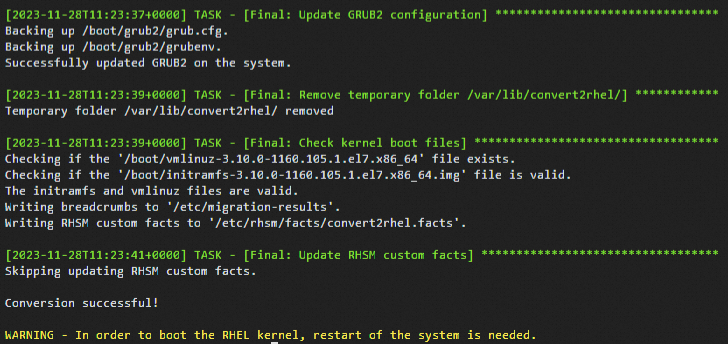
Restart the system.
After the conversion is complete, you are prompted to restart the system. Restarting allows the system to boot with the new RHEL kernel. Then, run
cat /etc/redhat-releaseto verify that the operating system was successfully converted.sudo rebootCalibrate the operating system of the instance.
After the conversion, the Operating System value on the ECS instance details page, which is based on the OS property of the image used to create the instance, will differ from the actual operating system (Red Hat Enterprise Linux Server release 7.9). You can calibrate the operating system of the instance to update its operating system platform information.
How do I switch repository addresses for CentOS 6 after EOL?
The content at the CentOS 6 repository address http://mirror.centos.org/centos-6/ has been removed. Third-party mirror sites have also removed their CentOS 6 repositories. Alibaba Cloud's repositories at http://mirrors.cloud.aliyuncs.com and http://mirrors.aliyun.com can no longer synchronize with the CentOS 6 repository. Continuing to use the default CentOS 6 repository configuration on Alibaba Cloud results in an error. An example of the error is shown below:
Solutions
This topic describes operations and configurations for ECS instances. If your server is not an ECS instance, ensure that it has public network access, and replace http://mirrors.cloud.aliyuncs.com with http://mirrors.aliyun.com. For example, switch the yum repository to http://mirrors.aliyun.com/centos-vault/6.10/ and the epel repository to http://mirrors.aliyun.com/epel-archive/6/.
Log on to the ECS instance.
Go to the ECS console - Instances page. In the top-left corner, select the resource group and region where your target resource is located.
Navigate to the details page of the target instance, click Connect, and select Workbench. Follow the prompts to log on and access the terminal.
Switch the yum repository.
sudo vim /etc/yum.repos.d/CentOS-Base.repoPress i to enter edit mode and replace the content with the following.
[base]
name=CentOS-6.10
enabled=1
failovermethod=priority
baseurl=http://mirrors.cloud.aliyuncs.com/centos-vault/6.10/os/$basearch/
gpgcheck=1
gpgkey=http://mirrors.cloud.aliyuncs.com/centos-vault/RPM-GPG-KEY-CentOS-6

[updates]
name=CentOS-6.10
enabled=1
failovermethod=priority
baseurl=http://mirrors.cloud.aliyuncs.com/centos-vault/6.10/updates/$basearch/
gpgcheck=1
gpgkey=http://mirrors.cloud.aliyuncs.com/centos-vault/RPM-GPG-KEY-CentOS-6

[extras]
name=CentOS-6.10
enabled=1
failovermethod=priority
baseurl=http://mirrors.cloud.aliyuncs.com/centos-vault/6.10/extras/$basearch/
gpgcheck=1
gpgkey=http://mirrors.cloud.aliyuncs.com/centos-vault/RPM-GPG-KEY-CentOS-6
After editing, press the Esc key, enter
:wq, and press Enter to save and exit the file.Switch the epel repository.
sudo vim /etc/yum.repos.d/epel.repoTo switch the repository, press i to enter edit mode and change the content as follows.
[epel]
name=Extra Packages for Enterprise Linux 6 - $basearch
enabled=1
failovermethod=priority
baseurl=http://mirrors.cloud.aliyuncs.com/epel-archive/6/$basearch
gpgcheck=0
gpgkey=http://mirrors.cloud.aliyuncs.com/epel-archive/RPM-GPG-KEY-EPEL-6
After editing, press the Esc key, enter
:wq, and press Enter to save your changes and exit.Run the
yum repolistcommand. If the repository list is displayed successfully without a 404 error, the repository switch is successful.
How to switch the source configuration on a CentOS 6 instance?
When you use a custom image to create a new ECS instance, cloud-init automatically initializes the repository configuration of the system on startup. If you want to create a custom image from an instance that has a custom repository configuration and preserve that configuration, you must modify the cloud-init configuration file /etc/cloud/cloud.cfg on the source instance before you create the custom image.
Edit the /etc/cloud/cloud.cfg file.
sudo vim /etc/cloud/cloud.cfgPress i to enter edit mode and use
#to comment out the- source-addressmodule undercloud_init_modules:.After you comment out the module, the configuration in the file appears as follows:

After editing, press the Esc key, enter
:wq, and press Enter to save and exit the file.
References
For an overview of the operating system lifecycle, its stages, and standard solutions for end-of-life or extended support phases, see Operating system lifecycle overview.