ESA WAF provides four protection policies of increasing complexity, from one-click AI-powered rate limiting to fully custom rules.
Mitigation policies
The table below compares all four policies. Start with the one that fits your needs — you can layer more later.
Policy | Use cases | Complexity | Key benefits |
Smart rate limiting | Individual developers and new, small-scale websites | Very Low | One-click, AI-powered protection with zero configuration. |
Create rules from security analytics | Proactive identification and mitigation of potential threats on stable websites. | Low | Data-driven insights to pinpoint and quickly respond to anomalous traffic. |
Create rules from a rule template | Combat common attacks or address specific protection needs. | Medium | Pre-built templates cover common scenarios for efficient deployment. |
Create custom rules | Complex or unique security needs requiring fine-grained control. | High | Flexible enough for complex protection requirements. |
Policy 1: Smart rate limiting
This is the fastest way to get started, ideal for users new to web security.
The smart rate limiting feature uses ESA's AI engine to automate rate limiting. Enable the feature and select a protection level. The system learns a baseline from your past seven days of traffic and blocks requests that exceed normal patterns — no manual configuration required. Effective against CC attacks (resource exhaustion) and malicious crawlers.
Use cases
Individual developers or startups: Low-traffic websites that need basic CC attack protection with minimal setup.
Security beginners: Users unfamiliar with WAF who need one-click protection.
Before you begin
Activation time: Takes effect about 10 seconds after enablement.
Block duration: IPs that trigger rate limiting are blocked for approximately 24 hours.
Handling false positives: If a legitimate IP address is blocked, add it to a whitelist under WAF > Whitelist Rules.
Steps
In the ESA console, select Websites. In the Website column, click the target website.
In the left-side navigation pane, select .
On the Overview tab, find the Smart Rate Limiting section and click Configure. Turn on the Status switch, then configure the Protection Level and Action. We recommend setting the Protection Level to Medium and the Action to Block.
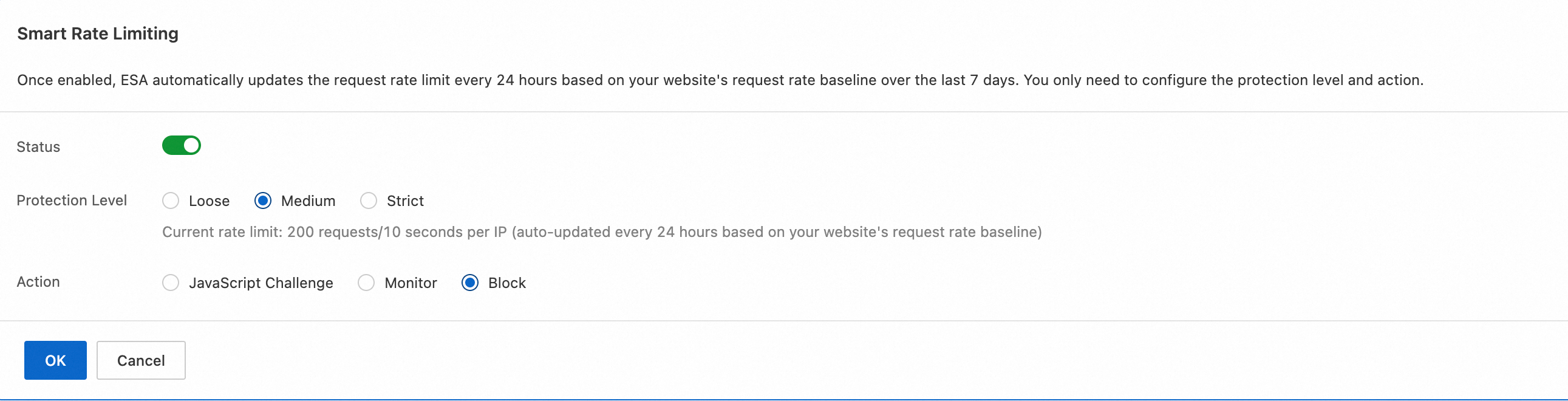
Available protection levels and actions.
Policy 2: Security analytics
Monitor traffic proactively and respond to potential threats.
ESA provides Security Analytics and Events dashboards to inspect requests by IP, path, and User-Agent. When you spot anomalies, create a WAF rule from the dashboard with one click. For example:
Block an IP sending repeated malicious requests.
Block a crawler disguised as a browser by its User-Agent.
Use cases
Growing websites: Detect anomalies early as website traffic grows.
Proactive security operations: Stop suspicious behavior, such as rapid directory scanning, before it escalates.
Note
Security Analytics and Events data has approximately 5 minutes of latency.
Steps
-
On the Security Analytics page, to the right of the filters, click
Create rule from filter conditions.NoteOn the Request Analytics tab of the Overview module, you can select Create Custom WAF Rule from Filters. On the Bot Analytics tab of the Overview module, you can select Create Bot Management Rule from Filters. On the Rate Limiting Analytics tab of the Overview module, you can select Create WAF Rate Limiting Rule from Filters.

-
On the new rule page, enter a Rule Name, select an action, and click OK. The rule takes effect immediately.

Policy 3: Rule templates
Use rule templates to combat common attack types.
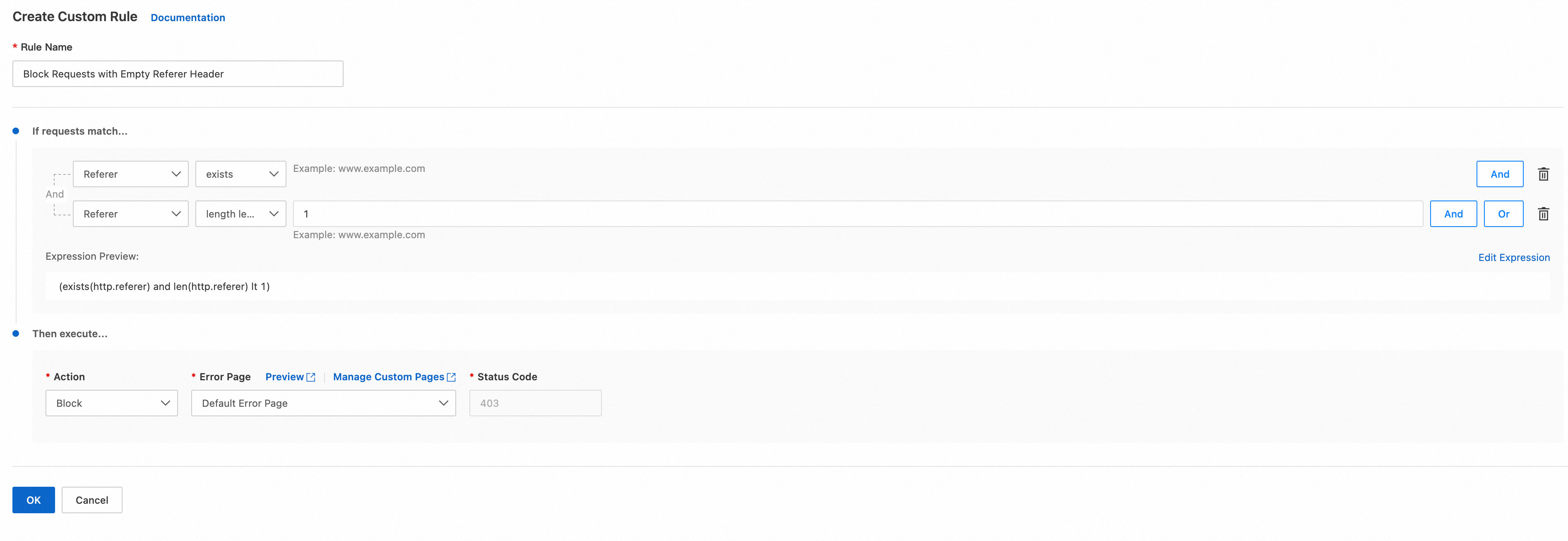
ESA provides pre-configured rule templates based on real-world attack data: blocking empty-Referer requests, protecting login pages from brute force, and allowlisting IPs. Select a template, fill in the parameters (such as your login URL), and the rule deploys immediately.
Use cases
Common attacks: Your website faces brute-force, SQL injection, or similar attacks.
Clear protection goals: You know exactly what you need, such as "allow only search engine crawlers".
Note
Read each template's description before use. Misconfigured parameters may block legitimate traffic.
Steps
In the ESA console, select Websites. In the Website column, click the target website.
In the left-side navigation pane, select .
On the Overview tab, select a Rule Template that fits your current scenario, and then click Create.
On the rule creation page, fill in the template parameters as needed, and then click OK. The rule takes effect immediately.
Policy 4: Custom rules
When other policies fall short, use WAF Configuration Rules for fully customized protection.
Custom rules combine request attributes — IP, URL path, headers, cookies, and body — into match conditions. Assign an action (block, observe, or allow) for full control over traffic filtering.
Use cases
Advanced security operations: You need fine-grained, multi-condition rules built by experienced security engineers.
Special business scenarios: Your application requires tightly integrated rules, such as restricting API access to users with a specific cookie.
Responding to complex attacks: You face advanced persistent threats (APTs) with evolving methods that demand adaptive rules.
Example
This example creates a rate limiting rule: if a single IP sends more than 20 requests to www.example.com and image.example.com within 10 seconds, subsequent requests from that IP are challenged with a slider CAPTCHA for 1 minute.
Only Pro and higher plans support rate limiting rules.
In the ESA console, go to Site Management. In the Actions column of the target site, click
 > WAF.
In the navigation pane on the left, choose .
On the WAF page, select the Rate Limiting Rules tab, click Create Rule, and enter the required information for the rule.
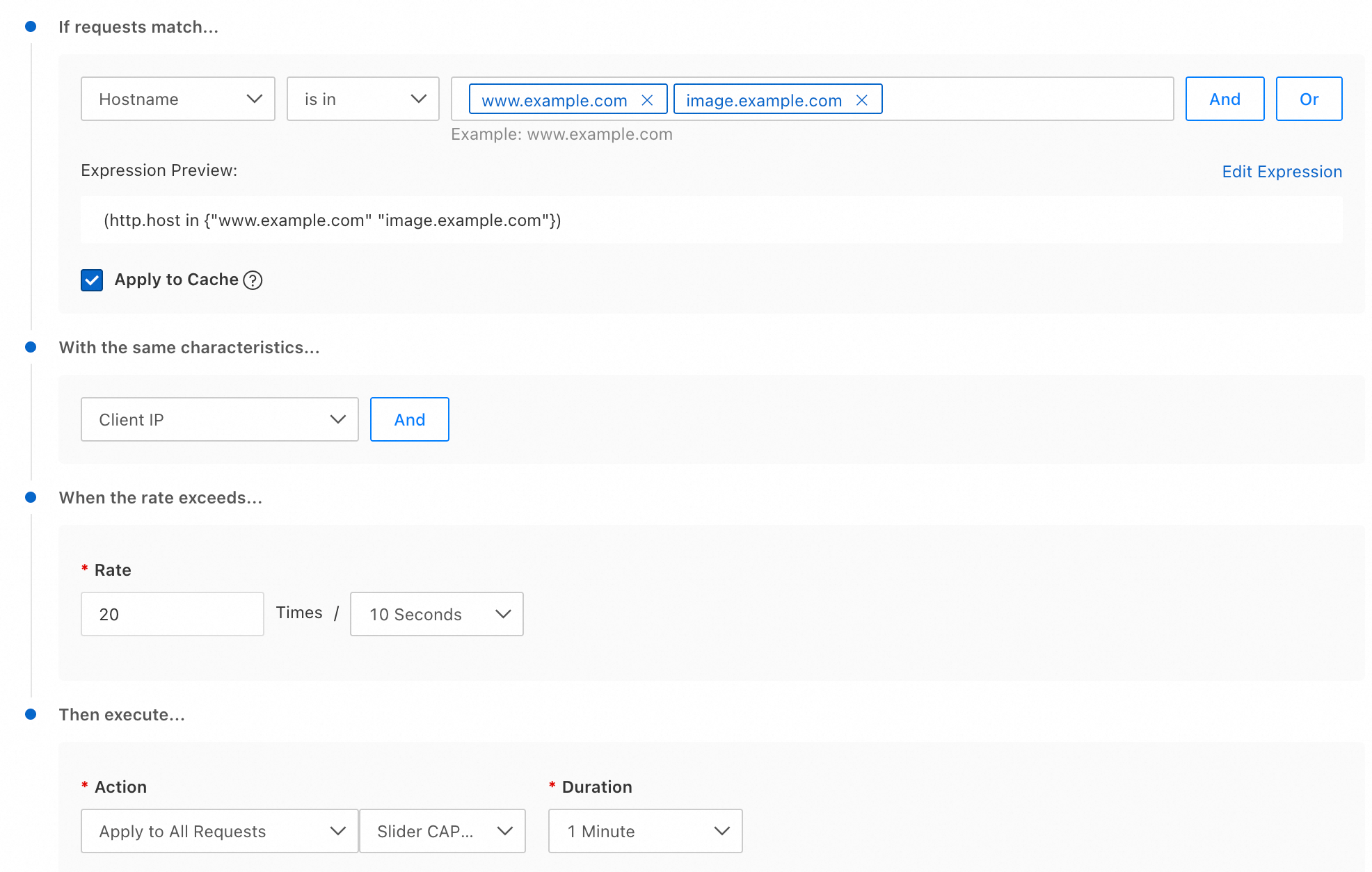
Enter a Rule Name.
If requests match...: Specifies the conditions that requests must meet. For more information about match fields, see Components of a rule expression. In this example, set Match Type to Hostname, set Operator to is one of, and enter
www.example.comandimage.example.comfor Value.Apply to Cache: Rate limiting controls the number of client requests based on a specific feature to reduce the load on your origin server. However, requests that hit the cache are served directly by ESA and do not add load to your origin server. If you do not want to apply rate limiting to these cached requests, clear this checkbox.
With the same characteristics...: Further filters requests that meet the match conditions.
When the rate exceeds...: Specifies the maximum number of requests allowed within the specified time period.
NoteIf you set the action to Apply to Matched Requests, the action duration equals the statistical period.
WAF counts a request only after the full response is sent. Therefore, for requests to download large files, the blocking action may be delayed because of the long download time.
Then execute...: The action to perform when the request rate reaches the limit. You can apply the action to only requests that exceed the limit, or to all subsequent matching requests. For more information, see Action descriptions.