The DDoS protection features use always-on rules built by the Alibaba Cloud anti-DDoS engine from historical attack and defense data. During an HTTP DDoS attack, these rules detect and block malicious requests in real time, preventing attack traffic from reaching and overloading the origin server.
To use this feature, upgrade to the Enterprise plan.
View and adjust rules
Mitigation rules have default status and action settings. Adjust them as needed.
In the ESA console, choose Websites and click your target website.
In the navigation pane on the left, choose .
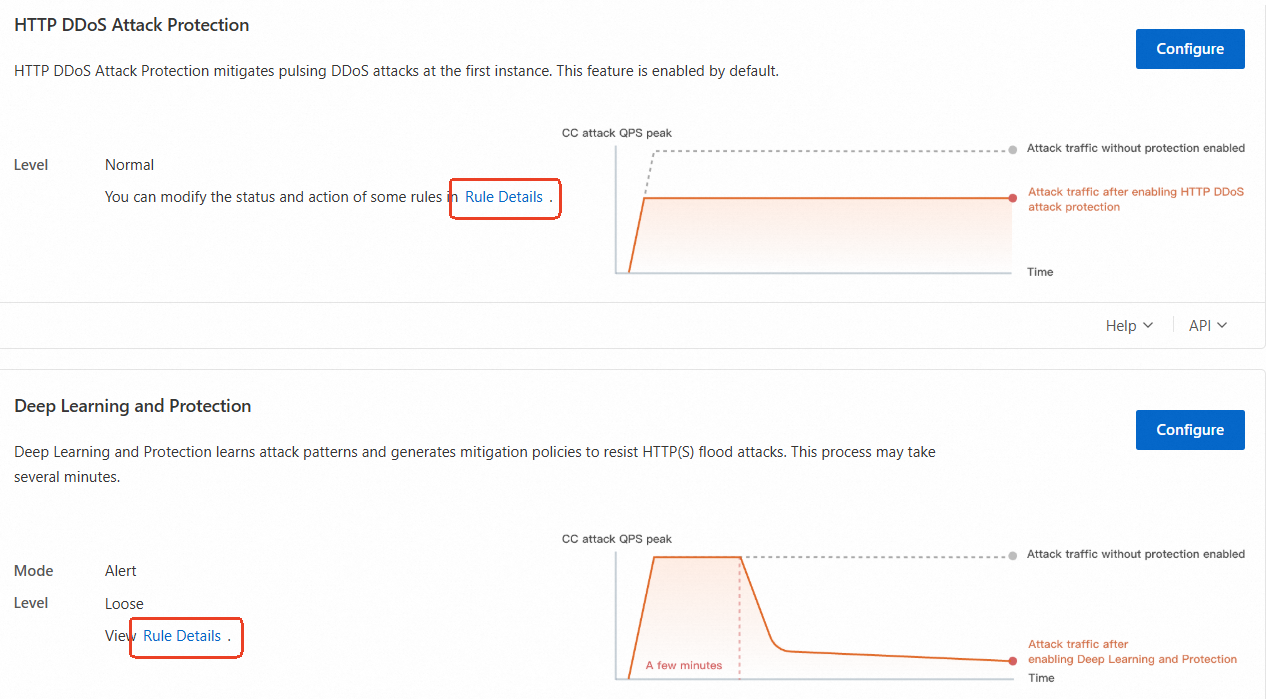
On the Protection Settings tab, click Rule Details (available only for Enterprise plan) in the HTTP DDoS Attack Protection or Deep Learning and Protection section to adjust the rule status and action.
Rule actions
Block: When a request matches a rule, it is blocked and a response page indicating the action is sent back to the requesting client.
NoteTo configure a custom error page for block actions, see Configure custom pages.
Monitor: Requests that match the rule are not blocked but are logged instead. You can query logs about requests that match the rule and analyze the protection performance. For example, you can check whether normal requests are blocked based on logs. The first time you configure a rule, you can set the Action parameter to Monitor to check the protection performance of the rule and whether legitimate requests are blocked. Then, you can determine whether to change the action for these requests.
NoteYou can query logs only when the Simple Log Service for WAF feature is enabled.
JavaScript Challenge: This indicates that WAF issues a JavaScript code snippet to the client, which a standard browser can execute automatically. If the client passes JavaScript verification, WAF allows requests from the client within a specific time range. During this time range, the client can bypass the verification. By default, the time range is 30 minutes. If the client fails JavaScript verification, WAF blocks requests from the client.