Define request matching conditions to return fixed responses or override load balancer settings.
Create a custom rule
-
In the ESA console, choose Websites. In the Website column, click the target site.
-
In the navigation pane on the left, choose . Click Edit for the target load balancer.

-
On the Configure Custom Rule tab, click Create Custom Rule.

-
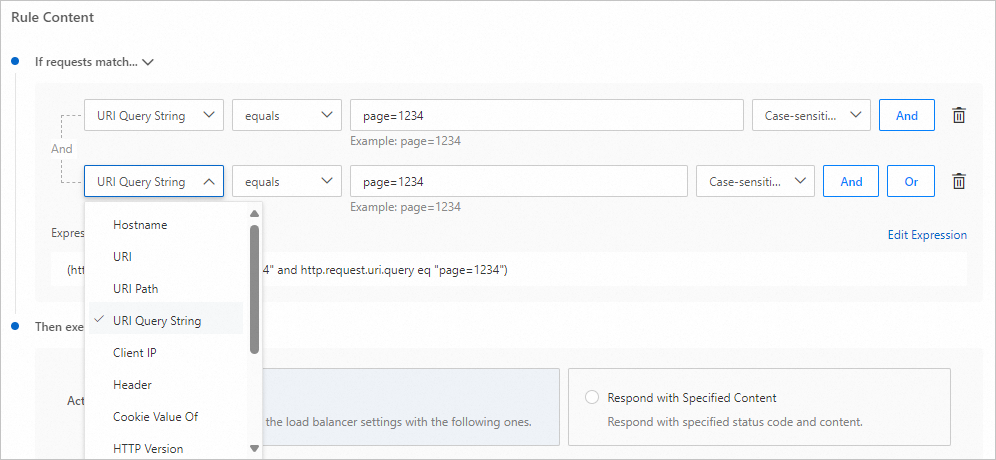
Enter a Rule Name. In the If requests match... section, select a field and its properties.
Note-
The expression builder covers common request attributes. Select request matching rules and generate expressions as needed.
-
Accelerated domain names can route requests to different origins based on URI paths.
-
From the match type list, select a match field.
-
From the operator list, select a match operator.
-
-
In the Then execute... section, select Respond with Specified Content or Override.

Project
Item
Description
Respond with specified content
Response status code
Optional. Default: 200.
Content-Type
Optional. Default: application/octet-stream.
Location
Optional. Not included by default. Maximum: 1,024 bytes.
Body
Optional. Empty by default. Maximum: 1,024 bytes.
Override load balancer configuration
Origin pool
Specify the origin pool.
Fallback origin pool
Specify the fallback origin pool.
Load balancing policy
Specify the traffic steering policy.
Session persistence
Enable or disable session persistence.
Primary region pool
A global region-level origin pool.
Secondary region pool
A region-level origin pool within the corresponding primary region.
Load balancer TTL
The time a data packet can exist in the network.
Stop
Stops matching and executing further custom rules.
NoteRules execute in ascending order. If a rule with the Stop action matches, no further custom rules run.
-
Click OK.