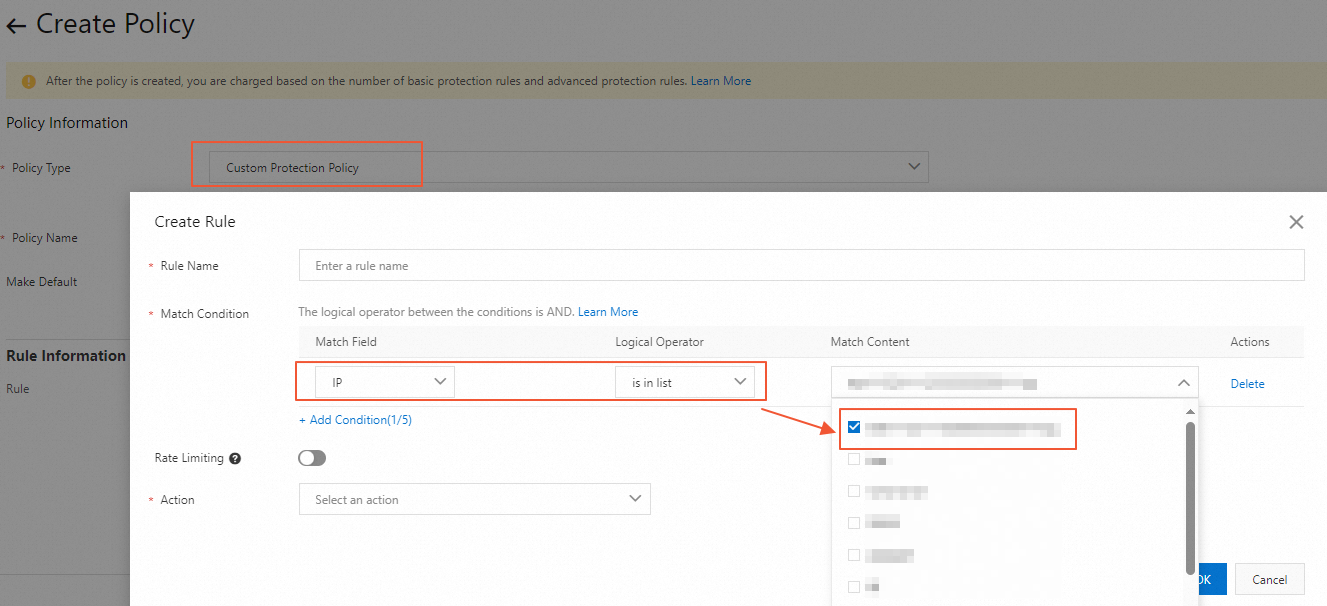
When you configure various protection policies, you may need to configure a large number of IP addresses and reference these IP addresses in multiple rules at the same time. For example, you may need to perform JavaScript validation and rate limiting for 200 IP addresses at the same time. In this case, you can configure an IP address group and add 200 or more IP addresses to the group. Then, you can reference the group when you configure various WAF protection policies. This feature helps reduce the repeated workload of entering IP addresses and better manage access permissions.
Create an IP address group
-
Log on to the DCDN console.
-
In the left-side navigation pane, click Global Configurations.
-
On the IP Address/CIDR Block Groups tab, click Create Group.
NoteYou can create up to 10 groups. The groups can be referenced in WAF protection policies.
-
In the Create Group dialog box, configure Group Name and IP Addresses/CIDR Blocks.
Note-
Group Name: The name can contain letters, digits, and underscores (_). It must be fewer than 32 characters long and cannot start with an underscore.
-
IP Addresses/CIDR Blocks: You can enter up to 500 IP addresses or CIDR blocks, such as
192.168.0.1/24. Separate entries with a comma.
-
-
Click OK.
Reference an IP address group
-
Log on to the DCDN console.
In the left-side navigation pane, choose .
On the Protection Policies page, click Create Policy.
-
When you configure a rule for a protection policy, such as a custom protection policy, whitelist, or IP address blacklist, set Match Field to IP and Logical Operator to Belongs To or Does Not Belong To. You can then select a configured group.