IP address blacklist-based protection policies block requests from specific IPv4 addresses, IPv6 addresses, or CIDR blocks. You can specify the IP addresses or CIDR blocks based on your business requirements.
Prerequisites
Web Application Firewall (WAF) is enabled. For more information, see Getting started with WAF (new edition).
The domain name that needs to be protected is added to WAF. For more information, see Add a domain name for protection.
Create an IP address blacklist-based protection policy
-
Log on to the DCDN console.
In the left-side navigation pane, choose .
On the Protection Policies page, click Create Policy.
On the Create Policy page, configure the parameters. The following table describes the parameters.
Section
Parameter
Description
Policy Information
Policy Type
Select IP Blacklist.
Policy Name
The name of the protection policy. The name can be up to 64 characters in length and can contain letters, digits, and underscores (_).
Make Default
Specifies whether the current policy is the default policy of the current policy type.
NoteYou can specify only one default policy for each policy type. After you specify a default policy, you cannot change the default policy.
If you have specified a default policy for the current policy type, this switch is unavailable.
Rule Information
Rule
The information about the current blacklist rule. For more information, see Parameters of an IP address blacklist rule.
NoteTo increase the quota for the number of rules, submit a ticket.
Protected Domain Names
Select Association Mode
You can associate a protected domain name with multiple policies of the same type. If you have associated a domain name with a policy of the same type, you can add the current policy or replace the existing policy with the current policy. You can only replace the existing policy with the current policy for domain names that are associated with the default policy. Valid values:
Replace existing associated policies: Replaces the existing policies associated with the domain name with the current policy.
Add to existing associated policies: Associates the domain name with the current policy while retaining existing associations. All associated policies are in effect.
Protected Domain Names
The domain names that you want to associate with the current protection policy.
Click Create Policy.
By default, the protection policy that you created is enabled.
Parameters of an IP address blacklist rule
You can create an IP address blacklist rule when you create an IP address blacklist. You can also create a rule for an existing blacklist. The following table describes the parameters.
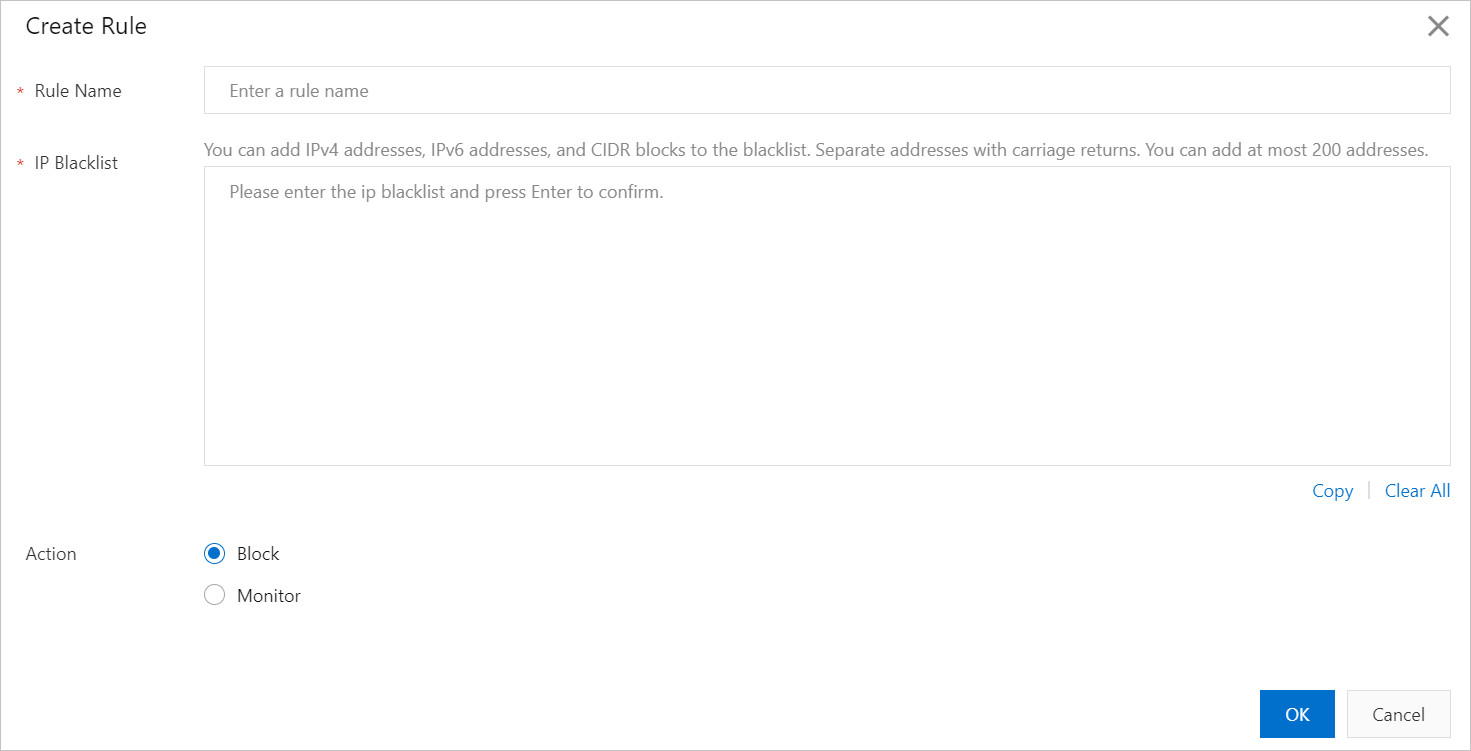
Parameter | Description |
Rule Name | The name of the custom rule. The name can be up to 64 characters in length and can contain letters, digits, and underscores (_). |
IP Address Blacklist | Enter IP addresses. If a request is sent from one of the specified IP addresses, the request matches the protection rule. You can enter an IP address based on the following descriptions:
|
Action | Select the action that you want WAF to perform when a request matches a rule. Valid values:
In Monitor mode, you can view the protection performance of the rule and check whether the rule blocks normal requests. Then, you can determine whether to set the Action parameter to Block. |