A Referer blacklist or whitelist controls access to your resources based on the Referer header of HTTP requests. This feature prevents hotlinking and unauthorized resource use. Once configured, DCDN evaluate the Referer header to grant or deny access.
By default, the Referer blacklist/whitelist feature for Alibaba Cloud DCDN is disabled, allowing any website to access your resources.
Referer blacklists and whitelists are one way to prevent hotlinking. For more methods, see Best practices for preventing hotlinking.
When you add a domain name like
aliyundoc.comto a Referer list, DCDN apply the rule to both the domain itself and all its subdomains (such as*.aliyundoc.com).
Use cases
A Referer blacklist or whitelist primarily protects your website resources from being directly linked or used by other websites. Common use cases include:
Copyright protection: For websites with copyrighted content, you can use a Referer whitelist to restrict access to authorized websites only.
Hotlinking prevention: A whitelist ensures that your resources can be accessed only from specific websites, preventing other sites from consuming your bandwidth by directly linking to your content.
Enhanced website security: By allowing only specific websites to access your resources, you can prevent malicious hotlinking, unauthorized access, and theft of sensitive information.
Traffic source control: You can restrict traffic from specific websites to control traffic sources and improve the stability and security of your website.
How it works
A Point of Presence (POP) checks the Referer header of each request. If the Referer is not on the whitelist or if it is on the blacklist, the POP denies the request. This saves bandwidth and reduces load on the origin server. DCDN use the following rules to process Referer requests:
If the Referer in a request matches an entry in the blacklist or does not match any entry in the whitelist, DCDN deny the request.
If the Referer in a request matches an entry in the whitelist, DCDN allow the request.

Procedure
-
Log on to the DCDN console.
-
In the left-side navigation pane, click Domain Names.
-
On the Domain Names page, find the target domain name and click Configure.
-
In the left-side navigation tree of the domain name, click Access Control.
-
On the Hotlink Protection tab, turn on Hotlink Protection.
-
Select Blacklist or Whitelist based on your needs.
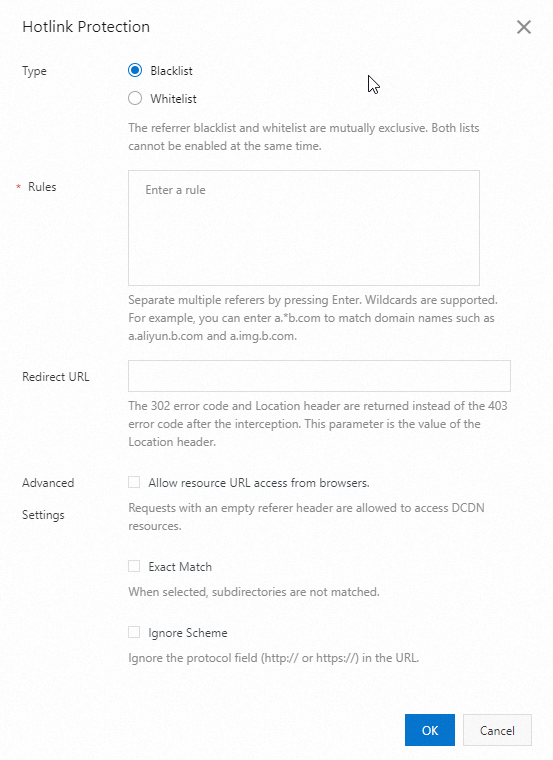
Parameter
Description
Type
-
Blacklist
Requests from blacklisted domains are denied.
-
Whitelist
Only requests from whitelisted domains can access your resources.
NoteThe blacklist and whitelist are mutually exclusive.
Rules
-
Enter one domain name per line. No leading spaces.
-
Asterisks (*) work as wildcards. For example,
*.developer.aliyundoc.commatchesimage.developer.aliyundoc.comandvideo.developer.aliyundoc.com.
NoteMaximum rule size: 60 KB.
Redirect URL
Blocked requests receive an HTTP 302 redirect to this URL. The URL must start with
http://orhttps://, for example,http://www.example.com.Advanced Settings
Allow resource URL access from browsers
Disabled by default. When enabled, requests with an empty Referer header can access resources regardless of whether you configure a whitelist or blacklist. An empty Referer occurs when:
-
No Referer header is present.
-
The Referer header value is empty.
Exact Match
Not selected by default. If you select this check box, subdomains cannot be matched. For example, adding
example.commatches onlyexample.com— subdomains are excluded.Ignore Scheme
-
When disabled, the Referer value must include an
http://orhttps://scheme. -
When enabled, the Referer value is matched without requiring an
http://orhttps://scheme.
-
-
Click OK.
Matching logic
The following table shows how DCDN matches the Referer header against your list. Requests that match a blacklist entry or fail to match any whitelist entry are rejected by DCDN with HTTP 403.
|
Configured domain name |
Referer header value in a request |
Matched |
Description |
|
http://www.example.com/img.jpg |
Yes |
Referer domain matches a list entry. |
|
http://www.example.com:80/img.jpg |
Yes |
||
|
www.example.com |
No |
No HTTP/HTTPS scheme in the Referer value. |
|
|
http://aaa.example.com |
Yes |
Wildcard *.example.com matches subdomains at any depth. |
|
|
http://aaa.bbb.example.com |
Yes |
||
|
http://example.com |
No |
*.example.com matches subdomains but not the root domain. |
|
|
http://www.example.net |
No rules matched |
Domain not in list; default allow rule applies. |