When an application on an Elastic Compute Service (ECS) cluster has multiple instance groups running different versions or services, you can use URL-based forwarding policies to route requests from specific paths to specific instance groups. Without forwarding policies, a Server Load Balancer (SLB) instance distributes traffic randomly across all groups. With forwarding policies, each request reaches the group that matches its URL path.
In this topic, you learn how to:
Configure vServer groups for your application's instance groups.
Create URL-based forwarding policies to direct traffic by path.
Verify that each path reaches the correct instance group.
How URL-based forwarding works
After you associate an SLB instance with an application deployed on an ECS cluster, traffic behavior depends on whether forwarding policies are configured:
| Configuration | Traffic behavior |
|---|---|
| No forwarding policies | Traffic is distributed randomly across all instance groups |
| Forwarding policies configured | The SLB instance routes each request to the instance group that matches the URL path |
Example: isolate high-traffic services
An ordering system exposes o.domain.com/orders/queryitem for product queries. During flash sales, this endpoint receives far more traffic than other services.
To handle the spike, deploy the product query service to a dedicated flash sales instance group and keep other services in the default group. Then, create a forwarding policy that routes /orders/queryitem to the flash sales group. All other requests fall through to the default group.
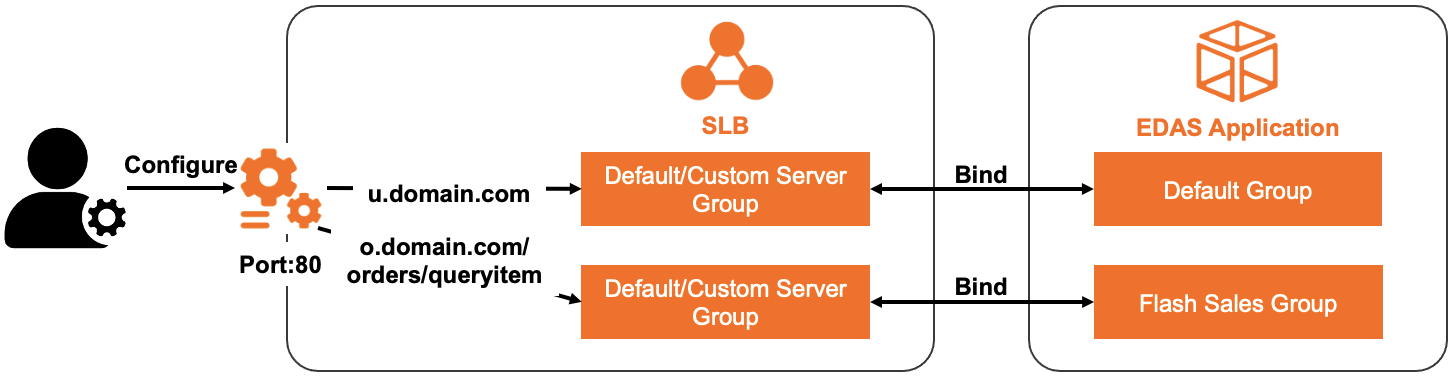
Prerequisites
Before you begin, make sure that you have:
An SLB instance. For more information, see Create a CLB instance
At least two instance groups for the application. For more information, see Create an application instance group
The SLB instance associated with the application instances. For more information, see Configure a dedicated SLB instance for an application
Configure vServer groups and forwarding policies
Repeat the following steps for each instance group. Each instance group requires a different vServer group.
A vServer group can be associated with only one application or application group.
Log on to the EDAS console.
In the left-side navigation pane, choose Application Management > Applications.
On the Applications page, select the target region and microservices namespace. From the Cluster Type drop-down list, select ECS Clusters. Click the name of the application.
On the Basic Information tab, click the Instance Information tab.
Find the target instance group. In the upper-right corner of the group, click Group Settings and select Public-facing SLB Instance Information.
In the Group Settings dialog box, configure a vServer group and a forwarding policy:
Option A: Use an existing vServer group
Select Existing VServer Group and choose a vServer group from the list.
Configure a forwarding policy:
To reuse an existing forwarding policy, select Modify the forwarding policy of the current VServer group and choose the policy.
To create a new forwarding policy, select Add Forwarding Policy and enter a domain name and path rule in the Forwarding Policy field.
Option B: Create a new vServer group
Select Create VServer Group and enter a name in the VServer Group Name field.
Select Add Forwarding Policy and enter a domain name and path rule in the Forwarding Policy field.
Click Next.
In the SLB Change Order step, click Confirm.
Repeat steps 5 through 8 for each remaining instance group.
Verify the result
After you configure forwarding policies for all instance groups, test that traffic reaches the correct group:
Get the public IP address or domain of the SLB instance from the EDAS console.
Send a request to a path covered by a forwarding policy. For example, if
/orders/queryitemroutes to the flash sales group: The response should come from an instance in the flash sales group.curl http://<SLB-public-IP>/orders/queryitemSend a request to a path not covered by any forwarding policy: The response should come from an instance in the default group.
curl http://<SLB-public-IP>/other-pathRepeat for each forwarding policy to confirm all rules work as expected.