Applications managed in Enterprise Distributed Application Service (EDAS) may contain multiple services or subsystems, which can be developed and maintained by different teams and members. EDAS provides two permission models that control who can perform which operations on which resources, enabling you to isolate applications, resources, and data, and implement access control.
Permission models
EDAS supports two permission models:
Resource Access Management (RAM) policies (recommended): Fine-grained, policy-based access control. Each policy defines specific actions a user can perform on specific resources. RAM policies follow the least-privilege principle and support wildcards, conditional expressions, and multi-policy composition.
EDAS-defined permissions (legacy): Coarse-grained, role-based access control. Permissions bundle operations and resources together, so you cannot independently control which operations apply to which resources.
To manage permissions for EDAS and other Alibaba Cloud services in a unified system, we recommend that you use RAM. For details on setting up RAM-based access control, see Overview.
If your organization still uses EDAS-defined permissions, see Manage EDAS-defined permissions (not recommended).
How access is evaluated
When both permission models coexist, EDAS evaluates access as follows:
RAM users are always governed by RAM policies. EDAS-defined permissions do not apply.
Sub-accounts with AliyunEDASFullAccess are governed by RAM policies, not EDAS-defined permissions.
Sub-accounts with EDAS-defined permissions continue to use EDAS-defined permissions until you migrate them to RAM users.
We recommend that you switch sub-accounts that are regulated by EDAS-defined permissions to RAM users. For the migration procedure, see Replace EDAS-defined permissions with RAM policies.
To manage the EDAS-defined permissions granted to a sub-account, log on to the EDAS console and specify the resources that the sub-account is allowed or not allowed to access. After you replace EDAS-defined permissions with RAM policies, you can no longer grant EDAS-defined permissions to sub-accounts. Sub-accounts are switched to RAM users. You must grant RAM users permissions on EDAS in the RAM console.
Why RAM policies are better than EDAS-defined permissions
Finer-grained access control
With EDAS-defined permissions, granting deploy and stop permissions on APP1 and APP2 means the sub-account can deploy and stop both applications. You cannot separate which operations apply to which applications.
RAM policies decouple operations from resources. For example, a single RAM user can receive:
Deploy permissions for APP1 and APP2
Stop permissions for APP2 and APP3
In this case, the RAM user can deploy APP1 and APP2 but cannot deploy APP3. The RAM user can stop APP2 and APP3 but cannot stop APP1.
| EDAS-defined permission | RAM policy |
|---|---|
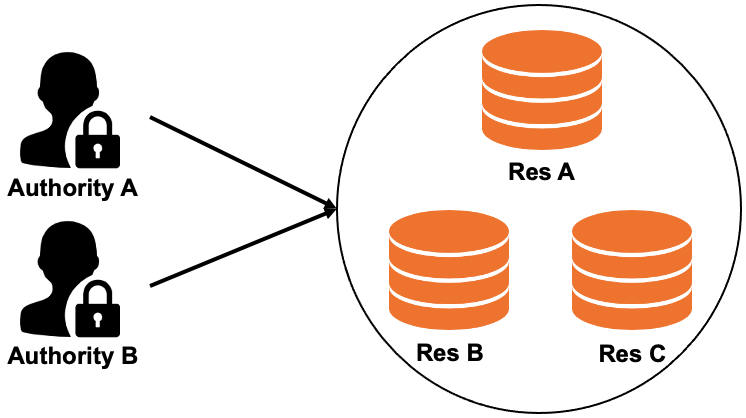 | 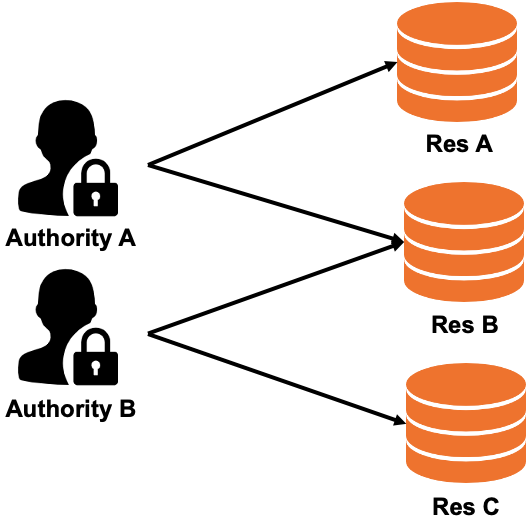 |
| Permissions bundle operations and resources together. A sub-account with deploy and stop permissions on APP1 and APP2 can perform both operations on both applications. | Each policy statement binds specific operations to specific resources. Deploy permissions and stop permissions target different sets of applications. |
Flexible policy syntax
RAM policies support features that EDAS-defined permissions lack:
Wildcards in resource identifiers to match multiple resources at once
Allow and Deny statements in a single policy for precise control
Multiple policies attached to a single RAM user
Conditional expressions to define a policy
Example: view all applications except one
The following policy allows a RAM user to view all EDAS applications, except the application whose ID is 12345678 in the cn-beijing region:
{
    "Statement": [
      {
        "Action": [
          "edas:ReadApplication"
        ],
        "Effect": "Allow",
        "Resource": ["acs:edas:*:*:namespace/*/application/*"]
      },
      {
        "Action": [
          "edas:ReadApplication"
        ],
        "Effect": "Deny",
        "Resource": ["acs:edas:cn-beijing:*:namespace/*/application/12345678"]
      }
    ],
    "Version": "1"
}
This policy contains two statements:
The first statement sets the effect to
Allowand uses a wildcard (*) in the resource path to match all applications across all namespaces. The RAM user can view any EDAS application.The second statement sets the effect to
Denyfor the specific application12345678in thecn-beijingregion. BecauseDenytakes precedence overAllow, the RAM user cannot view this application.
The combined result: the RAM user can view all applications except application 12345678.
For the full policy syntax reference, including conditional expressions, see Policy overview.
Permission mapping reference
EDAS-defined permissions are not equivalent to RAM policies and cannot be directly converted. However, when you replace EDAS-defined permissions with RAM policies, EDAS can inherit most permissions automatically. By default, permissions that define whether a sub-account can perform a specific operation on EDAS resources (such as applications and clusters) are carried over to the corresponding RAM user.
EDAS resources are organized in a hierarchy: namespace > cluster/application. The resource path in RAM policies reflects this hierarchy. For example, acs:edas:*:*:namespace/*/application/${applicationId} targets a specific application within any namespace.
The following table maps each EDAS-defined permission to its RAM policy equivalent:
| EDAS-defined permission | RAM action | RAM resource |
|---|---|---|
| Super Admin (full permissions) | edas:* | acs:edas:\*:\*:\* |
| Acting Alibaba Cloud account | edas:ManageSystem | acs:edas:\*:\*:\* |
| System management - View operation logs | edas:ReadOperationLog | acs:edas:\*:\*:\* |
| Application management - Modify microservice namespaces | edas:ManageNamespace | acs:edas:\*:\*:namespace/${namespaceId} |
| Application management - Query microservice namespaces | edas:ReadNamespace | acs:edas:\*:\*:namespace/${namespaceId} |
| Resource management - Create clusters | edas:CreateCluster | acs:edas:\*:\*:namespace/\* |
| Resource management - View clusters | edas:ReadCluster | acs:edas:\*:\*:namespace/\*/cluster/${clusterId} |
| Resource management - Manage and delete clusters | edas:ReadCluster, edas:ManageCluster | acs:edas:\*:\*:namespace/\*/cluster/${clusterId} |
| Application management - Create applications | edas:CreateApplication | acs:edas:\*:\*:namespace/\* |
| Application management - Deploy, start, scale out, and delete applications | edas:ManageApplication, edas:ReadApplication | acs:edas:\*:\*:namespace/\*/application/${applicationId} |
| Application management - View application information | edas:ReadApplication | acs:edas:\*:\*:namespace/\*/application/${applicationId} |
| Application management - Configure containers and set Java Virtual Machine (JVM) parameters | edas:ConfigApplication, edas:ReadApplication | acs:edas:\*:\*:namespace/\*/application/${applicationId} |
| Application management - Set log directories | edas:ManageAppLog, edas:ReadApplication | acs:edas:\*:\*:namespace/\*/application/${applicationId} |
| Purchase Elastic Compute Service (ECS) resources | edas:ECSPurchase | acs:edas:\*:\*:\* |
| Purchase Server Load Balancer (SLB) resources | edas:SLBPurchase | acs:edas:\*:\*:\* |
| Purchase Log Service resources | edas:SLSPurchase | acs:edas:\*:\*:\* |