Customize RSS hash rules and indirection tables on supported ENIs to distribute traffic evenly across CPU cores and resolve single-core bottlenecks.
What is RSS
Receive Side Scaling (RSS) uses the ENI hardware and driver to calculate a hash value from packet features (source/destination IP addresses and ports), mapping different traffic streams to multiple RX queues. Bound CPU cores process the queues in parallel, achieving load balancing and reducing single-core latency.
An ENI that supports multiple queues uses independent RX (receive) and TX (send) channels per queue for parallel processing. When a packet arrives, the ENI hardware uses an RSS policy to distribute different data streams across multiple RX queues. By default, the RSS policy for an ECS instance is fixed in the Virtual Private Cloud (VPC) and cannot be viewed or modified from within the instance.
Some instance families support the custom RSS feature for ENIs. After you enable the custom RSS feature on a supported instance family, the ENI distributes traffic based on the default custom hashing rules. You can also further adjust the RSS configuration based on actual traffic characteristics.
After enabling custom RSS, you can also configure RSS in DPDK scenarios to maximize multi-core performance.
How it works
Custom RSS for an ECS instance ENI works as follows:
-
Hash value calculation: The ENI calculates a hash value from the 5-tuple (source IP, destination IP, source port, destination port, and protocol), a hash key, and a hash algorithm.
-
Hash key: A fixed
40-byte value. The ENI driver generates a default hash key during initialization. You can adjust the hash key to affect traffic distribution. -
Hash algorithm: Currently, only the default
toeplitzalgorithm is supported. This setting cannot be modified. -
Hashing rules: The rules for calculating hash values vary by traffic type. The default hashing rules for ECS ENI RSS are as follows. You cannot change these rules.
-
TCP and UDP traffic over IPv4/IPv6: A hash value is calculated based on the 4-tuple (source IP, destination IP, source port, and destination port) and the hash key.
-
Non-TCP/UDP traffic over IPv4/IPv6, such as ICMP: A hash value is calculated based on the 2-tuple (source IP and destination IP) and the hash key.
-
Non-IP messages (such as ARP) are sent to the default queue (queue 0) and are not hashed.
-
-
-
Indirection table mapping: The RSS indirection table is a predefined array that maps hash values to destination receive queues. Each element (hash bucket) stores a queue number, such as 0, 1, or 2. When the ENI driver loads, it automatically generates an indirection table that evenly distributes traffic.
-
Indirection table length: The total number of hash buckets. The value is fixed at
128. -
Distribution modes:
The distribution mode of the RSS indirection table is the core mechanism that maps hash values to specific receive queues. Using a predefined indirection table, the result of the hash calculation is converted into a queue index. This allows for flexible traffic distribution across multiple cores.
Different distribution modes, such as uniform distribution and weighted distribution, directly affect how traffic is distributed across CPU cores. This in turn affects system throughput, latency, resource utilization, and service performance.
Choose a suitable distribution pattern based on your scenario. See Indirection table distribution pattern.
-
Indirection table mapping process:
-
Hash bucket index calculation:
Index = Hash value % Indirection table length(For example, 88 % 128 → index 88). You can use the RSS calculation script to calculate the index value. -
Fill queue numbers: Write queue numbers into each hash bucket based on the distribution mode.
After the indirection table is generated, each packet's hash index maps to a queue number, and the packet is sent to that queue.
-
-
-
CPU core binding: When a queue receives a packet, it triggers an interrupt. The bound CPU core processes the interrupt.
Images other than Red Hat Enterprise Linux support network interrupt affinity by default. Each queue is associated with an independent interrupt, and interrupt affinity distributes handling across different CPU cores. See Core mechanism of multi-queue.
Enable or disable custom RSS for an ENI
The custom RSS feature for ENIs is in invitational preview. To use this feature, you can submit a ticket.
After you enable custom RSS on a supported instance type, received traffic is distributed to multiple receive queues based on the default hashing rules. Different CPU cores process the queues in parallel, increasing throughput and reducing single-core load.
Prerequisites
-
Custom RSS is being rolled out in phases. It is available in the following regions:
Region Name
Region ID
China (Hong Kong)
cn-hongkong
-
Only some multi-queue instance families support custom RSS, including the general-purpose instance family g9i and the memory-optimized instance family r9i.
Call the DescribeInstanceTypes API operation to check support. RssSupport=`true` indicates the feature is supported.
-
Alibaba Cloud Linux 3.2104 LTS 64-bit image is recommended.
-
If you use other public images, the kernel version must be 6.12 or later.
-
If you use the custom RSS feature in a DPDK application, the DPDK version must be 21.11 or later.
-
How to enable or disable
Custom RSS is disabled by default. You can enable or disable it when you create an ENI or after the ENI is created.
-
When calling CreateNetworkInterface, set EnableRss in EnhancedNetwork to true or false.
Custom RSS takes effect after the ENI is attached to an instance.
-
Call ModifyNetworkInterfaceAttribute and set EnableRss in EnhancedNetwork to true or false. After enabling or disabling, the change takes effect when the ENI is reattached:
-
For a secondary ENI that is attached to an instance, you must detach the ENI and then attach the ENI for the change to take effect.
-
For the primary ENI, restart the instance for the change to take effect.
-
-
Call DescribeNetworkInterfaceAttribute with Attribute set to enhancedNetwork to query whether custom RSS is enabled. EnableRSS=true means enabled; false means disabled.
If RSS has not been modified for the ENI, this operation does not return the EnableRSS parameter, meaning the feature is not enabled.
View the RSS configuration of an ENI
After you enable custom RSS, the ENI driver generates a default RSS configuration based on the default mechanism and rules when the ENI is reloaded.
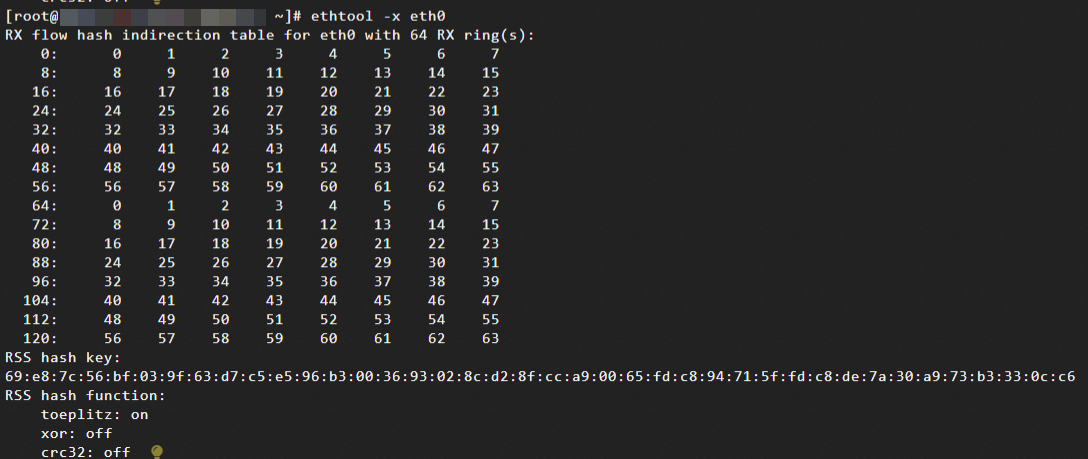
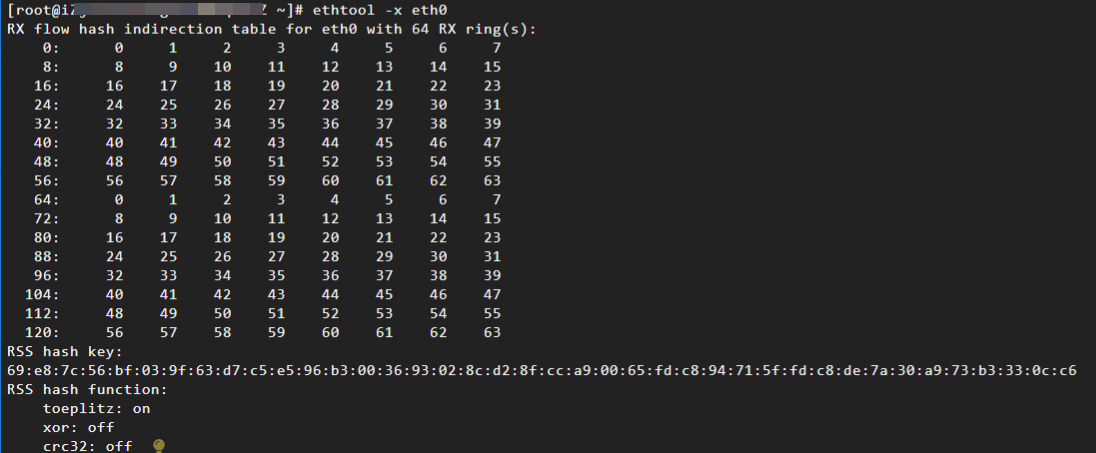
You can remotely log on to a Linux instance and run ethtool -x eth0 to view the RSS configuration of the primary ENI. For a secondary ENI, replace the interface identifier (eth1, eth2, etc.).
-
Hash table (RX flow hash indirection table): Defines the mapping rules from hash values to the 64 receive queues.
-
Each row in the hash table represents a range of hash values, indicated by the starting index. For example, 0 indicates hash values 0-7, and 8 indicates 8-15.
-
The numbers in the table (0, 1, 2, and so on) represent the IDs of the corresponding receive queues. In this example, there are 64 queues (0-63).
-
Current configuration: The indirection table is cyclically filled with the sequence
0,1,2,...,63,0,1,2...63, which ensures that hash values are evenly mapped to the 64 queues and that traffic is evenly distributed.
-
-
RSS hash key: The key used to calculate the hash value. The hexadecimal characters represent a 40-byte key.
-
RSS hash function: Defines the algorithm for calculating the hash value.
-
toeplitz: This is the default algorithm and is currently enabled. It supports symmetric hashing based on a 5-tuple and is suitable for general-purpose traffic. -
xor/crc32: These are other optional algorithms that are typically used in specific scenarios. ECS currently supports only thetoeplitzalgorithm, and other algorithms are not supported or enabled.
-
-
Hashing rules: View the hash field configuration for traffic received by the primary ENI.
ethtool -n eth0 rx-flow-hash tcp4-
You can replace
tcp4with the protocol type that you want to query, such asudp4,tcp6, orudp6. -
The default hashing rules for ECS ENI RSS are as follows. You cannot change these rules.
-
TCP and UDP traffic over IPv4/IPv6: A hash value is calculated based on the 4-tuple (source IP, destination IP, source port, and destination port) and the hash key.
-
Non-TCP/UDP traffic over IPv4/IPv6, such as ICMP: A hash value is calculated based on the 2-tuple (source IP and destination IP) and the hash key.
-
Non-IP messages (such as ARP) are sent to the default queue (queue 0) and are not hashed.
-
-
Taking
tcp4as an example, for IPv4 TCP traffic, the hash value is calculated by default based on the 4-tuple (source IP, destination IP address, source port, destination port) and the hash key: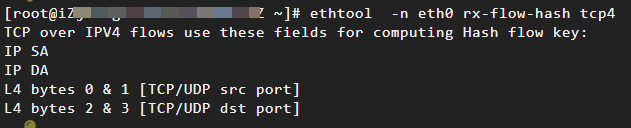
The expected traffic features are as follows:
-
Same TCP connection: All packets have the same hash value and are distributed to the same queue. This ensures packet ordering.
-
Different TCP connections: If the 4-tuples are different, the hash values are different. The traffic is distributed to different queues. This allows multiple CPU cores to process different connections in parallel and increases throughput.
-
-
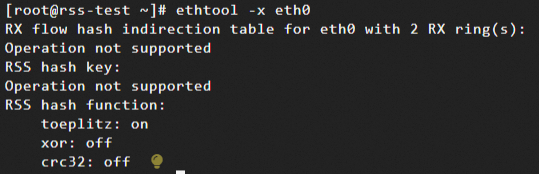
If the following message is returned, custom RSS is not enabled or the instance type does not support it. Enable custom RSS after confirming that the instance type supports it.
Configure custom RSS for an ENI
The default RSS configuration meets most requirements. You may need to adjust the hash key or indirection table in these situations:
-
Uneven traffic: Default hash values may concentrate specific traffic in a few queues.
-
Performance optimization: Adjust hashing rules based on traffic features, such as high UDP proportion, to improve queue utilization.
-
Security requirements: Use a custom hash key to prevent attackers from predicting traffic distribution.
-
In this example, the instance is configured with the
Alibaba Cloud Linux 3.2104 LTS 64-bitimage. -
This example uses the primary ENI
eth0. Replace the interface identifier with eth1 or eth2 to modify RSS for the corresponding secondary ENI. -
When the RSS configuration does not match your traffic features, it can cause uneven distribution and cross-core state contention, affecting performance. Adjust based on actual traffic characteristics and use monitoring tools to observe queue distribution in real time.
Configure the hash key
Regenerate the RSS hash key if traffic is unevenly distributed (for example, rx_packets of some queues are significantly higher than others), or to prevent attackers from inferring traffic patterns by reverse-engineering the hash value.
Modifying the key changes hash values of existing connections, which may cause temporary packet reordering or retransmissions. Perform this during off-peak hours.
-
View the current hash key of the ENI.
The ENI driver generates a 40-byte default hash key when the ENI loads.
ethtool -x eth0
-
Generate a new random key using OpenSSL.
openssl rand -hex 40 | fold -w2 | paste -sd: - -
Apply the new key to the ENI.
ImportantThis is a temporary setting. It becomes invalid after the instance is restarted or the ENI is reattached. The ENI driver automatically initializes a random default configuration.
ethtool -X eth0 hkey <hash key>Replace <hash key> with the new key that you generated in the previous step.
-
Verify that the new key has taken effect.
ethtool -x eth0The output shows that the new key has taken effect:

Configure the indirection table
The distribution mode of the RSS indirection table is the core mechanism that maps hash values to specific receive queues. Using a predefined indirection table, the result of the hash calculation is converted into a queue index. This allows for flexible traffic distribution across multiple cores.
Different distribution modes, such as uniform distribution and weighted distribution, directly affect how traffic is distributed across CPU cores. This in turn affects system throughput, latency, resource utilization, and service performance.
Choose a distribution mode based on your scenario.
The following configurations are temporary. They become invalid after the instance restarts or the ENI is reattached. The ENI driver reinitializes a random default configuration.
-
Uniform distribution mode: The first N queues fill the hash buckets in a loop. Suitable for general high-concurrency scenarios.
ethtool -X eth0 equal <Number of queues N>If the value is set to 64, the indirection table is filled in a loop with
0,1,2,...,63,0,1,2...63,.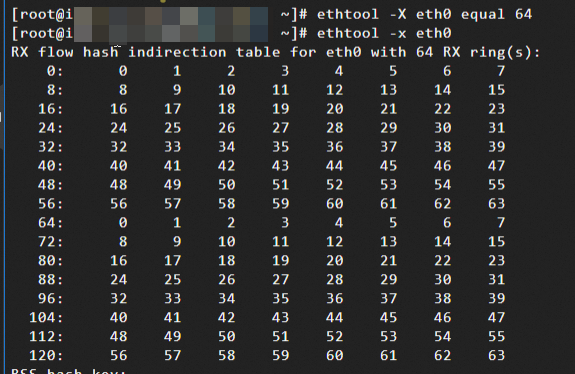
-
Weighted distribution: Allocate hash buckets based on weight ratios. Suitable for scenarios with differentiated business priorities (for example, queue 0 processes real-time traffic and queue 1 processes background tasks) or mixed CPU performance.
ethtool -X eth0 weight <queue 0 weight> <queue 1 weight> ...In the following example, queue 0 gets 60% and queue 1 gets 40%:
NoteIf there are four queues in total, but you only set weights for two queues, the indirection table will only generate mappings for queue 0 and queue 1.
ethtool -X eth0 weight 6 4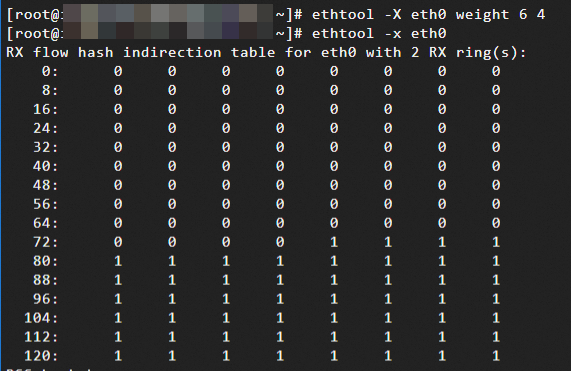
-
Partial queue distribution: Starting from a specified queue, use consecutive queues to fill hash buckets in a loop. Suitable for directing traffic to a specific CPU range, such as a NUMA node.
ethtool -X eth0 start <start queue> equal <number of queues>In the following example, queues 2-41 (40 queues starting from queue 2) fill the hash buckets:
ethtool -X eth0 start 2 equal 40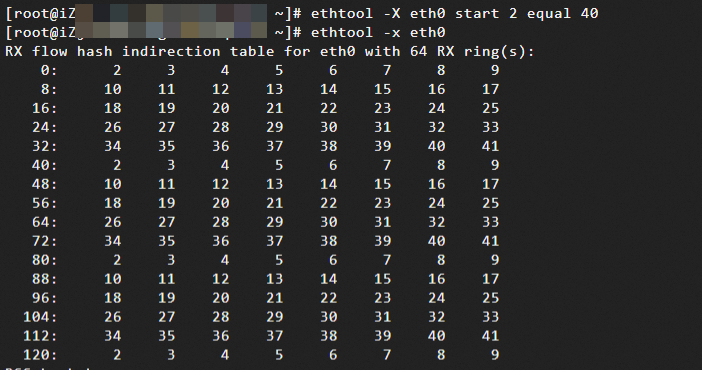
Use watch to observe traffic distribution
After you enable custom RSS on the ENI, use hping3 to generate traffic with different features and watch to monitor queue interrupt distribution, verifying whether traffic is distributed to multiple cores as expected.
Prerequisites
Purchase two ECS instances with these configurations:
-
Sending ECS instance (10.0.0.252): An instance installed with
hping3to generate traffic with different features. -
Accepter ECS instance: An instance whose type supports multi-queue for ENIs, with a secondary ENI attached (10.0.0.5) and custom RSS enabled on the secondary ENI eth1.
Note-
This example uses four queues for testing.
-
To eliminate the impact of SSH logon traffic on the primary ENI, custom RSS is enabled on the secondary ENI eth1 for testing.
-
-
Network connectivity: The two ECS instances are in the same security group and can communicate with each other over the internal network.
Procedure
-
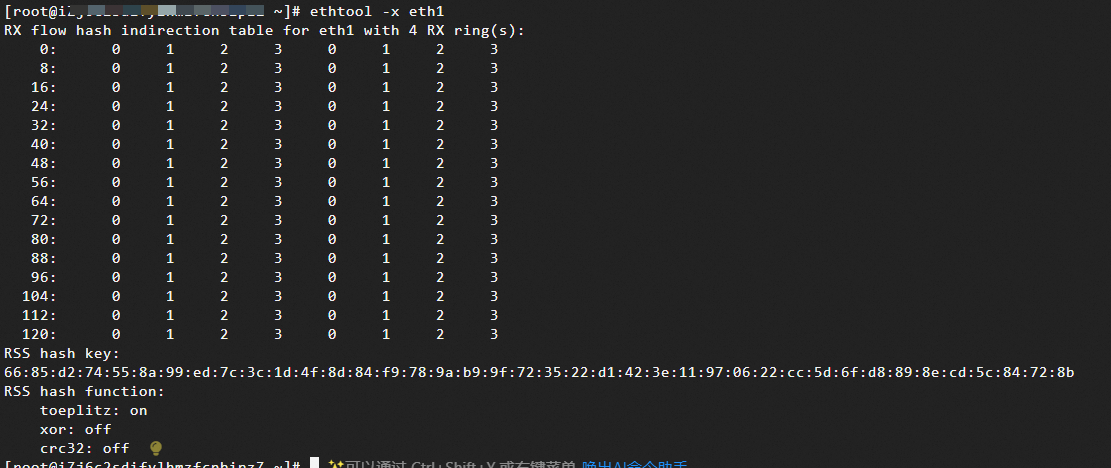
Log on to the accepter ECS instance, check the RSS configuration of the secondary ENI, and confirm the expected traffic distribution. See View the RSS configuration of an ENI.
-
Log on to the sender ECS instance and install
hping3.yum install -y hping3 -
On the acceptor ECS instance, monitor the queue packet counts in real time.
watch -n 1 "ethtool -S eth1 | grep rx[0,1,2,3]_packets"Replace the queue number configuration with the actual configuration of the acceptor ENI.
-
Log on to the sender ECS instance and simulate different traffic patterns.
-
Scenario 1: Send 10,000 SYN packets at high speed to the acceptor IP address with random destination ports. This ensures that the traffic hash is dispersed and verifies hash balancing.
sudo hping3 10.0.0.5 -S -a 10.0.0.252 --rand-dest -p 0 --baseport 10000 -c 10000 -i u100 -I eth0-
rand-dest: Random destination port -
-p 0: Used withrand-dest -
--baseport 10000: The starting value for the source port. -
-c 10000: Send 10,000 packets -
-i u100: Specifies an interval of 100 microseconds between packets for high-speed sending. -
-I eth0: Used withrand-destto specify the sender's network interface
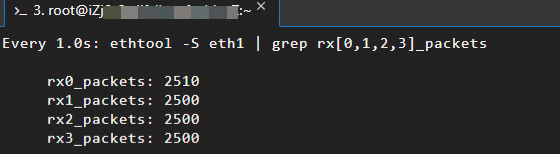
On the acceptor instance, the packet counts of the four queues should increase evenly:
-
-
Scenario 2: Send traffic with a fixed source IP address and port. This tests whether the same traffic is mapped to the same queue and verifies hash consistency.
The following command sends 10,000 TCP SYN packets to the target
10.0.0.5:80, with the source IP fixed to10.0.0.252and the source port fixed to12345.sudo hping3 10.0.0.5 -S -p 80 -c 10000 -s 12345 -a 10.0.0.252 --keep -i u100-
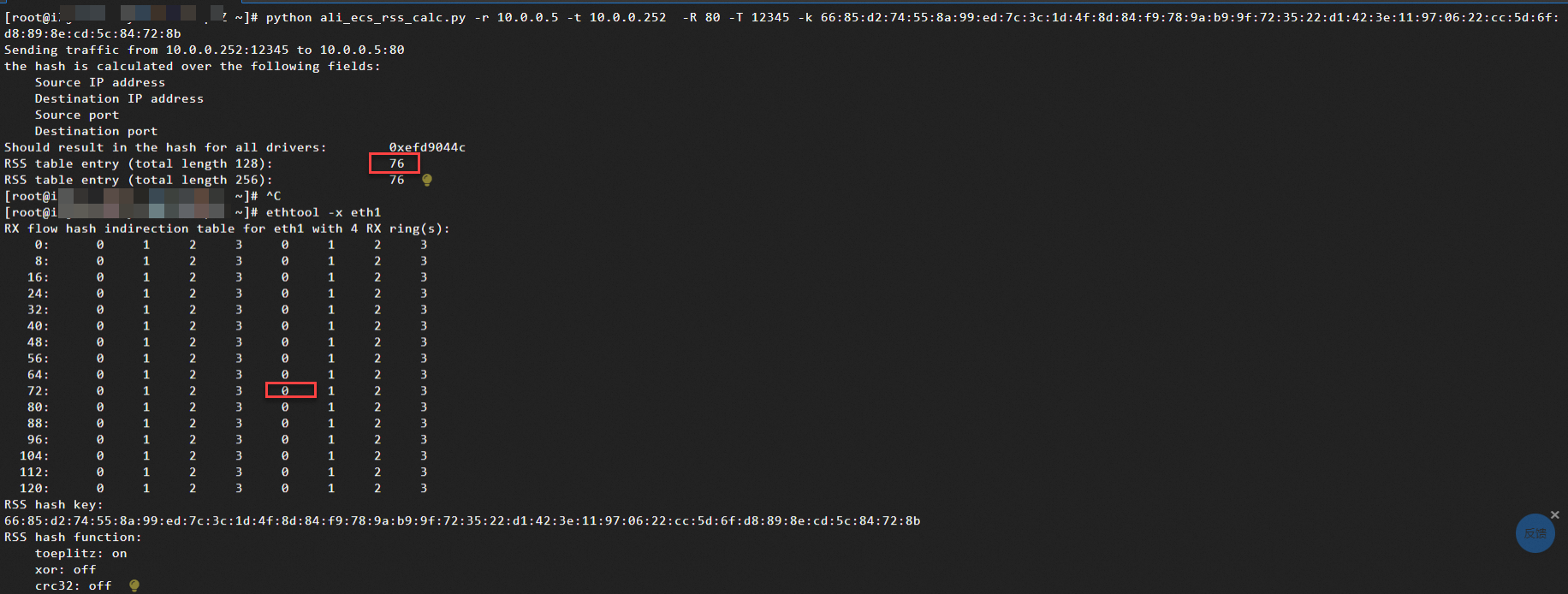
The hash index value is calculated based on the RSS script. The traffic is expected to be processed by queue 0:
-
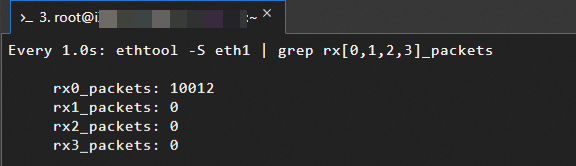
Actual observation result on the acceptor ECS instance (10.0.0.5):
-
-
-
If traffic distribution does not meet expectations (for example, a queue has significantly higher load), optimize by adjusting the hash key or configuring the indirection table.
Configure and use RSS in DPDK
The Data Plane Development Kit (DPDK) is an open-source user-mode data plane acceleration framework that uses user-mode drivers, zero-copy, and polling mode to achieve near-line-speed packet processing. It is suitable for domains sensitive to throughput and latency, such as telecom clouds, fintech, and edge computing. See Data Plane Development Kit (DPDK*).
After you enable custom RSS on the ENI, you can use testpmd and l3fwd in DPDK to test and verify RSS distribution.
Install and configure DPDK on an ECS instance
-
If you use the custom RSS feature in a DPDK application, the DPDK version must be 21.11 or later.
-
This topic uses an
ecs.r9i.16xlargeinstance (64 queues) running theAlibaba Cloud Linux 3.2104 LTS 64-bitimage as an example to demonstrate the installation of DPDK version22.11.3. -
This example uses the primary ENI
eth0. Replace the interface identifier with eth1 or eth2 to modify RSS for the corresponding secondary ENI.
Step 1: Install DPDK
-
Update the system and install basic tools.
sudo yum update -y sudo yum install -y git wget gcc make kernel-devel-$(uname -r) numactl-devel python3 pciutils -
Install DPDK dependencies.
sudo yum install -y libpcap-devel meson ninja-build -
Configure huge pages.
-
DPDK bypasses the kernel protocol stack to directly operate the ENI. It uses huge pages (typically 2 MB) instead of 4 KB pages to reduce TLB misses and improve memory access speed.
-
Allocating too many huge pages reduces normal memory available to the OS. This may cause other applications or system services to fail. Excessive allocation may also prevent instance connectivity.
-
Calculate the required number of huge pages based on your application's memory needs.
Number of huge pages = Application memory / Page size. Default page size is 2 MB. For example, 16 GB / 2 MB = 8192 pages.
echo "vm.nr_hugepages = 8192" | sudo tee -a /etc/sysctl.conf sudo sysctl -p -
-
Create and mount the huge pages directory.
sudo mkdir -p /dev/hugepages sudo mount -t hugetlbfs hugetlbfs /dev/hugepages -
Download the DPDK source code. An Internet connection is required.
cd ~ wget https://fast.dpdk.org/rel/dpdk-22.11.3.tar.xz tar xf dpdk-22.11.3.tar.xz cd dpdk-stable-22.11.3 -
Compile DPDK.
# Initialize the build directory and configure project options, specifying to build the l3fwd Layer 3 forwarding example.
meson setup -Dexamples=l3fwd build
cd build
# Compile.
ninja
# Install the compiled files to the system directory.
sudo ninja install
# Update the system's shared library cache.
sudo ldconfig
If you encounter the
missing python module: elftoolserror shown in the figure below during compilation,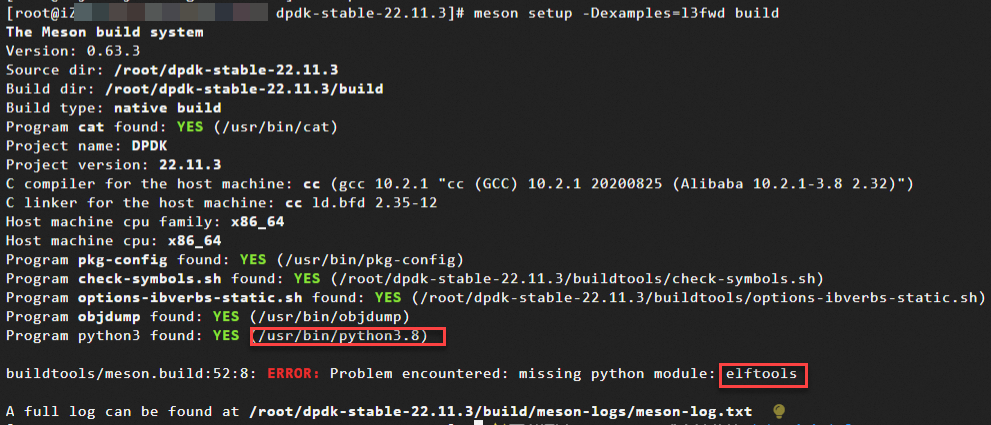
Specify your Python version, install
pyelftools, and recompile:sudo /usr/bin/python3.8 -m pip install pyelftools
Step 2: Load kernel modules
DPDK requires kernel modules such as UIO or VFIO for user-mode device access. VFIO is preferred for its security (relies on IOMMU), while UIO suits quick testing. This example uses VFIO.
-
Enable IOMMU.
VFIO relies on IOMMU for secure user-mode device binding and DMA mapping.
-
Open the file.
sudo vim /etc/default/grub -
Press
ito enter insert mode. Addintel_iommu=onto theGRUB_CMDLINE_LINUXparameter. Save and close the file.Example of the modified configuration:

-
Apply the configuration.
sudo grub2-mkconfig -o /boot/grub2/grub.cfg
-
Restart the instance and reconnect after it starts.
rebootWarningThe restart operation stops the instance for a short period of time and may interrupt services that are running on the instance. We recommend that you restart the instance during off-peak hours.
-
-
Install the VFIO and VFIO-PCI drivers.
sudo modprobe vfio && \ sudo modprobe vfio-pci -
Enable
noiommu_mode.sudo bash -c 'echo 1 > /sys/module/vfio/parameters/enable_unsafe_noiommu_mode'
Step 3: Bind the ENI to the DPDK driver
-
Ensure custom RSS is enabled for the ENI that DPDK will take over, and that the ENI has been reattached for the change to take effect.
-
Connect to an instance using VNC.
-
This example uses the primary ENI. Subsequent operations detach the ENI, which interrupts SSH sessions.
-
For secondary ENI operations, connect using Workbench (primary ENI) instead.
-
-
View the PCI device driver binding status. By default, the ENI is managed by the kernel.
dpdk-devbind.py --status
-
Device
0000:00:05.0is managed by thevirtio-pcikernel driver, andeth0is active. -
The device can be switched to
vfio-pcifor DPDK user-mode takeover. First disable the interface and detach the kernel driver.
-
-
Deactivate eth0.
sudo ip link set dev eth0 downIf you skip this step, binding to VFIO fails:

-
Unbind the kernel driver and bind to VFIO.
dpdk-devbind.py -b vfio-pci 0000:00:05.0Replace the PCI device identifier with the one that you queried for your ENI.
NoteTo rebind the kernel driver, stop the DPDK application with
sudo pkill dpdk-appand rundpdk-devbind.py -b virtio-pci 0000:00:05.0. -
View the PCI device driver binding status again. The ENI should now be taken over by DPDK.
ImportantWhen the ENI is taken over by the DPDK user-mode driver, the kernel no longer controls it. Commands such as
ip acannot display its information.dpdk-devbind.py --status
Device
0000:00:05.0is now bound tovfio-pci.
Configure RSS using testpmd
Testpmd is a DPDK testing tool for verifying ENI driver features and debugging data plane applications. See Testpmd Runtime Functions.
Modifications to the ENI configuration (queue count, RSS rules, RETA table) take effect only after starting or restarting packet forwarding.
-
Start the DPDK testpmd packet forwarding test tool.
dpdk-testpmd -a 0000:00:05.0 --socket-mem 1024 -- -i --portmask=0x1 --rxq=64 --txq=64 --forward-mode=rxonly-
-a 0000:00:05.0: Attaches the ENI at PCI address0000:00:05.0to DPDK. Rundpdk-devbind.py --statusto find the PCI address. -
--socket-mem 1024: Pre-allocates 1024 MB of huge page memory per NUMA node. -
-i: Starts interactive command-line mode for dynamically adjusting configuration and viewing statistics. Enterquitto exit. -
--portmask=0x1: Enables port mask0x1(binary0001), using only the first ENI (PCI address0000:00:05.0).-
Each binary bit of
portmaskcorresponds to a port (0x1enables port 0,0x3enables ports 0 and 1). -
Only one device (
0000:00:05.0) is attached, so its DPDK port number is 0.
-
-
--rxq=64/--txq=64: Sets the RX and TX queue count per port to 64 for multi-queue processing. Replace 64 with the actual ENI queue count. -
--forward-mode=rxonly: Receive-only mode (packets are received and discarded). Used to test ENI receive performance or for packet capture.
-
-
Enter interactive mode and query the current RSS configuration.
-
Query hash configuration information:
show port info <port_id>port_id: The port. In this example, port 0.
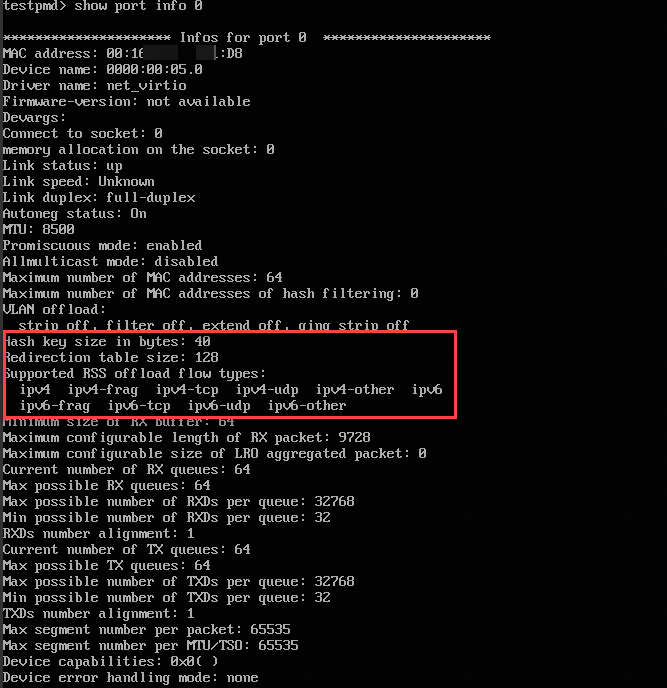
-
Query hash key:
show port <port_id> rss-hash key
-
Query indirection table configuration:
show port <port_id> rss reta <size> <mask0, mask1...>-
size: The number of indirection table entries to query. The value is fixed at128. -
mask0, mask1: The masks used to filter the range of hash indexes to be displayed, which are specified in hexadecimal format. For example,mask0=0xffindicates that entries for hash indexes 0 to 7 are displayed.The indirection table size is fixed at 128. Two masks are required, each covering 64 index blocks. Run
show port 0 rss reta 128 (0xffffffffffffffff,0xffffffffffffffff)to return all 128 index-to-queue mappings: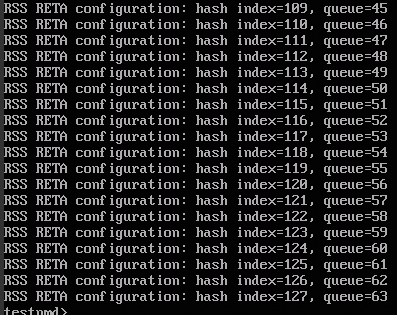
-
-
-
Configure RSS based on your requirements.
-
Configure a new hash key.
Generate a new random key with OpenSSL.
port config <port_id> rss-hash-key (ipv4|ipv4-frag|\
                  ipv4-tcp|ipv4-udp|ipv4-sctp|ipv4-other|\
                  ipv6|ipv6-frag|ipv6-tcp|ipv6-udp|ipv6-sctp|\
                  ipv6-other|l2-payload|ipv6-ex|ipv6-tcp-ex|\
                  ipv6-udp-ex <string of hex digits \
                  (variable length, NIC dependent)>)
For TCP over IPv4, run
port config 0 rss-hash-key ipv4 6D5A56DA255B0EC24167253D43A38FB0D0CA2BCBAE7B30B477CB2DA38030F20C6A42B73BBEAC01FCto configure the hash key and verify:
-
Configure the RSS indirection table to map hash values to specified queues.
port config all rss reta <hash,queue>,<hash,queue>..Configure based on the actual number of queues:
-
hash: The hash index. Range depends on indirection table size (for example, 0-63 for 64 entries). -
queue: The target receive queue number.
-
-
Apply RSS in l3fwd
To enable RSS in a DPDK application, implement the hash key and indirection table configuration in your code. The following uses L3FWD as an example.
L3FWD (Layer 3 Forwarding) is a DPDK sample application that demonstrates high-performance IP-based packet routing using zero-copy and Polling Mode Drivers (PMDs).
-
Modify the L3FWD source code in DPDK (
examples/l3fwd/main.c).-
Modify the port initialization section
static struct rte_eth_conf port_confin the L3FWD sample code. -
Add functions to configure the hash indirection table and the hash key.
-
After
rte_eth_dev_start, call the new configuration functions.
-
-
Recompile L3FWD after modifying the source code.
cd ~/dpdk-stable-22.11.3/ rm -rf build # Initialize the build directory and configure project options, specifying to build the l3fwd Layer 3 forwarding example. meson setup -Dexamples=l3fwd build cd build # Compile. ninja # Install the compiled files to the system directory. sudo ninja install # Update the system's shared library cache. sudo ldconfig -
Specify port-queue-core bindings and start L3FWD.
cd ~/dpdk-stable-22.11.3/build/examples ./dpdk-l3fwd --legacy-mem -a 0000:00:05.0 --socket-mem 1024 -- -p 0x1 --config="(PORT_ID, QUEUE_ID, LCORE_ID), (PORT_ID, QUEUE_ID, LCORE_ID), ..." --parse-ptype-
--config: Each trituple specifies:-
PORT_ID: The port ID (starts from 0).
-
QUEUE_ID: The receive queue ID (starts from 0).
-
LCORE_ID: The logical core ID (starts from 0).
-
-
The following example uses two cores and two queues:
./dpdk-l3fwd --legacy-mem -a 0000:00:05.0 --socket-mem 1024 -- -p 0x1 --config="(0,0,0),(0,1,1)" --parse-ptype-
The first trituple
(0,0,0): Logical core 0 (lcore0) processes queue 0 of port 0. -
The second trituple
(0,1,1): Logical core 1 (lcore1) processes queue 1 of port 0.
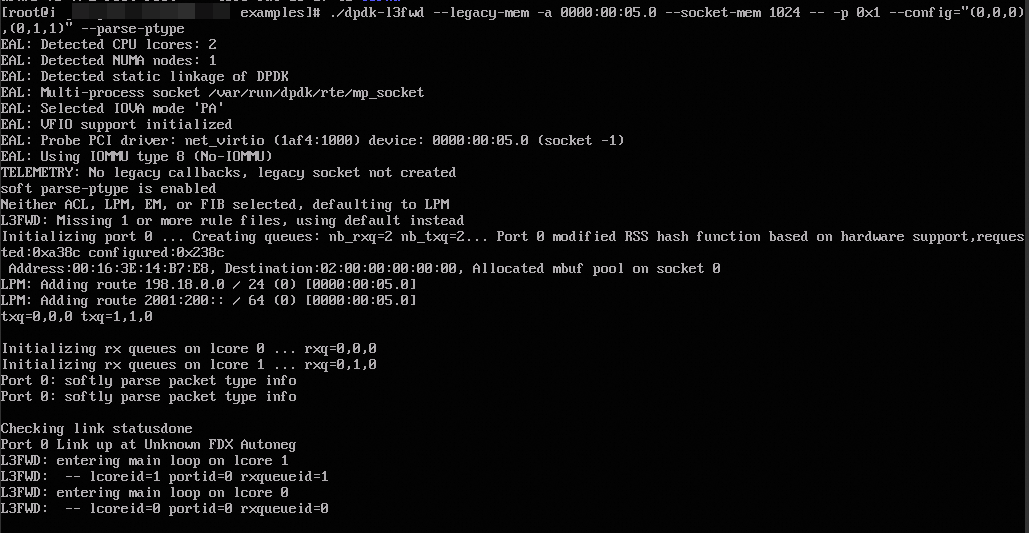
-
-
Use the RSS script to calculate a hash index
Use this Python script to calculate which receive queue a packet maps to, given its 4-tuple and hash key. The result guides indirection table configuration for directing specific flows to designated queues.
View script usage: python ali_ecs_rss_calc.py -h.
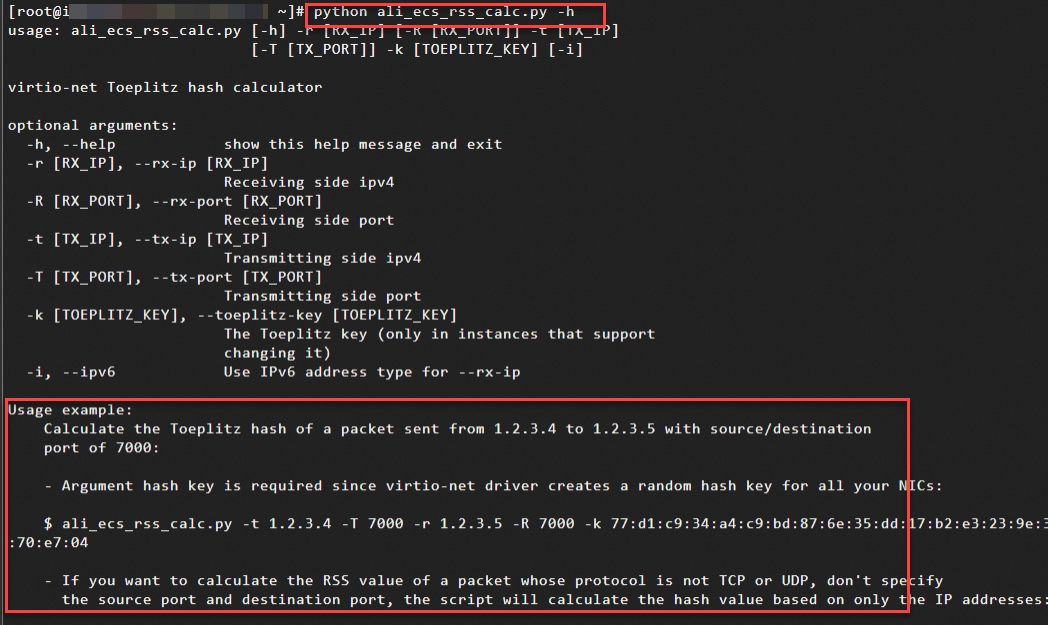
The following example uses the RSS configuration of an ENI with 64 queues:
Calculate the RSS hash value using the script with the following 5-tuple information (modify values as needed).
-
Destination IP address (-r): 10.0.0.1, which is the IP address of the acceptor instance's ENI with RSS configured.
-
Source IP address (-t): 10.0.0.251, which is the IP address of the sender's ENI.
-
Destination port (-R):
26000 -
Source port (-T):
18042 -
Hash key: Obtain from the RSS indirection table configuration.
python ali_ecs_rss_calc.py -r 10.0.0.1 -t 10.0.0.251 -R 26000 -T 18042 -k 69:e8:7c:56:bf:03:9f:63:d7:c5:e5:96:b3:00:36:93:02:8c:d2:8f:cc:a9:00:65:fd:c8:94:71:5f:fd:c8:de:7a:30:a9:73:b3:33:0c:c6The script calculates the hash using the toeplitz algorithm. In the result below, the system uses an indirection table length of 128. A hash index of 117 means the packet maps to the queue at index 117.

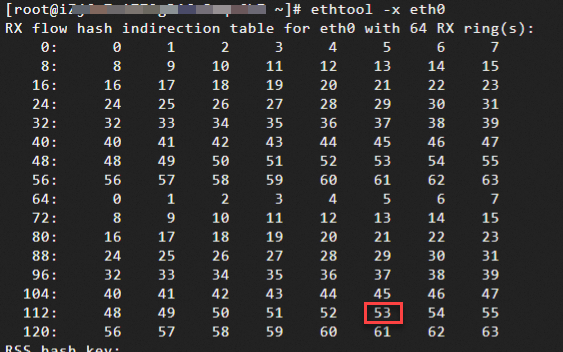
View the indirection table: index 117 maps to queue 53, so packets are processed by queue 53.