ECS instance types are billed based on their compute resources—vCPUs, memory, GPUs, local disks (non-detachable storage attached to the instance), and components for enhanced instance types. Three billing methods are available: Subscription, pay-as-you-go, and spot instance.
Billing methods
| Billing method | Subscription | Pay-as-you-go | Spot instance |
|---|---|---|---|
| Model | Prepaid. Pay upfront for one or more months at a discounted rate. | Postpaid, billed per second. Higher unit price than Subscription. | Postpaid. Price fluctuates with market supply and demand—up to 90% off the pay-as-you-go price. The instance is automatically reclaimed if the market price exceeds your bid or compute resources become scarce. |
| Best for | 24/7 services (websites, application backends), stable workloads with predictable demand, or long-term projects with fixed budgets. | Workloads with uncertain or fluctuating demand, seasonal peaks (for example, adding servers during e-commerce promotions), and temporary or experimental tasks. | Interruption-tolerant workloads that can resume from a checkpoint, such as movie rendering, scientific computing, and big data analytics. |
| Billing formula | Instance type unit price × billing duration. | Instance type unit price × billing duration. A minimum billing duration applies during the final billing cycle—see Minimum billing duration. | With a 1-hour protected period: if billing duration ≤ 1 hour, market price at purchase × billing duration; if billing duration > 1 hour, (market price at purchase × 1 hour) + Σ(market price per period × billing duration per period). Without a protected period: Σ(market price per period × billing duration per period). See the billing example to estimate actual cost. |
| Billing duration | Purchase duration. | Starts when the instance is created, ends when released. Measured per second. Billing continues even if the instance is stopped—enable economical mode to pause billing without releasing the instance. | Starts when the instance is created, ends when released. Measured per second. |
Unit prices vary by region. See the ECS pricing page for current rates.
Choose a billing method
If your workload runs continuously or has stable, predictable resource demand, use Subscription to get the lowest per-unit cost.
If your demand is variable or hard to predict, use pay-as-you-go so you only pay for what you use.
If your workload can tolerate interruptions and resume from a checkpoint, use spot instances to maximize savings—up to 90% off pay-as-you-go pricing.
If you run multiple ECS instances, combining billing methods lets you match each workload's cost profile. See Combine billing methods.
Billing example
The following example calculates the cost for an ecs.g7.large instance in the Singapore region.
Prices are for reference only. For current pricing, see the ECS pricing page. This example covers instance type costs only and excludes images, Elastic Block Storage, public bandwidth, and snapshots.
| Billing method | Conditions | Calculation | Total cost (USD) |
|---|---|---|---|
| Subscription | Unit price: 69.21 USD/month. Purchase duration: 1 month. | 69.21 × 1 | 69.21 |
| Pay-as-you-go | Unit price: 0.1188 USD/hour. Instance runs continuously for 30 days without being stopped in economical mode or released. | 0.1188 × 24 × 30 | 85.536 |
Minimum billing duration
For pay-as-you-go instances, Alibaba Cloud generates a billable item for each one-hour billing cycle (for example, 00:00:00–01:00:00). During the billing cycle in which an instance is released, if actual usage is shorter than the minimum billing duration, the instance is charged for the minimum duration:
1 vCPU instance: 10 minutes
2 vCPU instance: 5 minutes
4 vCPU or larger instance: 2 minutes
| Scenario | Instance creation and release time | Billed duration |
|---|---|---|
| Created and released within the same billing cycle | Created: 00:01:00 on January 1, 2025. Released: 00:02:00 on January 1, 2025. | Actual usage is shorter than the minimum, so the minimum duration applies: 1 vCPU: 10 min, 2 vCPU: 5 min, 4+ vCPU: 2 min. |
| Created and released across billing cycles | Created: 00:59:00 on January 1, 2025. Released: 02:00:20 on January 1, 2025. | Cycles 00:00–02:00 (actual usage): 1 hour 1 minute for all instance sizes. Cycle 02:00–03:00 (release cycle, below minimum): 1 vCPU: 10 min, 2 vCPU: 5 min, 4+ vCPU: 2 min. |
Switch billing methods
Subscription and pay-as-you-go instances support switching between the two methods. Spot instances do not support switching. Switching may result in a refund. For details, see Switch from Subscription to pay-as-you-go and Switch from pay-as-you-go to Subscription.
Cost optimization
Release or unsubscribe from an instance
Subscription instances: Request an unsubscription when the instance is no longer needed. Alibaba Cloud reclaims the resources and issues a refund based on the unsubscribe rules. For details on release timing and refund rules, see Unsubscribe rules.
Pay-as-you-go and spot instances: Release the instance manually to stop billing. For instructions, see Release an instance.
Data on a released instance is permanently deleted and cannot be recovered. To save your data, create a snapshot before releasing the instance. Creating a snapshot incurs snapshot costs. For instructions, see Create a snapshot.
Stop instances in economical mode
Economical mode is supported only for pay-as-you-go and spot instances.
When a pay-as-you-go instance is stopped normally, billing for the instance type continues. After you enable economical mode, billing for the instance type and image license fees stops. You are still charged for Elastic Block Storage (system disk and data disks), Elastic IP Addresses, and snapshots.
Downgrade the instance type
If instance monitoring shows the instance is over-provisioned, downgrade its configuration to reduce costs:
Subscription instances: Change the instance type or use downgrade on renewal.
Pay-as-you-go instances: Change the instance type.
Use discounts
Apply the following discounts to reduce pay-as-you-go costs:
Savings Plan: Commit to a fixed hourly spending amount (for example, 1 USD/hour) and pay upfront to receive a discount. Savings Plans are flexible and apply across different instance types.
Reserved Instance: Purchase a voucher for a specific instance type (such as ecs.g8i) and operating system. The voucher automatically offsets costs for matching pay-as-you-go instances.
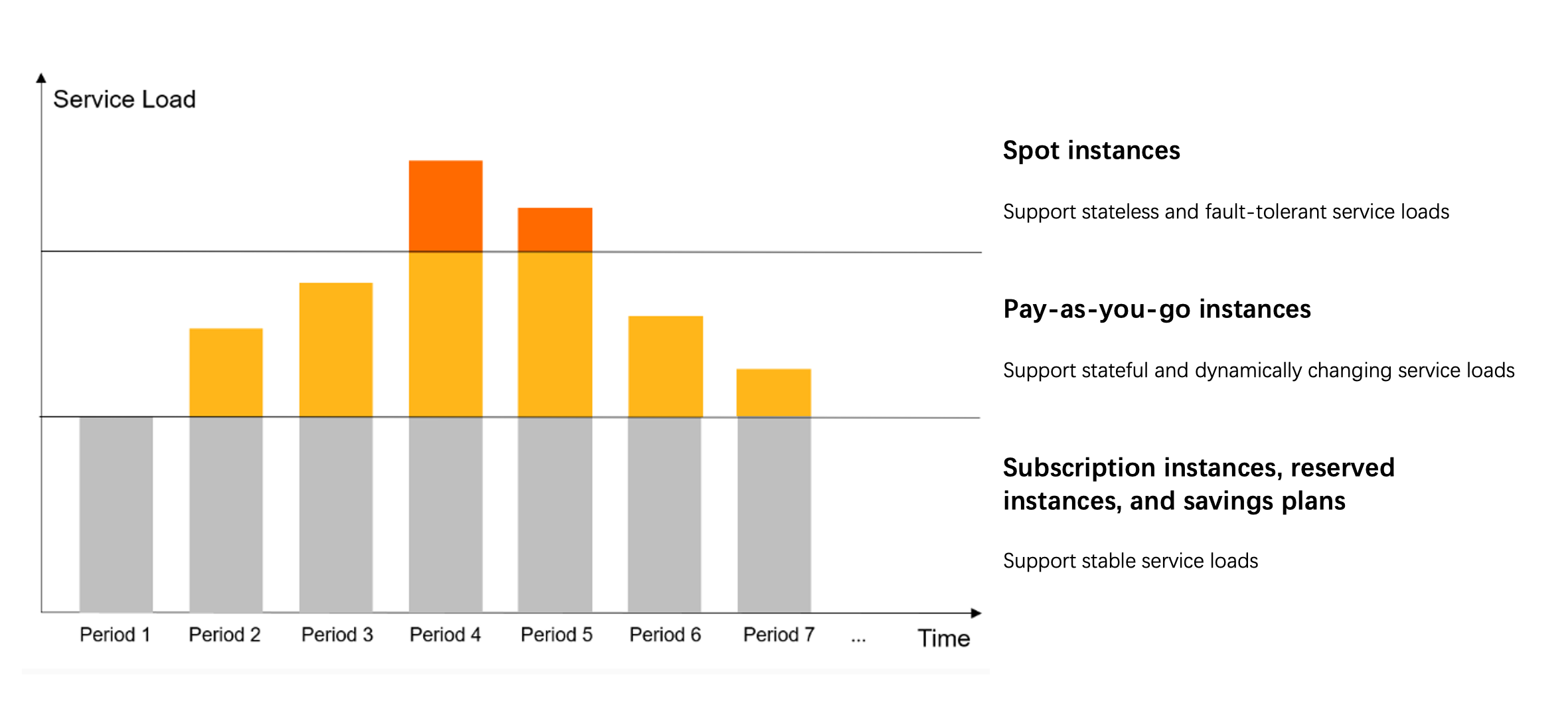
Combine billing methods
For workloads running multiple ECS instances, combining billing methods lets you optimize cost across the full workload:
Query bills
View your bills by following the steps in Query bills. The billable item for an instance type appears as Cloud Server Configuration in the billing details.
FAQ
What costs are included in my total ECS bill besides the instance type fee?
When you create an ECS instance, additional resources are provisioned alongside the instance type. Each resource has its own cost:
| Resource | Description | Cost |
|---|---|---|
| Elastic Block Storage | System disk and any attached data disks. | Charged separately. Local disk cost is bundled into the instance type fee. |
| Public bandwidth | Required if the instance needs internet access. | Charged for outbound data transfer. |
| Image | The operating system or software image used to launch the instance. | Cost varies. Certain public images, custom images, and Cloud Marketplace images may incur charges. |
| Snapshots | Created automatically by snapshot policies or manually for backup. | Charged when a snapshot policy is active or when you create snapshots manually. |