Scale pods from your self-managed Kubernetes cluster without provisioning or managing virtual machines. Pods scheduled to a virtual node (VNode) run as elastic container instances, releasing immediately when traffic drops.
ECI handles the infrastructure layer: pod scheduling and resource management. Kubernetes continues to manage workloads — Deployments, Services, StatefulSets, and CronJobs — on the platform layer.
How it works
Deploy a VNode into your self-managed Kubernetes cluster. The VNode registers as a native Kubernetes node and has virtual-kubelet and kube-proxy built in, making it fully compatible with the Kubernetes API.
When a pod is scheduled to the VNode, the VNode automatically provisions and manages the underlying elastic container instance. Each pod on a VNode runs as a separate elastic container instance. The following figure shows the hybrid architecture:
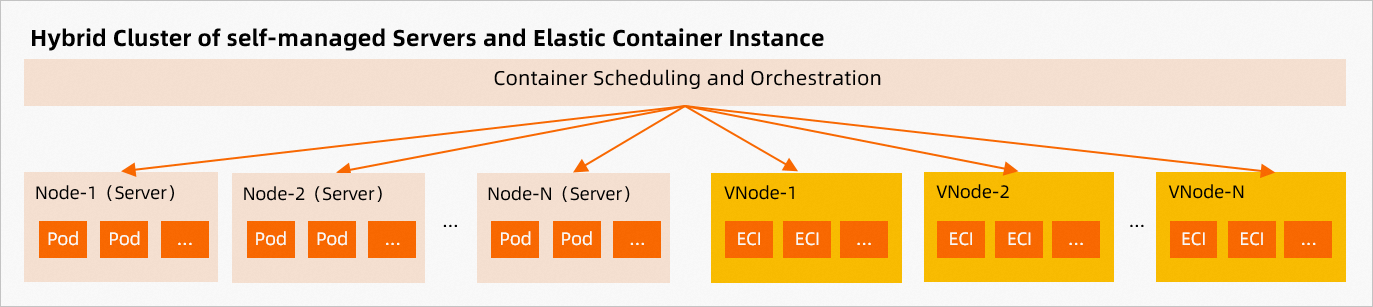
VNodes work in clusters hosted in a data center or on Elastic Compute Service (ECS).
Connect a VNode to your cluster
Two methods are available:
(Recommended) Use VNodectl to deploy a VNode in a self-managed Kubernetes cluster — a command-line tool that automates VNode deployment and configuration.
Manually deploy a VNode in a self-managed Kubernetes cluster — deploy and configure each component yourself.
Schedule pods to a VNode
For clusters with both real nodes and VNodes, two scheduling modes are available:
Manual scheduling
Configure nodeSelector and tolerations, or set nodeName directly in the pod spec to target a VNode. See Schedule pods to a VNode.
Automatic scheduling
Deploy the eci-profile component and configure a Selector. Pods matching the selector are automatically scheduled to the VNode. See Use eci-profile to schedule pods to a VNode.
Limitations
Some Kubernetes features are not supported due to security constraints of Alibaba Cloud public cloud and VNode architecture. If your workloads rely on any of these features, use the recommended alternatives before migrating pods to ECI.
| Unsupported feature | If your workload uses this | Recommended alternative |
|---|---|---|
| HostPath | Pods that mount files from the host filesystem will not run on a VNode. | Use emptyDir volumes, disks, or File Storage NAS (NAS) file systems. |
| HostNetwork | Pods that map host ports to containers will not run on a VNode. | Create a Service of the LoadBalancer type. |
| DaemonSet | DaemonSets do not deploy pods to VNodes. If your application requires a daemon, reconfigure it to run in the same pod. | Deploy multiple images in a pod by using sidecar containers. |
| Service of the NodePort type | Pods that map host ports to containers will not run on a VNode. | Create a Service of the LoadBalancer type. |
Billing
Each VNode has one resident node equivalent to 2 vCPUs and 8 GiB of memory. Billing starts when the resident node reaches the Ready state.
Price of one VNode = (2 × unit price of vCPUs + 8 × unit price of memory) × run duration
For vCPU and memory unit prices, see Billing of elastic container instances.
VNodes support tagging, so you can track VNode costs separately from elastic container instance costs. Check the status of the resident node on the Virtual Node page in the Elastic Container Instance console.
Use ECI features
Add annotations to pod specs to use ECI-specific features. Annotations must follow Kubernetes syntax and go in the metadata section of the pod configuration.
To apply annotations automatically, configure eci-profile to add annotations to pods with specified labels — no need to edit each pod spec individually.
For the full list of supported annotations and configuration examples, see Annotations for Elastic Container Instance-based pods.
What's next
Schedule pods to a VNode — manual scheduling with nodeSelector, tolerations, and nodeName
Use eci-profile to schedule pods to a VNode — automatic scheduling with label selectors
Annotations for Elastic Container Instance-based pods — full annotation reference