Elastic Container Instance (ECI) charges for compute resources based on the billing mode you choose when creating an instance. This topic covers billing modes, pricing, billing duration, and cost optimization options.
This topic covers billing for compute resources only. If you attach image caches, expand temporary storage, or configure an Elastic IP Address (EIP), additional charges apply for those resources.
Billing modes
ECI supports two billing modes. Choose based on your workload requirements.
| Billed by vCPU and memory | Billed by ECS instance type | |
|---|---|---|
| How it's charged | Based on the vCPU count and memory size you specify at creation. If the combination isn't supported, ECI adjusts the specs automatically and bills based on the adjusted values. | Based on the ECS instance type you specify. Use this mode when you need specific capabilities such as GPU acceleration (for example, ecs.gn5i-c4g1.xlarge). |
| Billing method | Pay-as-you-go, billed per second, invoiced hourly | Pay-as-you-go, billed per second, invoiced hourly |
| Cost optimization | General-purpose savings plans | General-purpose savings plans, ECS compute savings plans, reserved instances, Preemptible Instances |
| Pricing formula | (vCPU count × vCPU unit price + memory size × memory unit price) × billing duration | ECS instance type unit price × billing duration |
For workloads that don't require GPUs or local disks, billing by vCPU and memory is recommended. ECI tries multiple ECS instance types (such as ecs.c6.large, ecs.c5.large, and ecs.sn1ne.large) to fulfill your request, improving resource availability.
Billing is based on requested resources, not actual utilization. An instance with 2 vCPUs and 4 GiB memory is billed for the full 2 vCPUs and 4 GiB, regardless of actual CPU utilization or memory usage.
Pricing
Billing by vCPU and memory
| Resource | Unit price |
|---|---|
| 1 vCPU | USD 0.0000077/second (USD 0.02772/hour) |
| 1 GiB memory | USD 0.00000096/second (USD 0.003456/hour) |
vCPU unit price (per vCPU): USD 0.0000077/second (USD 0.02772/hour)
Memory unit price (per GiB): USD 0.00000096/second (USD 0.003456/hour)
For instances created using ECS economy compute instance types, the vCPU unit price is USD 0.00000424/second (USD 0.015264/hour).
Prices displayed on the purchase page and in bills take precedence over the prices listed here.
Billing by ECS instance type
Prices vary by region. See the ECS pricing page for current rates.
Billing duration
Billing starts when ECI begins pulling the container image (the instance enters the Pending state) and stops when the instance finishes running (the instance enters the Succeeded or Failed state).
| Details | |
|---|---|
| Billing starts | When the container image starts being pulled (Pending state) |
| Billing ends | When the instance stops running (Succeeded or Failed state) |
| Granularity | Per second |
| Not charged | Instances that fail to be created or started |
For more information about instance states, see Lifecycle of elastic container instances.
Billing examples
These examples are for reference only. The prices in your bills take precedence.
Example 1: Billed by vCPU and memory
An instance with 2 vCPUs and 4 GiB memory, running for 1 hour:
vCPU cost
Total vCPU cost = vCPU unit price (per second) × seconds × vCPU count
Total vCPU cost = USD 0.0000077 × 3,600 × 2 = USD 0.055440.0000077 × 3600 × 2 = USD 0.05544
Memory cost
Total memory cost = memory unit price (per second) × seconds × memory size (GiB)
Total memory cost = USD 0.00000096 × 3,600 × 4 = USD 0.0138240.00000096 × 3600 × 4 = USD 0.013824
Total hourly cost = USD 0.05544 + USD 0.013824 = USD 0.069264
Billable items in the bill appear as cpu (vCPU) and mem (memory). In the bill details, the Billing Item column displays Memory (billing item code: mem, usage: 4000 MB) and vCPU (billing item code: cpu, usage: 2000). The consumption type is Pay-As-You-Go, and the listed prices are consistent with the calculation results above.
Example 2: Billed by ECS instance type
An instance created in the China (Hangzhou) region using the ecs.c6.large instance type, the hourly fee is USD 0.06. This is because the unit price of the ecs.c6.large instance type is USD 0.06/hour.
Total hourly cost = ECS instance type unit price × billing duration
Total hourly cost = USD 0.06/hour (unit price of ecs.c6.large in China (Hangzhou))
The billable item in the bill appears as instance_type.
Cost optimization
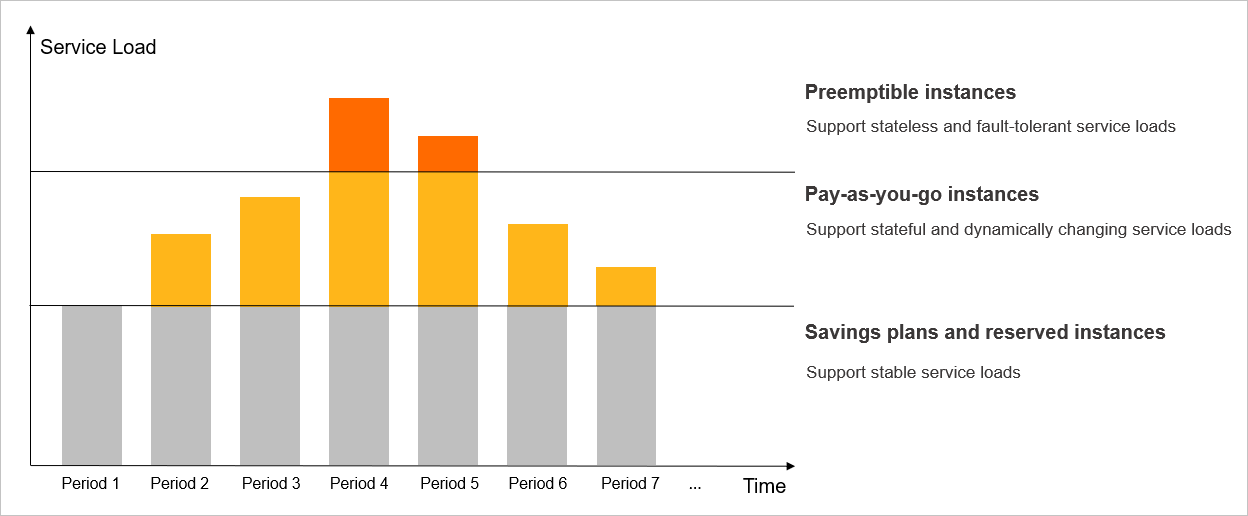
For stable long-running workloads, savings plans and reserved instances reduce costs compared to standard pay-as-you-go pricing. For short-running or interrupt-tolerant jobs, Preemptible Instances offer significantly lower prices.
| Option | Best for | Key constraints | References |
|---|---|---|---|
| Savings plan | Stable workloads running 24/7 over a long period | General-purpose savings plans apply to all ECS instance types. ECS compute savings plans apply only to instances created with a specified ECS instance type. Prices are based on hourly commitment, payment method, and term. Savings plans have a slightly higher cost than reserved instances but are more flexible because they are not limited by regions or instance families. | Overview and Use savings plans |
| Reserved instance | Stable workloads requiring reserved resources | Applies only to instances created with a specified ECS instance type. Reserved instances must be matched to apply. Prices are based on region, instance type, OS, payment method, and term. The cost of a reserved instance is similar to the cost of a subscription ECS instance of the same instance type. | Overview and Use reserved instances |
| Preemptible Instance | Short-running, interrupt-tolerant jobs | Prices fluctuate with supply and demand. After the protection period expires, the instance may be released due to insufficient inventory or a market price higher than your bid. If you create a preemptible instance by specifying vCPU count and memory size, the system selects a matching ECS instance type based on your requirements for vCPU count, memory size, and prices, and bills at the real-time market price of that type, not at the standard vCPU and memory pay-as-you-go rates. | What are preemptible instances? and Create a preemptible elastic container instance |
You can purchase both savings plans and reserved instances simultaneously. When both apply, reserved instances offset bills first.