An elastic container instance moves through a series of states from creation to termination. Understanding these states helps you design monitoring logic, handle billing boundaries, and respond correctly to terminal outcomes.
Instance states
Instance states fall into three categories:
Transition states: the system is actively performing an operation. The instance will move to another state when the operation completes.
Stable states: the instance is running normally and will remain in this state until an external action or internal event occurs.
Terminal states: the instance has reached a final outcome and will not change further. Billing stops when the instance enters a terminal state.
| State | Category | Description | Billed |
|---|---|---|---|
| Scheduling | Transition | The system is allocating underlying resources. The instance does not yet exist as a running entity. | No |
| Pending | Transition | Resources are allocated. One or more containers are starting, but none are running yet. | Yes |
| Running | Stable | All containers are created, and at least one container is running or restarting. | Yes |
| Restarting | Transition | The instance is restarting. | Yes |
| Updating | Transition | The instance configuration is being updated. | Yes |
| Terminating | Transition | The instance is being terminated. When a running instance configured with preStop is being deleted, the instance enters the Terminating state. After the preStop hook runs, the instance is deleted. | Yes |
| Succeeded | Terminal | All containers ran to completion and exited successfully. No containers will restart. | No |
| Failed | Terminal | All containers have exited. At least one container exited with a non-zero code or was terminated by the system. | No |
| Expired | Terminal | The instance is a preemptible instance that was reclaimed due to resource expiration. | No |
| ScheduleFailed | Terminal | The instance failed to be created. The system deletes the instance after 24 hours, and you are not charged. | No |
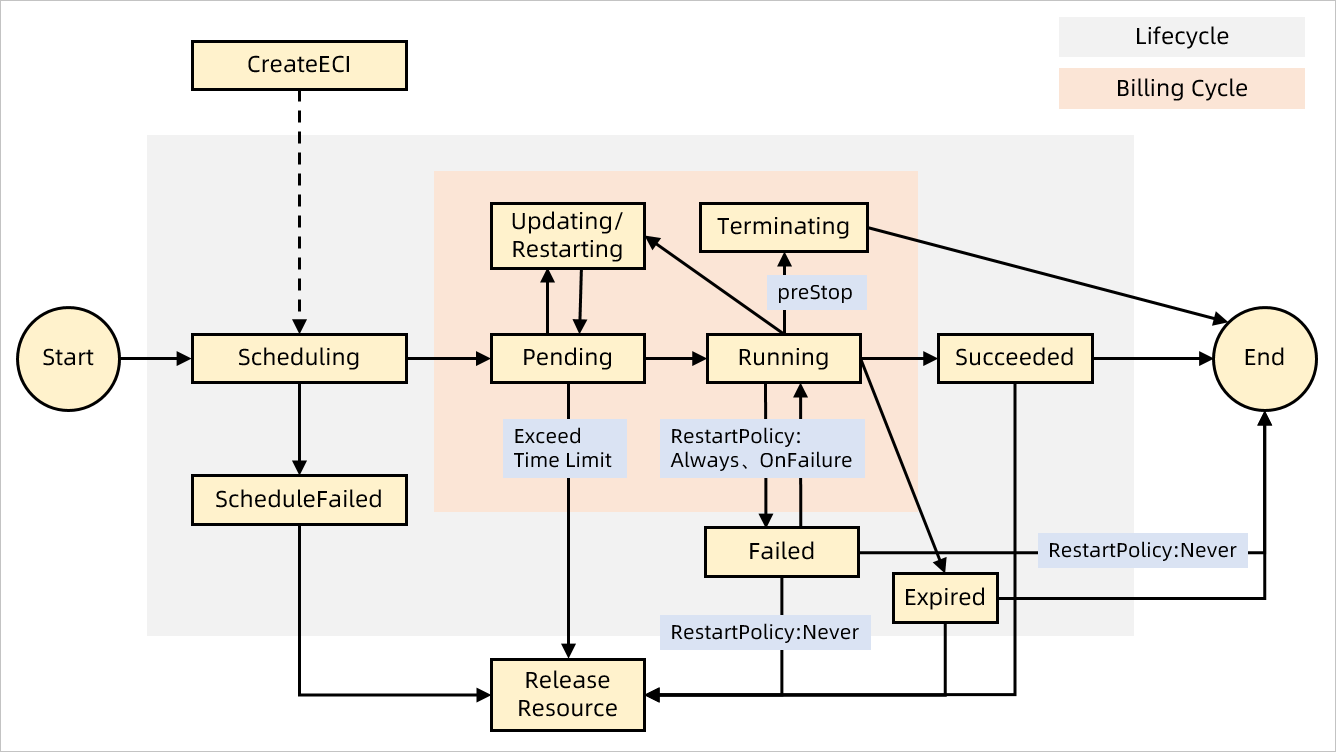
The restart policy applies only to containers within the instance — the instance itself does not automatically restart. This means that when all containers exit, the instance transitions to Succeeded or Failed based on the exit outcomes, not back to Running.
The following diagram shows how an instance transitions between states during its lifecycle.
After termination
When an instance reaches a terminal state:
The underlying computing resources are reclaimed.
By default, associated resources — such as elastic IP addresses (EIPs) — that were created alongside the instance are released together with it.
Metadata retention
After an instance enters a terminal state (Succeeded, Failed, or Expired), its metadata is retained as follows:
| Time since entering terminal state | Metadata retained |
|---|---|
| Within 1 hour | All metadata |
| After 1 hour | The 100 most recent entries per region |
Container states
Each container within an instance has its own state, independent of the instance state.
| State | Description |
|---|---|
| Waiting | The container is waiting to start. Application containers remain in this state while an InitContainer is running, until the InitContainer exits. |
| Running | The container is running. |
| Terminated | The container has exited, either after a successful run or due to a failure. |