A registrant profile stores your contact details (name, address, email) and pre-fills them during domain registration, simplifying management of multiple domains.
The Alibaba Cloud international site (alibabacloud.com) uses domain registrars outside the Chinese mainland, so domain names registered on the international site are not eligible for ICP filing. To deploy services in the Chinese mainland, register the domain name on the Alibaba Cloud China site (aliyun.com) and complete the ICP filing. Otherwise, your services may be inaccessible from the Chinese mainland.
Alibaba Cloud offers two types of registrant profiles:
-
Common profile: For most top-level domains (TLDs).
-
CNNIC profile: For
.cndomains. CNNIC requires identity verification for all.cnregistrations.
Create a common profile
Go to the Registrant Profiles page and click Create Registrant Profile. Enter the following information in English:
|
Parameter |
Description |
|
Registrant Name |
Full legal name of the domain owner (individual or organization). |
|
Registrant Organization (Optional) |
Full legal name of the registering organization. For individual registrants, enter your full name. |
|
Country/Region |
Select your country/region. |
|
Province/State |
Enter your province/state. |
|
City |
Enter your city. |
|
Postal Code |
Your postal code. |
|
Address |
Your mailing address. |
|
Phone Number |
Mobile phone number without country code. The system adds it based on your selected country/region. |
|
|
A valid, actively monitored email address. Note
ICANN requires an accurate registrant email. Complete email verification promptly to avoid service interruptions. |
Click Submit to create the profile.
Create a CNNIC profile
Step 1: Prepare identity verification documents
For individual registrants
Individual registrants must provide one of the following identity documents:
-
ID Card
-
Passport
-
Mainland Travel Permit for Hong Kong and Macao Residents
-
Mainland Travel Permit for Taiwan Residents
-
Permanent Resident Identity Card for Foreigners
-
Residence Permit for Hong Kong and Macao Residents
-
Residence Permit for Taiwan Residents
-
The registrant name must exactly match the name on the identity document.
-
Submit a color scan of the original document for fastest review.
For organizational registrants
Organizational registrants (companies, foundations, schools) must submit one of the following documents based on organization type.
|
Registered region |
Supported document |
Description |
|
Chinese mainland |
Business License (for Enterprises or Self-employed Individuals) |
Enter the 18-digit Unified Social Credit Code exactly as it appears on the document. Note
For licenses issued after the "three-in-one" certificate reform, the document number is the 18-digit Unified Social Credit Code. Use Business License (for Enterprises or Self-employed Individuals) as the document type for identity verification. |
|
Organization Code Certificate |
For organizations with still-valid Organization Code Certificates issued before the "three-in-one" reform. Enter the 18-digit Unified Social Credit Code if available; otherwise, enter the certificate number. |
|
|
Outside the Chinese mainland |
Foreign Business Registration Certificate |
Submit a valid business registration document from the local authority. The document must include:
For example, a company based in Hong Kong (China) may submit the Certificate of Incorporation. |
Wait at least 10 calendar days after a certificate's issue date before submitting it for verification.
Upload requirements
-
Format: JPG, JPEG, or BMP. Size: 55 KB to 1 MB. Upload a color scan or clear photo of the original document.
-
The image must be a complete, unaltered copy of the original with all borders visible. Official seals must be clearly legible.
-
Do not edit the image. For unsupported formats, use an image editor to re-save as JPG, JPEG, or BMP rather than renaming the file extension.
Step 2: Create the CNNIC registrant profile
Go to the Registrant Profiles page, select the CNNIC Profiles tab, click Create Registrant Profile, and fill in the required information.
Basic information
|
Parameter |
Description |
|
Registrant Type |
Select Individual or Organization. |
|
Registrant Name |
Full legal name of the domain owner. |
|
Registrant Organization |
Full legal name of the organization. Note
If you set Registrant Type to Individual, this parameter is not displayed. |
|
Country/Region |
Select your country/region. |
|
Province/State |
Enter your province/state. |
|
City |
Enter your city. |
|
Postal Code |
Your postal code. |
|
Address |
Your mailing address. |
|
Phone Number |
Landline or mobile number without country code. The system adds it based on your selected country/region. |
|
|
A valid, actively monitored email address. Note
Verify the registrant email before submitting identity verification documents. If unverified, click Send Verification Email. |
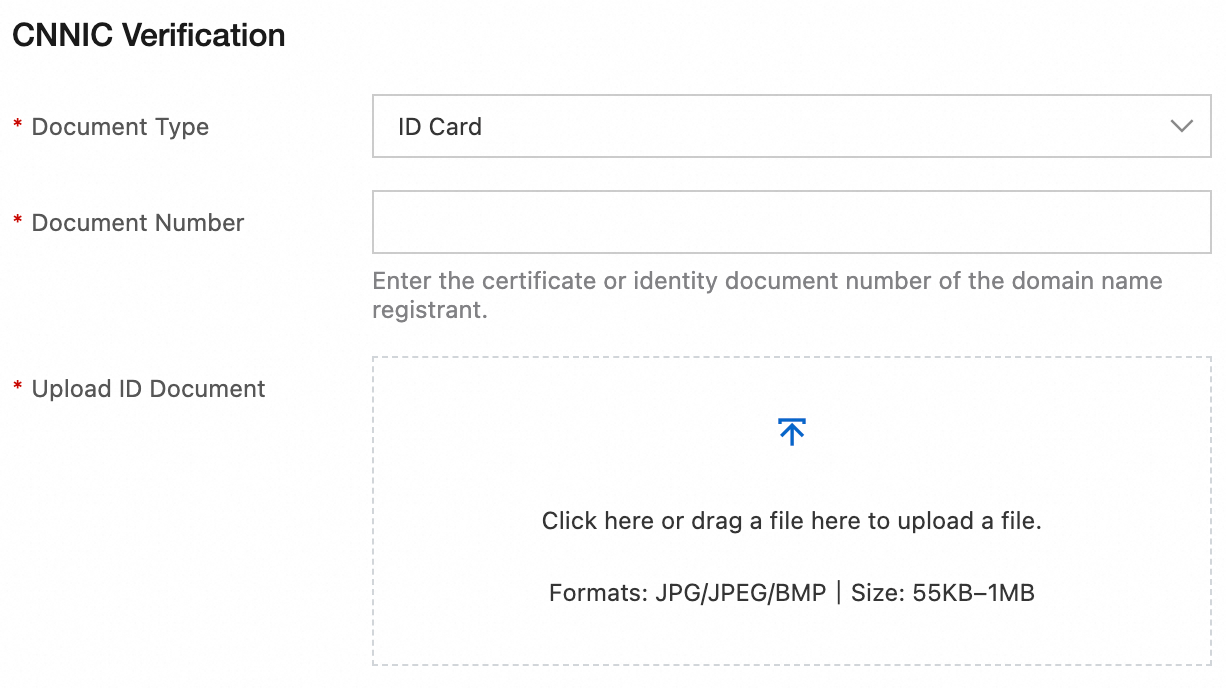
CNNIC verification
Complete the identity verification fields and upload your documents. For required documents and upload rules, see Step 1: Prepare identity verification documents.
Step 3: Submit for review
Confirm your information and click Save to submit for review.
-
Identity verification is reviewed by a third-party authority, typically within 3 to 5 business days.
-
If identity verification fails, click Unverified or Failed in the Identity Verification Status column, correct the information as prompted, and resubmit the profile for review.