This topic explains how to manage active or expired domain names that prevent you from closing your Alibaba Cloud account.
Problem
When you attempt to close your Alibaba Cloud account, a pre-closure check may fail with a message indicating that the account cannot be closed because it contains domain names.
Solutions
Domain name status | Solution |
The domain is active and not expired. | |
The domain is expired and is in the renewal grace period or redemption period. |
Wait for the domain name to expire and be automatically deleted
You can take no action and allow the domain name to proceed through its natural lifecycle. Once the registry deletes the domain name, you will be able to close your account. The typical domain name lifecycle is shown below.

If a domain name is not renewed or redeemed, it is automatically deleted by the registry at the end of its lifecycle. No action is required from you. For more information about domain name expiration, see Redeem a domain name.
Request to delete the domain name
You can submit a ticket to request an early deletion of a domain name. If approved, the domain name immediately enters the redemption period. You must then wait for this period to end before the domain name is deleted by the registry and you can close your account.
Requesting an early deletion is irreversible and immediately moves the domain name into the redemption period.
The registration fee for the domain name's remaining term will not be refunded.
If the domain name has an associated ICP filing, requesting its deletion will make the corresponding website inaccessible.
Transfer the domain name
If your domain name has not expired, you can transfer it to another Alibaba Cloud account or to a different registrar. After the domain name is no longer in your account, you can proceed with the account closure.
For more information about how to transfer a domain name to another Alibaba Cloud account, see Transfer to a different Alibaba Cloud account.
Procedure
Log on to the Domain Names console using the source account (the account that currently owns the domain name).
Go to the Account Transfer page by using one of the following methods:
Method 1:
On the Domain Names page, find the domain name that you want to transfer.
Click Manage in the Actions column. On the page that appears, click Transfer between Accounts.
Method 2:
In the left-side navigation pane, choose .
NoteThe bulk transfer action is not supported for
.cndomain names.
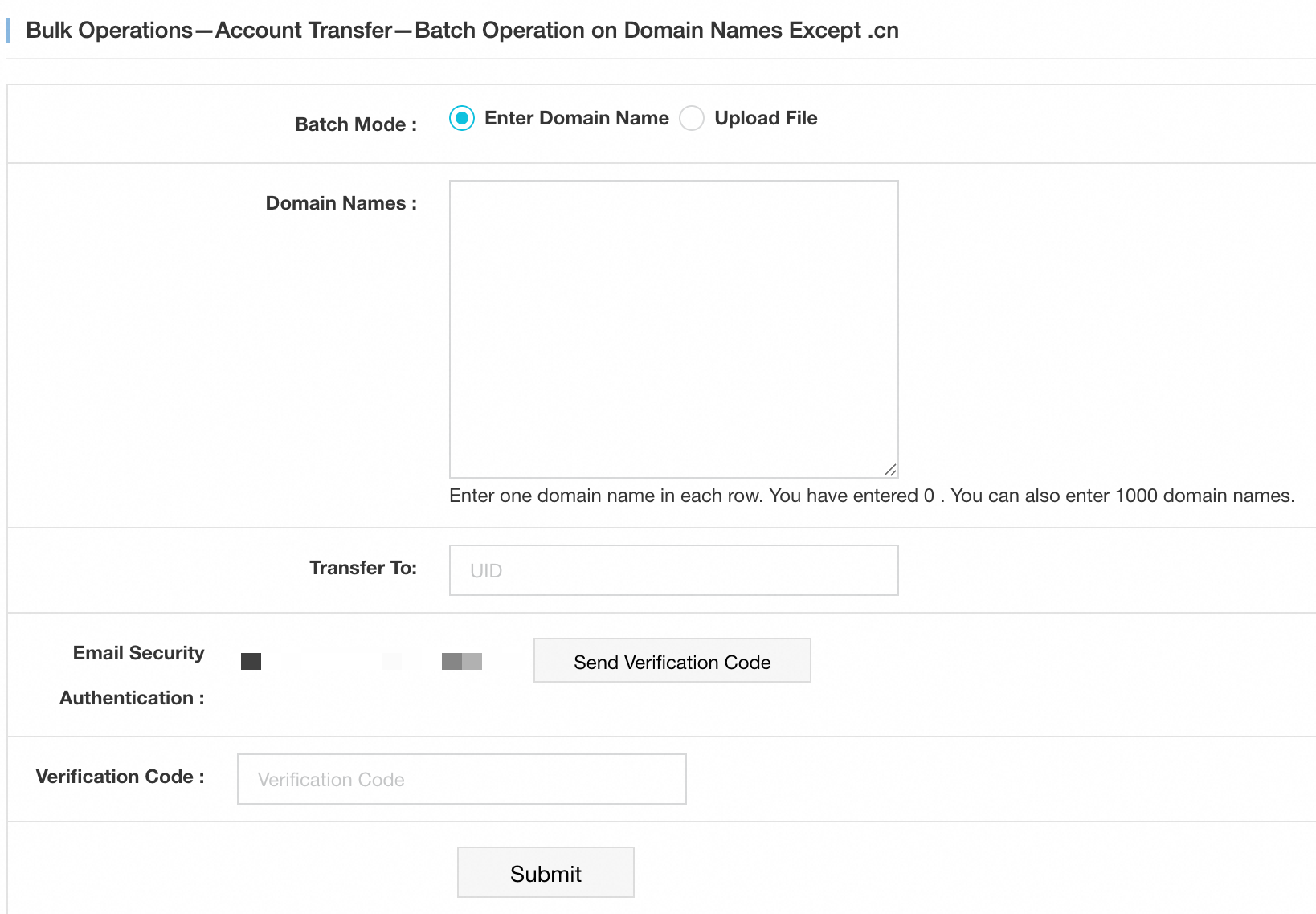
Configure the transfer parameters as described in the following table.
Parameter
Description
Batch Mode
The method used to specify the domain names for transfer. Valid values:
Enter Domain Name: In the Domain Names field, enter the domain names that you want to transfer.
NoteEnter one domain per row, up to a maximum of 1,000 domain names.
Upload File: If the domain names that you want to transfer are saved in a file on your computer, upload the file.
NoteThe file must be in XLS or XLSX format, with one domain per row. The maximum file size is 2 MB.
Transfer To
The ID of the destination Alibaba Cloud account.
Email Security Authentication
Click Send Verification Code to obtain a verification code.
Verification Code
Enter the verification code sent to your email address.
Click Submit.
Sell the domain name
If your domain name has not expired, you can list it for sale on a marketplace. After the domain name is sold and transferred to the new registrant, you can close your account.