This topic describes how to use Data Transmission Service (DTS) to create a DTS task in which the source database is an ApsaraDB RDS for MySQL Cluster Edition instance.
Prerequisites
A direct node connection endpoint is created for the secondary node in the source ApsaraDB RDS for MySQL Cluster Edition instance and can be used to connect to the secondary node. For more information, see the View and manage the direct node connection endpoint section of the "View and manage instance endpoints and ports" topic.
Usage notes
If the secondary node specified by the Secondary Node in ApsaraDB RDS for MySQL Cluster parameter fails to be connected due to exceptions when the corresponding DTS task is running, an error is reported and DTS immediately retries a connection. Whether the DTS task can be resumed depends on the recovery time of the secondary node. If the secondary node fails to be recovered within the time that is specified by the Retry Time for Failed Connections parameter, the DTS task fails.
Procedure
Go to the Configure Source and Destination Databases step.
For more information, see relevant topics in Overview of data synchronization scenarios, Overview of data migration scenarios, and Overview of change tracking scenarios.
Configure the source database.
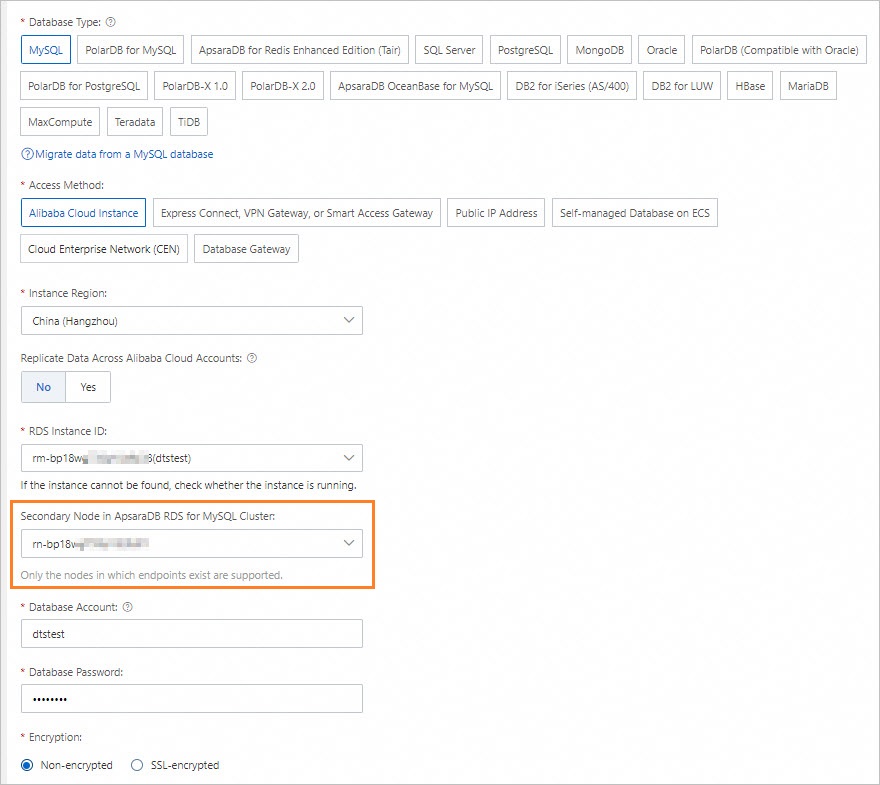
The following table describes the key parameters. Configure other parameters based on your business requirements.
Section
Parameter
Description
Source Database
Database Type
The type of the source database. Select MySQL.
Access Method
The access method of the source database. Select Alibaba Cloud Instance.
Instance Region
The region in which the source ApsaraDB RDS for MySQL Cluster Edition instance resides.
RDS Instance ID
The ID of the source ApsaraDB RDS for MySQL Cluster Edition instance.
Secondary Node in ApsaraDB RDS for MySQL Cluster
The secondary node of the source ApsaraDB RDS for MySQL Cluster Edition instance that you want to connect.
Complete the subsequent operations based on relevant topics.
For more information, see relevant topics in Overview of data synchronization scenarios, Overview of data migration scenarios, and Overview of change tracking scenarios.
FAQ
Can I use a secondary node of an ApsaraDB RDS for MySQL Cluster Edition instance as the destination database?
No, you cannot use a secondary node of an ApsaraDB RDS for MySQL Cluster Edition instance as the destination database.
If I add a secondary node to the source ApsaraDB RDS for MySQL Cluster Edition instance of a DTS task that is running, does the DTS task fail?
No, the DTS task does not fail.
Does a DTS task fail if the connected secondary node is modified?
If the secondary node is promoted to serve as a primary node, the DTS task does not fail.
If the secondary node is deleted, the DTS task fails.
Is the Secondary Node in ApsaraDB RDS for MySQL Cluster parameter required?
No, this parameter is optional. If no secondary node is specified, DTS connects to the ApsaraDB RDS for MySQL Cluster Edition instance by using the read/write endpoint of the instance.
Parameter description
Retry Time for Failed Connections: The retry time range for failed connections. If the source or destination database fails to be connected after a DTS task is started, DTS immediately retries a connection within the time range. Valid values: 10 to 1440. Unit: minutes. Default value: 720. We recommend that you set this parameter to a value greater than 30. If DTS reconnects to the source and destination databases within the specified time range, DTS resumes the task. Otherwise, the task fails.