When you create a data synchronization or migration task in Data Transmission Service (DTS), you can add extra columns to the destination table and assign values to them. After data lands in the destination, filter by those column values to perform metadata management, deduplication, and sorting.
Supported scenarios
Additional columns are supported in the following source-to-destination combinations:
| Source database type | Destination database type |
|---|---|
| Any | DataHub, Lindorm, Kafka, or ClickHouse |
| DB2 for LUW or DB2 for iSeries (AS/400) | MySQL or PolarDB for MySQL |
| MySQL, MariaDB, or PolarDB for MySQL | MySQL, MariaDB, or PolarDB for MySQL |
| MySQL | Tair/Redis, AnalyticDB for PostgreSQL, or AnalyticDB for MySQL 3.0 |
| PolarDB for PostgreSQL | AnalyticDB for PostgreSQL |
| SQL Server | MySQL |
Usage notes
-
For synchronization instances, set Synchronization Types to Schema Synchronization. For migration instances, set Migration Types to Schema Migration.
-
Before modifying additional column rules on a running synchronization task, check whether the column names conflict with existing columns in the destination table.
-
If the source database is MongoDB, the destination collections cannot contain fields named _id or _value. Otherwise, the synchronization fails.
-
Right-clicking a database in Selected Objects applies the configured additional columns to all tables in that destination database.
-
If extract, transform, and load (ETL) is configured on the synchronization task, the additional column rules run first to generate a value, and then the ETL script computes the final value that is synchronized to the destination.
Add additional columns to a synchronization task
The following steps use a synchronization instance as an example. The same approach applies to migration instances.
Prerequisites
Before you begin, ensure that you have:
-
A DTS synchronization or migration instance in a supported scenario
-
Access to the Data Management (DMS) console or the DTS console
Configure additional columns
-
Go to the Data Synchronization Tasks page.Data Synchronization Tasks page of the new DTS console
-
Log on to the Data Management (DMS) console.
-
In the top navigation bar, click Data + AI.
-
In the left-side navigation pane, choose DTS (DTS) > Data Synchronization.
The navigation path may vary based on the DMS console mode. For details, see Simple mode console and Customize the layout and style of the DMS console. You can also go directly to the Data Synchronization Tasks page of the new DTS console.
-
-
Click Create Task and configure the source and destination databases.
To add additional columns to a Running synchronization instance, click Reselect Objects instead.
-
Follow the prompts to the Configure Objects step.
-
Set Synchronization Types to Schema Synchronization.
-
In Source Objects, select the databases or tables to synchronize, then click
 to move them to Selected Objects.
 -
In Selected Objects, right-click the database or table.
-
In the dialog box, go to the Additional Columns section and click Add Column.
-
Enter the Column Name, Type, and Assign Value for the new column.
-
Column Name and Type define the column added to the destination table.
-
Assign Value is an expression that references source table columns or built-in variables. Click the
 icon to open the expression editor. For syntax details, see Expression reference.
-
-
Click OK.
-
Follow the prompts to complete the rest of the task configuration.
Expression reference
An additional column value is built from constants, variables, operators, and expression functions. The syntax is compatible with the data processing DSL (Domain-Specific Language) used for ETL.
In expressions, enclose column names in backticks (`col`), not single quotation marks ('col').
Common use cases
Before diving into the full reference, here are the most common patterns:
| Goal | Expression pattern |
|---|---|
| Tag each row with its source table name | __TB__ |
| Tag each row with its source database name | __DB__ |
| Record the operation type (insert/update/delete) | __OPERATION__ |
| Record when the transaction was committed | __COMMIT_TIMESTAMP__ |
| Build a composite key from source columns | 'prefix:'+col1+':'+col2 |
| Flag inserts vs. other operations | (op_eq(__OPERATION__,'__OP_INSERT__')? 1 : 0) |
| Mask sensitive data in a column | str_mask(phone, 7, 10, '#') |
Constants
| Type | Example |
|---|---|
| int | 123 |
| float | 123.4 |
| string | "hello1_world" |
| boolean | true or false |
| datetime | DATETIME('2021-01-01 10:10:01') |
Variables
Use these built-in variables to capture metadata about each replicated row.
| Variable | Description | Data type | Example value |
|---|---|---|---|
__TB__ |
Name of the source table | string | table |
__DB__ |
Name of the source database | string | mydb |
__OPERATION__ |
Type of DML operation | string | __OP_INSERT__, __OP_UPDATE__, __OP_DELETE__ |
__COMMIT_TIMESTAMP__ |
Time when the transaction was committed | datetime | '2021-01-01 10:10:01' |
column |
Value of a source column for the current row | string | id , name |
__SCN__ |
System Change Number (SCN) — uniquely identifies the version and time of a transaction commit | string | 22509**** |
__ROW_ID__ |
Address ID of a data record — uniquely locates the row. Not supported for MySQL sources. | string | AAAgWHAAKAAJgX**** |
Expression functions
Numerical operations
| Function | Syntax | Parameters | Return value | Example |
|---|---|---|---|---|
| Addition | op_sum(value1, value2) or value1+value2 |
value1, value2: integer or float |
Integer if both inputs are integers; float otherwise | op_sum(col1, 1.0) |
| Subtraction | op_sub(value1, value2) or value1-value2 |
value1, value2: integer or float |
Integer if both inputs are integers; float otherwise | op_sub(col1, 1.0) |
| Multiplication | op_mul(value1, value2) or value1*value2 |
value1, value2: integer or float |
Integer if both inputs are integers; float otherwise | op_mul(col1, 1.0) |
| Division | op_div_true(value1, value2) or value1/value2 |
value1, value2: integer or float |
Integer if both inputs are integers; float otherwise | op_div_true(col1, 2.0) — if col1=15, returns 7.5 |
| Modulo | op_mod(value1, value2) |
value1, value2: integer or float |
Integer if both inputs are integers; float otherwise | op_mod(col1, 10) — if col1=23, returns 3 |
Logical operations
| Function | Syntax | Parameters | Return value | Example |
|---|---|---|---|---|
| Equals | op_eq(value1, value2) |
integer, float, or string | boolean | op_eq(col1, 23) |
| Greater than | op_gt(value1, value2) |
integer, float, or string | boolean | op_gt(col1, 1.0) |
| Less than | op_lt(value1, value2) |
integer, float, or string | boolean | op_lt(col1, 1.0) |
| Greater than or equal to | op_ge(value1, value2) |
integer, float, or string | boolean | op_ge(col1, 1.0) |
| Less than or equal to | op_le(value1, value2) |
integer, float, or string | boolean | op_le(col1, 1.0) |
| AND | op_and(value1, value2) |
boolean | boolean | op_and(is_male, is_student) |
| OR | op_or(value1, value2) |
boolean | boolean | op_or(is_male, is_student) |
| IN | op_in(value, json_array) |
value: any type; json_array: JSON-format string |
boolean | op_in(id,json_array('["0","1","2","3","4","5","6","7","8"]')) |
| Is null | op_is_null(value) |
any type | boolean | op_is_null(name) |
| Is not null | op_is_not_null(value) |
any type | boolean | op_is_not_null(name) |
String functions
| Function | Syntax | Parameters | Return value | Example |
|---|---|---|---|---|
| Concatenate strings | op_add(str_1, str_2, ..., str_n) |
strings | Concatenated string | op_add(col,'hangzhou','dts') |
| Format and concatenate | str_format(format, value1, value2, ...) |
format: string with {} placeholders |
Formatted string | str_format("part1: {}, part2: {}", col1, col2) — if col1="ab" and col2="12", returns "part1: ab, part2: 12" |
| Replace substring | str_replace(original, oldStr, newStr, count) |
count: max replacements; -1 replaces all |
String after replacement | str_replace(name, "a", 'b', -1) — if name="aba", returns "bbb" |
| Replace in all string fields | tail_replace_string_field(search, replace, all) |
all: only true is supported |
String after replacement | tail_replace_string_field('\u000f','',true) — replaces \u000f with an empty string in all varchar, text, and char fields |
| Strip characters | str_strip(string_val, charSet) |
charSet: characters to remove |
String with leading/trailing characters removed | str_strip(name, 'ab') — if name="axbzb", returns "xbz" |
| Convert to lowercase | str_lower(value) |
string column or constant | Lowercase string | str_lower(str_col) |
| Convert to uppercase | str_upper(value) |
string column or constant | Uppercase string | str_upper(str_col) |
| String to integer | cast_string_to_long(value) |
string | Integer | cast_string_to_long(col) |
| Integer to string | cast_long_to_string(value) |
integer | String | cast_long_to_string(col) |
| Count occurrences | str_count(str, pattern) |
str: string; pattern: substring to find |
Number of occurrences | str_count(str_col, 'abc') — if str_col="zabcyabcz", returns 2 |
| Find substring | str_find(str, pattern) |
str: string; pattern: substring to find |
Position of first match; -1 if not found |
str_find(str_col, 'abc') — if str_col="xabcy", returns 1 |
| Check if all letters | str_isalpha(str) |
string column or constant | boolean | str_isalpha(str_col) |
| Check if all digits | str_isdigit(str) |
string column or constant | boolean | str_isdigit(str_col) |
| Regular expression match | regex_match(str, regex) |
str: string; regex: regex pattern |
boolean | regex_match(__TB__,'user_\\\d+') |
| Mask part of a string | str_mask(str, start, end, maskStr) |
start: start position (min: 0); end: end position (max: length−1); maskStr: single character |
Masked string | str_mask(phone, 7, 10, '#') |
| Get substring after a string | substring_after(str, cond) |
str: original string; cond: delimiter |
Substring after cond (delimiter not included) |
substring_after(col, 'abc') |
| Get substring before a string | substring_before(str, cond) |
str: original string; cond: delimiter |
Substring before cond (delimiter not included) |
substring_before(col, 'efg') |
| Get substring between two strings | substring_between(str, cond1, cond2) |
str: original string; cond1, cond2: delimiters |
Substring between cond1 and cond2 (delimiters not included) |
substring_between(col, 'abc','efg') |
| Check if value is a string | is_string_value(value) |
string or column name | boolean | is_string_value(col1) |
| Get a field from a MongoDB document | bson_value("field1", "field2", ...) |
Nested field path | Field value | e_set(user_name, bson_value("person","name")) |
Conditional expressions
| Syntax | Parameters | Return value | Example |
|---|---|---|---|
(cond ? val_1 : val_2) |
cond: boolean; val_1 and val_2: same type |
val_1 if cond is true; val_2 otherwise |
(id>1000? 1 : 0) |
Time functions
| Function | Syntax | Parameters | Return value | Example |
|---|---|---|---|---|
| Current time (second precision) | dt_now() |
None | DATETIME, accurate to the second | dt_now() |
| Current time (millisecond precision) | dt_now_millis() |
None | DATETIME, accurate to the millisecond | dt_now_millis() |
| UTC timestamp (seconds) to DATETIME | dt_fromtimestamp(value, [timezone]) |
value: integer; timezone: optional |
DATETIME, accurate to the second | dt_fromtimestamp(1626837629,'GMT+08') |
| UTC timestamp (milliseconds) to DATETIME | dt_fromtimestamp_millis(value, [timezone]) |
value: integer; timezone: optional |
DATETIME, accurate to the millisecond | dt_fromtimestamp_millis(1626837629123,'GMT+08') |
| DATETIME to UTC timestamp (seconds) | dt_parsetimestamp(value, [timezone]) |
value: DATETIME; timezone: optional |
Integer | dt_parsetimestamp(datetime_col,'GMT+08') |
| DATETIME to UTC timestamp (milliseconds) | dt_parsetimestamp_millis(value, [timezone]) |
value: DATETIME; timezone: optional |
Integer | dt_parsetimestamp_millis(datetime_col,'GMT+08') |
| DATETIME to string | dt_str(value, format) |
value: DATETIME; format: yyyy-MM-dd HH:mm:ss |
String | dt_str(col1, 'yyyy-MM-dd HH:mm:ss') |
| String to DATETIME | dt_strptime(value, format) |
value: string; format: yyyy-MM-dd HH:mm:ss |
DATETIME | dt_strptime('2021-07-21 03:20:29', 'yyyy-MM-dd hh:mm:ss') |
| Adjust DATETIME | dt_add(value, [years=intVal], [months=intVal], [days=intVal], [hours=intVal], [minutes=intVal]) |
value: DATETIME; intVal: integer (negative subtracts) |
DATETIME | dt_add(datetime_col,years=-1) |
FAQ
How do I configure custom keys and values for a DTS task from MySQL to Redis?
By default, DTS maps the entire source row using one of three Cache Mapping Mode options. To extract specific columns and build custom key-value pairs instead, add two special additional columns: __DTS_TP_TO_REDIS_KEY__ and __DTS_TP_TO_REDIS_VALUE__.
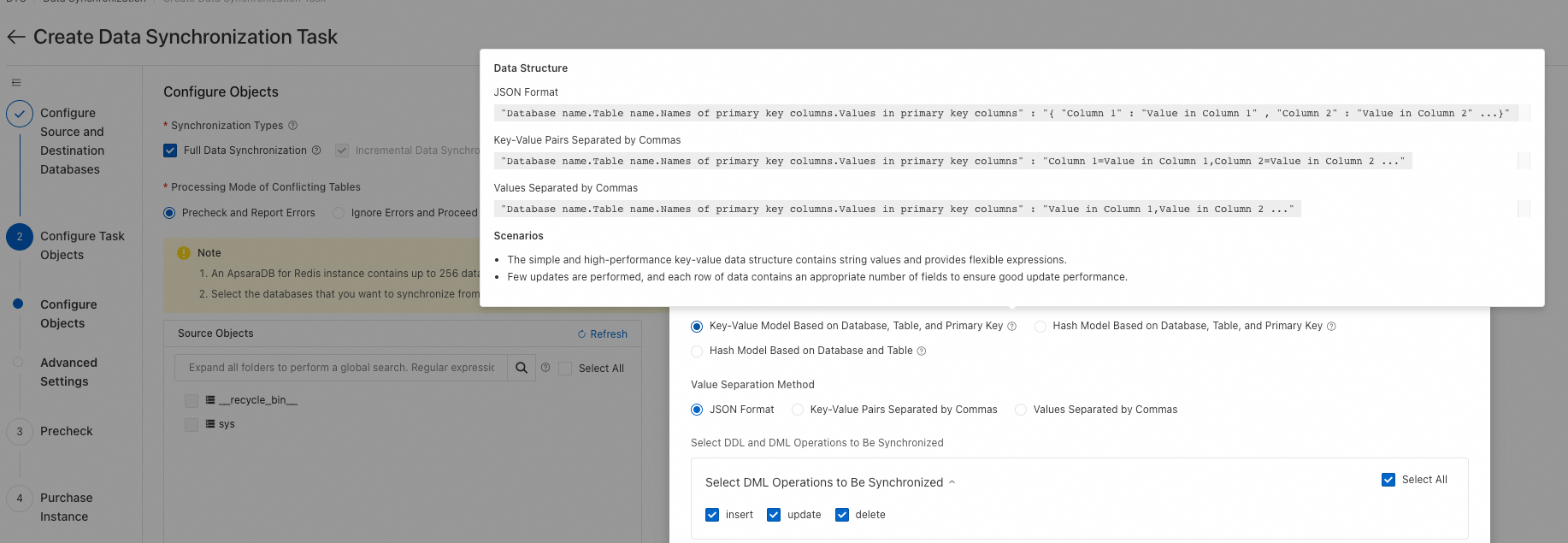
Configuration steps:
-
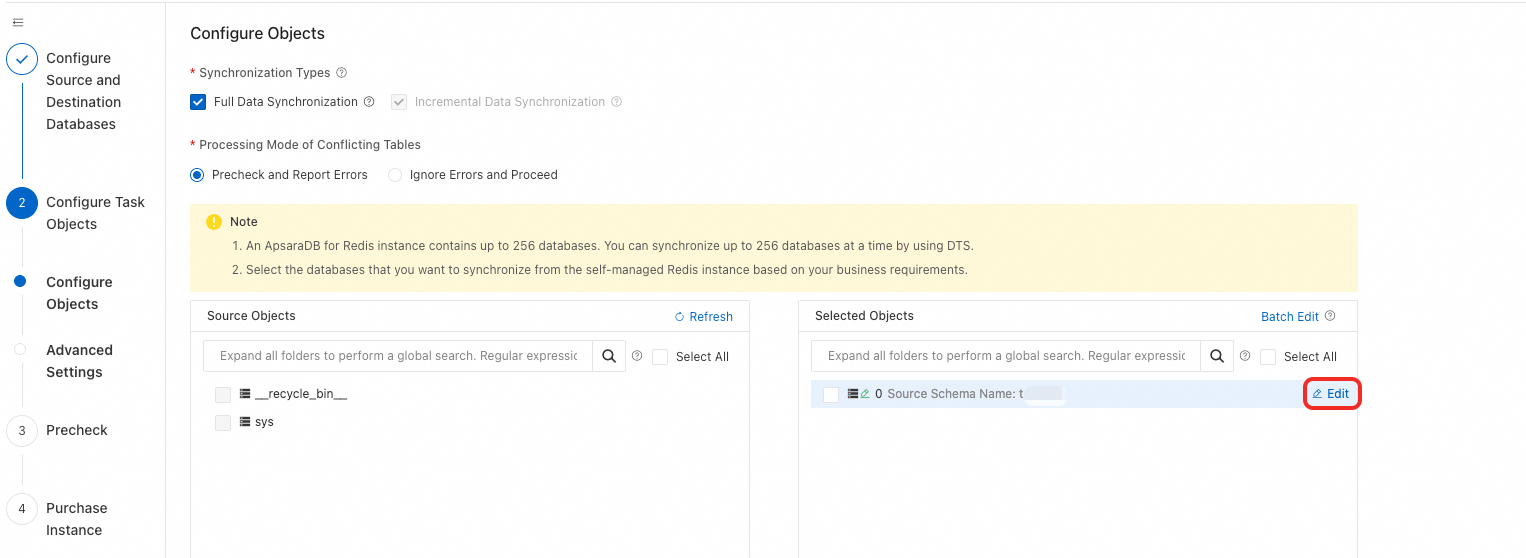
When configuring objects, move the databases and tables to the right pane, then click the edit button for the destination Redis DB.
-
Add the columns
__DTS_TP_TO_REDIS_KEY__and__DTS_TP_TO_REDIS_VALUE__.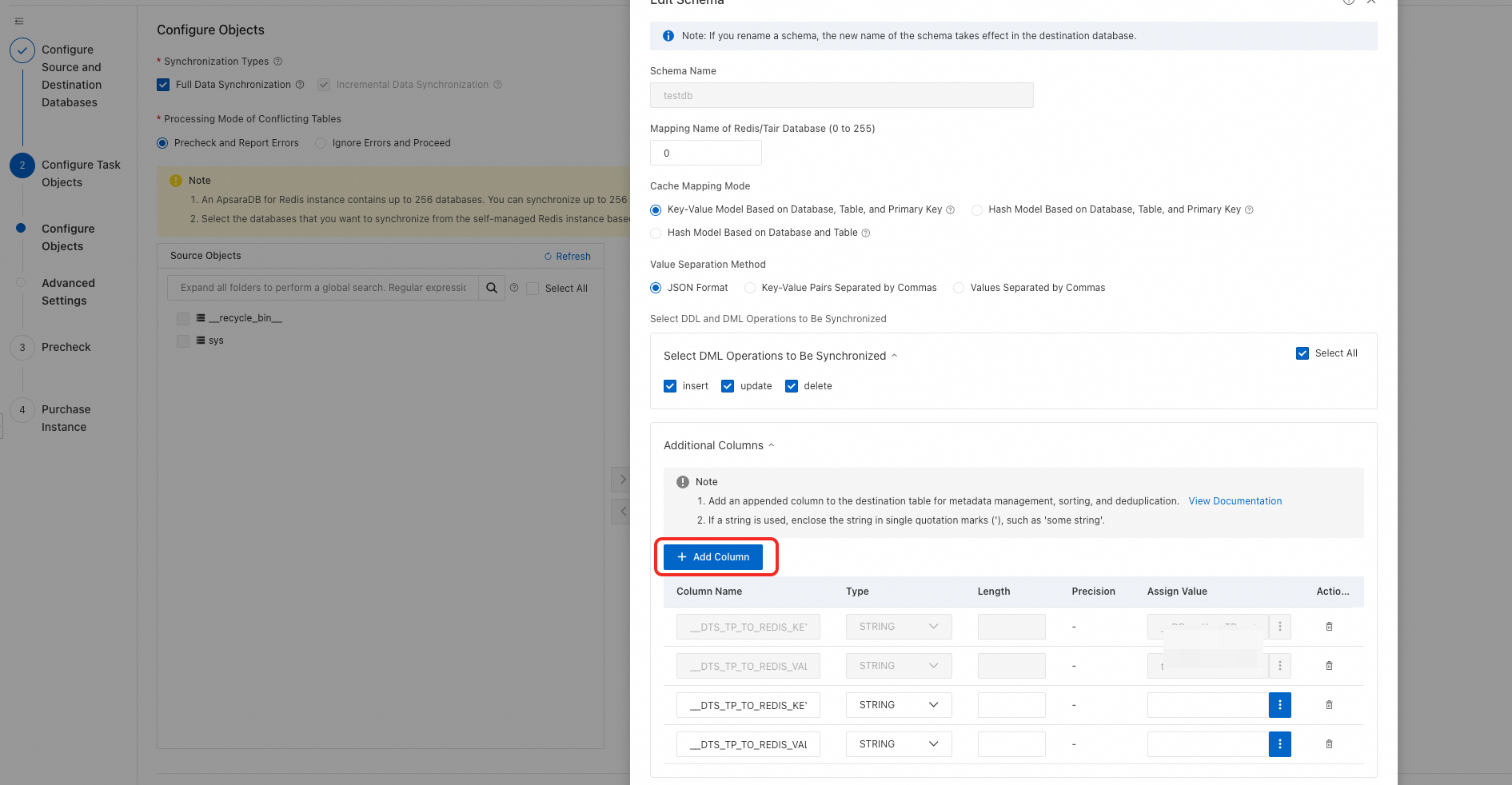
-
Set the Assign Value expressions using DSL syntax. For example, consider the following MySQL
aestable:CREATE TABLE `aes` ( `id` BIGINT(20) UNSIGNED NOT NULL AUTO_INCREMENT COMMENT 'Auto-increment primary key', `login_time` INT(10) NOT NULL DEFAULT '0' COMMENT 'Logon identifier time', `pay_time` INT(10) NOT NULL DEFAULT '0' COMMENT 'Payment identifier time', `gid` INT(10) NOT NULL DEFAULT '0' COMMENT 'Game ID', `cid` INT(10) NOT NULL DEFAULT '0' COMMENT 'Channel ID', `gcp_code` VARCHAR(40) NOT NULL DEFAULT '' COMMENT 'Channel package number. An empty value indicates a new entry for the gid.', `uname` VARCHAR(120) CHARACTER SET utf8 COLLATE utf8_bin NOT NULL DEFAULT '' COMMENT 'Account', PRIMARY KEY (`id`), UNIQUE KEY `idx_uq` (`gid`, `gcp_code`, `uname`), KEY `idx_uname` (`uname`) )ENGINE=InnoDB AUTO_INCREMENT=48022 DEFAULT CHARSET=utf8 COMMENT='Game account activation time information table';Business requirements:
-
Key:
stat_create_day:{gcp_code}:{uname}— built from two source columns -
Value:
{login_time}— a Unix timestamp converted to datetime format
Assign Value expressions:
-
__DTS_TP_TO_REDIS_KEY__:'stat_create_day'+':'+gcp_code+':'+uname -
__DTS_TP_TO_REDIS_VALUE__:dt_fromtimestamp(cast_string_to_long(login_time))
-
-
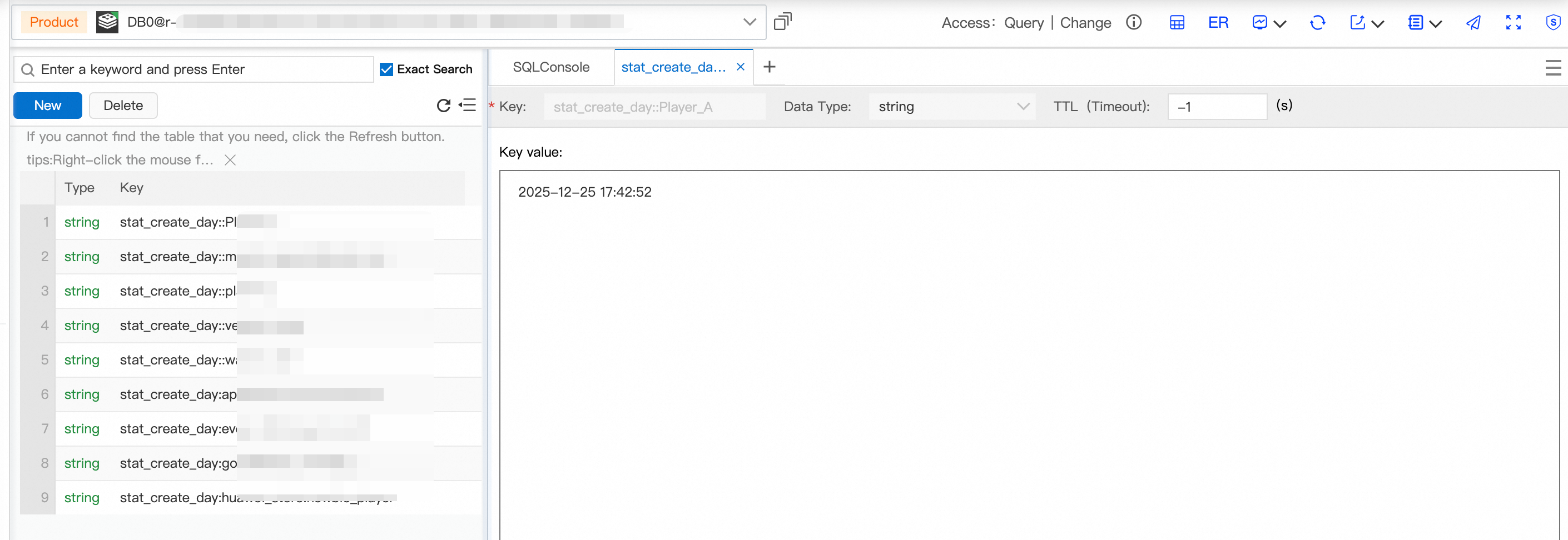
After synchronization or migration completes, the key-value pair in Redis appears as follows: