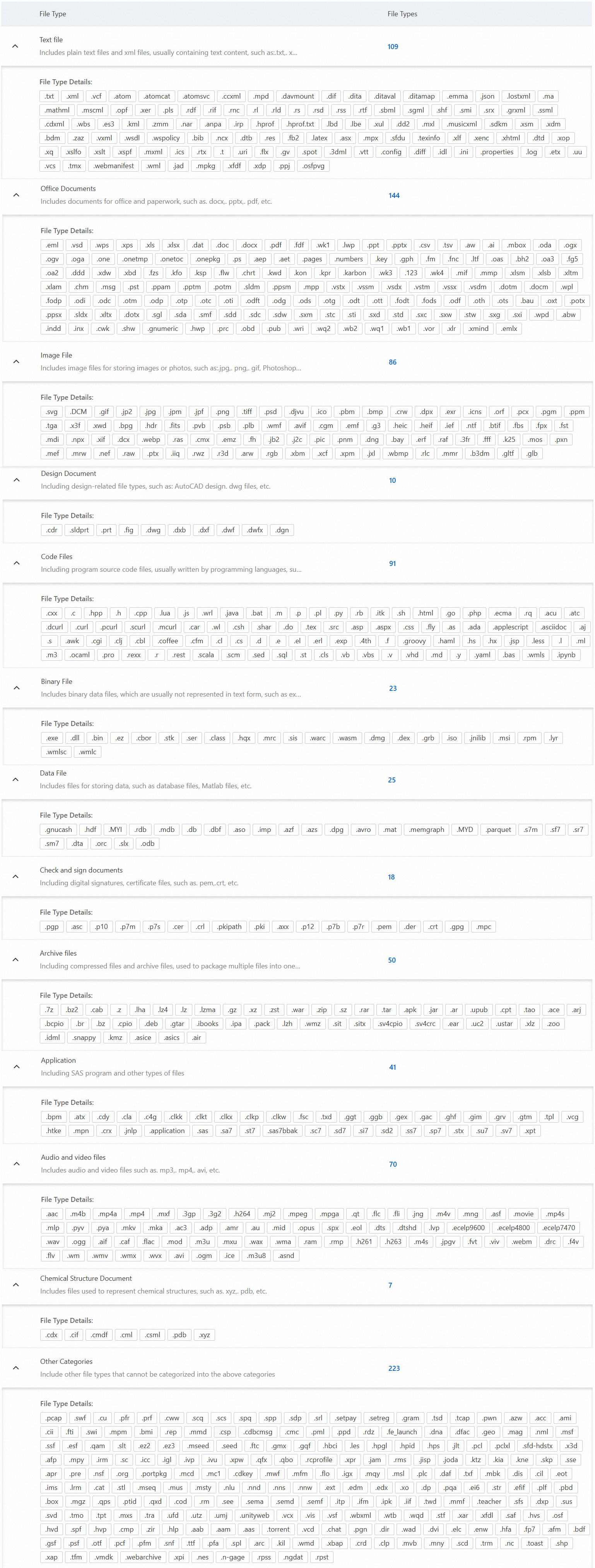
Data Security Center (DSC) supports sensitive data identification for more than 800 file types across 12 categories: text, office, image, design, code, data, binary, signature verification, archive, application, audio and video, and chemical structure files. To see the complete list, view the file type catalog in the DSC console.
Prerequisites
Before you begin, make sure that DSC is active:
If DSC is not yet activated, activate a Free Edition instance to browse supported file types without a paid subscription. For more information, see Data Security Center Free Edition service.
If your DSC subscription has expired, renew it before proceeding. For more information, see Renew subscription DSC.
View supported file types
Log on to the Data Security Center console.
In the left navigation pane, select Classification and Grading > Config.
Click the File Type tab.
The tab shows the total number of supported file categories, the total number of supported file types, and the complete file type list.
To view the details of a specific file type, click the
 icon to the left of the file type name, or click the number in the File Types column.
What's next
To compare features across DSC editions, see Differences between the features of different editions.
To purchase DSC, see Purchase DSC.