A preStop sleep delays SIGTERM so the ALB Ingress controller can deregister the pod before shutdown.
Prerequisites
Before you begin, make sure you have:
-
An ACK managed cluster or ACK dedicated cluster (discontinued) running Kubernetes 1.18 or later. To upgrade, see Manually upgrade ACK clusters.
-
The ALB Ingress controller is installed in the cluster.
To use an ALB Ingress with an ACK dedicated cluster, authorize the cluster for the ALB Ingress controller first.
How it works
Pod lifecycle
A pod contains two types of containers:
-
Init container: Runs before the main container for initialization.
-
Main container: Runs the application. postStart runs after startup, liveness and readiness checks run during the container's lifetime, and preStop runs before termination.
The following figure shows the pod lifecycle.

Why errors occur: two procedures run in parallel
Deleting a pod triggers two parallel procedures—pod termination and traffic routing updates—causing 502/504 errors.
Pod termination procedure
-
kube-apiserver marks the pod as
Terminating. -
The system runs the preStop hook, if configured.
-
The cluster sends a SIGTERM signal to the container.
-
The system waits for the container to stop or the grace period (
terminationGracePeriodSeconds, default: 30 seconds) to expire. -
If the pod is still running after the grace period, the kubelet waits 2 additional seconds and sends a SIGKILL signal.
-
The pod is deleted.
Traffic routing rule update procedure
-
kube-apiserver marks the pod as
Terminating. -
The endpoint controller removes the pod's IP address from the endpoint.
-
The ALB Ingress controller reconciles the backend servers and removes the Service endpoint from the backend server group.
Because both procedures run in parallel, the ALB Ingress controller may not finish reconciling before the pod shuts down, routing traffic to a terminating pod.
How a preStop hook prevents errors
Without a preStop hook, these errors may occur during rolling updates:
| Status code | Cause |
|---|---|
| 504 | The pod was processing a non-idempotent request when terminated. |
| 502 | The pod shut down after receiving SIGTERM, but the ALB Ingress controller had not yet removed it from the backend server group. |
A preStop hook adds a sleep delay starting when kube-apiserver marks the pod as Terminating, giving the ALB Ingress controller time to deregister the pod before it receives SIGTERM.
Time budget
The preStop sleep and container shutdown share the same grace period (terminationGracePeriodSeconds). With sleep 10 and a 5-second program shutdown, set terminationGracePeriodSeconds to at least 15—plus a safety margin. This topic uses sleep 10 and terminationGracePeriodSeconds: 45.
If preStop duration plus program shutdown time exceedsterminationGracePeriodSeconds, the graceful shutdown times out and the kubelet sends SIGKILL after a 2-second wait. IncreaseterminationGracePeriodSecondsto cover both.
Step 1: Deploy the application with a preStop hook
-
Create
tea-service.yamlwith the following content. Thelifecycle.preStopfield configures the hook.apiVersion: apps/v1 kind: Deployment metadata: name: tea spec: replicas: 3 selector: matchLabels: app: tea template: metadata: labels: app: tea spec: containers: - name: tea image: registry.cn-hangzhou.aliyuncs.com/acs-sample/nginxdemos:latest ports: - containerPort: 80 lifecycle: preStop: # Delay SIGTERM by 10 seconds to allow the ALB Ingress controller exec: # to finish deregistering the pod from the backend server group. command: - /bin/sh - -c - "sleep 10" terminationGracePeriodSeconds: 45 # Must exceed preStop duration + program shutdown time. --- apiVersion: v1 kind: Service metadata: name: tea-svc spec: ports: - port: 80 targetPort: 80 protocol: TCP selector: app: tea type: NodePort -
Deploy the Deployment and Service.
kubectl apply -f tea-service.yaml -
Create
tea-ingress.yamlwith the following content.apiVersion: networking.k8s.io/v1 kind: Ingress metadata: name: tea-ingress spec: ingressClassName: alb rules: - host: demo.ingress.top http: paths: - path: / pathType: Prefix backend: service: name: tea-svc port: number: 80 -
Create the Ingress.
kubectl apply -f tea-ingress.yaml -
Get the ALB address for the Ingress.
kubectl get ingressExpected output:
NAME          CLASS   HOSTS              ADDRESS                                              PORTS   AGE
tea-ingress   alb     demo.ingress.top   alb-110zvs5nhsvfv*****.cn-chengdu.alb.aliyuncs.com   80      7m5s
Note the
ADDRESSvalue for the next step.
Step 2: Verify that the preStop hook prevents service interruptions
-
Create
test.shwith the following content. The script sends one request per second and logs each HTTP status code.#!/bin/bash HOST="demo.ingress.top" DNS="alb-110zvs5nhsvfv*****.cn-chengdu.alb.aliyuncs.com" # Replace with your ADDRESS value. printf "Response Code|| TIME \n" >> log.txt while true; do RESPONSE=$(curl -H Host:$HOST -s -o /dev/null -w "%{http_code}" -m 1 http://$DNS/) TIMESTAMP=$(date +%Y-%m-%d_%H:%M:%S) echo "$TIMESTAMP - $RESPONSE" >> log.txt sleep 1 done -
Run the script.
bash test.sh -
Trigger a rolling restart.
kubectl rollout restart deploy tea -
Watch the rollout progress. The following screenshots show the expected pod states during each phase of the update.




-
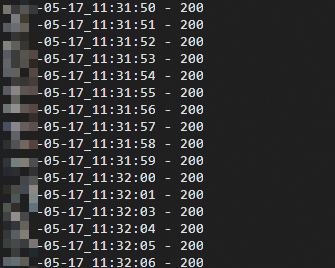
Check the test log. All requests should return 200, confirming zero service interruptions.
cat log.txtExpected output:
Next steps
-
For advanced routing—such as HTTP-to-HTTPS redirects and canary releases—see Advanced ALB Ingress configurations.
-
To ensure pods pass readiness checks before receiving traffic during rolling updates, see Use readiness gates to seamlessly launch pods that are associated with ALB Ingresses during rolling updates.
-
If you run into issues, see ALB Ingress FAQ and ALB Ingress controller troubleshooting.