An IPsec server lets you connect iOS devices to Alibaba Cloud through the built-in VPN feature, enabling secure access to cloud resources.
Usage scenarios
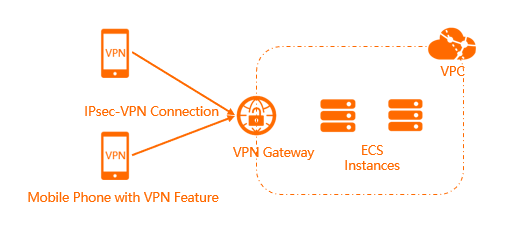
IPsec servers provide end-to-site connections through the built-in VPN feature on iOS devices. After connecting, your device can securely access resources on Alibaba Cloud.
Limits
-
IPsec servers are available in the following regions: China (Hangzhou), China (Shanghai), China (Nanjing - Local Region), China (Qingdao), China (Beijing), China (Zhangjiakou), China (Hohhot), China (Ulanqab), China (Shenzhen), China (Heyuan), China (Guangzhou), China (Chengdu), China (Hong Kong), Japan (Tokyo), South Korea (Seoul), Singapore, Malaysia (Kuala Lumpur), Indonesia (Jakarta), Philippines (Manila), Thailand (Bangkok), Germany (Frankfurt), UK (London), US (Virginia), US (Silicon Valley), UAE (Dubai), Mexico, SAU (Riyadh - Partner Region).
-
Only iOS mobile clients are supported.
-
Each VPN gateway supports only one IPsec server.
-
To use an IPsec server, enable SSL-VPN on the VPN gateway and ensure no IPsec-VPN connection exists on it.
An IPsec server and an IPsec-VPN connection on the same gateway conflict and cannot work as expected.
-
An IPsec server and an SSL-VPN server on the same VPN gateway share the SSL connection quota.
For example, if the quota is 20 and the SSL-VPN server uses 5 connections, the IPsec server can serve at most 15 clients.
Prerequisites
Before you create an IPsec server:
-
A virtual private cloud (VPC) is created in the target region. For more information, see Create a VPC with an IPv4 CIDR block.
-
The mobile client has internet access.
-
The mobile client runs iOS.
-
Elastic Compute Service (ECS) security group rules allow traffic from the mobile client. For more information, see View security group rules and Add a security group rule.
Procedure
-
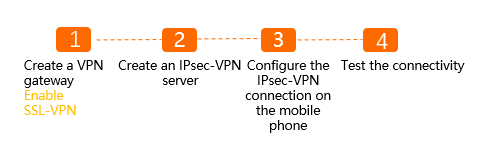
Create a VPN gateway
Create a VPN gateway with SSL-VPN enabled.
-
Create an IPsec server
Specify the destination CIDR block and the client CIDR block.
-
Configure the IPsec-VPN connection on the mobile client
Enter the VPN gateway details on the mobile client to establish the connection.
-
Test network connectivity
Connect to a cloud resource from the mobile client to verify connectivity.
For more information about the use cases of IPsec servers, see Connect an iPhone or iPad to a VPC using SSL-VPN.
References
-
Query IPsec server logs to troubleshoot errors.
-
Manage IPsec servers:
IPsec server vs. SSL server
|
Item |
IPsec server |
SSL server |
|
Use scenario |
Provides end-to-site connections. |
Provides end-to-site connections. |
|
Client mode |
iOS mobile clients connect via IPsec-VPN. |
Android mobile clients and computers connect via SSL-VPN. |
|
Connection mode |
Uses the built-in iOS VPN feature. |
Uses OpenVPN. |
|
Encryption methods |
IPsec |
SSL certificates |