This topic describes how to view a RAM user's AccessKey pair information, including the AccessKey ID, status, last used cloud service/time, and creation time.
This topic applies only to viewing AccessKey pairs of RAM users. To view or manage AccessKey pairs for your Alibaba Cloud account (main account), go to the AccessKey Management page.
The AccessKey Secret is displayed only once when you create an AccessKey pair. If you did not save it at the time of creation, you cannot retrieve it. You must create a new AccessKey pair.
View AccessKey information for all RAM users
An Alibaba Cloud account or a RAM administrator (a RAM user with the AliyunRAMFullAccess permission) can view AccessKey pair information for all RAM users within the account.
-
Log on to the RAM console as a RAM administrator.
-
In the left-side navigation pane, choose .
-
On the Users page, click the name of the target RAM user.
-
On the Credential tab, find the AccessKey section and view basic information about the AccessKey pair, including its AccessKey ID, status, last used cloud service/time, and creation time.
The list also includes the Time Since Creation column. If an AccessKey pair poses a security risk, a Suggested Rotation indicator appears in the Time Since Creation column.
View your own AccessKey information
If a RAM administrator allows RAM users to manage their own AccessKey pairs, RAM users can also view their own AccessKey pair information. For information about how to configure this permission, see Manage RAM user security settings.
-
Log on to the Alibaba Cloud Management Console as a RAM user.
-
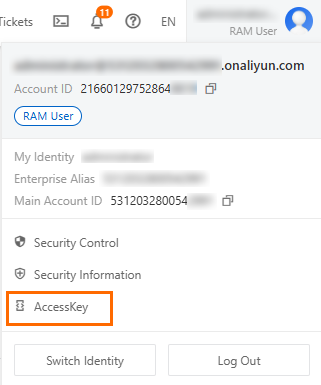
Hover over the account icon in the upper-right corner and click AccessKey Management.
-
On the AccessKey page, view your AccessKey pair information, including the AccessKey ID, status, last used cloud service/time, and creation time.
FAQ
What do I do if I receive an AccessKey security alert but cannot find the corresponding AccessKey in the console?
If you receive an AccessKey security alert but cannot locate the AccessKey in the RAM console, check the following:
Verify the AccessKey ownership: The AccessKey in the alert may belong to a RAM user rather than the Alibaba Cloud account (main account) you are currently logged on to. As a RAM administrator, go to the RAM console, choose , click the specific RAM user name, and check the AccessKey section on the Authentication tab.
Check your permissions: Make sure your account has sufficient permissions (such as the AliyunRAMFullAccess policy) to view all RAM users' AccessKey pairs. If you do not have the required permissions, switch to a RAM administrator account.
Check whether the AccessKey has been deleted: A deleted AccessKey no longer appears in the console. Confirm with your account administrator whether the AccessKey was deleted.
What does a hyphen (-) in the Last Used column of the AccessKey list mean?
The Last Used column shows the most recent time the AccessKey was used to call an Alibaba Cloud service through an API, CLI, or SDK, along with the name of the cloud service that was called. A hyphen (-) indicates that the AccessKey has never been used to initiate any API request since it was created. Alibaba Cloud records the last used time only when an AccessKey is actively used for identity authentication.
How do I query the permission list or the owning Alibaba Cloud account of a specific AccessKey?
Permission list: An AccessKey does not directly bind to a permission list. The effective permissions of an AccessKey are determined by the policies attached to the RAM user that owns the AccessKey. To view the permissions, go to the RAM console, choose , click the target RAM user name, and view the Permissions tab.
Owning Alibaba Cloud account: For security and privacy reasons, the RAM console does not support reverse lookup of the Alibaba Cloud account that owns an AccessKey. To identify the owning account, check your internal asset inventory or contact your account administrator.
Can I view the usage scenario type selected when creating an AccessKey?
No. The usage scenario type (such as local development or production environment) selected during AccessKey creation cannot be queried after the AccessKey is created. This option serves only as a planning label for business purposes and does not affect the creation or functionality of the AccessKey. When creating a new AccessKey pair, select the appropriate scenario type based on your business requirements.
What do I do if I have the AliyunRAMReadOnlyAccess permission but still receive a permission error when calling the GetAccessKeyLastUsed operation?
Verify that your API call parameters and method are correct by referring to the GetAccessKeyLastUsed API reference. If the parameters are correct and you still receive an error, check whether the RAM user is subject to an explicit deny policy or other condition-based restrictions that override the AliyunRAMReadOnlyAccess permission.