This topic describes how to use Global Traffic Management (GTM) with Web Application Firewall (WAF), Global Accelerator (GA), and Server Load Balancer (SLB). GTM addresses the limitations of self-managed DNS systems that do not support intelligent DNS resolution and scheduling. It also provides high availability (HA) and failover for GA, WAF, and origin servers.
Architecture

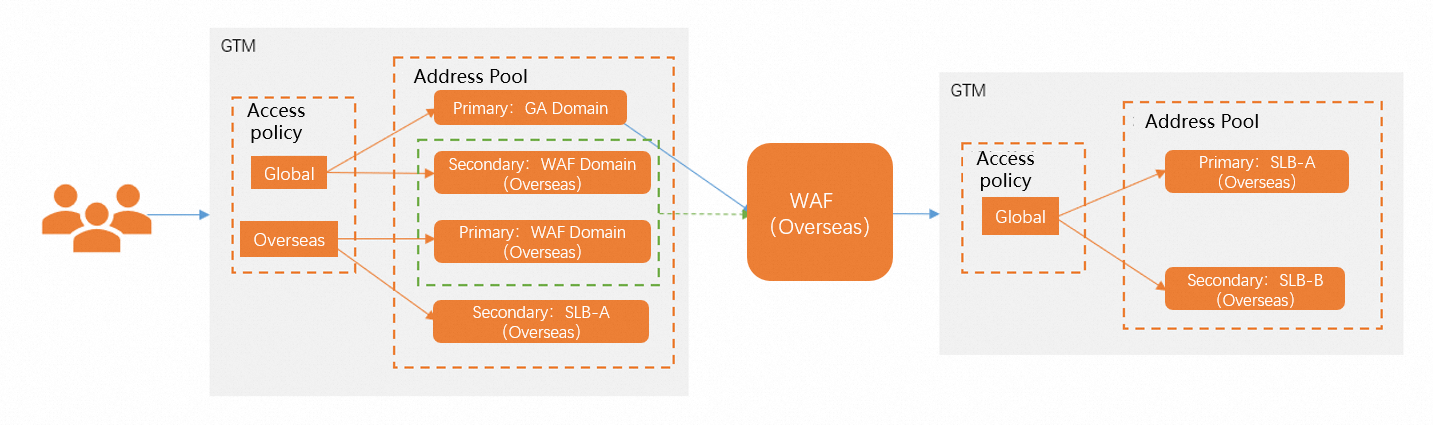
Front-end GTM: Provides intelligent DNS resolution and failover. You can omit this GTM layer if your DNS provider supports intelligent DNS resolution and you do not require failover redundancy.
GA: Provides global acceleration. In this example, GA is used to accelerate requests from the Chinese mainland to servers located outside the Chinese mainland.
WAF: Provides web application protection and intelligently routes DNS resolution requests to the nearest node.
Back-end GTM: Provides failover redundancy and intelligent DNS resolution for multiple origin servers.
Prerequisites
The following resources are required:
|
Resource |
Value |
Remarks |
|
Global Traffic Management (GTM) |
gtm-cn-*****q5a001 |
GTM① Note
Provides intelligent DNS resolution and failover. |
|
gtm-cn-*****id880y |
GTM② Note
Ensures high availability for multiple origin server nodes. |
|
|
Web Application Firewall (WAF) |
vbrqh41*********uohrsiojoxfkcfmh.aliyunwaf5.com |
WAF (outside the Chinese mainland) |
|
Global Accelerator (GA) |
ga-bp1y0fo9******jo9c2mq.aliyunga0017.com |
GA Acceleration |
|
Domain name |
demo.test.alidns.com |
Test domain name |
|
Server Load Balancer (SLB) |
123.123.XXX.XXX 124.124.XXX.XXX |
SLB-A outside the Chinese mainland SLB-B outside the Chinese mainland |
Procedure
Step 1: Configure the back-end GTM instance
-
Log on to the Alibaba Cloud DNS console for GTM.
-
In the list of GTM instances, find the target instance and click Configure in the Actions column. (These are example configurations. You must replace the sample values with your actual resource information.)
Basic configurations
-
Instance Name: Back-end GTM
-
Service Domain Name: The CNAME record assigned by WAF.
-
CNAME Access Domain: A custom access domain name.
-
Global TTL: 10 minutes
Address pool configuration
-
Address Pool Name: SLB-A outside the Chinese mainland (and SLB-B outside the Chinese mainland)
-
Address Pool Type: IPv4
-
Load Balancing Policy: Return All Addresses
-
Address List:
-
Address: 123.123.XXX.XXX (and 124.124.XXX.XXX)
-
Mode: Smart Return
-
NoteYou need to create two address pools: SLB-A outside the Chinese mainland and SLB-B outside the Chinese mainland. Enter the corresponding names and addresses for each.
If you use a location-based access policy, you can skip the Address Location configuration.
Health check configuration
GTM supports health checks by using the PING, TCP, and HTTP(S) protocols. For more information, see Enable health checks.
NoteIf the address pool contains SLB instances or Alibaba Cloud IP addresses, select appropriate monitoring nodes from different carriers based on your business requirements.
Configure the health check parameters as follows: Set Check Protocol to PING, Check Interval to 1 minute, Number of Ping Packets to 20, and Packet Loss Rate to 10. Set Timeout to 5 seconds, Consecutive Failures to 2, and Failure Ratio to 50%. In the Monitoring Nodes section, select the required BGP nodes, such as China (Zhangjiakou), China (Qingdao), China (Hangzhou), China (Shanghai), China (Hohhot), China (Shenzhen), and China (Beijing). Select international nodes as needed.
Carrier-specific monitoring nodes include China Unicom nodes, China Telecom nodes, and China Mobile nodes. You can select specific city nodes under each category.
-
Access policy configuration
Enable and configure a location-based access policy. For more information, see Access policies.
You can enable only one type of access policy for an instance. Select Enabled in the lower-right corner of the Location-based Access Policy card.
-
Policy Name: Global
-
Source of DNS Requests: Global-Global
-
Address Pool Type: IPv4
-
Primary Address Pool: SLB-A outside the Chinese mainland
-
Failover Address Pool: SLB-B outside the Chinese mainland
The load balancing policy for both the primary and failover address pool sets is Return All Addresses. The minimum number of available addresses is 1 for both address pool sets, and their status is Available. Set the Effective Address Pool Switching Policy to Automatic Switching.
Step 2: Configure the WAF instance (International)
Log on to the Web Application Firewall console to configure an instance outside the Chinese mainland. For more information, see What is Web Application Firewall? (These are example configurations. You must replace the sample values with your actual resource information.)
-
Domain: demo.test.alidns.com
-
Origin Server Address: gtm-cn-npk20id880y.gtm-a4b5.com
The configuration is the same for instances inside and outside the Chinese mainland.
To obtain the CNAME record assigned by GTM:
Log on to the Alibaba Cloud DNS console. Then, navigate to Global Traffic Management > Basic Configurations > CNAME Access Domain (Internet).
Step 3: Configure a GA instance
Log on to the Global Accelerator console to perform the configuration. For more information, see What is Global Accelerator?.
The general steps are as follows:
-
Purchase a premium bandwidth plan.
-
Configure a listener.
-
Configure an acceleration area.
After you associate a bandwidth plan, go to the instance details page and click the Bandwidth Plan Management tab. You can view details of the associated basic bandwidth plan, including its ID, bandwidth specification (Standard Accelerated Bandwidth), bandwidth value (for example, 2 Mbps), billing method (Subscription), effective/expiration time, and status (Available). You can also perform operations such as Replace, Unbind, and Renew.
In the listener configuration, add a listener that uses the TCP protocol and port 80. Set the Routing Type to Intelligent Routing and confirm that the listener status is Available.
When you configure the acceleration area, select the China (Hangzhou) region in the China East area. Set the allocated bandwidth to 2 Mbps and select IPv4 for the IP Address Protocol. The system automatically assigns an accelerated IP address.
Step 4: Configure the front-end GTM instance
Basic configurations
-
Instance Name: Front-end GTM
-
Service Domain Name: Enter your actual service domain name.
-
CNAME Access Domain: The access domain name assigned by the system.
-
Global TTL: 10 minutes
In addition, set Alert Notification Group to the alert contacts of your Alibaba Cloud account. The Instance Edition is Ultimate.
Address pool configuration
Configure the GA Acceleration address pool, the WAF (outside the Chinese mainland) address pool, and the origin server address pool.
After the configuration is complete, you can view the load balancing policy for each address pool in the address pool list. The policy for the origin server address pool is Return All Addresses, and the policy for the WAF (outside the Chinese mainland) and GA Acceleration address pools is Return Addresses by Weight.
-
GA Acceleration address pool:
Address Pool Name: GA Acceleration
Address Pool Type: Domain Name
Address List: Enter the GA acceleration CNAME assigned to your service.
Set the Load Balancing Policy (Address) to Return Addresses by Weight and the address Mode to Smart Return.
-
WAF (outside the Chinese mainland) address pool:
Address Pool Name: WAF (outside the Chinese mainland)
Address Pool Type: Domain Name
Address List: Enter the CNAME of the WAF instance assigned to your service. Select Return Addresses by Weight for the Load Balancing Policy (Address).Origin Server address pool:
Address Pool Name: Origin Server
Address Pool Type: IPv4
Address List: Enter the actual origin server address. In this example, enter the address of one of the SLB instances deployed outside the Chinese mainland.
Select Return All Addresses for the Load Balancing Policy (Address) and Smart Return for the address Mode.
Access policy configuration
Enable the location-based access policy and configure access policies for global traffic and traffic from outside the Chinese mainland.
-
Global access policy configuration:
Policy Name: Global
Source of DNS Requests: Global-Global
① Address Pool Type: Domain Name
Select Address: GA Acceleration
③ Load Balancing Policy: Return Addresses by Weight (This is the only policy supported when the address pool type is Domain Name.)
① Address Pool Type: Domain Name
② Select Address: WAF (outside the Chinese mainland)
③ Load Balancing Policy: Return Addresses by Weight (This is the only policy supported when the address pool type is Domain Name.) When you configure the source of DNS requests, note the following: You can select request sources from either Carriers or Mainland China, but not both. Each request source can be used in only one access policy. For the GA Acceleration address pool, set Weight to 1 and Minimum Available Addresses to 1. For the WAF (outside the Chinese mainland) address pool, the Weight is also set to 1, and the Minimum Available Addresses is set to 1.
-
Access policy configuration for outside the Chinese mainland:
Policy Name: Outside the Chinese mainland
Source of DNS Requests: Outside the Chinese mainland-Outside the Chinese mainland
Address Pool Type: Domain Name
② Select Address: WAF (outside the Chinese mainland)
③ Load Balancing Policy: Return Addresses by Weight (This is the only policy supported when the address pool type is Domain Name.)
Failover Address Pool Set:
① Address Pool Type: IPv4
Select Address: SLB-A outside the Chinese mainland
Load Balancing Policy: Return All Addresses
The Weight for the WAF (outside the Chinese mainland) address pool is set to 1, and the Minimum Available Addresses is set to 1.
Step 5: Configure DNS resolution
-
Navigate to the Alibaba Cloud DNS - Hosted Public Zone console. In the domain list, find your domain name and click Settings.
-
Click Add DNS Record. Create a CNAME record that points your service hostname to the CNAME access domain provided by GTM. After you add the record, GTM manages your application traffic.