Use Flink SQL in Realtime Compute for Apache Flink to query and manage tables in a Data Lake Formation (DLF) catalog through the Apache Paimon REST protocol.
Prerequisites
Before you begin, make sure you have:
-
A fully managed Flink workspace. See Activate Realtime Compute for Apache Flink.
-
The Flink workspace and DLF in the same region.
-
The Virtual Private Cloud (VPC) where the Flink workspace resides added to the DLF whitelist. See Configure a VPC whitelist.
Version requirement
Ververica Runtime (VVR) 11.1.0 or later is required to connect to DLF catalogs.
Create a DLF catalog
See Set up DLF.
Register the catalog in Flink
Registering a catalog in Flink creates a mapping to the DLF catalog. Creating or deleting this mapping does not affect the underlying data in DLF.
Choose either the console UI or a SQL statement to register the catalog.
Register using the console
-
Log on to the Realtime Compute for Apache Flink console.
-
Click the name of the target workspace.
-
In the left navigation pane, click Catalogs.
-
On the Catalogs page, click Create Catalog.
-
Select Apache Paimon and click Next.
-
Set metastore to DLF, select the DLF catalog in the catalog name field, and click OK.
The catalog is now registered in Flink.
Register using SQL
In Development > Scripts, run the following statement in the SQL editor:
CREATE CATALOG `flink_catalog_name`
WITH (
  'type' = 'paimon',
  'metastore' = 'rest',
  'token.provider' = 'dlf',
  'uri' = 'http://cn-hangzhou-vpc.dlf.aliyuncs.com',
  'warehouse' = 'dlf_test'
);
Connection parameters
| Parameter | Description | Required | Example |
|---|---|---|---|
type |
Catalog type. Set to paimon. |
Yes | paimon |
metastore |
Metastore type. Set to rest. |
Yes | rest |
uri |
The URI used to access the DLF REST Catalog Server. The format is http://<region-id>-vpc.dlf.aliyuncs.com. For region IDs, see Endpoints. |
Yes | http://cn-hangzhou-vpc.dlf.aliyuncs.com |
warehouse |
Name of the DLF catalog. | Yes | dlf_test |
Authentication parameters
| Parameter | Description | Required | Example |
|---|---|---|---|
token.provider |
Token provider for authentication. Set to dlf. |
Yes | dlf |
Troubleshooting
NullPointerException when connecting
Symptom
Caused by: java.lang.NullPointerException
at org.apache.paimon.rest.HttpClient.getRequestUrl(HttpClient.java:180)
at org.apache.paimon.rest.HttpClient.get(HttpClient.java:108)
at org.apache.paimon.rest.RESTCatalog.<init>(RESTCatalog.java:159)
at org.apache.paimon.rest.RESTCatalog.<init>(RESTCatalog.java:141)
at org.apache.paimon.rest.RESTCatalogFactory.create(RESTCatalogFactory.java:36)
at org.apache.paimon.catalog.CatalogFactory.createUnwrappedCatalog(CatalogFactory.java:84)
at org.apache.paimon.catalog.CatalogFactory.createCatalog(CatalogFactory.java:71)
at org.apache.paimon.flink.VvrCatalogFactory.createCatalog(VvrCatalogFactory.java:67)
at org.apache.paimon.flink.VvrCatalogFactory.createCatalog(VvrCatalogFactory.java:37)
at org.apache.flink.table.gateway.vvr.module.delegation.CatalogFactoryWrapper.createCatalog(CatalogFactoryWrapper.java:91)
at org.apache.flink.table.factories.FactoryUtil.createCatalog(FactoryUtil.java:572)Cause: The uri parameter value does not start with http://.
Fix: Set uri to a value that starts with http://, for example, http://cn-hangzhou-vpc.dlf.aliyuncs.com.
ForbiddenException: not authorized to perform this operation
Symptom
Caused by: org.apache.paimon.rest.exceptions.ForbiddenException: Forbidden: You are not authorized to do this operation. Action: dlf:GetConfig. AccessDeniedDetail : {"AuthAction":"dlf:GetConfig","AuthPrincipalType":"AssumedRoleUser","AuthPrincipalOwnerId":"xxxxx","AuthPrincipalDisplayName":"aliyunstreamasidefaultrole:xxxxx","PolicyType":"AccountLevelIdentityBasedPolicy","NoPermissionType":"ImplicitDeny"} requestId:xxxxx
at org.apache.paimon.rest.DefaultErrorHandler.accept(DefaultErrorHandler.java:59)
at org.apache.paimon.rest.DefaultErrorHandler.accept(DefaultErrorHandler.java:35)
at org.apache.paimon.rest.HttpClient.exec(HttpClient.java:205)
at org.apache.paimon.rest.HttpClient.get(HttpClient.java:112)
at org.apache.paimon.rest.RESTCatalog.<init>(RESTCatalog.java:159)
at org.apache.paimon.rest.RESTCatalog.<init>(RESTCatalog.java:141)
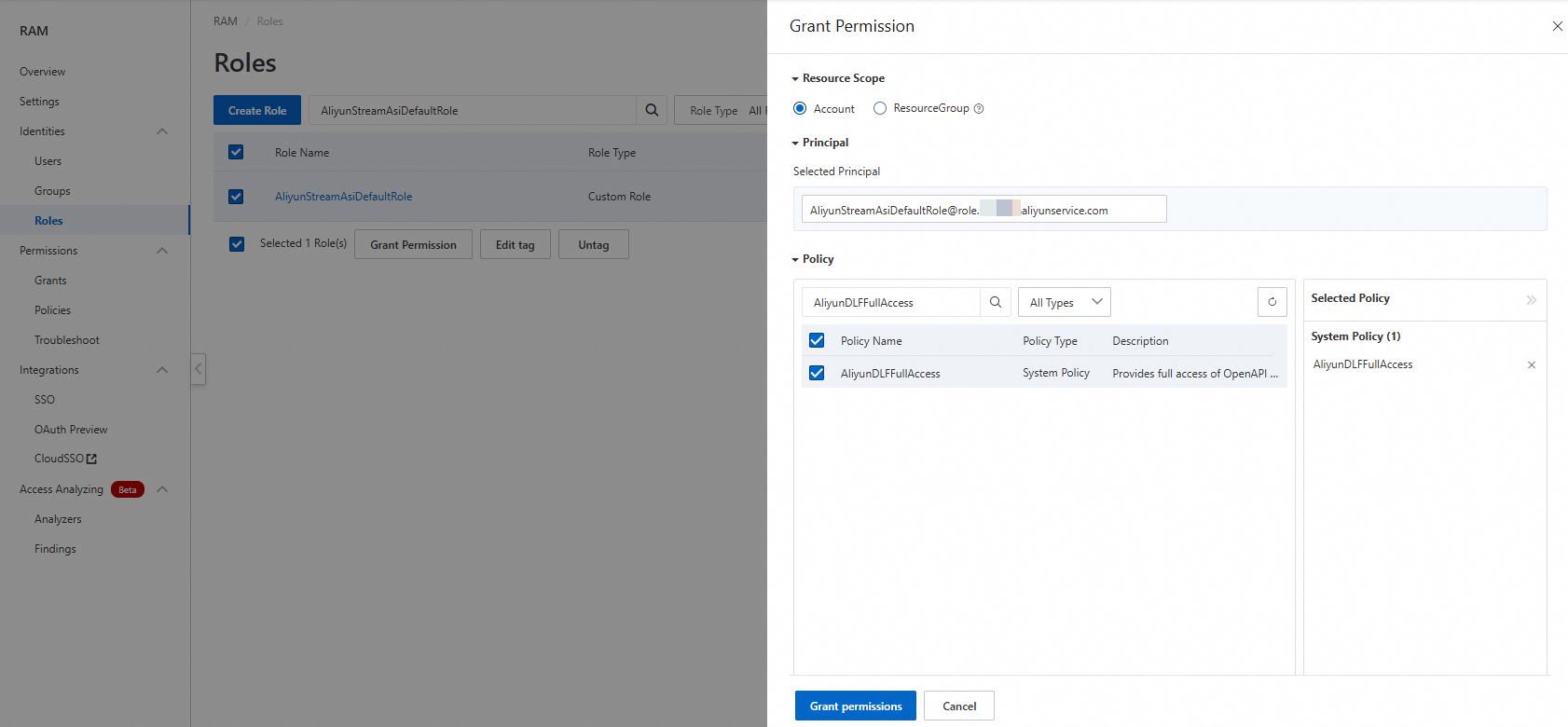
at org.apache.paimon.rest.RESTCatalogFactory.create(RESTCatalogFactory.java:36)Cause: The AliyunStreamAsiDefaultRole role lacks the AliyunDLFFullAccess permission.
This step is not required after Flink is integrated as a product.
Fix: Grant AliyunDLFFullAccess to the AliyunStreamAsiDefaultRole role.
-
Log on to the Resource Access Management (RAM) console using your Alibaba Cloud account or as a RAM administrator.
-
In the left navigation pane, choose Identities > Roles, then find AliyunStreamAsiDefaultRole.
-
In the Actions column, click Add Permissions.
-
In the Access Policies section, select AliyunDLFFullAccess and click OK.