Tablestore is a NoSQL storage service built on the Alibaba Cloud Apsara Distributed File System. The Tablestore data source in DataWorks enables bidirectional data synchronization with Tablestore tables.
Limitations
-
The Tablestore Reader and Writer plugins read from and write to Tablestore. These plugins operate on wide-column and time-series tables in two modes: row mode and column mode.
-
column mode: In the multi-version model of Tablestore, Tablestore organizes data in a three-level structure of . A row can have any number of columns, and the column names are not fixed. Each column can have multiple versions, and each version has a specific timestamp, which also serves as the version number. In column mode, data is exported as a four-tuple: (primary key value, column name, timestamp, column value). Data imported in column mode also uses the four-tuple format: (primary key value, column name, timestamp, column value).
-
row mode: This mode exports each updated record as a row in the format (primary key value, column values).
In row mode, each row of data corresponds to a single row in the Tablestore table. Data written in row mode includes values for both primary key columns and attribute columns.
-
-
Tablestore columns consist of primary key columns primaryKey and attribute columns column. The order of the source columns must be consistent with the order of the primary key columns and attribute columns in the destination Tablestore. Otherwise, a column mapping error will occur.
-
The Tablestore Reader divides a table's data range into N tasks based on a specified concurrency level, N. A dedicated Tablestore Reader thread executes each task.
-
MaxCompute external tables cannot directly read columns that contain mixed data types from Tablestore, for example, a column that contains both STRING and DOUBLE values. If your Tablestore table contains such columns, importing data by using a MaxCompute external table fails. As a workaround, you can use the single-table batch synchronization feature in DataWorks Data Integration to synchronize data from Tablestore to MaxCompute.
When you use single-table batch synchronization, the Data Integration resource group must have network access to the VPC where the Tablestore instance resides to read data and run the synchronization task. This workaround does not guarantee full compatibility for mixed-type data. You may need to convert or filter data types by using column mapping during the synchronization. Using a Data Integration resource group incurs additional fees.
Supported column types
Tablestore Reader and Tablestore Writer support all Tablestore data types. The following table lists the supported type mappings.
|
Type category |
Tablestore data type |
|
Integer |
INTEGER |
|
Floating-point |
DOUBLE |
|
String |
STRING |
|
Boolean |
BOOLEAN |
|
Binary |
BINARY |
-
Tablestore does not natively support the date data type. The application layer typically uses a Long value to store the Unix timestamp.
-
You must configure the INTEGER data type as INT in script mode. DataWorks converts it to the INTEGER type. If you directly configure the type as INTEGER, an error is reported in the logs and the task fails.
Add a data source
Before you develop a synchronization task in DataWorks, you must add the required data source to DataWorks by following the instructions in Data source configuration. You can view parameter descriptions in the DataWorks console to understand the meanings of the parameters when you add a data source.
Develop a data synchronization task
For information about the entry point for and the procedure of configuring a synchronization task, see the following configuration guides.
Guidelines for configuring a single-table batch synchronization task
-
For the procedure, see Configure a single-table batch synchronization task.
-
For the complete parameters and script demos for script mode configuration, see Appendix 1: Reader script demos and parameter description below.
Appendix 1: Reader script demos and parameter description
Configure a batch synchronization task by using the code editor
If you want to configure a batch synchronization task by using the code editor, you must configure the related parameters in the script based on the unified script format requirements. For more information, see Script mode configuration. The following information describes the parameters that you must configure for data sources when you configure a batch synchronization task by using the code editor.
Reader script demos
Row mode configuration for reading wide-column tables
{
    "type":"job",
    "version":"2.0",// The version number.
    "steps":[
        {
            "stepType":"ots",// The plugin name.
            "parameter":{
                "datasource":"",// The data source.
                "newVersion":"true",// Use the new version of otsreader.
                "mode": "normal",// Read data in row mode.
                "isTimeseriesTable":"false",// Configure this table as a wide-column table (not a time-series table).
                "column":[// The columns.
                    {
                        "name":"column1"// The column name.
                    },
                    {
                        "name":"column2"
                    },
                    {
                        "name":"column3"
                    },
                    {
                        "name":"column4"
                    },
                    {
                        "name":"column5"
                    }
                ],
                "range":{
                    "split":[
                        {
                            "type":"STRING",
                            "value":"beginValue"
                        },
                        {
                            "type":"STRING",
                            "value":"splitPoint1"
                        },
                        {
                            "type":"STRING",
                            "value":"splitPoint2"
                        },
                        {
                            "type":"STRING",
                            "value":"splitPoint3"
                        },
                        {
                            "type":"STRING",
                            "value":"endValue"
                        }
                    ],
                    "end":[
                        {
                            "type":"STRING",
                            "value":"endValue"
                        },
                        {
                            "type":"INT",
                            "value":"100"
                        },
                        {
                            "type":"INF_MAX"
                        },
                        {
                            "type":"INF_MAX"
                        }
                    ],
                    "begin":[
                        {
                            "type":"STRING",
                            "value":"beginValue"
                        },
                        {
                            "type":"INT",
                            "value":"0"
                        },
                        {
                            "type":"INF_MIN"
                        },
                        {
                            "type":"INF_MIN"
                        }
                    ]
                },
                "table":""// The table name.
            },
            "name":"Reader",
            "category":"reader"
        },
        {
            "stepType":"stream",
            "parameter":{},
            "name":"Writer",
            "category":"writer"
        }
    ],
    "setting":{
        "errorLimit":{
            "record":"0"// The error count.
        },
        "speed":{
            "throttle":true,// false indicates that throttling is disabled and the throttling speed below does not take effect. true indicates that throttling is enabled.
            "concurrent":1 // The concurrency.
            "mbps":"12"// The throttling speed.
        }
    },
    "order":{
        "hops":[
            {
                "from":"Reader",
                "to":"Writer"
            }
        ]
    }
}
Row mode configuration for reading time-series tables
{
    "type":"job",
    "version":"2.0",// The version number.
    "steps":[
        {
            "stepType":"ots",// The plugin name.
            "parameter":{
                "datasource":"",// The data source.
                "table": "",// The table name.
                // mode must be set to normal for reading time-series data.
                "mode": "normal",
                // newVersion must be set to true for reading time-series data.
                "newVersion": "true",
                // Configure this table as a time-series table.
                "isTimeseriesTable":"true",
                // measurementName: The measurement name of the time-series data to read. This parameter is optional. If left empty, data from the entire table is read.
                "measurementName":"measurement_1",
                "column": [
                  {
                    "name": "_m_name"
                  },
                  {
                    "name": "tagA",
                    "is_timeseries_tag":"true"
                  },
                  {
                    "name": "double_0",
                    "type":"DOUBLE"
                  },
                  {
                    "name": "string_0",
                    "type":"STRING"
                  },
                  {
                    "name": "long_0",
                    "type":"INT"
                  },
                  {
                    "name": "binary_0",
                    "type":"BINARY"
                  },
                  {
                    "name": "bool_0",
                    "type":"BOOL"
                  },
                  {
                    "type":"STRING",
                    "value":"testString"
                  }
                ]
            },
            "name":"Reader",
            "category":"reader"
        },
        {
            "stepType":"stream",
            "parameter":{},
            "name":"Writer",
            "category":"writer"
        }
    ],
    "setting":{
        "errorLimit":{
            "record":"0"// The error count.
        },
        "speed":{
            "throttle":true,// false indicates that throttling is disabled and the throttling speed below does not take effect. true indicates that throttling is enabled.
            "concurrent":1 // The concurrency.
            "mbps":"12"// The throttling speed.
        }
    },
    "order":{
        "hops":[
            {
                "from":"Reader",
                "to":"Writer"
            }
        ]
    }
}
Column mode configuration for reading wide-column tables
{
    "type":"job",
    "version":"2.0",// The version number.
    "steps":[
        {
            "stepType":"ots",// The plugin name.
            "parameter":{
                "datasource":"",// The data source.
                "table":"",// The table name.
                "newVersion":"true",// The new version of otsreader.
                "mode": "multiversion",// The multi-version mode.
                "column":[// Configure the column names to export (must be non-primary key columns).
                    {"name":"mobile"},
                    {"name":"name"},
                    {"name":"age"},
                    {"name":"salary"},
                    {"name":"marry"}
                ],
                "range":{// The export range.
                    "begin":[
                        {"type":"INF_MIN"},
                        {"type":"INF_MAX"}
                    ],
                    "end":[
                        {"type":"INF_MAX"},
                        {"type":"INF_MIN"}
                    ],
                    "split":[
                    ]
                },

            },
            "name":"Reader",
            "category":"reader"
        },
        {
            "stepType":"stream",
            "parameter":{},
            "name":"Writer",
            "category":"writer"
        }
    ],
    "setting":{
        "errorLimit":{
            "record":"0"// The error count.
        },
        "speed":{
            "throttle":true,// false indicates that throttling is disabled and the throttling speed below does not take effect. true indicates that throttling is enabled.
            "concurrent":1 // The concurrency.
            "mbps":"12"// The throttling speed.
        }
    },
    "order":{
        "hops":[
            {
                "from":"Reader",
                "to":"Writer"
            }
        ]
    }
}
Reader script common parameters
|
Parameter |
Description |
Required |
Default value |
|
endpoint |
The endpoint (service address) of the Tablestore server. For more information, see Endpoints. |
Yes |
N/A |
|
accessId |
The AccessKey ID of the Tablestore instance. |
Yes |
N/A |
|
accessKey |
The AccessKey Secret of the Tablestore instance. |
Yes |
N/A |
|
instanceName |
The name of the Tablestore instance. An instance is the entity that you use to manage the Tablestore service. After you activate the Tablestore service, you must create an instance in the console and then create and manage tables within the instance. An instance is the basic unit for Tablestore resource management. Tablestore performs access control and resource metering at the instance level. |
Yes |
N/A |
|
table |
The name of the table to extract data from. You can specify only one table. Tablestore does not support multi-table synchronization. |
Yes |
N/A |
|
newVersion |
Specifies the version of the Tablestore Reader plugin.
The new Tablestore Reader not only supports new features, but also has lower system resource overhead. We recommend that you use the new Tablestore Reader. The new version plugin is backward compatible with the legacy version configuration. You can add the newVersion=true configuration to existing tasks and they will run properly. |
No |
false |
|
mode |
Specifies the data reading mode. Two modes are supported:
This parameter takes effect only when the new Tablestore Reader is used (newVersion:true). The legacy Tablestore Reader ignores the mode parameter and only supports row mode reading. |
No |
normal |
|
isTimeseriesTable |
Specifies whether the data table is a time-series table:
This parameter takes effect only when newVersion:true & mode:normal is configured. The legacy Tablestore Reader does not support time-series tables, and time-series tables cannot be read in column mode. |
No |
false |
Reader script additional parameters
Tablestore Reader supports reading wide-column tables in row mode, reading time-series tables in row mode, and reading wide-column tables in column mode. Each mode has its own additional parameters.
Row mode parameters for reading wide-column tables
|
Parameter |
Description |
Required |
Default value |
|
column |
The set of column names to synchronize from the configured table, described using a JSON array. Because Tablestore is a NoSQL system, you must specify the column names during data extraction by the Tablestore Reader.
|
Yes |
N/A |
|
begin and end |
The begin and end parameters specify the data range to extract from the Tablestore table. begin and end describe the interval distribution of the Tablestore PrimaryKey. For infinite intervals, you can use Note
For example, to extract data from a Tablestore table with three primary key columns
|
No |
(INF_MIN, INF_MAX) |
|
split |
This is an advanced configuration parameter that allows you to define custom split configurations. We do not recommend that you use this parameter in general scenarios. By configuring the split parameter, you can define custom data ranges for sharding. This is typically used when hotspots occur in Tablestore data storage. The following task configuration is an example: At runtime, the data is split into 6 segments and read concurrently. We recommend that the number of segments be greater than the task concurrency. |
No |
When the split parameter is not configured, automatic splitting logic is used. The automatic splitting logic finds the maximum and minimum values of the Partition Key and performs even segmentation. The Partition Key supports integer and string types. Integer keys use integer division for segmentation, and string keys use the Unicode code of the first character for segmentation. |
Row mode parameters for reading time-series tables
|
Parameter |
Description |
Required |
Default value |
|
column |
column is an array where each element represents a column. You can configure constant columns and regular columns. For constant columns, configure the following fields:
For regular columns, configure the following fields:
Script example for reading four columns: |
Yes |
N/A |
|
measurementName |
The measurement name of the time series to read. If this parameter is not configured, data from the entire table is read. |
No |
N/A |
|
timeRange |
The time range of the data to read. The range is [begin, end), a left-closed, right-open interval, and begin must be less than end. The timestamp unit is microseconds. The format is as follows: |
No |
All versions |
Column mode parameters for reading wide-column tables
|
Parameter |
Description |
Required |
Default value |
|
column |
Specifies the columns to export. Only regular columns are supported in column mode. Format: Note
|
Yes |
All columns |
|
range |
The data range to read. The range is [begin, end), a left-closed, right-open interval, and:
The following types are supported for the type field:
Format: |
No |
All data |
|
timeRange |
The time range of the data to read. The range is [begin, end), a left-closed, right-open interval, and begin must be less than end. The timestamp unit is microseconds. Format: |
No |
All versions |
|
maxVersion |
The maximum number of data versions to request. The value range is 1 to INT32_MAX. |
No |
All versions |
Appendix 2: Writer script demos and parameter description
Configure a batch synchronization task by using the code editor
If you want to configure a batch synchronization task by using the code editor, you must configure the related parameters in the script based on the unified script format requirements. For more information, see Script mode configuration. The following information describes the parameters that you must configure for data sources when you configure a batch synchronization task by using the code editor.
Writer script demos
Row mode configuration for writing to wide-column tables
{
    "type":"job",
    "version":"2.0",// The version number.
    "steps":[
        {
            "stepType":"stream",
            "parameter":{},
            "name":"Reader",
            "category":"reader"
        },
        {
            "stepType":"ots",// The plugin name.
            "parameter":{
                "datasource":"",// The data source.
                "table":"",// The table name.
                "newVersion":"true",// Use the new version of otswriter.
                "mode": "normal",// Write data in row mode.
                "isTimeseriesTable":"false",// Configure this table as a wide-column table (not a time-series table).
                "primaryKey" : [// The primary key information of the Tablestore table.
                    {"name":"gid", "type":"INT"},
                    {"name":"uid", "type":"STRING"}
                 ],
                "column" : [// The columns.
                      {"name":"col1", "type":"INT"},
                      {"name":"col2", "type":"DOUBLE"},
                      {"name":"col3", "type":"STRING"},
                      {"name":"col4", "type":"STRING"},
                      {"name":"col5", "type":"BOOL"}
                  ],
                "writeMode" : "PutRow"    // The write mode.
            },
            "name":"Writer",
            "category":"writer"
        }
    ],
    "setting":{
        "errorLimit":{
            "record":"0"// The error count.
        },
        "speed":{
            "throttle":true,// When throttle is set to false, the mbps parameter does not take effect, indicating no throttling. When throttle is set to true, throttling is enabled.
            "concurrent":1, // The concurrency.
            "mbps":"12"// The throttling speed. 1 mbps = 1 MB/s.
        }
    },
    "order":{
        "hops":[
            {
                "from":"Reader",
                "to":"Writer"
            }
        ]
    }
}
Row mode configuration for writing to time-series tables
{
    "type":"job",
    "version":"2.0",// The version number.
    "steps":[
        {
            "stepType":"stream",
            "parameter":{},
            "name":"Reader",
            "category":"reader"
        },
        {
            "stepType":"ots",// The plugin name.
            "parameter":{
                "datasource":"",// The data source.
                "table": "testTimeseriesTableName01",
                "mode": "normal",
                "newVersion": "true",
                "isTimeseriesTable":"true",
                "timeunit":"microseconds",
                "column": [
                      {
                        "name": "_m_name"
                      },
                      {
                        "name": "_data_source",
                      },
                      {
                        "name": "_tags",
                      },
                      {
                        "name": "_time",
                      },
                      {
                        "name": "string_1",
                        "type":"string"
                      },
                      {
                        "name":"tag3",
                        "is_timeseries_tag":"true",
                      }
                    ]
            },
            "name":"Writer",
            "category":"writer"
        }
    ],
    "setting":{
        "errorLimit":{
            "record":"0"// The error count.
        },
        "speed":{
            "throttle":true,// When throttle is set to false, the mbps parameter does not take effect, indicating no throttling. When throttle is set to true, throttling is enabled.
            "concurrent":1, // The concurrency.
            "mbps":"12"// The throttling speed. 1 mbps = 1 MB/s.
        }
    },
    "order":{
        "hops":[
            {
                "from":"Reader",
                "to":"Writer"
            }
        ]
    }
}
Column mode configuration for writing to wide-column tables
{
    "type":"job",
    "version":"2.0",// The version number.
    "steps":[
        {
            "stepType":"stream",
            "parameter":{},
            "name":"Reader",
            "category":"reader"
        },
        {
            "stepType":"ots",// The plugin name.
            "parameter":{
                "datasource":"",// The data source.
                "table":"",
                "newVersion":"true",
                "mode":"multiVersion",
                "primaryKey" : [
                    "gid",
                    "uid"
                    ]
            },
            "name":"Writer",
            "category":"writer"
        }
    ],
    "setting":{
        "errorLimit":{
            "record":"0"// The error count.
        },x`
        "speed":{
            "throttle":true,// When throttle is set to false, the mbps parameter does not take effect, indicating no throttling. When throttle is set to true, throttling is enabled.
            "concurrent":1, // The concurrency.
            "mbps":"12"// The throttling speed. 1 mbps = 1 MB/s.
        }
    },
    "order":{
        "hops":[
            {
                "from":"Reader",
                "to":"Writer"
            }
        ]
    }
}
Writer script common parameters
|
Parameter |
Description |
Required |
Default value |
|
datasource |
The data source name. Script mode supports adding data sources. The value of this parameter must be the same as the name of the added data source. |
Yes |
N/A |
|
endPoint |
The endpoint (service address) of the Tablestore server. For more information, see Endpoints. |
Yes |
N/A |
|
accessId |
The AccessKey ID of the Tablestore instance. |
Yes |
N/A |
|
accessKey |
The AccessKey Secret of the Tablestore instance. |
Yes |
N/A |
|
instanceName |
The name of the Tablestore instance. An instance is the entity that you use to manage the Tablestore service. After you activate the Tablestore service, you must create an instance in the console and then create and manage tables within the instance. An instance is the basic unit for Tablestore resource management. Tablestore performs access control and resource metering at the instance level. |
Yes |
N/A |
|
table |
The name of the table to write data to. You can specify only one table. Tablestore does not support multi-table synchronization. |
Yes |
N/A |
|
newVersion |
Specifies the version of the Tablestore Writer plugin.
The new Tablestore Writer not only supports new features, but also has lower system resource overhead. We recommend that you use the new Tablestore Writer. The new version plugin is backward compatible with the legacy version configuration. You can add the newVersion=true configuration to existing tasks and they will run properly. |
Yes |
false |
|
mode |
Specifies the data writing mode. Two modes are supported:
This parameter takes effect only when newVersion:true is configured. The legacy Tablestore Writer ignores the mode parameter and only supports row mode writing. |
No |
normal |
|
isTimeseriesTable |
Specifies whether the data table is a time-series table.
This parameter takes effect only when newVersion:true & mode:normal is configured (column mode is not compatible with time-series tables). |
No |
false |
Writer script additional parameters
Tablestore Writer supports writing to wide-column tables in row mode, writing to time-series tables in row mode, and writing to wide-column tables in column mode. Each mode has its own additional parameters.
Row mode parameters for writing to wide-column tables
|
Parameter |
Description |
Required |
Default value |
|
primaryKey |
The primary key information of the Tablestore table, described using a JSON array. Because Tablestore is a NoSQL system, you must specify the column names during data import by the Tablestore Writer. The data synchronization system supports type conversion, so Tablestore Writer performs data type conversion for source data that is not STRING or INT. Configuration example: Note
Tablestore PrimaryKey only supports STRING and INT types. Therefore, the Tablestore Writer only accepts STRING and INT types. |
Yes |
N/A |
|
column |
The set of column names to synchronize from the configured table, described using a JSON array. Configuration example: The name field specifies the Tablestore column name to write to, and the type field specifies the data type to write. Tablestore supports STRING, INT, DOUBLE, BOOL, and BINARY types. Note
Constants, functions, or custom expressions are not supported during writing. |
Yes |
N/A |
|
writeMode |
The mode for writing data to Tablestore. The following two modes are supported:
|
Yes |
N/A |
|
enableAutoIncrement |
Specifies whether to allow writing data to a Tablestore table that contains auto-increment primary key columns.
|
No |
false |
|
requestTotalSizeLimitation |
This parameter limits the size of a single row of data when writing to Tablestore. The configuration type is a number. |
No |
1MB |
|
attributeColumnSizeLimitation |
This parameter limits the size of a single attribute column when writing to Tablestore. The configuration type is a number. |
No |
2MB |
|
primaryKeyColumnSizeLimitation |
This parameter limits the size of a single primary key column when writing to Tablestore. The configuration type is a number. |
No |
1KB |
|
attributeColumnMaxCount |
This parameter limits the number of attribute columns when writing to Tablestore. The configuration type is a number. |
No |
1,024 |
Row mode parameters for writing to time-series tables
|
Parameter |
Description |
Required |
Default value |
|
column |
Each element in the column array corresponds to a field in the time-series data. Each element can be configured with the following parameters:
Because the measurement name and timestamp of time-series data cannot be empty, you must configure the Example: A data record to be written contains six fields: Use the following configuration: |
Yes |
N/A |
|
timeunit |
The unit of the _time timestamp field. Supported values: NANOSECONDS, MICROSECONDS, MILLISECONDS, SECONDS, and MINUTES. |
No |
MICROSECONDS |
Column mode parameters for writing to wide-column tables
|
Parameter |
Description |
Required |
Default value |
|
primaryKey |
The primary key columns of the table. To reduce configuration overhead, you do not need to specify the position of primaryKey in the record (line). However, the record format must be fixed: primaryKey must be at the beginning of the row, followed by primaryKey and then columnName. The record format is: For example, given the following 9 data records: Write result in wide-row format: |
Yes |
N/A |
|
columnNamePrefixFilter |
The column name prefix filter. For data imported from HBase, cf and qulifier together form the columnName. However, Tablestore does not support cf, so you need to filter out the cf prefix. Configuration example: Note
|
No |
N/A |
FAQ
-
Q: How do I configure Tablestore Writer to write data to a destination table that contains auto-increment primary key columns?
-
The Tablestore Writer configuration must include the following two requirements:
"newVersion": "true", "enableAutoIncrement": "true", -
Do not configure the auto-increment primary key column name in Tablestore Writer.
-
The number of primaryKey entries plus the number of column entries configured in Tablestore Writer must equal the number of columns in the upstream Tablestore Reader data.
-
-
Q: In the time-series model configuration, how do I understand the
_tagandis_timeseries_tagfields?Example: A data record has three tags: [phone=Xiaomi, RAM=8G, camera=Leica].
-
Data export example (Tablestore Reader)
-
If you want to merge the above tags into a single column for export, use the following configuration:
"column": [
      {
        "name": "_tags",
      }
    ],
DataWorks exports the tags as a single column of data in the following format:
["phone=xiaomi","camera=LEICA","RAM=8G"] -
If you want to export the
phonetag and thecameratag, with each tag exported as a separate column, use the following configuration:"column": [ { "name": "phone", "is_timeseries_tag":"true", }, { "name": "camera", "is_timeseries_tag":"true", } ],DataWorks exports two columns of data in the following format:
xiaomi, LEICA
-
-
Data import example (Tablestore Writer)
The upstream data source (Reader) has two columns of data:
-
One column contains:
["phone=xiaomi","camera=LEICA","RAM=8G"]. -
The other column contains: 6499.
To add both columns to the tags field, the expected format of the tags field after writing is as follows:
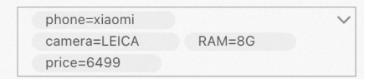 Use the following configuration:
"column": [ { "name": "_tags", }, { "name": "price", "is_timeseries_tag":"true", }, ],-
The first column configuration imports
["phone=xiaomi","camera=LEICA","RAM=8G"]as a whole into the tags field. -
The second column configuration imports
price=6499individually into the tags field.
-
-