This topic answers a frequently asked question about alert notifications in the intelligent monitoring system in Operation Center.
Why didn't I receive an alert notification after a task failed?
The phone number or email address of the alert recipient configured in the intelligent monitoring system is likely invalid.
When a DataWorks task fails, the system sends an alert to the phone number and email address configured in the intelligent monitoring system. If those are invalid, the system falls back to the recipient configured on the Manage Contacts page — the same contact who receives account-level notices such as overdue payment, suspension, and imminent release notifications. To access the Manage Contacts page, click Manage Contacts in the upper-right corner of the Common Settings page using your Alibaba Cloud account. In this case, the alert recipient you configured in the intelligent monitoring system does not receive the alert.
Before you troubleshoot: Confirm that your scenario matches this cause by checking whether the phone number and email address of your alert recipient in the intelligent monitoring system are valid.
To verify and update the contact information:
-
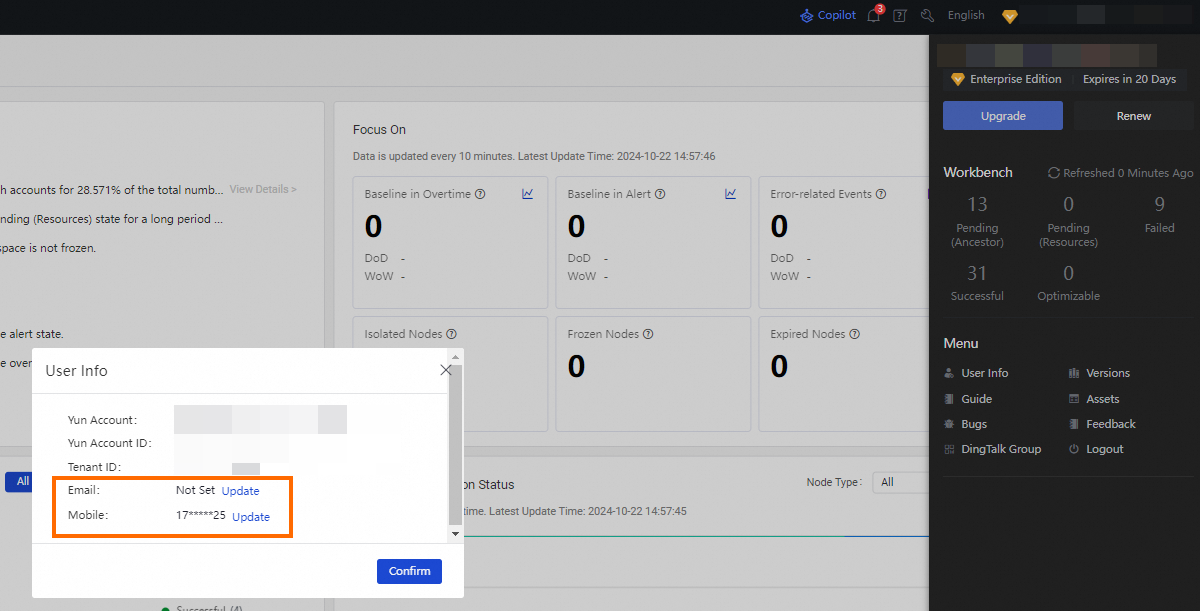
In the upper-right corner of the Operation Center page, click your account name.
-
In the panel that appears, click User Info in the Menu section.
-
In the User Info dialog box, view or update the email address and phone number.
If a RAM user is used, only the Alibaba Cloud account to which the RAM user belongs can change the email address and phone number of the RAM user.