Alibaba Cloud provides data security solutions for enterprise users running DataWorks on E-MapReduce (EMR), covering user authentication, data permission management, and big data job management. DataWorks on EMR addresses these needs through three layered security capabilities: user authentication with OpenLDAP, data permission management with Ranger or DLF-Auth, and node access control through Workspace and Security Center. This topic describes each capability and walks through a complete setup using Lightweight Directory Access Protocol (LDAP) and Data Lake Formation (DLF) DLF-Auth.
Authentication
DataWorks on EMR uses OpenLDAP for user authentication. OpenLDAP integrates with the following services, so only authenticated users can query data through them:
Hive
Spark ThriftServer
Kyuubi
Presto
Impala
Data permission management
Two components are available for managing data permissions in EMR clusters: Apache Ranger and DLF-Auth.
Choose a permission manager
| Ranger | DLF-Auth | |
|---|---|---|
| Type | Open source | Alibaba Cloud (provided by Data Lake Formation) |
| Manages permissions on | Hadoop Distributed File System (HDFS), YARN, Hive databases, Hive tables | Databases, tables, columns, functions |
| Where to configure | Ranger console (deployed in the EMR cluster) | DataWorks Security Center |
If you use Object Storage Service (OSS) for storage, configure OSS permissions separately in the OSS console. DataWorks observes permission settings from Ranger, DLF, and OSS.
Enable Ranger
Start Ranger from within your EMR cluster. Once enabled, Ranger manages permissions on HDFS, YARN, Hive databases, and Hive tables.
For details on DLF-Auth, see DLF-Auth and Manage permissions on DLF
Node access control
DataWorks manages big data computing nodes through two modules: Workspace and Security Center.
Workspace — controls who can access and modify nodes:
Add members to a workspace
Configure visibility and maintainability settings for big data nodes
For details, see Workspace overview.
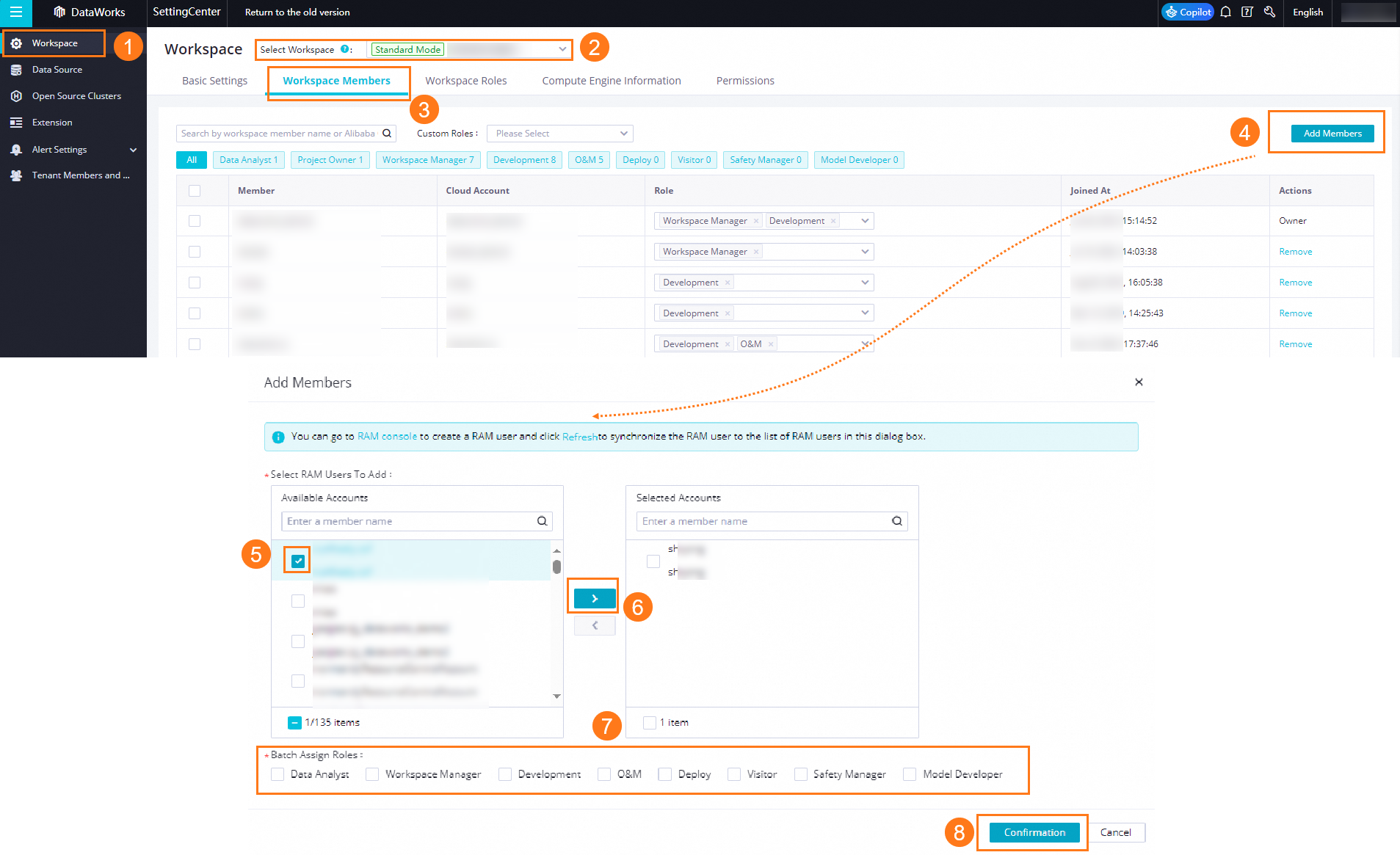
Security Center — controls data access:
Configure access permissions on DLF tables
For details, see Manage permissions on DLF.
Cluster registration and account mapping
When you register an EMR cluster to a DataWorks workspace, specify the identity used to run EMR tasks in production. You can specify a task owner, an Alibaba Cloud account, or a RAM user.
After registration, configure account mappings to link workspace members to their corresponding EMR cluster accounts. The mapped account is used when a node runs in the cluster.
For details, see Register an EMR cluster to DataWorks.
Implement complete data permission management
When multiple users share the same Hadoop account, users and data permissions are not effectively managed. Using LDAP authentication together with Ranger or DLF-Auth solves this: each user gets a named account, and data permissions are granted explicitly per account.
The following steps use LDAP + DLF-Auth as an example.
Set up LDAP + DLF-Auth
Enable OpenLDAP. In the EMR cluster, select the OpenLDAP service, start it, and add user accounts for each team member.
Enable LDAP authentication for a service. Select a service such as Hive, and enable OpenLDAP for it. Verify that users can log in with their LDAP credentials and run jobs as expected.
Register the EMR cluster. Go to Management Center > Cluster Management. When registering your EMR cluster to a DataWorks workspace, set the Default Access Identity to match your access model (task owner, Alibaba Cloud account, or RAM user). For details, see Register an EMR cluster to DataWorks.
Map workspace accounts to LDAP accounts. On the Cluster Management page, find your cluster and click the Account Mappings tab. Click Edit Account Mappings and map each Alibaba Cloud account or RAM user to the corresponding LDAP account.
Grant data permissions in Security Center. Go to DataWorks Security Center and configure DLF permissions for each account. Make sure every account that runs nodes has the required permissions—nodes will fail if the executing account lacks access to the data.