Configure scheduling dependencies for nodes across different workflows and workspaces to ensure a downstream workflow runs only after its upstream workflow completes successfully.
Background information
In DataWorks, a node dependency is created by configuring an upstream node's output as the input for a downstream node. The same approach applies across different workflows and workspaces. For more information, see Guide for configuring scheduling dependencies.
Configure a cross-workflow scheduling dependency
In a cross-workflow dependency, a downstream workflow node depends on the output of an upstream workflow node. This example demonstrates the setup for a workflow with multiple branch results.
For a workflow with multiple branch results, use a zero load node to aggregate the outputs from all branch nodes. Then, manually set this node's output as the input for the downstream workflow's root node. This establishes the dependency.
Note
- A zero load node is a type of control node that runs without producing data. It is typically used either as a workflow's root node to manage overall scheduling (such as its start time), or as an output node to aggregate results from branch nodes.
- If a workflow has multiple branch results, create a zero load node, for example,
workflow_end_zero_load_node. Configureworkflow_end_zero_load_nodeto depend on the outputs of the upstream branch nodes. The workflow is considered complete only whenworkflow_end_zero_load_noderuns successfully.
To create a cross-workflow dependency for a workflow with multiple branch results, use zero load nodes to configure upstream and downstream dependencies as shown below.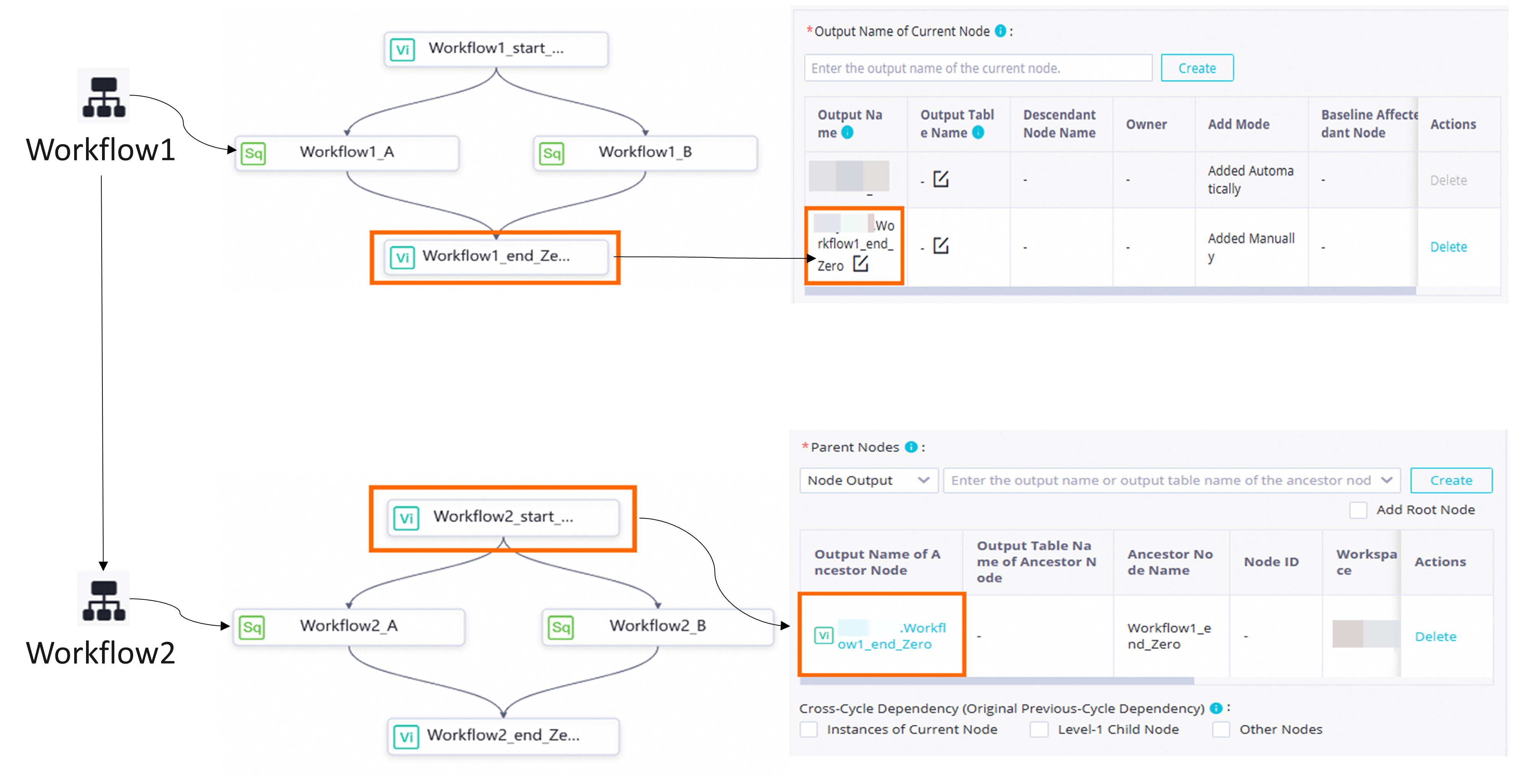
- Create an upstream workflow (workflow 1) and a downstream workflow (workflow 2).
- In the upstream workflow 1, create the following zero load nodes:
workflow1_start_zero_load_node: The start node for the branch nodes in upstream workflow 1.workflow1_end_zero_load_node: The output node that aggregates the outputs from the branch nodes in upstream workflow 1.
- In the downstream workflow 2, create the following zero load nodes:
workflow2_start_zero_load_node: The start node for the branch nodes in downstream workflow 2.workflow2_end_zero_load_node: The output node that aggregates the outputs from the branch nodes in downstream workflow 2.
- Dependency between the upstream and downstream workflows: Configure the output of
workflow1_end_zero_load_nodeas the input ofworkflow2_start_zero_load_node. This establishes the cross-workflow dependency.
Note In DataWorks, you create a dependency by configuring an upstream node's output as the input for a downstream node. You can configure a node dependency in three ways: drag-and-drop, manual configuration, or Auto Parse. In this example, the dependency is created manually: In the Parent Nodes section for the downstream node
workflow2_start_zero_load_node, you manually enter the output of the upstream node workflow1_end_zero_load_node to create the dependency.- To create a workflow, see Create a periodic workflow.
- To create a zero load node, see Zero load node.
- To configure a scheduling dependency, see Configure same-cycle scheduling dependencies.
Configure a cross-workspace scheduling dependency
DataWorks supports dependencies between workspaces in the same region. The configuration is the same as a standard scheduling dependency. For instructions, see Configure same-cycle scheduling dependencies.
Note Some older workspaces may not support dependencies from a standard mode workspace to a basic mode one. If you encounter this issue, submit a ticket for assistance.