The branch node is a control node in DataStudio that creates branching logic in a workflow. This topic explains how to use it to run a task at a specific time.
Background
You cannot use a cron expression to schedule a node to run only on the last day of each month. The branch node lets you implement this logic with a switch-case model. For more information, see branch node.
Branch nodes and other control nodes
On the DataStudio page, you can find the control nodes supported by your DataWorks edition, such as the assignment node, branch node, and merge node.
The following list describes the function of each control node:
-
Assignment Node: An assignment node passes its output to downstream nodes. For more information, see assignment node.
The assignment node uses the dependency feature of the node context. In addition to constant and variable contexts, an assignment node supports custom context outputs. DataWorks captures the execution result of an assignment node and sets the
outputsparameter to this result. Downstream nodes can then reference this value. -
Branch Node: Determines which downstream nodes to execute. For more information, see branch node.
The branch node uses the input and output features of DataWorks dependencies. For more information, see Configure same-cycle scheduling dependencies.
For a standard node, the output is a globally unique string. When you set up a dependency, you can configure a downstream node using this string as its input.
For a branch node, however, you can select a condition-specific output when configuring its downstream dependencies. A downstream node of a branch node is therefore associated with that branch's condition:
-
If the condition is met, the downstream nodes that depend on the corresponding output run.
-
Downstream nodes that depend on outputs for unmet conditions are set to dry run.
-
-
Merge Node: A merge node is always scheduled to run, regardless of the status of its upstream nodes.
For branches that are not selected by the branch node, DataWorks sets all node instances in those branches to dry run. A node instance is set to dry run if any of its upstream instances are in a dry run state.
You can use a merge node in DataWorks to stop the dry run state from propagating downstream. A merge node instance runs successfully regardless of how many of its upstream instances are in a dry run state. It does not set its own downstream nodes to dry run.
The following figure shows the logical flow in a dependency tree that contains branch nodes.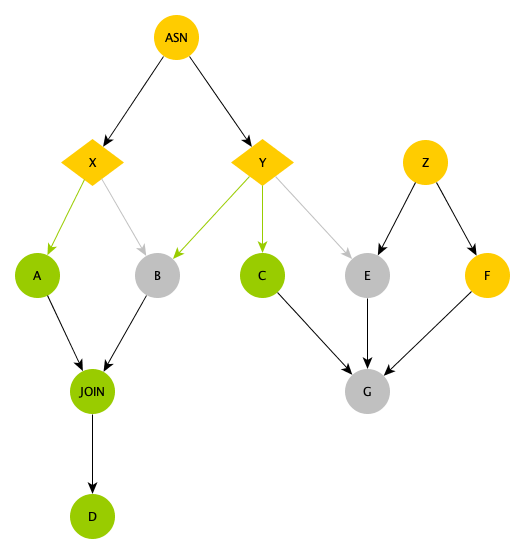
-
ASN: An assignment node that performs complex calculations. Its output determines which branch condition is met.
-
X and Y: Branch nodes that are downstream of the ASN assignment node. They select branches based on the output of ASN. As shown by the green lines in the figure, node X selects the left branch, and node Y selects the two leftmost branches:
-
Nodes A and C run because they are downstream of selected outputs from both X and Y.
-
Node B is set to dry run. Although it is downstream of a selected branch of node Y, it is not on a selected branch of node X.
-
Node E is set to dry run because it is not on a selected branch of node Y, even though it has an upstream standard node Z.
-
Node G is set to dry run because its upstream node E is in a dry run state, even though nodes C and F run.
-
When does the dry run state stop propagating downstream?
The JOIN node is a merge node. It stops the dry run state from propagating. Because node D is downstream of the JOIN node, the dry run state from node B is blocked, and node D runs.
-
Using a branch node together with other control nodes, you can create a workflow where a specific node runs only on the last day of each month.
Use a branch node
-
Define node dependencies.
-
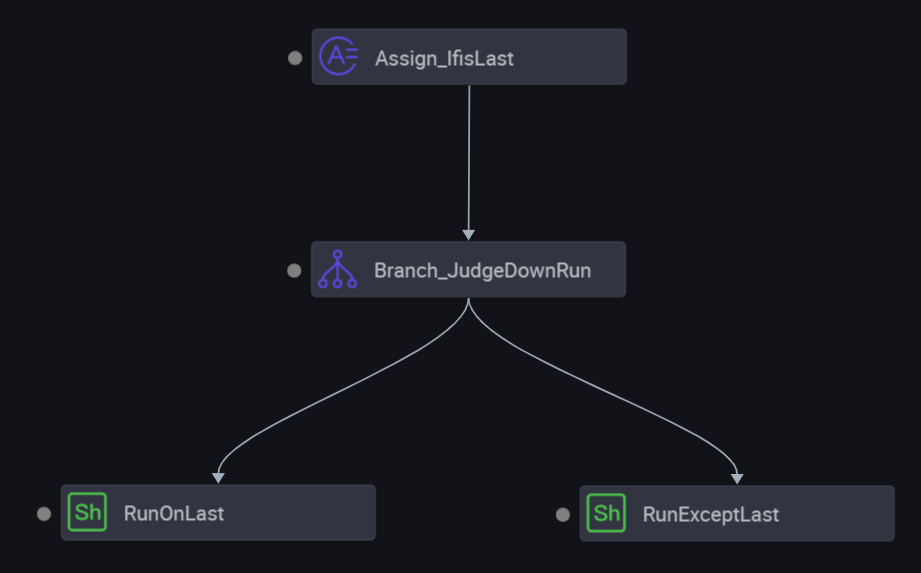
The root assignment node uses the scheduling time SKYNET_CYCTIME to determine if the current day is the last day of the month. If it is, the node outputs 1. Otherwise, the node outputs 0. This output is captured by DataWorks and passed to the downstream.
-
The branch node uses the output of the assignment node to define its branches.
-
Two Shell nodes, downstream of the branch node, execute different branch logic.
-
-
Define the assignment node.
When you create an assignment node, it includes a built-in
outputsparameter. You can write code for an assignment node in SQL, Shell, or Python.-
For SQL nodes, DataWorks captures the result of the last
SELECTstatement as the value of theoutputsparameter. -
For Shell and Python nodes, DataWorks captures the last line of the standard output as the value of the
outputsparameter.
This example uses Python for the assignment node. The code and scheduling property settings are described below.
-
Code
import os import time dueTimeStr = os.environ['SKYNET_CYCTIME'] # 20190104000200 dueTime = time.strptime(dueTimeStr[:8], "%Y%m%d") dueMonth = time.strftime("%m", dueTime) nextDueTimeStamp = int(time.mktime(dueTime))+3600*24 nextDueTime = time.localtime(nextDueTimeStamp) nextDueMonth = time.strftime("%m", nextDueTime) print ('Current month: %s, next month: %s') % (dueMonth, nextDueMonth) if nextDueMonth == dueMonth: print 0 else: print 1 -
Configuration of scheduling properties
The Node output parameters of the assignment node includes an
outputsparameter by default. The parameter type is Variable and its value is${outputs}, which is determined at runtime. Theoutputsparameter is the core capability of the assignment node. It passes the execution result of the assignment node to downstream branch nodes.
-
-
Define the branches.
You can use Python expressions to define conditions for a branch node. Each condition is bound to an output. When a condition is met, the downstream nodes that depend on the corresponding output are executed. All other downstream nodes are set to dry run.
-
Scheduling configuration
In the scheduling configuration of the branch node, the input parameter
isLastin Node context gets its value from the output of the assignment node (isLast=1 on the last day of the month, isLast=0 otherwise). The output parameteroutputsis set to${outputs}, which is determined at runtime. This node's outputs are bound to two downstream nodes: Run only on the last day and Run on days other than the last day. The branch direction is determined by the value ofisLast. -
Branch configuration
In Branch logic definition, two branches are defined based on the
isLastvariable:-
Condition
${isLast}==0, bound to node outputautotest.last_day_cond.not_last, indicating this branch is used when the current day is not the last day of the month. -
Condition
${isLast}==1, bound to node outputautotest.last_day_cond.is_last, indicating this branch is used when the current day is the last day of the month.
-
-
Outputs bound to conditions generated in the scheduling configuration
In This node's outputs, the system automatically adds an output for each branch condition with the same name as the condition, for example
autotest.last_day_cond.is_lastandautotest.last_day_cond.not_last. The output table shows the downstream node name, downstream node ID, owner, and source information for each output.
-
-
Attach task nodes to different branches.
The branch node in this example has three outputs. You can select any output as an input for a downstream node. Because each output corresponds to a condition, choose carefully.
-
Dependency for the node that runs on the last day of the month
In the Scheduling dependencies panel of the Run only on the last day node, set Automatic parsing to Yes. In Upstream dependencies, manually add a dependency with the parent node output name
autotest.last_day_cond.is_last(corresponding to the node: Branch_determine downstream execution based on last day). This attaches the node to the last-day branch and ensures it only runs on the last day of each month. -
Dependency for the node that runs on other days of the month
In the Scheduling dependencies configuration of the Run on days other than the last day node, manually add the parent node output name
autotest.last_day_cond.not_last. This attaches the node to the "non-last day" branch of the branch node Branch_determine downstream execution based on last day, so that it is only scheduled on non-last days of the month.
-
-
Verify the result.
After you configure the nodes, commit and deploy them. Then, you can backfill data to test the workflow. Set the data timestamps to 2018-12-30 and 2018-12-31, which correspond to scheduling times of 2018-12-31 and 2019-01-01, respectively. The first backfill instance triggers the last-day logic, and the second instance triggers the non-last-day logic. The following sections show the results.
Data timestamp: 2018-12-30 (scheduling time: 2018-12-31)
-
Branch selection result for the branch node
2019-01-04 23:26:19.867 INFO - The following profiles are active: dev 2019-01-04 23:26:21.239 INFO - Started ControllerWrapper in 2.072 seconds (JVM runni... python output: False 2019-01-04 23:26:21.419 INFO - ... 2019-01-04 23:26:22.424 INFO - not meet the condition! condition:1==0 python output: True 2019-01-04 23:26:22.435 INFO - ... 2019-01-04 23:26:23.436 INFO - meet the condition. condition:1==1 2019-01-04 23:26:23.437 INFO - ===>Output Result: autotest.last_day_cond.is_last 2019-01-04 23:26:24.070 INFO - cost Time: 2 2019-01-04 23:26:24.071 INFO - job finished! -
The node for the last day runs.
-
The node for other days is set to dry run.
Data timestamp: 2018-12-31 (scheduling time: 2019-01-01)
-
Branch selection result for the branch node
The branch node execution log shows the condition evaluation process: the condition
0==0is met (output: True), the condition0==1is not met (output: False), and the final output result is===>Output Result: autotest.last_day_cond.not_last, which means the non-last-day branch was selected. -
The node for the last day is set to dry run.
-
The node for other days runs.
-
Summary
Key takeaways for using branch nodes:
-
DataWorks captures the result of the last
SELECTstatement (for SQL) or the last line of the standard output (for Shell and Python) as an assignment node's output. Downstream nodes can reference this output. -
Each branch node output corresponds to a condition. When you configure a downstream dependency, you must select the output that matches the desired condition.
-
Unselected branches are set to dry run, and this state propagates downstream until a merge node stops it.