This topic provides answers to some frequently asked questions about node freezing and unfreezing.
- What happens after I freeze or unfreeze an auto triggered node or an auto triggered node instance?
- What happens to data backfill instances and test instances after I freeze an auto triggered node?
- How do I rerun an unfrozen auto triggered node instance?
- Why is a frozen auto triggered node run as scheduled?
- How do I view the users who performed operations on a node and view the operations that are performed?
What happens after I freeze or unfreeze an auto triggered node or an auto triggered node instance?
- Freeze and unfreeze an auto triggered nodeEach night, the system generates auto triggered node instances for the next day based on the corresponding auto triggered node. When you freeze an auto triggered node, its subsequent instances are also frozen. This also blocks any dependent descendant instances from running.Note On the day you freeze an auto triggered node, auto triggered node instances already generated for that day run as scheduled. The instances generated for the following day will be frozen, blocking all descendant instances from running.
- In Operation Center: In the left-side navigation pane, go to Cycle Task > Auto Triggered Nodes. In the node list, select the target node, and then click Pause (Freeze) or Resume (Unfreeze) from the drop-down menu in the Actions column or from the batch operation bar at the bottom.
- In DataStudio: On the Schedule panel of a node, the Recurrence section has three options: Normal, Skip Execution, and Dry Run. When an auto triggered node is frozen, its Recurrence parameter is set to Skip Execution. To unfreeze the node, set this parameter to Normal.
Note After you select Skip Execution or Normal for the Recurrence parameter in DataStudio, you must commit and deploy the node again to freeze or unfreeze the auto triggered node in the production environment. - Freeze and unfreeze an auto triggered node instanceFreezing an auto triggered node instance affects only that specific instance. If you unfreeze an instance while its auto triggered node remains frozen, instances generated for the next day will still be frozen. On the Operation Center > Cycle Task > Auto Triggered Node Instances page, you can freeze a single instance by selecting Pause (Freeze) from the More drop-down menu. You can also perform batch operations by using the Pause (Freeze) and Resume (Unfreeze) buttons in the bottom action bar.Important Freeze and unfreeze operations are performed manually. If you encounter issues, check the operation log.
What happens to data backfill instances and test instances after I freeze an auto triggered node?
A data backfill instance and a test instance are snapshots that are generated for an auto triggered node. If an auto triggered node is frozen, the generated data backfill instance and test instance are also frozen.
How do I rerun an unfrozen auto triggered node instance?
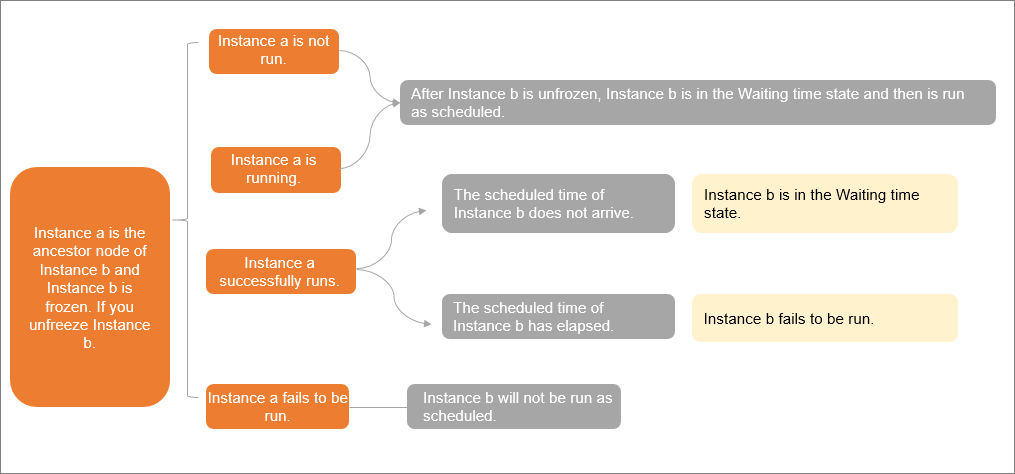
An unfrozen auto triggered node instance is run based on the scheduling time that you specify in the Schedule section of the Properties tab, and the status of the ancestor nodes of the auto triggered node that generates the instance.
- Scenario 1: If instance A has not run, instance B enters a waiting state and runs at its scheduled time.
- Scenario 2: If instance A is running, instance B enters a waiting state and runs at its scheduled time.
- Scenario 3: If instance A has run successfully:
- If the scheduled time for instance B has not yet arrived, it enters a waiting state.
- If the scheduled time for instance B has already passed, the instance fails. To run the instance, click Rerun in the Actions column for instance B. After the instance runs successfully, it triggers its descendant instances to run according to their dependencies.
- Scenario 4: If instance A fails, it does not trigger instance B to run. For information about how to handle the failure of instance A, see Node does not run.
Why is a frozen auto triggered node run as scheduled?
- Problem description
A frozen auto triggered node is run as scheduled.
- Causes and solutionsEvery night, the system generates auto triggered node instances that are scheduled to run on the next day for an auto triggered node and schedules the auto triggered node instances. You can go to the Patch Data or Test Instance page in Operation Center and click Patch Data or Test in the Actions column of the auto triggered node. The system generates a data backfill instance or a test instance based on the snapshot information of the current auto triggered node. You must take note of the following points based on the relationships between auto triggered nodes and auto triggered node instances and between test instances and data backfill instances:
- Check whether the node that you freeze is an auto triggered node.
- The freeze operation that is performed on an auto triggered node does not take effect on the auto triggered node instances that are scheduled to run before the time at which you freeze the auto triggered node.
- The auto triggered node instances that are scheduled to run on the same day when you freeze the auto triggered node can be run as expected.
- The freeze operation does not take effect on data backfill instances and test instances that are generated before the freeze operation.
How do I view the users who performed operations on a node and view the operations that are performed?
- View the operation log for an instance or nodeYou can view the operation log on the Auto Triggered Task or Auto Triggered Node Instance pages in Operation Center. Go to the Operation Center > Cycle Task > Auto Triggered Node Instances page. Select a target instance and click the Operation Log tab on the right to view its history. The table includes the Time, Operator, and Operation columns, which record details for operations such as freezing an instance, creating a data backfill workflow, recovering a node, and changing node ownership.
- View the users and operations based on the comparison results of versions of an auto triggered node:
If you change a node and commit and deploy the node, but the node change operation is not recorded on the Operation Log tab of the Cycle Task or Cycle Instance page in Operation Center, you can compare the current version of the node on the Versions tab of the DataStudio page with the version of the node in the production environment to obtain the details about version changes. For more information, see View node versions.
- View the users and operations on the Operating Record page in Operation Center:
On the Operating Record page, a workspace member who is assigned the O&M or Workspace Manager role can view the operations that are performed by the members in the workspace on pages of Operation Center in the production environment. For more information, see View operation history.