This topic outlines the configuration items for the skybox layer.
Chart style
The skybox layer, a 3D Earth subcomponent, allows for independent style configurations such as box size and mapping effects. It renders a three-dimensional box model with mapping effects, enhancing the user's immersive experience. 
Style panel
-
Search Configuration: Click the Style icon
 in the upper right corner of the panel to enter the name of the configuration item you wish to locate in the search field. The system supports fuzzy matching. For more information, see Search configuration item.
 px/nx/py/ny/pz/nz: These six items specify the mapping addresses for the box model's six faces within the coordinate system. Enter the mapping URL manually to define the box model style.
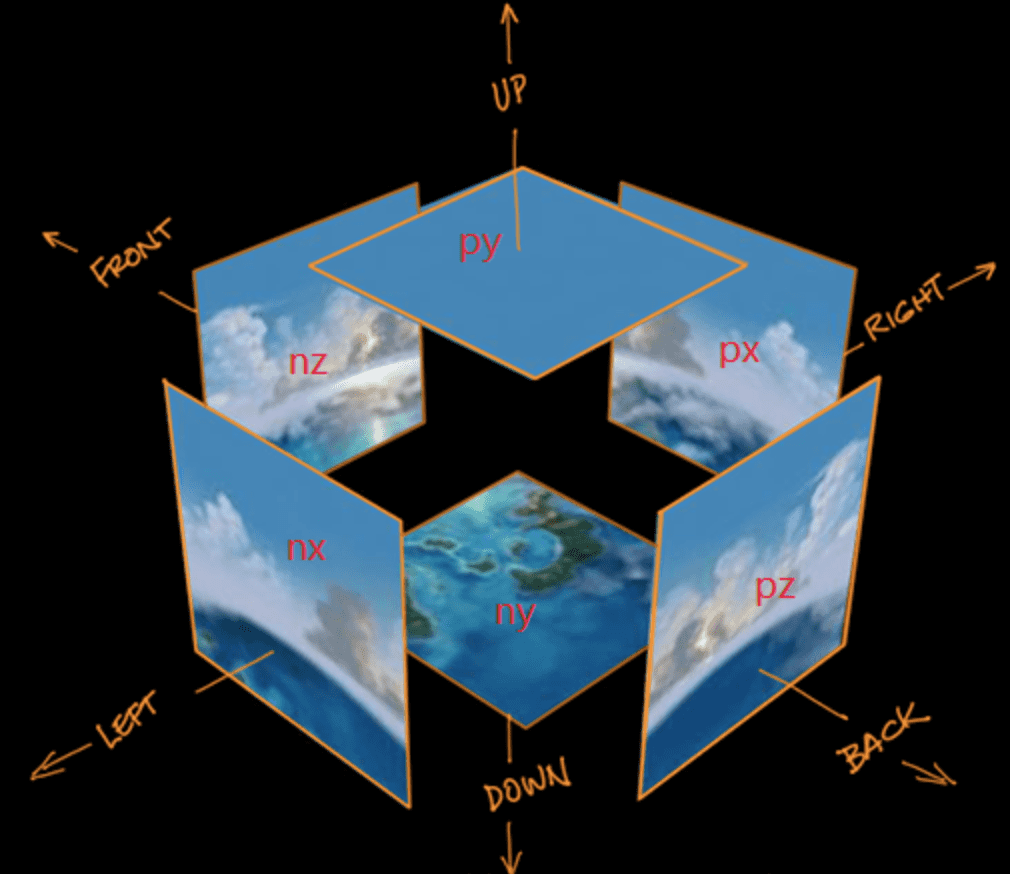
Tiles Per Row: Defines the horizontal repetition count of the mapping.
Tiles Per Column: Sets the vertical repetition count of the mapping.
Size: Indicates the mapping size, with pixels (px) as the default unit.
Data source panel
Data configuration is not required for this component.
Advanced panel
There are no interaction occurrences for this component.
Blueprint interaction
Click the
 icon in the upper left corner to access the Blueprint page.
In the Layer Node tab, add the component to the main canvas.
Examine the blueprint's configuration parameters.

Event: None.
Action
Action
Description
Switch Visibility
Toggle the component's visibility. No parameters required.
Show
Display the component. For more information, see the referenced document.
{
    "animationDuration":1000
}
Hide
Conceal the component. For more information, see the referenced document.
{
    "animationDuration":1000
}
Update Component Configuration
Update the component's style configuration dynamically. Begin by selecting Copy Configuration To Clipboard from the component's Style panel to obtain the configuration data. Then, modify the style field values as needed in the data processing node on the blueprint editor configuration page.