Add an Oracle data source to DataV and configure the connection parameters.
Prerequisites
An Oracle data source is prepared.
You must add the IP addresses for the corresponding region to the whitelist of your data source. This ensures that DataV can access your database. For more information, see Configure a database whitelist.
Limits
This feature is available only in DataV Enterprise Edition and later versions.
Procedure
Access the DataV console.
On the Workbench page, click in the navigation pane on the left. On the Data Source page, click New Data Source.
-
From the Type list, select Oracle.
-
Enter the database information.
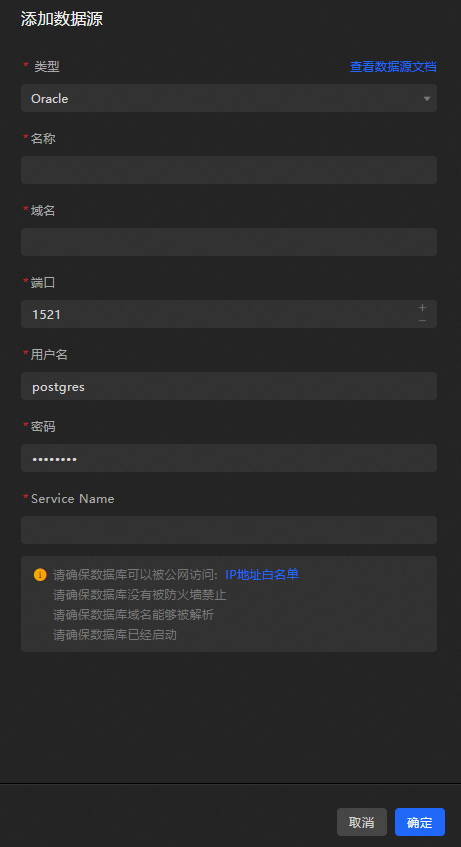
Parameter
Description
Name
Custom display name for the data source.
Domain Name
The domain name or IP address of the database.
ImportantThe address must be accessible to the DataV server over the Internet or through the Alibaba Cloud internal network in certain regions.
Port
The database port number.
Username
The username used to connect to the database.
Password
The password used to connect to the database.
Service Name
The Oracle service name for the database.
After you enter the information, DataV automatically tests the connection.
-
After the connection test succeeds, click OK.
What to do next
After you obtain the raw data, see Configure a widget data source to adapt the data for your widgets.
FAQ
For more information, see FAQ about data source configuration and usage.