Define and manage ID types associated with platform entities, such as phone numbers and email addresses for consumers and merchants.
Prerequisites
Before creating an ID, ensure that the necessary entities are already established. For more information, see Create an entity and .
ID management overview
The ID management page consists of the feature area and the ID list.
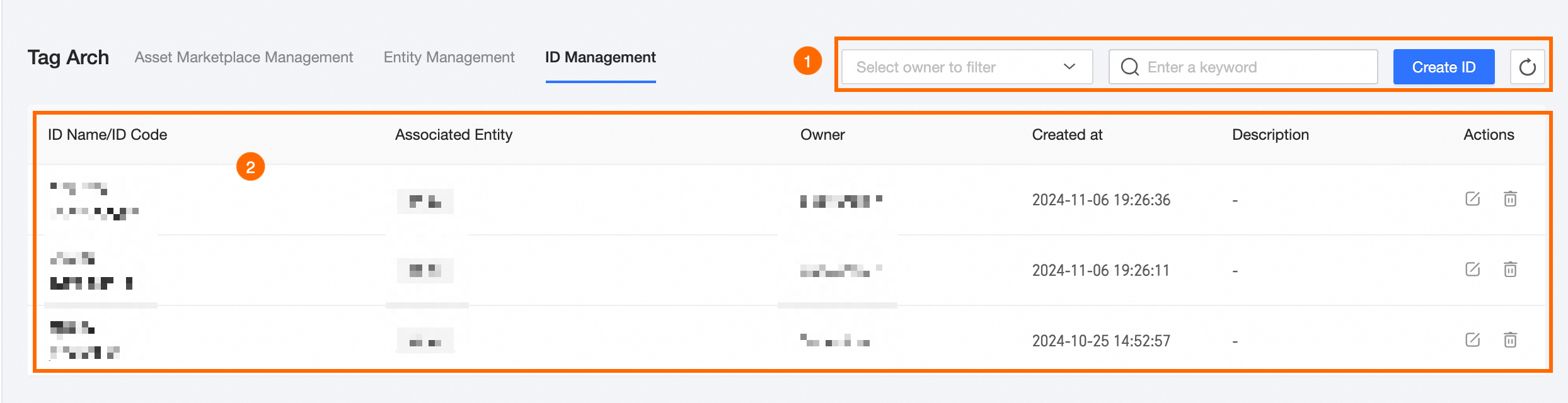
|
Area |
Description |
|
①Feature area |
|
|
②ID list |
The ID list shows details such as ID Name/code, Associated Entity, Owner, Created At, Description, and available Actions. You can perform the following operations:
|
 to update the ID list.
 to edit an ID. The ID code cannot be modified.
 to remove an ID. You cannot delete an ID that is used by downstream resources such as tags, audience groups, or behavior relationships.
Create an ID
-
Navigate to the Dataphin home page and select Planning followed by Tag Architecture from the top menu bar.
-
To access the Create ID dialog box, follow these steps:
Select ID Management and then Add ID in sequence.
-
In the Create ID dialog box, fill in the necessary ID information.
Parameter
Description
ID name
The ID name can include Chinese and English characters, numbers, underscores, or hyphens, up to 64 characters.
ID code
A unique identifier that starts with a letter and can contain lowercase letters, numbers, and underscores, up to 64 characters.
Owner
Select the ID owner from the list of active Dataphin members.
Entity
Select the entity to associate with the ID.
NoteAn ID can be linked to multiple entities.
Description
A brief description of the ID, up to 1,000 characters.
-
To finalize the ID creation, click OK.
What to do next
After creating an ID, you can use it with the corresponding entity for tag development. For more information, see Offline tags.