After you create a public calendar, you can create tags for it.
Create a tag
On the Dataphin homepage, in the top menu bar, select Plan > Public Definitions.
On the Public Definitions page, click the Public Calendar tab.
In the public calendar list, find the target public calendar and click New Tag on the right to open the New Tag panel.
NoteYou can also click a day on the calendar and then click the
 icon in the dialog box that opens to quickly create a tag for that day.
In the New Tag dialog box, configure the tag's parameters.
Parameter
Description
tag name
The naming rules are as follows:
The name can contain Chinese characters, English letters, digits, underscores (_), and hyphens (-).
The name cannot exceed 32 characters in length.
tag code
The unique identifier for the tag, used as a parameter value when a task references the tag. The code can contain only letters, digits, and underscores (_). It cannot exceed 32 characters in length.
description (Optional)
A brief description of the tag.
recurrence rule
The tag applies to any date that meets the criteria of a rule. You can create up to 5 rule groups. The logical relationship between multiple rule groups is OR.
recurrence period: You can select specified date, Day, Week, Month, Year, fiscal year, or fiscal month.
specified date: Applies the tag to specific dates. Click Add Dates to select multiple dates or a date range. You can also click Batch Input to enter multiple dates in the
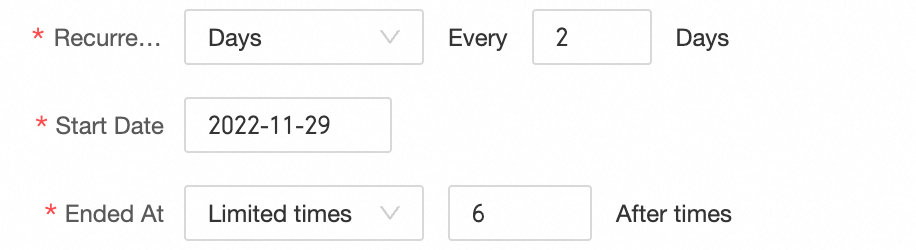
YYYY-MM-DDformat, separated by line breaks, commas, semicolons, or spaces. You can add up to 36,500 dates. Selected dates are grouped by year or month and displayed in a list. You can remove a single date, all dates in a month or year, or clear all selected dates.Day: Sets a daily recurrence. You can configure the schedule to repeat every N days from a start date. The supported end conditions are Repeat Indefinitely, Limited Occurrences, and End Date.
For example, the configuration in the following figure indicates that the tag is applied every 2 days starting from 2022-11-29 and ends after 6 occurrences.
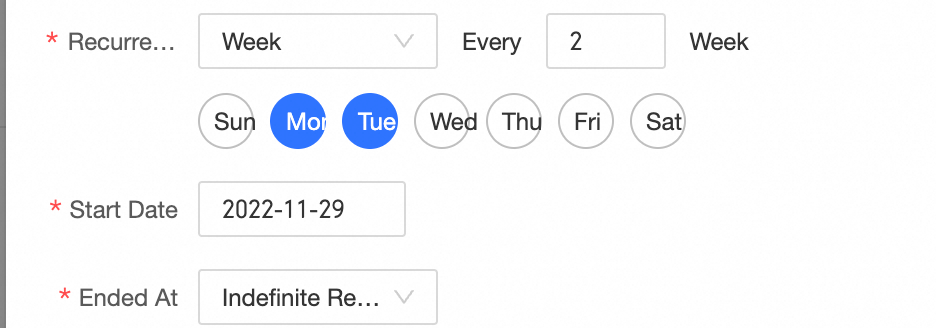
Week: On a weekly basis, you can repeat the task every N weeks on selected days, starting from a specific date. The end condition supports indefinite repetition, a limited number of occurrences, or an end date.
For example, the configuration in the following figure indicates that the tag is applied every 2 weeks on Mondays and Tuesdays, starting from 2022-11-29, and repeats indefinitely.
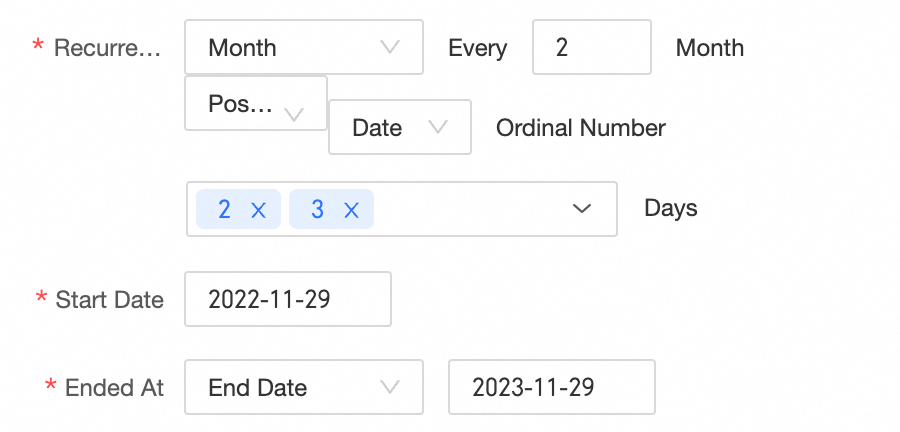
Month: On a monthly basis, this option allows you to set the schedule to repeat every N months from a start date on specific days of the month or on selected days of the Nth week. You can also count the days from the beginning or the end of the month. The recurrence can be set to repeat indefinitely, end after a specific number of occurrences, or end on a specific date. For example, the configuration in the following figure means that the schedule starts on 2022-11-29, repeats every 2 months on the second-to-last and third-to-last days of the month, and ends on 2023-11-29.
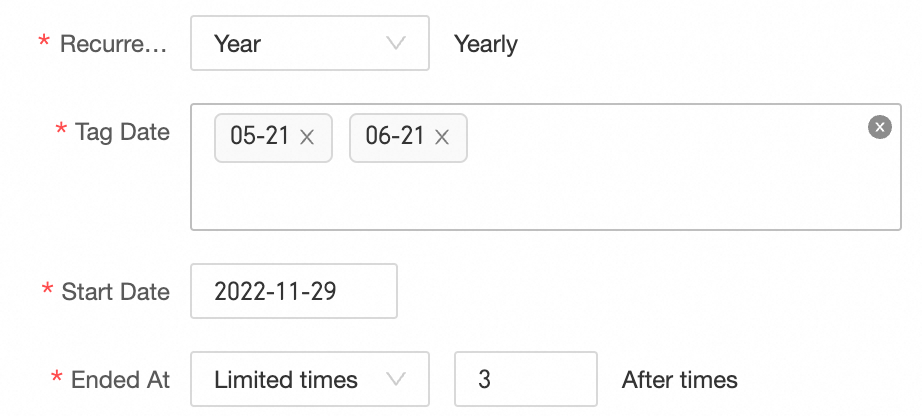
Year: Repeats on a yearly basis, which applies the tag on the specified dates each year. The repetition can be configured to end by selecting Repeat indefinitely, A specific number of times, or End date. For example, the figure below shows that starting from November 29, 2022, the tag is created on May 21 and June 21 every year, and repeats 3 times.
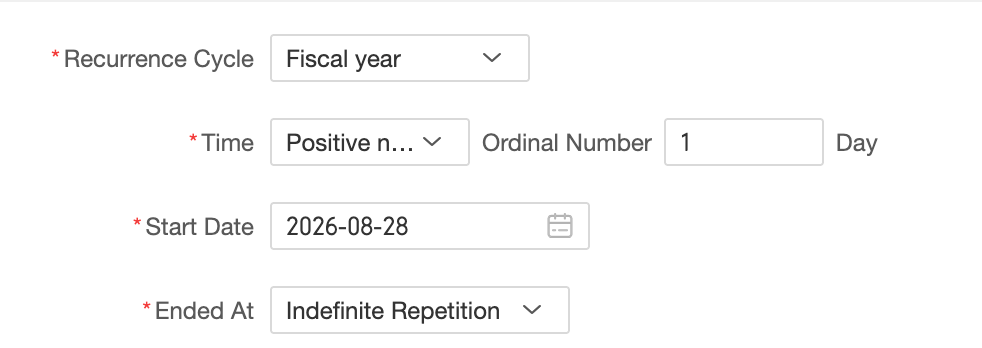
fiscal year: Sets a recurrence by fiscal year. You can set the tag to apply on the Nth day (1-371) of each fiscal year, counting either forward or backward. The end condition supports Repeat Indefinitely, Limited Occurrences, and End Date. For example, the configuration in the following figure indicates that the tag is applied on the 1st day (counting forward) of each fiscal year, starting from 2026-08-28, and repeats indefinitely.
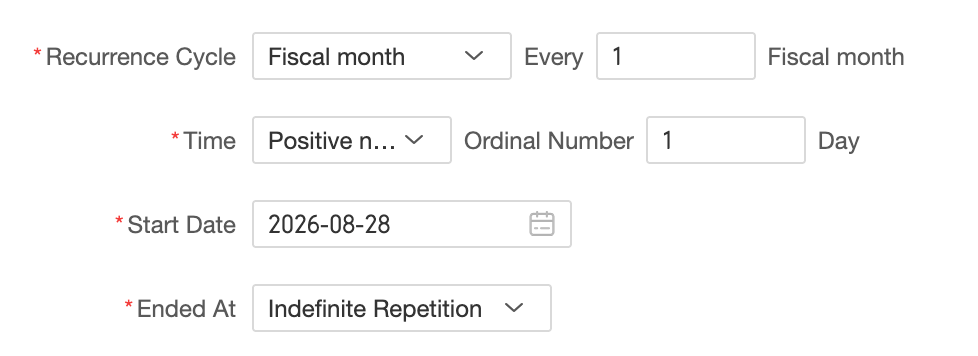
fiscal month: Sets a recurrence by fiscal month. You can set the tag to apply on the Nth day of every n fiscal months (where n is from 1 to 13), counting either forward or backward. The day can be from 1 to x, where x is 31 for custom financial calendars, 28 for 4*13 financial calendars, or 42 for 4-4-5/5-4-4/4-5-4 financial calendars. The end condition supports Repeat Indefinitely, Limited Occurrences, and End Date. For example, the configuration in the following figure indicates that the tag is applied on the 1st day (counting forward) of every fiscal month, starting from 2026-08-28, and repeats indefinitely.
NoteThe recurrence period for the first rule group is always set to specified date, and it cannot be deleted.
The fiscal year and fiscal month recurrence periods are available only for a financial calendar.
exception date (Optional)
Dates to explicitly exclude from the tag. Exception dates take precedence over recurrence rules, meaning the tag is never applied to an exception date. The procedure for adding and deleting exception dates is the same as that for the specified date recurrence rule.
Click Preview to see which dates the tag will apply to. Matching dates appear highlighted.
Click OK to create the tag.
Manage tags
In a public calendar, click a tag to open its management panel.
Actions | Description |
View tag details | In the tag panel, you can view the tag's description, recurrence rule, exception date, and reference count. |
Edit | Click the Edit icon to modify all its parameters except for the tag code. For parameter descriptions, see the table above. |
Clone | Click the Clone icon to create a new tag based on the current tag's recurrence rules and exception dates. The new tag will have an empty tag name and tag code. You can then configure the new tag as needed. For parameter descriptions, see the table above. |
Delete | Click the Delete icon. In the dialog box that appears, select a Deletion Scope. You can choose to Cancel tag for current date only or Delete this tag from calendar.
|