All Products
Search
Document Center

Dataphin:Custom approval system integration interface

Last Updated:Jun 23, 2026

Dataphin BPMS supports integration with third-party approval workflows. This topic describes the available API capabilities, integration process, and sample use cases.

Prerequisites

You must have configured the approval settings in the Dataphin system. For instructions, see approval settings. O&M tenants can find this setting under approval settings > Select Approval System > Other.

Approval API

Important
  • {url}: The integration endpoint for the third-party approval workflow. The URL for submitting approval requests is http(s)://{url}.

  • accessToken: The credential for server-side API calls. This token is either automatically generated on the Dataphin page, or you can generate it manually and enter it in Dataphin.

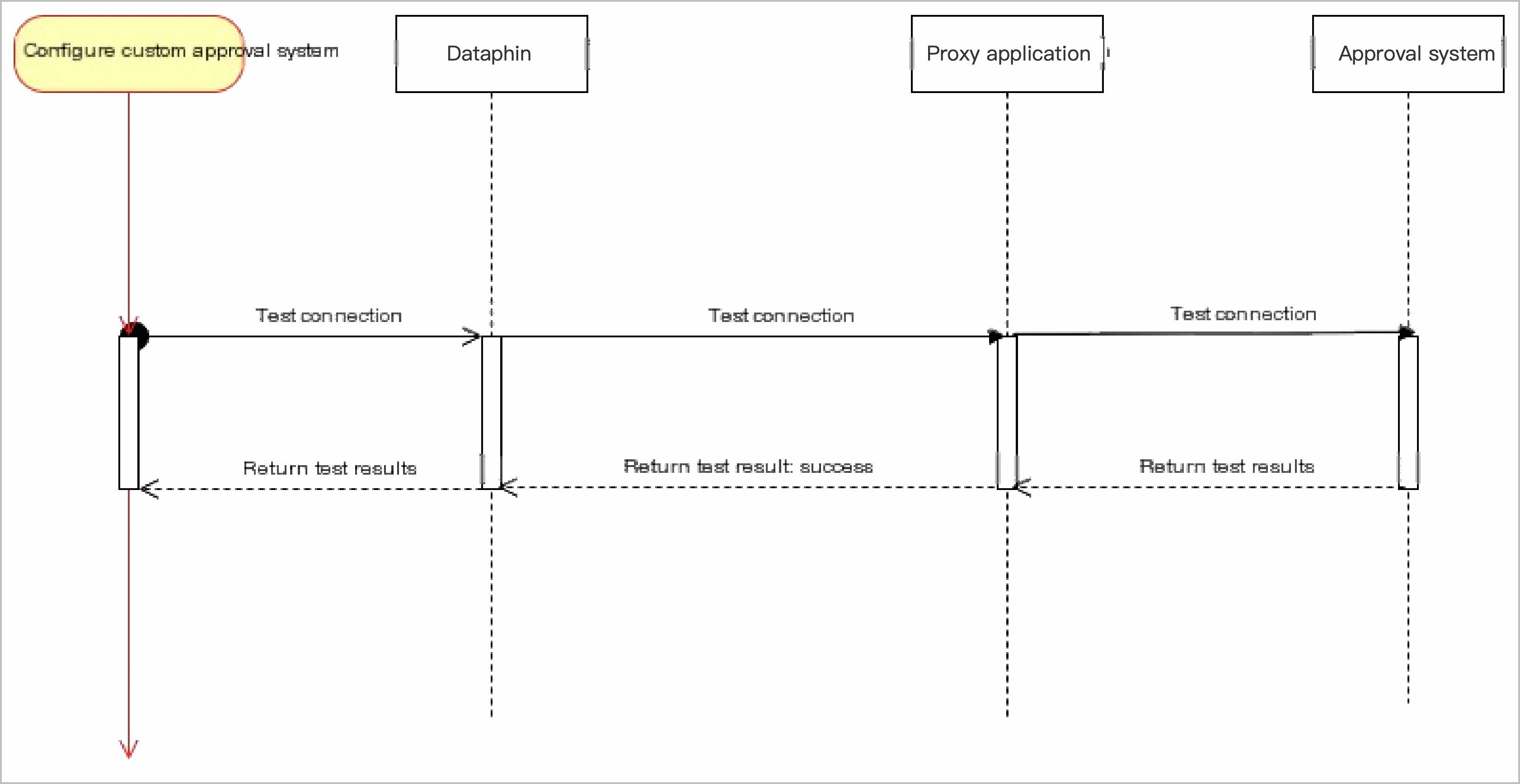
  • Connection test

    Request method: POST.

    Request URL: http(s)://{url}/dataphin/bpms/check/connect.

    Request sequence diagram
    image

    Query parameters

    Parameter

    Type

    Description

    accessToken

    String

    The credential for server-side API calls. This token is either automatically generated on the Dataphin page, or you can generate it manually and enter it in Dataphin. Example: 6d1bxxxx.

    Automatically generated by Dataphin, or generated and entered by the user. For example: 6d1bxxxx.

    timestamp

    String

    The message timestamp, in milliseconds. Example: 1654156836531.

    Body parameters

    checkEvent (String): The check event. Set this to connectivity to perform a connection test.

    Response parameters

    checkResult (String): The check result. The connection test is successful only if the returned value is success. Any other value indicates that the test failed. Example: success.

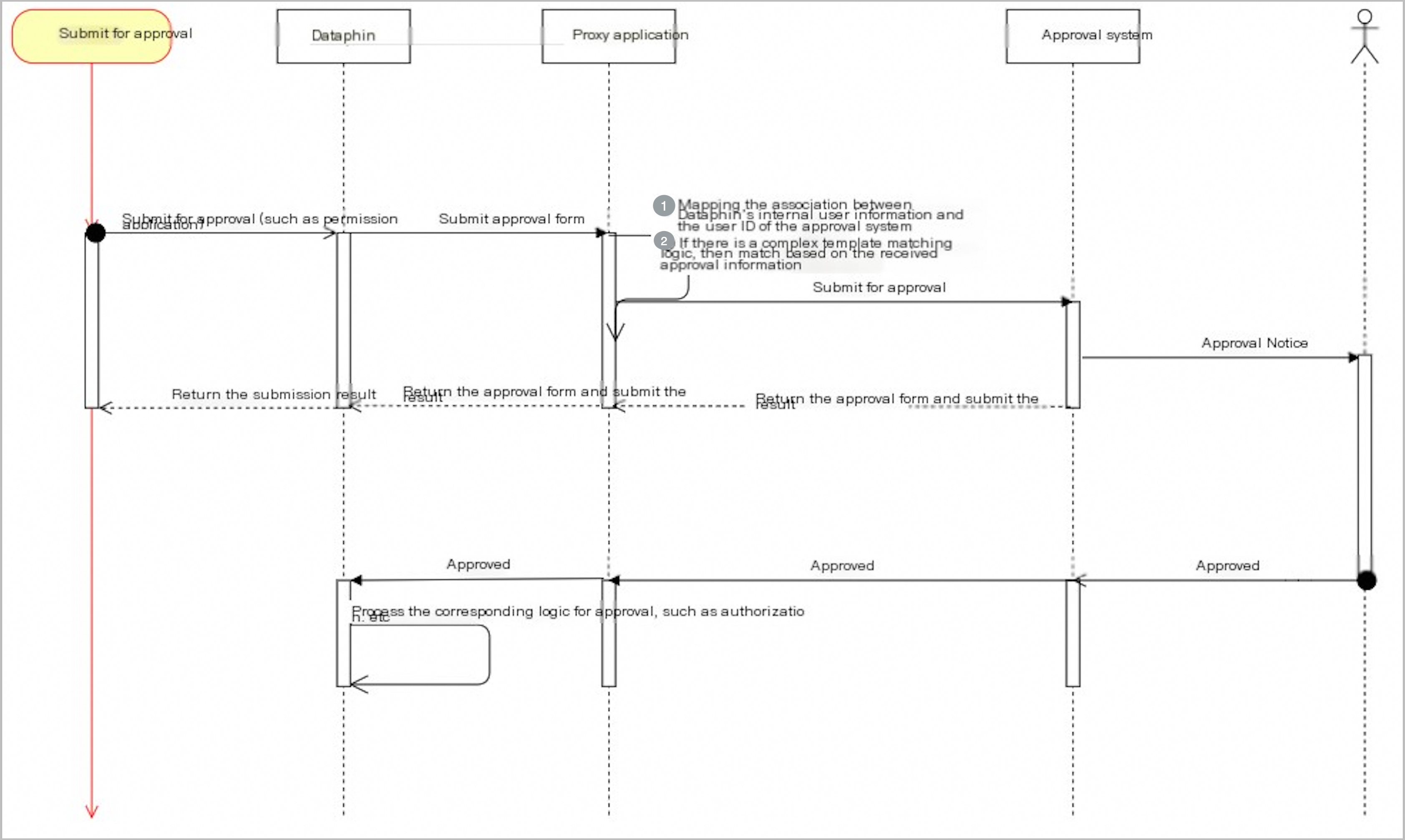
  • Submit approval

    Request method: POST.

    Request URL: http(s)://{url}/dataphin/bpms/processinstance/create.

    Sequence diagram for submitting an approval request
    image

    Query parameters

    Parameter

    Type

    Description

    accessToken

    String

    The credential for server-side API calls. This token is either automatically generated on the Dataphin page, or you can generate it manually and enter it in Dataphin. Example: 6d1bxxxx.

    Automatically generated by Dataphin, or generated and entered by the user. For example: 6d1bxxxx.

    timestamp

    String

    The message timestamp, in milliseconds. Example: 1654156836531.

    Body parameters

    Parameter

    Type

    Description

    applyId

    String

    The ID of the Dataphin approval form. Example: 1223.

    title

    String

    The title of the Dataphin approval form. Example: dataphin bpms.

    content

    String

    The content of the Dataphin approval form. Example: bpms content. See Metadata description for approval message content.

    type

    String

    • Approval request type: APPROVAL_DOC_TYPE.

    • Code review: CODE_REVIEW.

    • Publish control: PUBLISH.

    • Business planning: BIZ_PLANNING.

    • Permission approval: AUTH.

    • Default: DEFAULT.

    templateCode

    String

    The approval template code. This parameter is optional and depends on page configurations.

    Approval message content metadata

    Parameter

    Type

    Description

    resourceType

    String

    The type of the approval task. An enumerated value. Valid values include:

    • PhysicalTable: physical table.

    • LogicTable: logical table.

    • MetaTable: Real-time meta table.

    • MirrorTable: Mirror table.

    • Fun: Function.

    • DataSource: data source.

    • FeatureConfig: Feature permission configuration.

    • OSAPP: data service app.

    • OSAPI: data service API.

    • OSLogicUnit: Data service unit.

    • OSDS: data service data source.

    • SECRET_KEY: secret key.

    • GLOBAL_PARAM: global variable.

    grantToUsers

    List<GrantToUser>

    A list of users to grant permissions to. See GrantToUser.

    bpmsEnvironment

    BpmsEnvironment

    The environment of the approval system. See BpmsEnvironment.

    operates

    List<String>

    The permission types requested. Valid values:

    • SYNC_READ: Synchronous read from a data source.

    • SYNC_WRITE: Synchronous write to a data source.

    • SQL_QUERY: SQL query on physical and logical tables.

    • SQL_WRITE: SQL write to physical tables.

    • SQL_ALTER: Alter physical tables.

    • SQL_DROP: Drop physical and logical tables.

    • SELECT: Query a data service API.

    • WRITE: Write permission.

    • DEV: Development permission.

    • USE: Use permission.

    • UPDATE: Update table data.

    • PIPELINE_ENCRY: Integration encryption.

    • PIPELINE_DECRY: Integration decryption.

    levels

    List<String>

    The permission levels. Valid values are HIGH, MIDDLE, and LOW.

    operations

    List<String>

    The permission types. Valid values:

    • SELECT: Query.

    • DESCRIBE: Describe table structure.

    • UPDATE: Update table data.

    • ALTER: Alter table structure.

    • DELETE: Delete a table.

    • COPY_TASK: Copy.

    resources

    List<BpmsResource>

    The resource content. See BpmsResource.

    applyObject

    ApplyObject

    Information about the requested object. See ApplyObject.

    reason

    String

    The reason for the request.

    GrantToUser

    Parameter

    Type

    Description

    account

    Account

    The accounts to be authorized. See Account.

    period

    Period

    The validity period. See Period.

    Account

    Parameter

    Type

    Description

    accountType

    String

    The account type. Valid values are Personal account, Production account, and Application account.

    • PERSONAL: Personal account.

    • PRODUCE: Production account.

    • APPLICATION: Application account.

    userName

    String

    The username.

    Period

    Parameter

    Type

    Description

    periodType

    String

    The validity period type. Only Long-term (LONG_TERM) is supported.

    periodEnd

    String

    The expiration date of the permission. Format: yyyy-mm-dd. Example: 2022-09-11.

    BpmsEnvironment

    Parameter

    Type

    Description

    projectName

    String

    The project name.

    bizUnitName

    String

    The business unit name.

    resourceEnv

    String

    The environment. Valid values:

    • PROD: production environment.

    • DEV: development environment.

    BpmsResource

    Parameter

    Type

    Description

    resourceType

    String

    See Approval message content metadata.

    resourceName

    String

    The resource name.

    children

    List<Children>

    The list of fields. See Children.

    operations

    List<String>

    See the operates parameter in Approval message content metadata.

    authTypes

    String

    The type of permission requested.

    Children

    Parameter

    Type

    Description

    resourceName

    String

    The field name.

    resourceProperties

    String

    The field properties.

    ResourceProperties

    Parameter

    Type

    Description

    columnType

    String

    The field type.

    columnIsPartition

    String

    Indicates whether the field is a partition field.

    columnIsPk

    String

    Indicates whether the field is a primary key.

    ApplyObject

    Parameter

    Type

    Description

    objectName

    String

    The object name.

    codeContent

    String

    The code content.

    name

    String

    The business activity name in English.

    bizObjectType

    String

    The object type.

    bizObjectChangeType

    String

    The change type.

    bizObjectPkField

    String

    The component field.

    bizObjectParent

    String

    The parent object.

    bizObjectChildren

    String

    The downstream sub-object.

    bizProcessCn

    String

    The activity name.

    bizProcessType

    String

    The activity type.

    bizProcessChangeType

    String

    The change type.

    bizProcessNodes

    String

    The process node.

    atomicIndexCn

    String

    The metric name.

    dataType

    String

    The data type.

    unit

    String

    The unit of measurement.

    bizProcess

    String

    The activity name.

    des

    String

    The scope of the activity.

    derivedLogic

    String

    The derived logic.

    protoLogics

    String

    The calculation logic.

    Response parameters

    processInstanceId (String): The ID of the third-party approval instance. Example: 6d1bxxxx.

  • Revoke approval

    Note

    You can revoke a submitted approval request if its content is incorrect or it is no longer needed.

    Request method: POST.

    Request URL: http(s)://{url}/dataphin/bpms/processinstance/revoke.

    Query parameters

    Parameter

    Type

    Description

    accessToken

    String

    The credential for server-side API calls. This token is either automatically generated on the Dataphin page, or you can generate it manually and enter it in Dataphin. Example: 6d1bxxxx.

    Automatically generated by Dataphin, or generated and entered by the user. For example: 6d1bxxxx.

    timestamp

    String

    The message timestamp, in milliseconds. Example: 1654156836531.

    Body parameters

    Parameter

    Type

    Description

    applyId

    String

    The ID of the Dataphin approval form. Example: 1223.

    processInstanceId

    String

    The ID of the third-party approval instance. Example: 6d1bxxxx.

    operatingUserId

    String

    The employee ID of the operator. Example: 6d1bxxxx.

    Response parameters

    result (String): The result of the revocation. The operation is successful only if the returned value is success.

  • Query instance URL

    Request method: GET.

    Request URL: http(s)://{url}/dataphin/bpms/processinstance/apply.

    Query parameters

    Parameter

    Type

    Description

    accessToken

    String

    The credential for server-side API calls. This token is either automatically generated on the Dataphin page, or you can generate it manually and enter it in Dataphin. Example: 6d1bxxxx.

    Automatically generated by Dataphin, or generated and entered by the user. For example: 6d1bxxxx.

    timestamp

    String

    The message timestamp, in milliseconds. Example: 1654156836531.

Callback API

Important
  • https://{callbackUrl} is the callback URL configured in approval settings under Other.

  • accessToken: The credential for server-side API calls, either automatically generated by Dataphin or manually generated and entered by the user.

  • callBackAesKey: The callback AES key for authentication, either automatically generated by Dataphin or manually generated and entered by the user.

  • Callback method

    Request method: POST

    Request URL: http://{callbackUrl}/api/oa/bpms/integration/thirdparty/callback

    Query parameters

    Parameter

    Type

    Description

    signature

    String

    The signature for message authentication. For more information, see the encryption and decryption method.

    timestamp

    String

    The message timestamp, in milliseconds. Example: 1654156836531.

    nonce

    String

    A unique random string. For more information, see the encryption and decryption method.

    Body parameters

    encrypt (String): The encrypted message. Example: ajls384k.

    Response parameters

    encrypt (String): The encrypted message that contains the callback status. Example: ajls384k.

  • Callback encrypted payload

    Callback connectivity check

    • Incoming encrypted parameters:

      applyStatus (String): Used for the connectivity check. Example: CHECK.

    • Response encrypted parameters:

      success: The value returned on a successful callback.

    Callback for BPMS instance approval results

    • Incoming encrypted parameters:

      Parameter

      Type

      Description

      applyId

      String

      The Dataphin application ID. Example: 1223.

      processInstanceId

      String

      The ID of the third-party approval instance. Example: 6d1bxxxx.

      comment

      String

      The comment on the approval instance.

      applyStatus

      String

      • accept: Accepted.

      • reject: Rejected.

      • revoke: Revoked.

      nodes

      List<ApplyCallBackNode>

      An optional list of approval nodes from the third-party approval system, required only when the integration method is set to Display all nodes of the third-party approval.

    • ApplyCallBackNode

      Parameter

      Type

      Description

      nodeId

      String

      The node ID. Nodes are ordered from 1 to n.

      nodeStatus

      String

      The node status (ApproveNodeStatusEnum).

      • APPROVING: In progress.

      • ACCEPTED: Approved.

      • REJECTED: Rejected.

      • REVOKED: Revoked.

      nodeName

      String

      The name of the node.

      approverRelation

      String

      The approval relationship (ApproveOperatorEnum).

      • AND: All approvers must approve the request.

      • OR: Any approver can approve the request.

      pendingApprovers

      List<ExternalApproverInfo>

      A list of current pending approvers. This list is empty after all relevant approvers have acted.

      records

      List<OperationRecord>

      Contains records of actions performed by approvers, sorted chronologically.

    • ExternalApproverInfo

      Parameter

      Type

      Description

      userId

      String

      The user ID in the third-party approval system. Example: 1223.

      userName

      String

      The username in the third-party approval system. Example: Zhang San.

    • OperationRecord

      Parameter

      Type

      Description

      operateUser

      ExternalApproverInfo

      Information about the operator. Example: {"userId":"1111", "userName":"Zhang San"}.

      action

      String

      The operation type (ApproveNodeActionType).

      • ASSIGN_APPROVE: Transfer a permission request.

      • COUNTER_SIGN_APPROVE: Add a countersigner to a permission request.

      • REVOKE_APPLY: Revoke a permission request.

      • APPROVE: Approve a permission request.

      comment

      String

      The comment for the operation.

      operatedTime

      String

      The timestamp of the operation.

      transferApprovers

      List<ExternalApproverInfo>

      An optional list of transfer targets, required when performing a countersign or transfer operation. Example: [{"userId":"2222", "userName":"Li Si"}].

    • Response encrypted parameters

      success: The value returned on a successful callback.

  • Callback payloads for approval results

    The third-party approval system supports two integration methods: displaying only the final approval result and displaying all approval nodes. The callback payload varies depending on the selected integration method.

    • Final result only

      This integration method only requires the final approval result. Dataphin displays only the start and end nodes. Call the callback interface only after the third-party system completes the approval process. The following is an example payload:

      {
         "applyId": "123456",
         "applyStatus": "accept",
         "comment": "Approval granted",
         "processInstanceId": "qwqwqqq"
      }
      Note
      • The nodes field is not required for this integration method.

      • The applyStatus field can be set to accept, reject, or revoke. The value approving indicates that the approval is in progress. It is an intermediate state used only for display in all node integration methods for third-party approval.

    • All approval nodes

      This integration method returns the details of each approval node, allowing Dataphin to display and synchronize them all. When an approver performs an action, call this callback interface to update Dataphin with the current node information.

      Field reference
      • For this integration method, you must pass the applyId, applyStatus, processInstanceId, and nodes fields.

      • Overall approval request status (applyStatus). Valid values: approving, accept, reject, and revoke.

        • Set applyStatus to approving if any approval node is not in a final state.

        • Set applyStatus to accept when all approval nodes are approved.

        • Set applyStatus to reject if any approval node is rejected.

        • Set applyStatus to revoke if any approval node is revoked.

      • The list of approval nodes is sorted by the internal nodeId, which should be numbered sequentially (for example, 1, 2, 3).

      • Node status (nodeStatus). Valid values: APPROVING, ACCEPTED, REJECTED, and REVOKED.

        • Set nodeStatus to APPROVING if the current approval node is still in progress.

        • Set nodeStatus to ACCEPTED if the current approval node is approved.

        • Set nodeStatus to REJECTED if the current approval node is rejected.

        • Set nodeStatus to REVOKED if the current approval node is revoked.

      • Node display name (nodeName).

      • Node approval relation (approverRelation). Valid values: OR and AND.

        • OR: The node is approved if any one of the approvers approves it.

        • AND: The node is approved only after all approvers have approved it.

      • Pending approvers (pendingApprovers).

        • A list of approvers who have not yet acted on the request.

        • When an approver takes an action, they must be removed from this list in the next callback and their action added to the records list.

      • Operation records (records).

        • The user who performed the action (operateUser).

        • The action's comment (comment).

        • The time of the action (operatedTime). The records list must be sorted by operatedTime in ascending order.

        • The action type (action). Valid values: ASSIGN_APPROVE, COUNTER_SIGN_APPROVE, REVOKE_APPLY, and APPROVE.

          • If approverRelation is OR and an approver approves the request, set action to APPROVE and nodeStatus to ACCEPTED.

          • If approverRelation is OR and an approver rejects the request, set action to APPROVE and nodeStatus to REJECTED.

          • If approverRelation is OR and an approver revokes the request, set action to REVOKE_APPLY and nodeStatus to REVOKED.

          • If an approver transfers the task, set action to ASSIGN_APPROVE and nodeStatus to ACCEPTED.

          • If an approver adds a countersign, set action to COUNTER_SIGN_APPROVE and nodeStatus to ACCEPTED.

          • If approverRelation is AND and an approver approves, set action to APPROVE. If other approvers have not yet acted, nodeStatus remains APPROVING. Once all approvers have approved, set nodeStatus to ACCEPTED.

          • If approverRelation is AND and an approver rejects, set action to APPROVE and nodeStatus to REJECTED.

          • If approverRelation is AND and an approver revokes, set action to REVOKE_APPLY and nodeStatus to REVOKED.

        • Transfer target approvers (transferApprovers). This field lists the users who receive a transferred approval or an added countersign.

      Approval scenarios
      • Scenario: Multiple OR-relation nodes, no action taken

        Example:

        An approval request in the third-party system has two approval nodes, sorted by nodeId.

        On the first approval node, pending approvers Zhang San and Li Si have not yet acted. The pendingApprovers list includes information for both users. Because no action has been taken, the nodeStatus is APPROVING and the records list is empty.

        For the second approval node, the pending approver Wang Wu has not taken action. The pendingApprovers list includes Wang Wu, and the records list is empty.

        Since neither approval node is in a final state, the overall applyStatus is approving.

        {
           "applyId": "123456",
           "processInstanceId": "qwqwqeqe",
           "applyStatus": "approving",
           "nodes": [
              {
                 "nodeId": "1",
                 "nodeStatus": "APPROVING",
                 "nodeName": "Approval Test Node 1",
                 "approverRelation": "OR",
                 "pendingApprovers": [
                    {
                       "userId": "1111",
                       "userName": "Zhang San"
                    },
                    {
                       "userId": "2222",
                       "userName": "Li Si"
                    }
                 ],
                 "records": []
              },
              {
                 "nodeId": "2",
                 "nodeStatus": "APPROVING",
                 "nodeName": "Approval Test Node 2",
                 "approverRelation": "OR",
                 "pendingApprovers": [
                    {
                       "userId": "33333",
                       "userName": "Wang Wu"
                    }
                 ],
                 "records": []
              }
           ]
        }
      • Scenario: OR relation, first node partially approved, second node pending

        Example:

        An approval request has two approval nodes, sorted by nodeId.

        On the first node, Zhang San has approved the request, while Li Si has not yet acted. The pendingApprovers list now contains only Li Si. Since the approverRelation is OR, Zhang San's approval changes the nodeStatus to ACCEPTED. The records list contains Zhang San's action, with the action field set to APPROVE and a comment provided.

        On the second node, no approver has acted. The nodeStatus is APPROVING, and the pendingApprovers list contains Wang Wu.

        Since the second approval node is not complete, the overall applyStatus for the request remains approving.

        {
           "applyId": "123456",
           "processInstanceId": "qwqwqeqe",
           "applyStatus": "approving",
           "nodes": [
              {
                 "nodeId": "1",
                 "nodeStatus": "ACCEPTED",
                 "nodeName": "Approval Test Node 1",
                 "approverRelation": "OR",
                 "pendingApprovers": [
                    {
                       "userId": "2222",
                       "userName": "Li Si"
                    }
                 ],
                 "records": [
                    {
                       "operateUser": {
                          "userId": "1111",
                          "userName": "Zhang San"
                       },
                       "action": "APPROVE",
                       "comment": "Approve permission for this table",
                       "operatedTime": "2026-03-19 19:01:23"
                    }
                 ]
              },
              {
                 "nodeId": "2",
                 "nodeStatus": "APPROVING",
                 "nodeName": "Approval Test Node 2",
                 "approverRelation": "OR",
                 "pendingApprovers": [
                    {
                       "userId": "33333",
                       "userName": "Wang Wu"
                    }
                 ],
                 "records": []
              }
           ]
        }
      • Scenario: OR relation, both nodes approved, request accepted

        Example:

        An approval request has two approval nodes, sorted by nodeId.

        On the first node, Zhang San's approval is sufficient to set the nodeStatus to ACCEPTED because the approverRelation is OR. The pendingApprovers list still contains Li Si, and the records list contains Zhang San's action.

        On the second node, the sole approver Wang Wu has approved the request. The nodeStatus is ACCEPTED, and the pendingApprovers list is now empty. The records list contains Wang Wu's action.

        Since both approval nodes are approved, the overall applyStatus becomes accept.

        {
           "applyId": "123456",
           "processInstanceId": "qwqwqeqe",
           "applyStatus": "accept",
           "nodes": [
              {
                 "nodeId": "1",
                 "nodeStatus": "ACCEPTED",
                 "nodeName": "Approval Test Node 1",
                 "approverRelation": "OR",
                 "pendingApprovers": [
                    {
                       "userId": "2222",
                       "userName": "Li Si"
                    }
                 ],
                 "records": [
                    {
                       "operateUser": {
                          "userId": "1111",
                          "userName": "Zhang San"
                       },
                       "action": "APPROVE",
                       "comment": "Approve permission for this table",
                       "operatedTime": "2026-03-19 19:01:23"
                    }
                 ]
              },
              {
                 "nodeId": "2",
                 "nodeStatus": "ACCEPTED",
                 "nodeName": "Approval Test Node 2",
                 "approverRelation": "OR",
                 "pendingApprovers": [],
                 "records": [
                    {
                       "operateUser": {
                          "userId": "33333",
                          "userName": "Wang Wu"
                       },
                       "action": "APPROVE",
                       "comment": "Wang Wu approves the permission request",
                       "operatedTime": "2026-03-19 19:07:21"
                    }
                 ]
              }
           ]
        }
      • Scenario: OR relation, one node rejected, request rejected

        Example:

        An approval request has two approval nodes, sorted by nodeId.

        On the first node, Zhang San has approved it, so its nodeStatus is ACCEPTED.

        On the second node, the sole approver Wang Wu has rejected the request. The nodeStatus becomes REJECTED, and the records list contains Wang Wu's action.

        Although the first node was approved, the rejection of the second node terminates the process, setting the overall applyStatus to reject.

        {
           "applyId": "123456",
           "processInstanceId": "qwqwqeqe",
           "applyStatus": "reject",
           "nodes": [
              {
                 "nodeId": "1",
                 "nodeStatus": "ACCEPTED",
                 "nodeName": "Approval Test Node 1",
                 "approverRelation": "OR",
                 "pendingApprovers": [
                    {
                       "userId": "2222",
                       "userName": "Li Si"
                    }
                 ],
                 "records": [
                    {
                       "operateUser": {
                          "userId": "1111",
                          "userName": "Zhang San"
                       },
                       "action": "APPROVE",
                       "comment": "Approve permission for this table",
                       "operatedTime": "2026-03-19 19:01:23"
                    }
                 ]
              },
              {
                 "nodeId": "2",
                 "nodeStatus": "REJECTED",
                 "nodeName": "Approval Test Node 2",
                 "approverRelation": "OR",
                 "pendingApprovers": [],
                 "records": [
                    {
                       "operateUser": {
                          "userId": "33333",
                          "userName": "Wang Wu"
                       },
                       "action": "APPROVE",
                       "comment": "Wang Wu rejected the permission request",
                       "operatedTime": "2026-03-19 19:07:21"
                    }
                 ]
              }
           ]
        }
      • Scenario: OR relation, one node revoked, request revoked

        Example:

        An approval request has two approval nodes, sorted by nodeId.

        On the first node, Zhang San has approved it, so its nodeStatus is ACCEPTED.

        On the second node, Wang Wu has revoked the approval. The nodeStatus becomes REVOKED. The records list contains Wang Wu's action, with the action field set to REVOKE_APPLY.

        Because the second node was revoked, the overall applyStatus for the entire request is set to revoke.

        {
           "applyId": "123456",
           "processInstanceId": "qwqwqeqe",
           "applyStatus": "revoke",
           "nodes": [
              {
                 "nodeId": "1",
                 "nodeStatus": "ACCEPTED",
                 "nodeName": "Approval Test Node 1",
                 "approverRelation": "OR",
                 "pendingApprovers": [
                    {
                       "userId": "2222",
                       "userName": "Li Si"
                    }
                 ],
                 "records": [
                    {
                       "operateUser": {
                          "userId": "1111",
                          "userName": "Zhang San"
                       },
                       "action": "APPROVE",
                       "comment": "Approve permission for this table",
                       "operatedTime": "2026-03-19 19:01:23"
                    }
                 ]
              },
              {
                 "nodeId": "2",
                 "nodeStatus": "REVOKED",
                 "nodeName": "Approval Test Node 2",
                 "approverRelation": "OR",
                 "pendingApprovers": [],
                 "records": [
                    {
                       "operateUser": {
                          "userId": "33333",
                          "userName": "Wang Wu"
                       },
                       "action": "REVOKE_APPLY",
                       "comment": "Wang Wu revoked this permission approval",
                       "operatedTime": "2026-03-19 19:07:21"
                    }
                 ]
              }
           ]
        }
      • Scenario: AND relation, partial approval with no final state

        Example:

        An approval request has two approval nodes, sorted by nodeId.

        On the first node, which has an AND relation, Zhang San has approved the request, but Li Si has not. The pendingApprovers list still contains Li Si. The nodeStatus remains APPROVING because not all approvers have acted yet. The records list contains Zhang San's action.

        On the second node, no one has acted, so its nodeStatus is APPROVING.

        Since neither node has reached a final state, the overall applyStatus is approving.

        {
           "applyId": "123456",
           "processInstanceId": "qwqwqeqe",
           "applyStatus": "approving",
           "nodes": [
              {
                 "nodeId": "1",
                 "nodeStatus": "APPROVING",
                 "nodeName": "Approval Test Node 1",
                 "approverRelation": "AND",
                 "pendingApprovers": [
                    {
                       "userId": "2222",
                       "userName": "Li Si"
                    }
                 ],
                 "records": [
                    {
                       "operateUser": {
                          "userId": "1111",
                          "userName": "Zhang San"
                       },
                       "action": "APPROVE",
                       "comment": "Approve permission for this table",
                       "operatedTime": "2026-03-19 19:01:23"
                    }
                 ]
              },
              {
                 "nodeId": "2",
                 "nodeStatus": "APPROVING",
                 "nodeName": "Approval Test Node 2",
                 "approverRelation": "AND",
                 "pendingApprovers": [
                    {
                       "userId": "33333",
                       "userName": "Wang Wu"
                    }
                 ],
                 "records": []
              }
           ]
        }
      • Scenario: AND relation, first node approved, second node pending

        Example:

        An approval request has two approval nodes, sorted by nodeId.

        On the first node, the approverRelation is AND. Both Zhang San and Li Si have approved the request. The pendingApprovers list is now empty. Because all approvers have approved, the nodeStatus becomes ACCEPTED. The records list contains actions from both users.

        On the second node, no one has acted, so the nodeStatus is APPROVING, and the pendingApprovers list contains Wang Wu.

        Although the first node has reached a final state, the second node has not. Therefore, the overall applyStatus remains approving.

        {
           "applyId": "123456",
           "processInstanceId": "qwqwqeqe",
           "applyStatus": "approving",
           "nodes": [
              {
                 "nodeId": "1",
                 "nodeStatus": "ACCEPTED",
                 "nodeName": "Approval Test Node 1",
                 "approverRelation": "AND",
                 "pendingApprovers": [],
                 "records": [
                    {
                       "operateUser": {
                          "userId": "1111",
                          "userName": "Zhang San"
                       },
                       "action": "APPROVE",
                       "comment": "Approve permission for this table",
                       "operatedTime": "2026-03-19 19:01:23"
                    },
                    {
                       "operateUser": {
                          "userId": "2222",
                          "userName": "Li Si"
                       },
                       "action": "APPROVE",
                       "comment": "Approve permission for this table",
                       "operatedTime": "2026-03-19 19:02:23"
                    }
                 ]
              },
              {
                 "nodeId": "2",
                 "nodeStatus": "APPROVING",
                 "nodeName": "Approval Test Node 2",
                 "approverRelation": "AND",
                 "pendingApprovers": [
                    {
                       "userId": "33333",
                       "userName": "Wang Wu"
                    }
                 ],
                 "records": []
              }
           ]
        }
      • Scenario: AND relation, one node rejected, request rejected

        Example:

        An approval request has two approval nodes, sorted by nodeId.

        On the first node, the approverRelation is AND. Zhang San has approved the request, but Li Si has rejected it. The pendingApprovers list is empty because both have acted. Since Li Si rejected the request, the nodeStatus becomes REJECTED.

        On the second node, no one has acted. Its nodeStatus is still APPROVING.

        However, because the rejection on the first node terminates the entire process, the overall applyStatus is immediately set to reject.

        {
           "applyId": "123456",
           "processInstanceId": "qwqwqeqe",
           "applyStatus": "reject",
           "nodes": [
              {
                 "nodeId": "1",
                 "nodeStatus": "REJECTED",
                 "nodeName": "Approval Test Node 1",
                 "approverRelation": "AND",
                 "pendingApprovers": [],
                 "records": [
                    {
                       "operateUser": {
                          "userId": "1111",
                          "userName": "Zhang San"
                       },
                       "action": "APPROVE",
                       "comment": "Approve permission for this table",
                       "operatedTime": "2026-03-19 19:01:23"
                    },
                    {
                       "operateUser": {
                          "userId": "2222",
                          "userName": "Li Si"
                       },
                       "action": "APPROVE",
                       "comment": "Reject permission for this table",
                       "operatedTime": "2026-03-19 19:02:23"
                    }
                 ]
              },
              {
                 "nodeId": "2",
                 "nodeStatus": "APPROVING",
                 "nodeName": "Approval Test Node 2",
                 "approverRelation": "AND",
                 "pendingApprovers": [
                    {
                       "userId": "33333",
                       "userName": "Wang Wu"
                    }
                 ],
                 "records": []
              }
           ]
        }
      • Scenario: AND relation, one node revoked, request revoked

        Example:

        An approval request has two approval nodes, sorted by nodeId.

        On the first node, the approverRelation is AND. Zhang San has approved the request, but Li Si has revoked it. The pendingApprovers list is empty because both have acted. Because Li Si revoked the approval, the nodeStatus is set to REVOKED. Li Si's action in the records list has its action set to REVOKE_APPLY.

        On the second node, no one has acted. Its nodeStatus is still APPROVING.

        Because the revocation on the first node terminates the entire process, the overall applyStatus is immediately set to revoke.

        {
           "applyId": "123456",
           "processInstanceId": "qwqwqeqe",
           "applyStatus": "revoke",
           "nodes": [
              {
                 "nodeId": "1",
                 "nodeStatus": "REVOKED",
                 "nodeName": "Approval Test Node 1",
                 "approverRelation": "AND",
                 "pendingApprovers": [],
                 "records": [
                    {
                       "operateUser": {
                          "userId": "1111",
                          "userName": "Zhang San"
                       },
                       "action": "APPROVE",
                       "comment": "Approve permission for this table",
                       "operatedTime": "2026-03-19 19:01:23"
                    },
                    {
                       "operateUser": {
                          "userId": "2222",
                          "userName": "Li Si"
                       },
                       "action": "REVOKE_APPLY",
                       "comment": "Revoke permission for this table",
                       "operatedTime": "2026-03-19 19:02:23"
                    }
                 ]
              },
              {
                 "nodeId": "2",
                 "nodeStatus": "APPROVING",
                 "nodeName": "Approval Test Node 2",
                 "approverRelation": "AND",
                 "pendingApprovers": [
                    {
                       "userId": "33333",
                       "userName": "Wang Wu"
                    }
                 ],
                 "records": []
              }
           ]
        }
      • Scenario: AND relation, approval transfer

        An approval request initially has two approval nodes. The first node requires approval from Zhang San and Li Si, and the second requires approval from Wang Wu. Both nodes are pending.

        {
           "applyId": "123456",
           "processInstanceId": "qwqwqeqe",
           "applyStatus": "approving",
           "nodes": [
              {
                 "nodeId": "1",
                 "nodeStatus": "APPROVING",
                 "nodeName": "Approval Test Node 1",
                 "approverRelation": "AND",
                 "pendingApprovers": [
                    {
                       "userId": "1111",
                       "userName": "Zhang San"
                    },
                    {
                       "userId": "2222",
                       "userName": "Li Si"
                    }
                 ],
                 "records": []
              },
              {
                 "nodeId": "2",
                 "nodeStatus": "APPROVING",
                 "nodeName": "Approval Test Node 2",
                 "approverRelation": "AND",
                 "pendingApprovers": [
                    {
                       "userId": "33333",
                       "userName": "Wang Wu"
                    }
                 ],
                 "records": []
              }
           ]
        }

        When Zhang San on the first node transfers the approval to Qi Zai, the system inserts a new node into the workflow to represent the transfer. The records for this new node show that Zhang San performed a transfer (ASSIGN_APPROVE) to Qi Zai. The nodeStatus for this new transfer node is ACCEPTED.

        After the transfer, the pendingApprovers list for the original first node is updated to include Li Si and the new approver, Qi Zai. Because the transfer action inserted a new node at the beginning of the flow, the nodeId values of the original two nodes are shifted to 2 and 3, respectively.

        The second original node (now with nodeId: 3) remains unchanged, with Wang Wu as the pending approver.

        Since nodes 2 and 3 have not reached a final state, the overall applyStatus remains approving.

        {
           "applyId": "123456",
           "processInstanceId": "qwqwqeqe",
           "applyStatus": "approving",
           "nodes": [
              {
                 "nodeId": "1",
                 "nodeStatus": "ACCEPTED",
                 "nodeName": "Transfer Node Test 1",
                 "approverRelation": "AND",
                 "pendingApprovers": [],
                 "records": [
                    {
                       "operateUser": {
                          "userId": "1111",
                          "userName": "Zhang San"
                       },
                       "action": "ASSIGN_APPROVE",
                       "comment": "Transfer to Qi Zai for approval",
                       "transferApprovers": {
                          "userId": "7777",
                          "userName": "Qi Zai"
                       },
                       "operatedTime": "2026-03-19 19:01:23"
                    }
                 ]
              },
              {
                 "nodeId": "2",
                 "nodeStatus": "APPROVING",
                 "nodeName": "Approval Test Node 1",
                 "approverRelation": "AND",
                 "pendingApprovers": [
                    {
                       "userId": "7777",
                       "userName": "Qi Zai"
                    },
                    {
                       "userId": "2222",
                       "userName": "Li Si"
                    }
                 ],
                 "records": []
              },
              {
                 "nodeId": "3",
                 "nodeStatus": "APPROVING",
                 "nodeName": "Approval Test Node 2",
                 "approverRelation": "AND",
                 "pendingApprovers": [
                    {
                       "userId": "33333",
                       "userName": "Wang Wu"
                    }
                 ],
                 "records": []
              }
           ]
        }
      • Scenario: AND relation, add countersign

        An approval request initially has two approval nodes. The first node requires approval from Zhang San and Li Si, and the second requires approval from Wang Wu. Both nodes are pending.

        {
           "applyId": "123456",
           "processInstanceId": "qwqwqeqe",
           "applyStatus": "approving",
           "nodes": [
              {
                 "nodeId": "1",
                 "nodeStatus": "APPROVING",
                 "nodeName": "Approval Test Node 1",
                 "approverRelation": "AND",
                 "pendingApprovers": [
                    {
                       "userId": "1111",
                       "userName": "Zhang San"
                    },
                    {
                       "userId": "2222",
                       "userName": "Li Si"
                    }
                 ],
                 "records": []
              },
              {
                 "nodeId": "2",
                 "nodeStatus": "APPROVING",
                 "nodeName": "Approval Test Node 2",
                 "approverRelation": "AND",
                 "pendingApprovers": [
                    {
                       "userId": "33333",
                       "userName": "Wang Wu"
                    }
                 ],
                 "records": []
              }
           ]
        }

        When Zhang San adds a countersign on the first node for Qi Zai to approve, the system inserts two new nodes into the workflow to represent the countersign process.

        The first new node (nodeId: 1) represents the countersign action itself. Its nodeStatus is ACCEPTED, and its records list shows Zhang San performing the COUNTER_SIGN_APPROVE action and specifying Qi Zai in transferApprovers.

        The second new node (nodeId: 2) represents the task now assigned to Qi Zai. Its nodeStatus is APPROVING, and Qi Zai is listed in the pendingApprovers list.

        The two new nodes for the countersign flow shift the original nodes to nodeId: 3 and nodeId: 4, respectively.

        Node 3 (the original first node) still requires approval from Zhang San and Li Si and remains in the APPROVING state.

        Node 4 (the original second node) also remains unchanged in an APPROVING state.

        Since nodes 2, 3, and 4 have not reached a final state, the overall applyStatus remains approving.

        {
           "applyId": "123456",
           "processInstanceId": "qwqwqeqe",
           "applyStatus": "approving",
           "nodes": [
              {
                 "nodeId": "1",
                 "nodeStatus": "ACCEPTED",
                 "nodeName": "Countersign Node Test 1",
                 "approverRelation": "AND",
                 "pendingApprovers": [],
                 "records": [
                    {
                       "operateUser": {
                          "userId": "1111",
                          "userName": "Zhang San"
                       },
                       "action": "COUNTER_SIGN_APPROVE",
                       "comment": "Countersign to Qi Zai for approval",
                       "transferApprovers": {
                          "userId": "7777",
                          "userName": "Qi Zai"
                       },
                       "operatedTime": "2026-03-19 19:01:23"
                    }
                 ]
              },
              {
                 "nodeId": "2",
                 "nodeStatus": "APPROVING",
                 "nodeName": "Countersign node for Qi Zai's approval",
                 "approverRelation": "AND",
                 "pendingApprovers": [
                    {
                       "userId": "7777",
                       "userName": "Qi Zai"
                    }
                 ],
                 "records": []
              },
              {
                 "nodeId": "3",
                 "nodeStatus": "APPROVING",
                 "nodeName": "Approval Test Node 1",
                 "approverRelation": "AND",
                 "pendingApprovers": [
                    {
                       "userId": "1111",
                       "userName": "Zhang San"
                    },
                    {
                       "userId": "2222",
                       "userName": "Li Si"
                    }
                 ],
                 "records": []
              },
              {
                 "nodeId": "4",
                 "nodeStatus": "APPROVING",
                 "nodeName": "Approval Test Node 2",
                 "approverRelation": "AND",
                 "pendingApprovers": [
                    {
                       "userId": "33333",
                       "userName": "Wang Wu"
                    }
                 ],
                 "records": []
              }
           ]
        }
  • Encryption and decryption

    Encryption (example: BPMS receiving a callback):

    Map<String, String> callBackJson = Maps.newHashMap();
    callBackJson.put("applyId", "1");
    callBackJson.put("applyStatus", "accept");
    callBackJson.put("processInstanceId", "2");
    callBackJson.put("comment", "test");
    // If "Display all nodes of the third-party approval" is selected as the integration method, populate the nodes field.
    String nodesJson = "[{\"approverRelation\":\"OR\",\"nodeId\":\"1\",\"nodeName\":\"Execute Pass Node Test\",\"nodeStatus\":\"ACCEPTED\",\"pendingApprovers\":[],\"records\":[{\"action\":\"APPROVE\",\"comment\":\"Approval granted\",\"operateUser\":{\"userId\":\"22222\",\"userName\":\"Zhang San\"},\"operatedTime\":\"2026-03-18 15:14:23\"}]}]";
    callBackJson.put("nodes", nodesJson)
    String callBackResult = JSON.toJSONString(callBackJson);
    
    ThirdPartyCrypto callbackCrypto = new ThirdPartyCrypto(token, aesKey);
    
    String timestamp = String.valueOf(System.currentTimeMillis());
    String nonce = ThirdPartyCrypto.Utils.getRandomStr(16);
    String encrypt = callbackCrypto.encrypt(nonce, callBackResult);
    String signature = callbackCrypto.getSignature(token, timestamp, nonce, encrypt);

    Decryption (example: BPMS returning a success message):

    String encryptMsg = JSONObject.parseObject(encrypt);
    String decryptMsg = callbackCrypto.getDecryptMsg(signature, timestamp, nonce, encryptMsg);
    if ("success".equalsIgnoreCase(decryptMsg)) {
     log.error("call back success");
    }

    Encryption and decryption utility

    import com.alibaba.fastjson.JSON;
    import org.apache.commons.codec.binary.Base64;
    
    import javax.crypto.Cipher;
    import javax.crypto.spec.IvParameterSpec;
    import javax.crypto.spec.SecretKeySpec;
    import java.io.ByteArrayOutputStream;
    import java.lang.reflect.Field;
    import java.nio.charset.Charset;
    import java.nio.charset.StandardCharsets;
    import java.security.MessageDigest;
    import java.security.Permission;
    import java.security.PermissionCollection;
    import java.security.Security;
    import java.util.Arrays;
    import java.util.HashMap;
    import java.util.Map;
    import java.util.Random;
    
    /**
     * Encryption and decryption methods for the Dataphin open platform.
     */
    public class ThirdPartyCrypto {
    
     private static final Charset CHARSET = StandardCharsets.UTF_8;
     private static final Base64 BASE_64 = new Base64();
     private final byte[] AES_KEY;
     private final String TOKEN;
    
     /**
     * Fixed length of the encoding AES key.
     **/
     private static final Integer AES_ENCODE_KEY_LENGTH = 43;
     /**
     * Byte length of the random string for encryption.
     **/
     private static final Integer RANDOM_LENGTH = 16;
    
     /**
     * Constructor.
     *
     * @param token The token set by the developer.
     * @param encodingAesKey The EncodingAESKey set by the developer.
     *
     * @throws ThirdPartyEncryptException if the operation fails. See the exception for the error code and message.
     */
     public ThirdPartyCrypto(String token, String encodingAesKey) throws ThirdPartyEncryptException {
     if (null == encodingAesKey || encodingAesKey.length() != AES_ENCODE_KEY_LENGTH) {
     throw new ThirdPartyEncryptException(ThirdPartyEncryptException.AES_KEY_ILLEGAL);
     }
     this.TOKEN = token;
     AES_KEY = Base64.decodeBase64(encodingAesKey + "=");
     }
    
     public Map<String, String> getEncryptedMap(String plaintext) throws ThirdPartyEncryptException {
     return getEncryptedMap(plaintext, System.currentTimeMillis(), Utils.getRandomStr(16));
     }
    
     /**
     * Encrypts the message body for synchronization with Dataphin and returns an encrypted map.
     *
     * @param plaintext The plaintext of the message body.
     * @param timeStamp The request timestamp.
     * @param nonce The random string (nonce).
     * @return
     * @throws ThirdPartyEncryptException
     */
     public Map<String, String> getEncryptedMap(String plaintext, Long timeStamp, String nonce)
     throws ThirdPartyEncryptException {
     if (null == plaintext) {
     throw new ThirdPartyEncryptException(ThirdPartyEncryptException.ENCRYPTION_PLAINTEXT_ILLEGAL);
     }
     if (null == timeStamp) {
     throw new ThirdPartyEncryptException(ThirdPartyEncryptException.ENCRYPTION_TIMESTAMP_ILLEGAL);
     }
     if (null == nonce) {
     throw new ThirdPartyEncryptException(ThirdPartyEncryptException.ENCRYPTION_NONCE_ILLEGAL);
     }
     // Encrypt
     String encrypt = encrypt(Utils.getRandomStr(RANDOM_LENGTH), plaintext);
     String signature = getSignature(TOKEN, String.valueOf(timeStamp), nonce, encrypt);
     Map<String, String> resultMap = new HashMap<String, String>();
     resultMap.put("msg_signature", signature);
     resultMap.put("encrypt", encrypt);
     resultMap.put("timeStamp", String.valueOf(timeStamp));
     resultMap.put("nonce", nonce);
     return resultMap;
     }
    
     /**
     * Decrypts the ciphertext.
     *
     * @param msgSignature The signature string.
     * @param timeStamp The timestamp.
     * @param nonce The random string.
     * @param encryptMsg The Base64-encoded ciphertext.
     * @return The decrypted plaintext.
     * @throws ThirdPartyEncryptException
     */
     public String getDecryptMsg(String msgSignature, String timeStamp, String nonce, String encryptMsg)
     throws ThirdPartyEncryptException {
     // Verify the signature.
     String signature = getSignature(TOKEN, timeStamp, nonce, encryptMsg);
     if (!signature.equals(msgSignature)) {
     throw new ThirdPartyEncryptException(ThirdPartyEncryptException.COMPUTE_SIGNATURE_ERROR);
     }
     // Decrypt.
     return decrypt(encryptMsg);
     }
    
     /**
     * Encrypts the plaintext.
     * @param plaintext The plaintext to encrypt.
     * @return The Base64-encoded ciphertext.
     */
     public String encrypt(String random, String plaintext) throws ThirdPartyEncryptException {
     try {
     byte[] randomBytes = random.getBytes(CHARSET);
     byte[] plainTextBytes = plaintext.getBytes(CHARSET);
     byte[] lengthByte = Utils.int2Bytes(plainTextBytes.length);
     ByteArrayOutputStream byteStream = new ByteArrayOutputStream();
     byteStream.write(randomBytes);
     byteStream.write(lengthByte);
     byteStream.write(plainTextBytes);
     byte[] padBytes = PKCS7Padding.getPaddingBytes(byteStream.size());
     byteStream.write(padBytes);
     byte[] unencrypted = byteStream.toByteArray();
     byteStream.close();
     Cipher cipher = Cipher.getInstance("AES/CBC/NoPadding");
     SecretKeySpec keySpec = new SecretKeySpec(AES_KEY, "AES");
     IvParameterSpec iv = new IvParameterSpec(AES_KEY, 0, 16);
     cipher.init(Cipher.ENCRYPT_MODE, keySpec, iv);
     byte[] encrypted = cipher.doFinal(unencrypted);
     String result = BASE_64.encodeToString(encrypted);
     return result;
     } catch (Exception e) {
     throw new ThirdPartyEncryptException(ThirdPartyEncryptException.COMPUTE_ENCRYPT_TEXT_ERROR);
     }
     }
    
     /**
     * Decrypts the ciphertext.
     * @param text The ciphertext to decrypt.
     * @return The decrypted plaintext.
     */
     private String decrypt(String text) throws ThirdPartyEncryptException {
     byte[] originalArr;
     try {
     // Set the decryption mode to AES/CBC.
     Cipher cipher = Cipher.getInstance("AES/CBC/NoPadding");
     SecretKeySpec keySpec = new SecretKeySpec(AES_KEY, "AES");
     IvParameterSpec iv = new IvParameterSpec(Arrays.copyOfRange(AES_KEY, 0, 16));
     cipher.init(Cipher.DECRYPT_MODE, keySpec, iv);
     // Decode the ciphertext using Base64.
     byte[] encrypted = Base64.decodeBase64(text);
     // Decrypt.
     originalArr = cipher.doFinal(encrypted);
     } catch (Exception e) {
     throw new ThirdPartyEncryptException(ThirdPartyEncryptException.COMPUTE_DECRYPT_TEXT_ERROR);
     }
    
     String plainText;
     try {
     // Remove padding bytes.
     byte[] bytes = PKCS7Padding.removePaddingBytes(originalArr);
     // Extract the 16-byte random string and the network byte order.
     byte[] networkOrder = Arrays.copyOfRange(bytes, 16, 20);
     int plainTextLegth = Utils.bytes2int(networkOrder);
     plainText = new String(Arrays.copyOfRange(bytes, 20, 20 + plainTextLegth), CHARSET);
     } catch (Exception e) {
     throw new ThirdPartyEncryptException(ThirdPartyEncryptException.COMPUTE_DECRYPT_TEXT_LENGTH_ERROR);
     }
    
     return plainText;
     }
    
     /**
     * Computes the signature.
     *
     * @param token The ISV token.
     * @param timestamp The timestamp.
     * @param nonce The random string.
     * @param encrypt The Base64-encoded ciphertext.
     * @return
     * @throws ThirdPartyEncryptException
     */
     public String getSignature(String token, String timestamp, String nonce, String encrypt)
     throws ThirdPartyEncryptException {
     try {
     String[] array = new String[] {token, timestamp, nonce, encrypt};
     Arrays.sort(array);
     System.out.println(JSON.toJSONString(array));
     StringBuffer sb = new StringBuffer();
     for (int i = 0; i < 4; i++) {
     sb.append(array[i]);
     }
     String str = sb.toString();
     System.out.println(str);
     MessageDigest md = MessageDigest.getInstance("SHA-1");
     md.update(str.getBytes());
     byte[] digest = md.digest();
    
     StringBuffer hexstr = new StringBuffer();
     String shaHex = "";
     for (int i = 0; i < digest.length; i++) {
     shaHex = Integer.toHexString(digest[i] & 0xFF);
     if (shaHex.length() < 2) {
     hexstr.append(0);
     }
     hexstr.append(shaHex);
     }
     return hexstr.toString();
     } catch (Exception e) {
     throw new ThirdPartyEncryptException(ThirdPartyEncryptException.COMPUTE_SIGNATURE_ERROR);
     }
     }
    
     public static class Utils {
     public Utils() {
     }
    
     public static String getRandomStr(int count) {
     String base = "ABCDEFGHIJKLMNOPQRSTUVWXYZabcdefghijklmnopqrstuvwxyz0123456789";
     Random random = new Random();
     StringBuffer sb = new StringBuffer();
    
     for (int i = 0; i < count; ++i) {
     int number = random.nextInt(base.length());
     sb.append(base.charAt(number));
     }
    
     return sb.toString();
     }
    
     public static byte[] int2Bytes(int count) {
     byte[] byteArr = new byte[] {(byte)(count >> 24 & 255), (byte)(count >> 16 & 255), (byte)(count >> 8 & 255),
     (byte)(count & 255)};
     return byteArr;
     }
    
     public static int bytes2int(byte[] byteArr) {
     int count = 0;
    
     for (int i = 0; i < 4; ++i) {
     count <<= 8;
     count |= byteArr[i] & 255;
     }
    
     return count;
     }
     }
    
     public static class PKCS7Padding {
     private static final Charset CHARSET = StandardCharsets.UTF_8;
     private static final int BLOCK_SIZE = 32;
    
     public PKCS7Padding() {
     }
    
     public static byte[] getPaddingBytes(int count) {
     int amountToPad = 32 - count % 32;
     if (amountToPad == 0) {
     amountToPad = 32;
     }
    
     char padChr = chr(amountToPad);
     String tmp = new String();
    
     for (int index = 0; index < amountToPad; ++index) {
     tmp = tmp + padChr;
     }
    
     return tmp.getBytes(CHARSET);
     }
    
     public static byte[] removePaddingBytes(byte[] decrypted) {
     int pad = decrypted[decrypted.length - 1];
     if (pad < 1 || pad > 32) {
     pad = 0;
     }
    
     return Arrays.copyOfRange(decrypted, 0, decrypted.length - pad);
     }
    
     private static char chr(int a) {
     byte target = (byte)(a & 255);
     return (char)target;
     }
     }
    
     public static class ThirdPartyEncryptException extends Exception {
     public static final int SUCCESS = 0;
     public static final int ENCRYPTION_PLAINTEXT_ILLEGAL = 900001;
     public static final int ENCRYPTION_TIMESTAMP_ILLEGAL = 900002;
     public static final int ENCRYPTION_NONCE_ILLEGAL = 900003;
     public static final int AES_KEY_ILLEGAL = 900004;
     public static final int SIGNATURE_NOT_MATCH = 900005;
     public static final int COMPUTE_SIGNATURE_ERROR = 900006;
     public static final int COMPUTE_ENCRYPT_TEXT_ERROR = 900007;
     public static final int COMPUTE_DECRYPT_TEXT_ERROR = 900008;
     public static final int COMPUTE_DECRYPT_TEXT_LENGTH_ERROR = 900009;
     public static final int COMPUTE_DECRYPT_TEXT_CORPID_ERROR = 900010;
     private static Map<Integer, String> msgMap = new HashMap();
     private Integer code;
    
     static {
     msgMap.put(0, "Success");
     msgMap.put(900001, "Invalid plaintext for encryption");
     msgMap.put(900002, "Invalid timestamp parameter for encryption");
     msgMap.put(900003, "Invalid nonce parameter for encryption");
     msgMap.put(900005, "Signature mismatch");
     msgMap.put(900006, "Failed to compute signature");
     msgMap.put(900004, "Invalid AES key");
     msgMap.put(900007, "Failed to compute ciphertext");
     msgMap.put(900008, "Failed to decrypt text");
     msgMap.put(900009, "Plaintext length mismatch");
     msgMap.put(900010, "CorpId mismatch in decrypted plaintext");
     }
    
     public Integer getCode() {
     return this.code;
     }
    
     public ThirdPartyEncryptException(Integer exceptionCode) {
     super((String)msgMap.get(exceptionCode));
     this.code = exceptionCode;
     }
     }
     static {
     try {
     Security.setProperty("crypto.policy", "limited");
     RemoveCryptographyRestrictions();
     } catch (Exception var1) {
     }
    
     }
     private static void RemoveCryptographyRestrictions() throws Exception {
     Class<?> jceSecurity = getClazz("javax.crypto.JceSecurity");
     Class<?> cryptoPermissions = getClazz("javax.crypto.CryptoPermissions");
     Class<?> cryptoAllPermission = getClazz("javax.crypto.CryptoAllPermission");
     if (jceSecurity != null) {
     setFinalStaticValue(jceSecurity, "isRestricted", false);
     PermissionCollection defaultPolicy = (PermissionCollection)getFieldValue(jceSecurity, "defaultPolicy", (Object)null, PermissionCollection.class);
     if (cryptoPermissions != null) {
     Map<?, ?> map = (Map)getFieldValue(cryptoPermissions, "perms", defaultPolicy, Map.class);
     map.clear();
     }
    
     if (cryptoAllPermission != null) {
     Permission permission = (Permission)getFieldValue(cryptoAllPermission, "INSTANCE", (Object)null, Permission.class);
     defaultPolicy.add(permission);
     }
     }
    
     }
     private static Class<?> getClazz(String className) {
     Class clazz = null;
    
     try {
     clazz = Class.forName(className);
     } catch (Exception var3) {
     }
    
     return clazz;
     }
     private static void setFinalStaticValue(Class<?> srcClazz, String fieldName, Object newValue) throws Exception {
     Field field = srcClazz.getDeclaredField(fieldName);
     field.setAccessible(true);
     Field modifiersField = Field.class.getDeclaredField("modifiers");
     modifiersField.setAccessible(true);
     modifiersField.setInt(field, field.getModifiers() & -17);
     field.set((Object)null, newValue);
     }
     private static <T> T getFieldValue(Class<?> srcClazz, String fieldName, Object owner, Class<T> dstClazz) throws Exception {
     Field field = srcClazz.getDeclaredField(fieldName);
     field.setAccessible(true);
     return dstClazz.cast(field.get(owner));
     }
    
    }