Offline integrated pipeline quality monitoring automatically checks data table integrity and sends alerts to designated recipients when quality issues are detected. This topic describes how to configure quality rules.
Permission description
-
Project developers can create integration tasks, configure quality rules, and submit tasks for publication.
-
Quality administrators, data source/table quality owners, and super administrators can create and publish quality rules within integration tasks.
Create offline pipeline quality monitoring
-
Navigate to the Dataphin home page and select Development from the top menu bar.
-
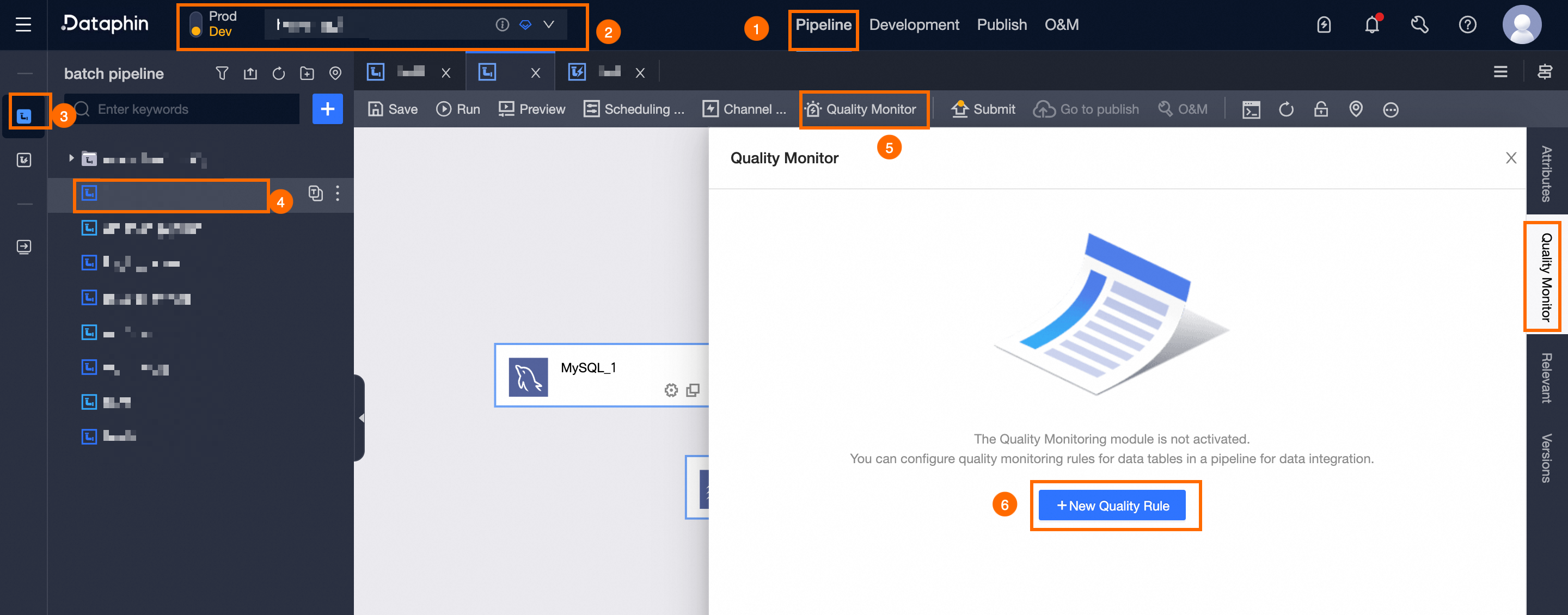
Follow the steps below to open the New Quality Rule dialog box. The asset quality module must be enabled before you can configure quality rules.
Select Integration -> choose Project -> click on Offline Integration -> pick Offline Pipeline -> opt for Quality Monitoring -> click New Quality Rule.
-
In the New Quality Rule dialog box, configure the following parameters.
Parameter
Description
Rule Template
Select a rule template, such as Table Structure Change Monitoring, Table Stability Validation, or Table Volatility Validation.
Data Table
Select a production-environment data table in the integration pipeline that matches the chosen rule template. Click More Rules to go to the Data Quality module for additional rule templates. For more information, see create data table quality rules.
Rule Strength
Set the rule enforcement level:
-
Choosing Strong Rule: An alert is issued and downstream task nodes are blocked when the rule validation detects an anomaly.
-
Opting for Weak Rule: An alert is triggered but downstream task nodes continue to run, even when the rule validation detects an anomaly.
Rule Configuration
Required when you select the Table Stability Validation or Table Volatility Validation template. The configuration varies by template. For more information, see data table parameter configuration.
Rule Validation
Required for the Table Stability Validation or Table Volatility Validation template.
-
After validation, results are compared against abnormal validation criteria. If the criteria are met, the validation fails and triggers alerts.
-
Abnormal validation indicators are template-specific and depend on the configuration. Multiple AND/OR conditions are supported, but we recommend no more than three.
For a detailed explanation, see validation configuration description.
Scheduling Method
Select a scheduling method: Recurrency Triggered, Scheduled Before Task Execution, or Scheduled After Task Completion.
-
Recurrency Triggered: Runs periodic quality checks on a predefined schedule. Suitable for scenarios with regular data production.
-
Recurrence: Supports five cycle types: Day, Week, Month, Hour, and Minute.
-
-
Scheduled Before Task Execution: Runs quality rule checks before the integration task starts.
-
Scheduled After Task Completion: Runs quality rule checks after the integration task completes successfully.
Partition Filter Expression
Required for partitioned tables. Configure the Partition Filter Expression Type and Custom Partition Filter Expression. For more information, see built-in partition filter expression types and .
Partition Budget
Currently, partition calculations are based on the analysis expression.
-
-
Click OK to save the quality rule.
NoteAfter setting the quality rules, check the Asset Quality module to confirm that the monitored object is configured to receive alerts for the current rule. For more information, see alert configuration.
After configuration, you can view the rule details in the Quality Monitoring section. You can also edit or delete unpublished rules by clicking Edit or Delete.
View published quality rules
When you open the quality rule dialog box in the integration pipeline, Dataphin automatically retrieves all configured and published quality rules for the pipeline's data tables. You can only create quality rules from the integration pipeline. To edit or delete published rules, go to the Asset Quality page. For more details, see create data table quality rules.