Add a traffic mirror source for Python third-party packages in Dataphin.
Permissions
Only super administrators and system administrators can add, upgrade, or delete traffic mirror sources.
Procedure
-
On the Dataphin home page, click Management Center in the top menu bar.
-
Open the Traffic Mirror Source dialog box:
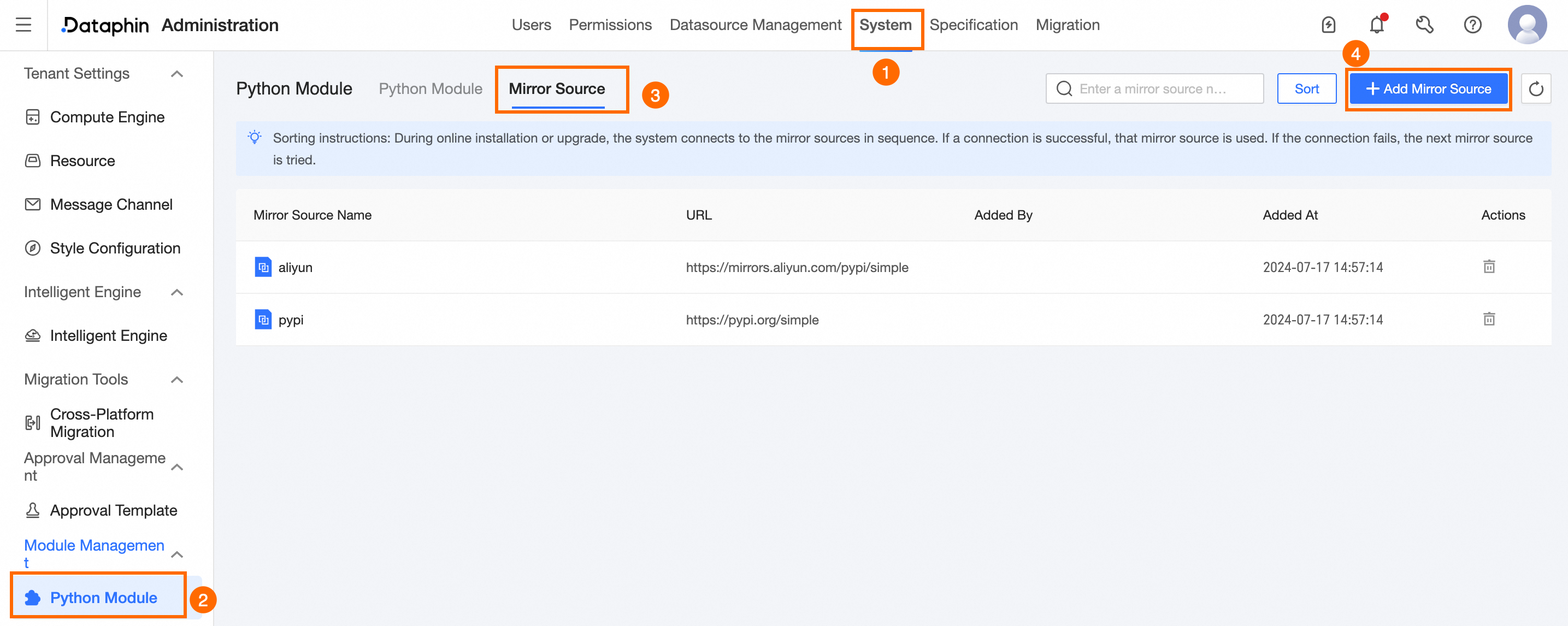
Choose System settings > Python third-party packages > Traffic Mirror Source > Add Traffic Mirror Source.
-
In the New Traffic Mirror Source dialog box, configure the following parameters:
Parameter
Description
Traffic Mirror Source Name
Enter a name. Maximum: 64 characters.
URL
Enter a valid mirror source URL.
NoteKeep at least one traffic mirror source to ensure proper operation.
-
Click Connectivity Test to verify URL connectivity.
-
After a successful test, click OK.
What to do next
After adding the traffic mirror source, install Python modules online from the Python Module page. Install Python Module.