This topic describes the process from order creation to data migration. You can lease a Data Transport Micro device for a long term to migrate data based on the process.
Activate Data Transport Micro
Go to the Data Transport Micro activation page to activate Data Transport Micro.
You can log on to the Data Migration console and choose Data Transport > Data Transport Mini in the left-side navigation pane to create an order only after you activate Data Transport Micro.
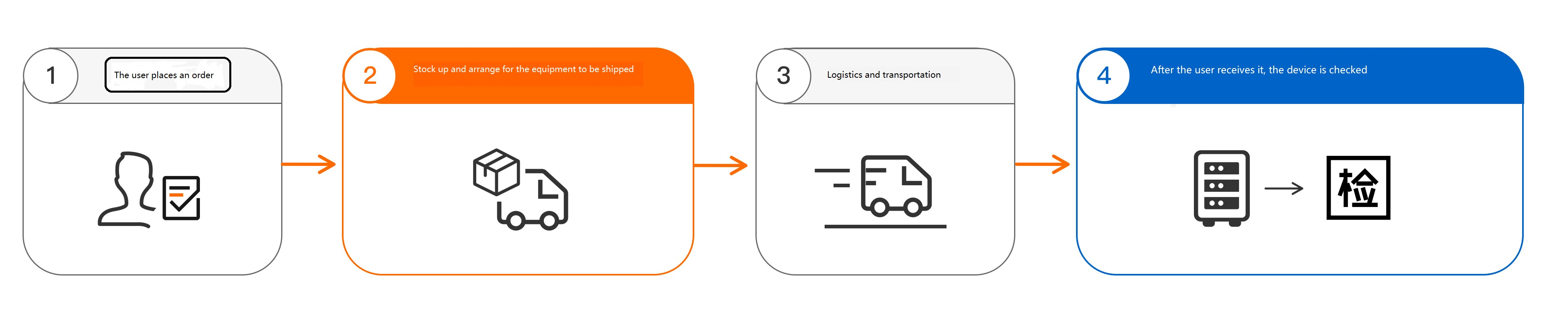
Create an order and receive a device
Create an order and lease the device for a long term.
NoteAfter an order is created, Alibaba Cloud prepares a Data Transport Micro device that meets your requirements and delivers the device to the address specified in the order.
After you receive the device, unpack and inspect the device. Check whether the device ports are intact and the power cords and other accessories are present. If the device is damaged or accessories are missing, contact Alibaba Cloud technical support.
Collect data and migrate data to the cloud
Collect data
Install the Data Transport Micro device. For more information, see Install a Data Transport device.
Mount the Data Transport Micro device. For more information, see Mount a Data Transport Micro device. After the Data Transport Micro device is mounted, test the network connectivity and data writes. If the network is connected and data can be written to the device, you can use the device to collect data.
Power off the device and unplug the Ethernet cable after data collection is complete.
Migrate data to the cloud
You can send the Data Transport Micro device to an Alibaba Cloud data center or a nearby third-party data center to migrate data to the cloud.
Send the device to an Alibaba Cloud data center
You notify Alibaba Cloud technical support to retrieve the device.
You hand over the device and accessories to the logistics personnel.
Alibaba Cloud technical support migrates the data from the device to the cloud after the device is received.
You verify the integrity and accuracy of the migrated data.
Send the device to a nearby third-party data center
You notify the personnel of a nearby third-party data center to retrieve the device.
You hand over the device and accessories to the personnel of the data center.
You can perform custom processing on the data. After the data is processed, the personnel migrate the data to the cloud.
The personnel of the data center retrieve the device.
You verify the integrity and accuracy of the migrated data.
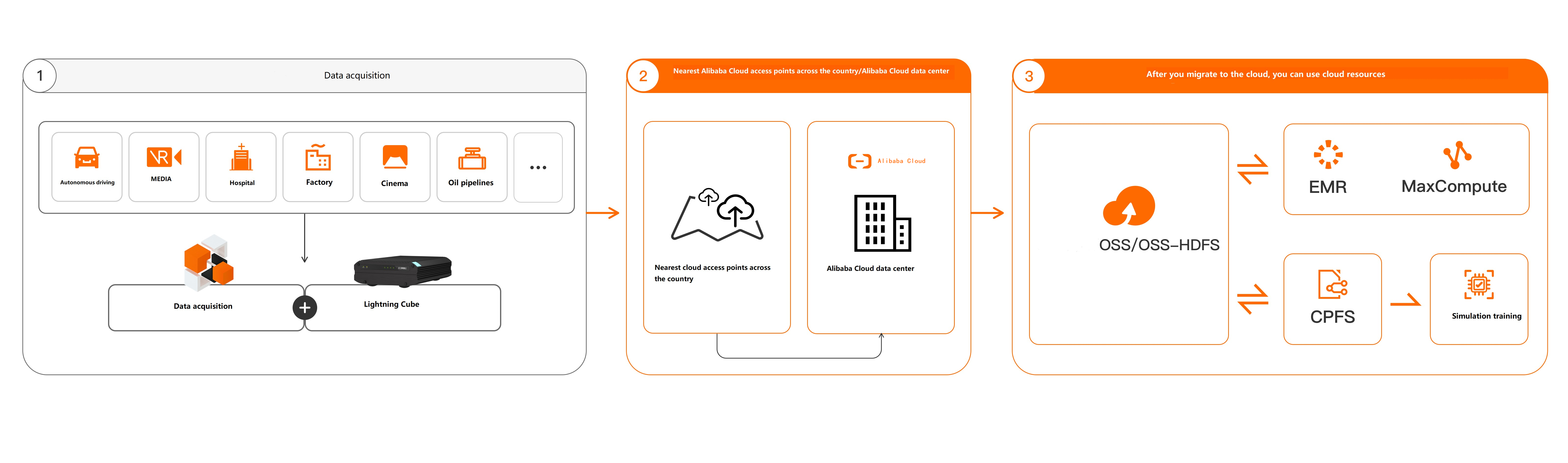
Alibaba Cloud partners provide 18 third-party data centers in the following cities of the Chinese mainland: Beijing, Nanjing, Wuhan, Changsha, Shanghai, Jinan, Hefei, Guangzhou, Fuzhou, Zhengzhou, Tianjin, Shijiazhuang, Xi'an, Chengdu, Chongqing, Shenzhen, Hangzhou, and Xuzhou.
Return the device
Your data must be removed from the device before you return the device. If you have leased multiple Data Transport Micro devices, remove the data from all devices.
If you have changed the logon password of the device console or storage pool, reset the password to the initial password before you power off the device.
You check the accessories of the device. If you lease multiple devices, check the number of devices and their accessories.
You notify Alibaba Cloud technical support to retrieve the device.
You hand over the device and accessories to the logistics personnel.
Alibaba Cloud technical support receives and confirms the device and accessories. The order is complete.
