Data Transmission Service (DTS) migrates schemas, historical data, and incremental changes between PolarDB for Oracle clusters. You can combine schema migration, full data migration, and incremental data migration to minimize downtime during cutover.
Prerequisites
Before you begin, make sure that:
The source and destination PolarDB for Oracle clusters reside in the China (Shanghai) region. Migration between PolarDB for Oracle clusters is available only in this region.
Tables to be migrated contain primary keys or UNIQUE NOT NULL indexes
The
wal_levelparameter of the source PolarDB for Oracle cluster is set tological. This enables logical decoding in write-ahead logging (WAL), which is required for incremental data migration. For more information, see Configure cluster parameters.
Supported migration types
| Migration type | Description |
|---|---|
| Schema migration | Migrates schemas of selected objects. Supported types: table, view, synonym, stored procedure, stored function, package, and user-defined type. |
| Full data migration | Migrates historical data of selected objects to the destination cluster. |
| Incremental data migration | Retrieves redo log files from the source database and replicates ongoing changes. Supported DML operations: INSERT, UPDATE, and DELETE. DDL operations are not synchronized. |
Billing
| Migration type | Task configuration fee | Internet traffic fee |
|---|---|---|
| Schema migration and full data migration | Free of charge. | Charged only when data is migrated from Alibaba Cloud over the Internet. For more information, see Billing overview. |
| Incremental data migration | Charged. For more information, see Billing overview. |
Limits
DTS does not support triggers. If an object contains triggers, data inconsistency between the source and destination databases may occur.
DTS does not synchronize DDL operations during incremental data migration.
Each migration task migrates data from only a single database. To migrate multiple databases, create a separate task for each one.
Do not perform DDL operations on objects being migrated during schema migration or full data migration. Otherwise, the objects may fail to be migrated.
Before you start
DTS uses read and write resources of both databases during full data migration, which may increase server loads. Slow SQL queries, tables without primary keys, or deadlocks can amplify resource consumption. Migrate data during off-peak hours when CPU utilization of both databases is less than 30%.
If a schema is selected as the migration object and a table is created or renamed (using the RENAME statement) during incremental data migration, run the following statement before writing data to the table: Replace
schemaandtablewith the actual schema name and table name.ALTER TABLE schema.table REPLICA IDENTITY FULL;DTS adds a heartbeat table named
dts_postgres_heartbeatto the source database to track incremental data migration latency.
If a migration task fails, DTS automatically resumes it. Stop or release the task before switching workloads to the destination database. Otherwise, data in the source database may overwrite data in the destination database after the task resumes.
Long-running transactions in the source database during incremental data migration prevent WAL log cleanup and consume large amounts of storage space.
Create a migration task
Log on to the DTS console.
NoteIf you are redirected to the Data Management (DMS) console, click the
 icon in the lower-right corner to go to the previous version of the DTS console.
In the left-side navigation pane, click Data Migration.
At the top of the Migration Tasks page, select the region where the destination cluster resides.
In the upper-right corner of the page, click Create Migration Task.
Configure the source and destination databases.
Section Parameter Description N/A Task Name DTS automatically generates a task name. Specify a descriptive name to identify the task. The task name does not need to be unique. Source Database Instance Type Select PolarDB. Instance Region The region of the source PolarDB cluster. PolarDB Instance ID The ID of the source PolarDB for Oracle cluster. Database Name The name of the source database. Database Account A privileged account of the source PolarDB cluster. For more information, see Create database accounts. Database Password The password of the database account. After you specify the source database information, click Test Connectivity next to Database Password to verify the settings. If the Passed message appears, the information is valid. If the Failed message appears, click Check next to Failed and modify the information based on the check results. Destination Database Instance Type Select PolarDB. Instance Region The region of the destination PolarDB cluster. PolarDB Instance ID The ID of the destination PolarDB for Oracle cluster. Database Name The name of the destination database. Database Account The database account of the destination PolarDB for Oracle cluster. The account must have the permissions of the database owner. You can specify the database owner when you create a database. Database Password The password of the database account. After you specify the destination database information, click Test Connectivity next to Database Password to verify the settings. If the Passed message appears, the information is valid. If the Failed message appears, click Check next to Failed and modify the information based on the check results. 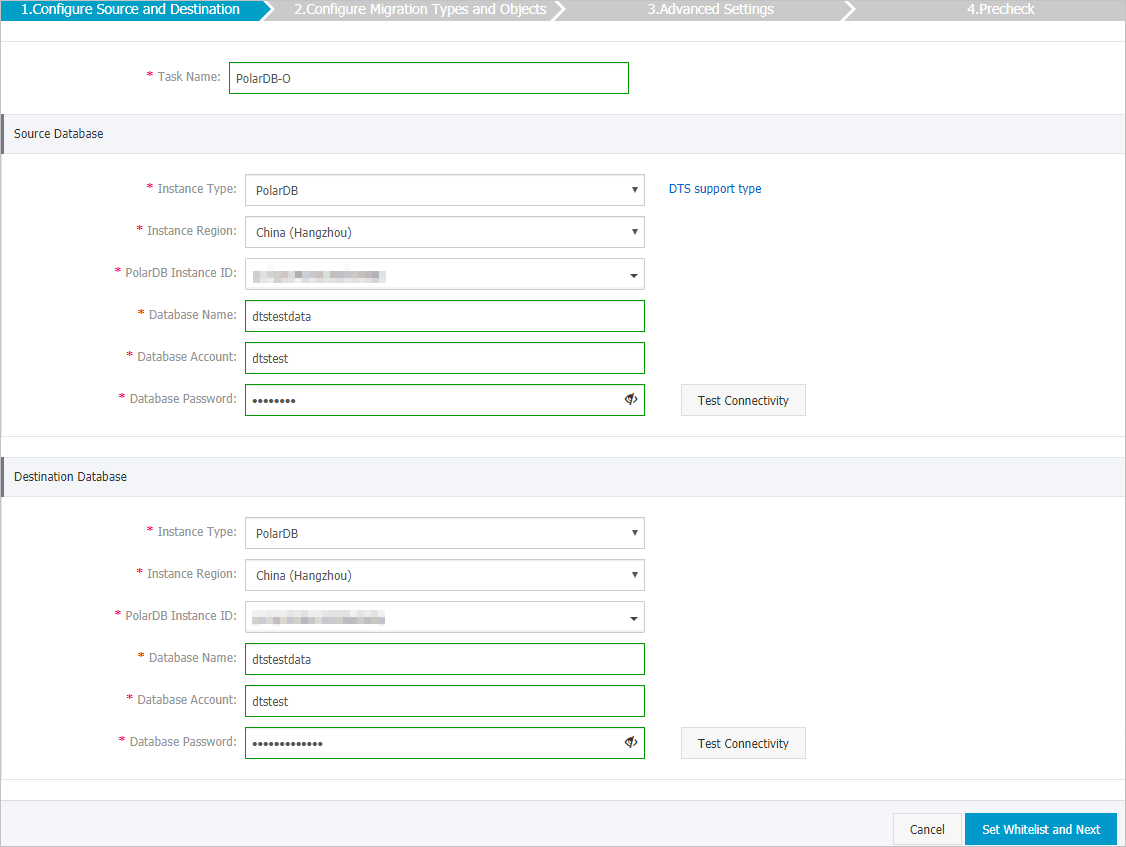
In the lower-right corner of the page, click Set Whitelist and Next.
WarningWhen DTS server CIDR blocks are added to the whitelist of a database or instance, or to ECS security group rules, security risks may arise. Before using DTS, take preventive measures such as: enhance the security of your username and password, limit exposed ports, authenticate API calls, regularly check whitelists and ECS security group rules, forbid unauthorized CIDR blocks, or connect the database to DTS by using Express Connect, VPN Gateway, or Smart Access Gateway.
Select the migration types and objects to be migrated.
Setting Description Select migration types To perform only full data migration, select Schema Migration and Full Data Migration. To maintain service continuity during migration, select Schema Migration, Full Data Migration, and Incremental Data Migration. ImportantIf Incremental Data Migration is not selected, do not write data to the source database during schema migration or full data migration to maintain data consistency. Do not perform DDL operations on the objects being migrated during schema migration or full data migration.
Select the objects to be migrated Select one or more objects from the Source Objects section and click the  icon to add them to the Selected Objects section. You can select columns, tables, or schemas as migration objects. Important
After an object is migrated, its name remains unchanged by default. To rename migrated objects, use the object name mapping feature. For more information, see Object name mapping. If object name mapping is used to rename an object, other objects that depend on the renamed object may fail to be migrated.
Specify whether to rename objects To rename objects migrated to the destination cluster, use the object name mapping feature. For more information, see Object name mapping. Specify the retry time range for failed connections to the source or destination database By default, if DTS fails to connect to the source or destination database, DTS retries within the next 720 minutes (12 hours). Specify the retry time range based on your needs. If DTS reconnects within the specified time range, the migration task resumes. Otherwise, the task fails. NoteThe DTS instance is charged during the retry period. Release the DTS instance promptly after the source and destination instances are released.
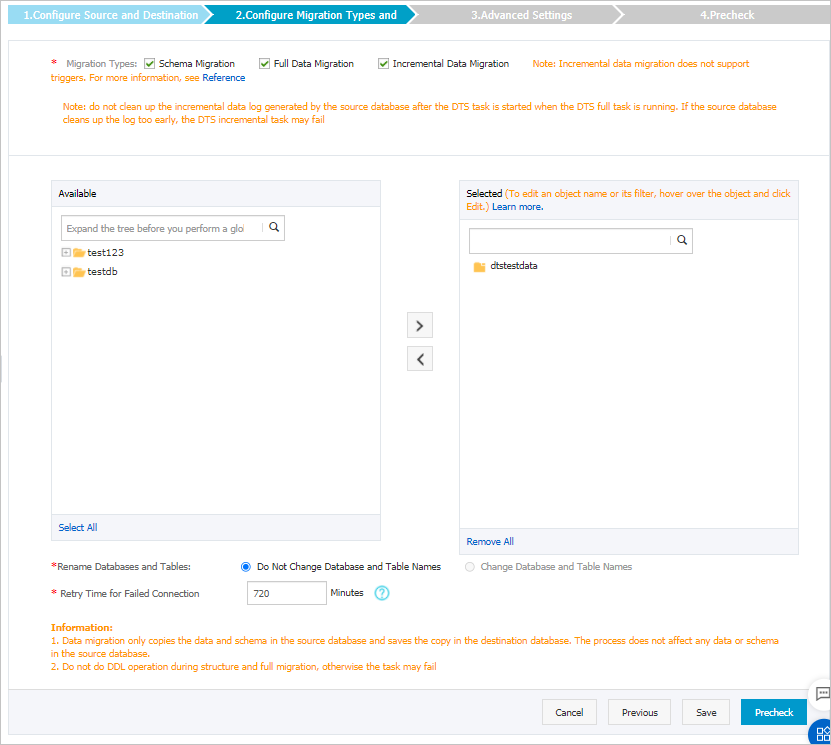
In the lower-right corner of the page, click Precheck.
NoteDTS performs a precheck before starting the migration task. The task starts only after it passes the precheck.
If the task fails the precheck, click the
 icon next to each failed item to view details. Fix the issues and run the precheck again, or ignore failed items and rerun the precheck.
After the task passes the precheck, click Next.
In the Confirm Settings dialog box, specify the Channel Specification parameter and select Data Transmission Service (Pay-As-You-Go) Service Terms.
Click Buy and Start to start the migration task.
Schema migration and full data migration Do not manually stop the task during full data migration. Otherwise, migrated data may be incomplete. Wait until the task stops automatically.
Schema migration, full data migration, and incremental data migration An incremental data migration task does not stop automatically. Manually stop the task during off-peak hours or before switching workloads to the destination cluster. To stop an incremental data migration task:

Wait until Incremental Data Migration and The migration task is not delayed appear in the progress bar of the migration task. Then, stop writing data to the source database for a few minutes. The latency of incremental data migration may be displayed in the progress bar.
Wait until the status of incremental data migration changes to The migration task is not delayed again. Then, manually stop the migration task.
What to do next
After the migration completes, switch your workloads to the destination database. For more information, see Switch workloads to the destination database.