Latency insight gives you microsecond-precision latency statistics for all commands and custom events on a Tair (Redis OSS-compatible) instance. Use it to pinpoint which events caused a latency spike, when it happened, and how severe it was—across events, time, and latency dimensions.
Prerequisites
Before you begin, ensure that your Tair (Redis OSS-compatible) instance meets the following minor version requirements. To update the minor version, see Update the minor version of an instance.
| Instance type | Minimum minor version | Notes |
|---|---|---|
| Tair (Enterprise Edition) DRAM-based instance | 1.6.9 | To collect statistics for Tair module commands, update to 1.7.28 or later |
| Redis Open-Source Edition 5.0 | 5.1.4 | |
| Redis Open-Source Edition 6.0 | 0.1.15 | |
| Redis Open-Source Edition 7.0 | 7.0.0.6 |
How latency insight works
Redis 2.8.13 introduced native latency monitoring, but it only retains data from the last 160 seconds and records only the single highest-latency event per second.
Latency insight extends this with:
-
Persistence: retains all latency statistics for the last three days, enabling latency spike tracing across time
-
High precision: microsecond-accurate measurements for all events
-
High performance: asynchronous implementation with minimal overhead
-
Real-time queries: supports live data queries and aggregation
-
Multidimensional statistics: analyzes an instance across up to 27 events, time ranges, and latency distributions
Billing
This feature is free of charge.
View latency statistics
-
Log on to the DAS console.
-
In the left navigation pane, choose Intelligent O&M Center > Instance Monitoring.
-
Find the instance you want to analyze, then click its instance ID to open the instance details page.
-
In the left navigation pane, choose Request Analysis > Latency Insight.
-
On the Latency Insight page, select a time range to view latency statistics for that period.
Only data from the last three days is available, and each query must span no more than one hour.
For cluster instances or read/write splitting instances, you can view Data Node and Proxy Node statistics.
Only commands or events that exceed the configured threshold are recorded and displayed. For guidance on resolving common latency events, see Suggestions for handling common latency events.
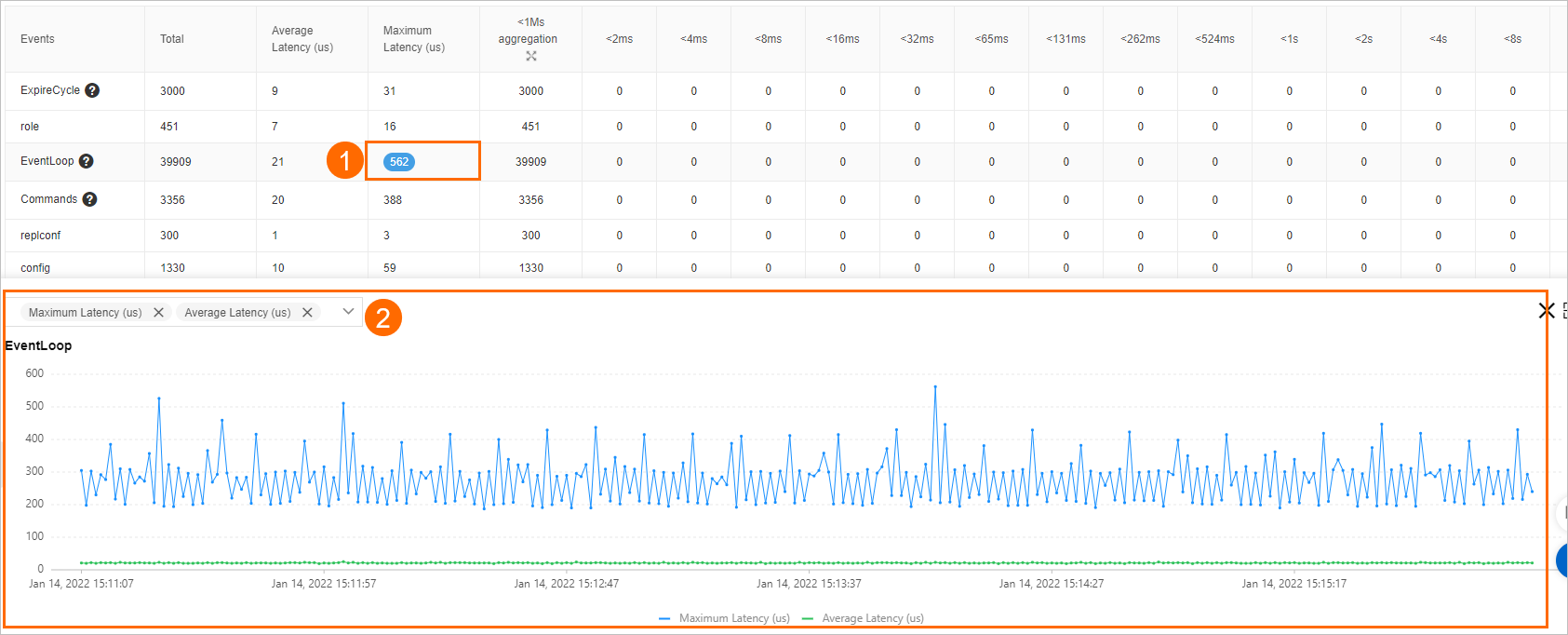
Metric reference
| Metric | Description |
|---|---|
| Events | Event name |
| Total | Total number of occurrences |
| Ave. Latency (μs) | Average server-side execution time, in microseconds |
| Max. Latency (μs) | Maximum server-side execution time, in microseconds |
| Aggregation of instances (Latency < 1 ms) | Number of occurrences with latency under 1 ms. Click  to expand sub-millisecond buckets: to expand sub-millisecond buckets: <1μs, <2μs, <4μs, <8μs, <16μs, <32μs, <64μs, <128μs, <256μs, <512μs. Counting method: The <1μs bucket counts occurrences from 0 μs to 1 μs; <2μs counts 1 μs to 2 μs; and so on. |
<2ms <4ms ... >33s |
Number of occurrences within each millisecond-range bucket. Counting method: The <2ms bucket counts occurrences from 1 ms to 2 ms; >33s counts anything over 33 seconds; and so on. |
Click a count in the table to open a trend chart for that event. You can also specify the metrics that you want to view on the chart by selecting the metric names from the drop-down list above the chart.
Common special events
The following table lists the events that Latency insight monitors, grouped by category. Each event is recorded only when its execution time exceeds the listed threshold.
| Category | Event | Threshold | What it measures |
|---|---|---|---|
| Memory eviction | EvictionDel | 30 ms | Time to delete evicted keys in one eviction cycle |
| EvictionLazyFree | 30 ms | Time for background threads to release memory in one eviction cycle | |
| EvictionCycle | 30 ms | Total eviction cycle time: selecting and deleting keys, plus waiting for background threads | |
| Memory defragmentation | ActiveDefragCycle | 100 ms | Time to complete one memory defragmentation pass |
| Rehash | Rehash | 100 ms | Time to perform a dictionary rehash |
| Data structure upgrade | ZipListConvertHash | 30 ms | Time to convert a ziplist to a dictionary using hash encoding |
| IntsetConvertSet | 30 ms | Time to convert an intset to a set using set encoding | |
| ZipListConvertZset | 30 ms | Time to convert a ziplist to a skiplist using ziplist encoding | |
| Append-only file (AOF) | AofWriteAlone | 30 ms | Time to write an AOF as expected |
| AofWrite | 30 ms | Total AOF write time. Each write generates one AofWrite event and exactly one of: AofWriteAlone, AofWriteActiveChild, or AofWritePendingFsync |
|
| AofFstat | 30 ms | Fstat latency | |
| AofRename | 30 ms | Time to rename the AOF file | |
| AofReWriteDiffWrite | 30 ms | Time for the parent process to write incremental AOF data while a child process rewrites the AOF | |
| AofWriteActiveChild | 30 ms | Time to write the AOF when another child process is also writing to disk | |
| AofWritePendingFsync | 30 ms | Time to write the AOF when a background fsync is already in progress | |
| Redis database (RDB) file | RdbUnlinkTempFile | 50 ms | Time to delete the temporary RDB file after a bgsave child process exits |
| Others | Commands | 30 ms | Execution time for regular commands not marked @fast |
| FastCommand | 30 ms | Execution time for commands marked @fast (O(1) or O(log N) time complexity) |
|
| EventLoop | 50 ms | Time to complete one main event loop iteration | |
| Fork | 100 ms | Time to call a fork operation |
|
| Transaction | 50 ms | Total execution time of a transaction | |
| PipeLine | 50 ms | Time consumed by a multi-threaded pipeline | |
| ExpireCycle | 30 ms | Time to run one expired-key cleanup pass | |
| ExpireDel | 30 ms | Time to delete expired keys in one cleanup cycle | |
| SlotRdbsUnlinkTempFile | 30 ms | Time to delete the temporary RDB file from a slot after a bgsave child process exits |
|
| LoadSlotRdb | 100 ms | Time to load an RDB file from a slot | |
| SlotreplTargetcron | 50 ms | Time to load an RDB file from a slot into a temporary database and migrate it to the destination database using a child process |
What's next
-
If you see consistently high latency in specific events, see Suggestions for handling common latency events for remediation guidance.