You can configure JVM garbage collection (GC) and Just-In-Time (JIT) compilation parameters to take full advantage of the in-place scaling feature of ACS during Java application startup. This topic provides recommended settings for ParallelGCThreads, ConcGCThreads, and CICompilerCount to accelerate Java startup.
Background
Java application startup is a resource-intensive process that involves class loading, bytecode compilation, and bytecode optimization. This process can take up to tens of minutes. During startup, the JVM typically consumes more than half of the available CPU resources to load and compile non-application code. After the application reaches a steady state, these resources become idle.
In containerized environments, the JVM reads the CPU count from the container's cgroup limits at startup. If the container has fewer than 2 vCPUs and less than 1792 MB of memory, the JVM classifies the environment as a client-class machine and selects the Serial GC by default, rather than the more performant G1 GC. This can significantly affect startup performance for smaller containers.
ACS addresses the startup resource gap through in-place scaling (CPU Burst), which temporarily allocates additional compute resources during the startup phase. By combining CPU Burst with properly tuned JVM thread parameters, you can significantly reduce Java application startup time.
Three types of threads run on the JVM: compiler threads, user threads, and garbage collection threads. The proportion of resources each type consumes varies across the lifecycle of the application.
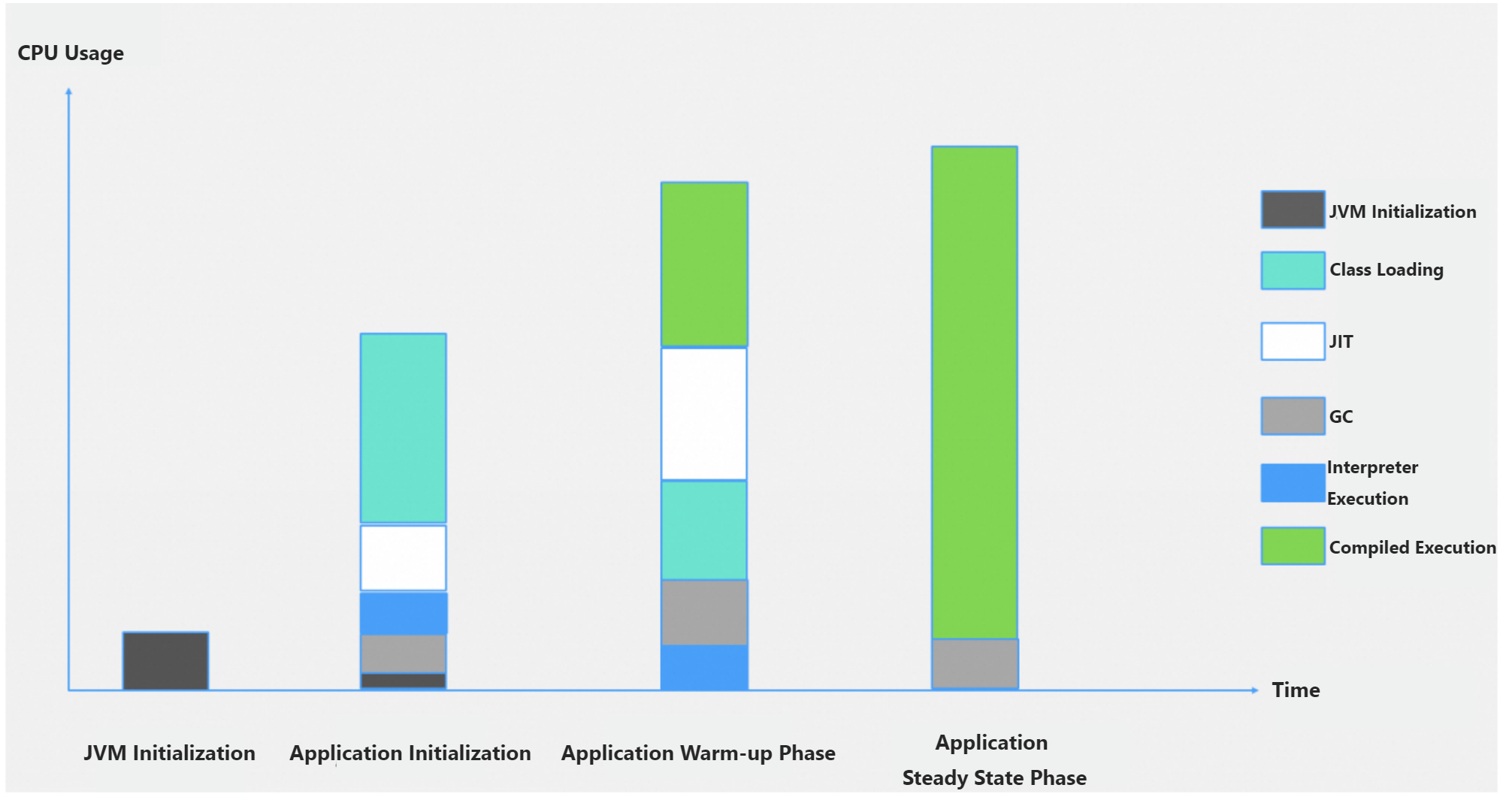
Recommended JVM settings
Assume the application is allocated X vCPUs under normal conditions. When CPU in-place scaling is enabled, the application receives Y vCPUs (Y >= X) during startup. Set these JVM parameters based on the scaled value Y to make full use of the additional vCPUs (Y - X). However, because the vCPU count drops from Y to X after the startup phase ends, do not set excessively large values. Ensure that the CPU Burst duration lasts until startup completes. Otherwise, the threads will contend for insufficient CPU resources and degrade performance.
ParallelGCThreads
The number of parallel garbage collection threads.
If Y <= 8 vCPUs, set
-XX:ParallelGCThreads=Y.If Y > 8, set
-XX:ParallelGCThreads=8+(Y-8)*(5/8).
ConcGCThreads
The number of concurrent garbage collection threads. These threads run concurrently with the application to reduce pause time. Reserve sufficient CPU resources for them.
Set
-XX:ConcGCThreads=1/4*ParallelGCThreads(one quarter of the parallel GC thread count).
CICompilerCount
The number of JIT compiler threads. This value affects compilation throughput. Too few threads can slow method compilation and increase CPU overhead.
| vCPUs (Y) after scaling | CICompilerCount |
|---|---|
| 1 | 2 |
| 2 | 2 |
| 4 | 3 |
| 8 | 3 |
| 16 | 8 |
| 32 | 10 |
| 64 | 12 |
Tip: As an alternative to setting individual thread parameters, you can use
-XX:ActiveProcessorCount=Nto override the number of CPUs the JVM detects. This causes the JVM to calculate all thread pool sizes as if N processors were available. This approach is useful when you want the JVM to base its defaults on the burst CPU count without tuning each parameter individually.
Quick reference: recommended values for 2x CPU Burst
The following table shows the recommended JVM parameter values when you double the vCPU count with CPU Burst.
| Original vCPUs | vCPUs after CPU Burst | ParallelGCThreads | ConcGCThreads | CICompilerCount |
|---|---|---|---|---|
| 0.5 | 1 | 1 | 1 | 2 |
| 1 | 2 | 2 | 1 | 2 |
| 2 | 4 | 4 | 1 | 3 |
| 4 | 8 | 8 | 2 | 3 |
| 8 | 16 | 13 | 3 | 8 |
Apply the JVM parameters
Step 1: Verify the current JVM defaults
Before applying custom settings, check the default thread configuration for your JVM version. Run the following command inside the container:
java -XX:+PrintFlagsFinal -version | grep ParallelGCThreadsYou can also verify the full set of system properties the JVM detects from the container, including the effective CPU count and memory limits:
java -XshowSettings:system -versionStep 2: Configure the Deployment
When ACS creates an instance for a Java application, you can use in-place scaling to temporarily double the CPU resources. The scaling lasts only until the application enters the Ready state, providing a targeted acceleration window. If the application needs to load additional libraries or perform initialization tasks beyond JVM compilation and warmup, you can extend the burst duration.
If the application performs warmup after the CPU scales down, the GC and JIT threads may compete with the application for CPU resources, because these threads were allocated based on the higher burst CPU count. To avoid this, ensure that your application completes its warmup before the CPU Burst ends.
apiVersion: apps/v1
kind: Deployment
metadata:
  labels:
    app: spring-with-burst
  name: spring-with-burst
  namespace: default
spec:
  replicas: 1
  selector:
    matchLabels:
      app: spring-with-burst
  minReadySeconds: 400 # Set a value that is greater than one during the CPU Burst duration. This way, you can verify the status of the instance after the CPU Burst ends.
  template:
    metadata:
      annotations:
        alibabacloud.com/startup-cpu-burst-factor: '2' #Set the CPU Burst factor to 2. The original 1 vCPU is scaled to 2 vCPUs during the startup.
        alibabacloud.com/startup-cpu-burst-duration-seconds: "300" #The default value (30 seconds) is too short. Most Java applications need 10 minutes or less to start up and another 5 minutes to complete the warmup. We recommend that you set a larger value.
        scaling.alibabacloud.com/enable-inplace-resource-resize: 'true' # Enable in-place scaling.
      labels:
        alibabacloud.com/compute-class: general-purpose
        alibabacloud.com/compute-qos: default
        app: spring-with-burst
    spec:
      containers:
        - image: 'registry.cn-hangzhou.aliyuncs.com/acs-demo-ns/demo-java:java-with-metrics-v1'
          imagePullPolicy: IfNotPresent
          name: spring
          ports:
            - containerPort: 8080
              protocol: TCP
          resources:
            limits:
              cpu: 1
              memory: 4Gi
            requests:
              cpu: 1
              memory: 4Gi
Step 3: Set the JVM parameters in the boot command
If the default thread configuration differs significantly from the recommended settings, modify the Java application boot command. For example, to configure JVM parameters for 1 vCPU scaled to 2 vCPUs:
java -XX:ParallelGCThreads=2 -XX:ConcGCThreads=1 -XX:CICompilerCount=2 -jar app.jar