Version 26.03 of the training-nv-pytorch image upgrades torch to 2.10, vllm to 0.17.0, megatron-core to 0.16.0, deepspeed to 0.18.8, and transformer_engine to 2.12. Use it for GPU training and inference on ACS with its compilation and recomputation memory optimizations.
What's new
Highlights
Upgraded torch to 2.10.
Upgraded vllm to 0.17.0.
Upgraded megatron-core to 0.16.0.
Upgraded deepspeed to 0.18.8.
Upgraded transformer_engine to 2.12.
Bug fixes
None.
Image contents
The following table lists the attributes of each image tag.
Item | 26.03-cu130-serverless | 26.03-cu128-serverless |
Image name | training-nv-pytorch | training-nv-pytorch |
Use case | Training and inference | Training/Inference |
Framework | pytorch | pytorch |
Requirements | NVIDIA Driver 580 or later | NVIDIA Driver 575 or later |
Supported architectures | amd64 and aarch64 | amd64 |
Core components
26.03-cu130-serverless
Ubuntu: 24.04
Python: 3.12.7+gc
CUDA: 13.0
perf: 5.4.30
gdb: 15.1
torch: 2.10.0+ali.10.nv25.10
triton: 3.6.0
transformer_engine: 2.12.0+5671fd36
deepspeed: 0.18.8+ali
flash_attn: 2.8.3
transformers: 4.57.6+ali
grouped_gemm: 1.1.4
accelerate: 1.11.0+ali
diffusers: 0.34.0
mmengine: 0.10.3
mmcv: 2.1.0
mmdet: 3.3.0
opencv-python-headless: 4.11.0.86
ultralytics: 8.3.96
timm: 1.0.26
vllm: 0.17.0+cu130
flashinfer-python: 0.6.4
pytorch-dynamic-profiler: 0.24.11
peft: 0.16.0
ray: 2.54.1
megatron-core: 0.16.0
26.03-cu128-serverless
Ubuntu: 24.04
Python: 3.12.7+gc
CUDA: 12.8
perf: 5.4.30
gdb: 15.1
torch: 2.10.0+ali.10.nv25.3.pgo
triton: 3.6.0
transformer_engine: 2.12.0+5671fd36
deepspeed: 0.18.8+ali
flash_attn: 2.8.3
flash_attn_3: 3.0.0b1
transformers: 4.57.6+ali
grouped_gemm: 1.1.4
accelerate: 1.11.0+ali
diffusers: 0.34.0
mmengine: 0.10.3
mmcv: 2.1.0
mmdet: 3.3.0
opencv-python-headless: 4.11.0.86
ultralytics: 8.3.96
timm: 1.0.26
vllm: 0.17.0+cu128
flashinfer-python: 0.6.4
pytorch-dynamic-profiler: 0.24.11
peft: 0.16.0
ray: 2.54.1
megatron-core: 0.16.0
Assets
This image is compatible with ACS and multi-tenant Lingjun environments, but not with single-tenant Lingjun environments.
Public images
CUDA 13.0.2 (NVIDIA Driver 580 or later, amd64 and aarch64)
egslingjun-registry.cn-wulanchabu.cr.aliyuncs.com/egslingjun/training-nv-pytorch:26.03-cu130-serverless
CUDA 12.8 (NVIDIA Driver 575 or later, amd64)
egslingjun-registry.cn-wulanchabu.cr.aliyuncs.com/egslingjun/training-nv-pytorch:26.03-cu128-serverless
VPC images
Replace the AI container image asset URI egslingjun-registry.cn-wulanchabu.cr.aliyuncs.com/egslingjun/{image:tag} specified in the YAML file of the ACS console with acs-registry-vpc.{region-id}.cr.aliyuncs.com/egslingjun/{image:tag} to quickly pull PG1 AI container images over the VPC.
Where
{region-id}is the available region where your ACS is activated, such as cn-beijing and cn-wulanchabu.{image:tag}is the name and tag of the image.
Driver requirements
Release 26.03 supports two CUDA versions, each with its own minimum driver version:
CUDA 13.0.2 requires NVIDIA Driver 580 or later.
CUDA 12.8.0 requires NVIDIA Driver 575 or later.
Check CUDA Application Compatibility for the full list of supported drivers and CUDA Compatibility and Upgrades for upgrade guidance.
Quick start
The following steps use Docker to pull the image and run a training demo on a local host. Run the docker commands in the host shell and the training commands in the container shell.
To use this image in ACS, select it from Artifact Center when you create a workload in the console, or specify the image reference in a YAML file.
Step 1: Pull the image
Run the following command in the host shell:
docker pull egslingjun-registry.cn-wulanchabu.cr.aliyuncs.com/egslingjun/training-nv-pytorch:[tag]Replace [tag] with the tag that matches your NVIDIA driver version and CPU architecture, either 26.03-cu130-serverless or 26.03-cu128-serverless. For the driver version and architectures that each tag supports, see the Image contents section.
Step 2: Start the container
Run the following command in the host shell. The command starts the container and opens a container shell, where the remaining steps run.
# Start the container and open a shell
docker run --rm -it --ipc=host --net=host  --privileged egslingjun-registry.cn-wulanchabu.cr.aliyuncs.com/egslingjun/training-nv-pytorch:[tag]
Step 3: Enable the optimizations
Enable both optimizations before training starts. Set the compilation optimization in your training script, and set the recomputation memory optimization in the container shell that Step 2 opens.
Enable compilation optimization
In your training script, set the following arguments through the transformers Trainer API:
training_args = TrainingArguments(
    bf16=True,
    gradient_checkpointing=True,
    torch_compile=True
)
Enable recomputation memory optimization
In the container shell, set the following environment variable:
export CHECKPOINT_OPTIMIZATION=trueStep 4: Run the training demo
The image includes ljperf, a built-in model training tool. Run the demo in the container shell.
For LLMs
# Run the training demo
ljperf benchmark --model deepspeed/llama3-8b
Usage recommendations
This image ships modified libraries, such as PyTorch and DeepSpeed. Do not reinstall them.
In the DeepSpeed configuration, leave
zero_optimization.stage3_prefetch_bucket_sizeblank or set it toauto.
Key features and enhancements
PyTorch compilation optimization
torch.compile(), introduced in PyTorch 2.0, often delivers strong gains for small-scale, single-GPU workloads. But LLM training depends on GPU memory optimization and distributed frameworks such as FSDP or DeepSpeed, so torch.compile() may offer limited benefits or even degrade performance.
-
Control communication granularity in the DeepSpeed framework. This helps the compiler capture a more complete compute graph and apply broader compilation optimizations.
-
Use an optimized PyTorch build:
-
The PyTorch compiler frontend is improved to ensure that compilation succeeds even if a graph break occurs in the compute graph.
-
Pattern matching and dynamic shape support are strengthened to improve post-compilation performance.
-
With these optimizations, 8B-parameter LLM training typically achieves an end-to-end throughput gain of about 20%.
GPU memory optimization for recomputation
A predictive model for GPU memory overhead, built on large-scale performance data—including different models, clusters, and training parameter settings, as well as system metrics such as GPU memory utilization collected during benchmarking—recommends the optimal number of activation recomputation layers. This approach is integrated into PyTorch, allowing you to achieve the performance gains of GPU memory optimization with minimal effort. This feature is now supported in the DeepSpeed framework.
E2E performance evaluation
This image was benchmarked against the standard base image with CNP, a cloud-native AI performance evaluation and analysis tool, using mainstream open source models and framework configurations. Ablation experiments show how much each optimization component contributes to overall model training performance.
Image comparison against the base image and iteration-over-iteration evaluation
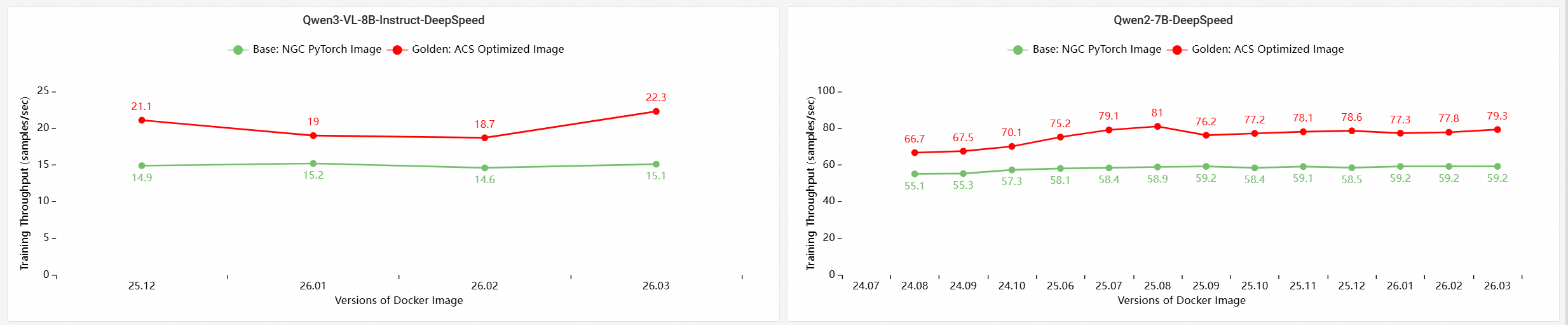
E2E performance contribution analysis of core GPU components
The following configurations of this release were compared for end-to-end training performance on a multi-node GPU cluster:
Base: The official NGC PyTorch image.
ACS AI Image (Base + ACCL): The base image with the ACCL communication library.
ACS AI Image (AC2 + ACCL): The image on AC2 BaseOS with ACCL, but no other optimizations.
ACS AI Image (AC2 + ACCL + CompilerOpt): The image on AC2 BaseOS with ACCL and only the torch.compile optimization enabled.
torch.compileoptimization enabled.ACS AI Image (AC2 + ACCL + CompilerOpt + CkptOpt): The image on AC2 BaseOS with ACCL,
torch.compile, and selective gradient checkpointing enabled.

Known issues
None.