Release notes for training-nv-pytorch version 25.09. This release upgrades PyTorch to 2.8.0 and Transformers to 4.56.1+ali, and delivers two new optimizations—compile-level throughput improvements and automatic activation recomputation—that reduce the effort required for LLM training on Alibaba Cloud GPU infrastructure.
What's new
Updated components
PyTorch and its related components are upgraded to 2.8.0.
Transformers is upgraded to 4.56.1+ali, incorporating features and bug fixes from the corresponding open-source version.
Bug fixes
Fixed an error that occurred when
torch.compile()was enabled for open-source Transformers on Qwen2-VL.
Key features and enhancements
PyTorch compiling optimization
torch.compile(), introduced in PyTorch 2.0, is effective for single-GPU training but provides limited or negative benefit for large language model (LLM) training, which depends on GPU memory optimization and distributed frameworks such as Fully Sharded Data Parallel (FSDP) or DeepSpeed.
This release improves torch.compile() for distributed LLM training through two optimizations:
Communication granularity control in DeepSpeed: Controlling communication granularity gives the compiler a complete compute graph, enabling wider compiling optimization.
Frontend improvements: The PyTorch compiler frontend now compiles even when a graph break occurs, with enhanced mode matching and dynamic shape capabilities.
Result: ~20% higher end-to-end throughput in 8B-parameter LLM training.
GPU memory optimization for recomputation
Based on performance tests across different clusters and parameter configurations, this release integrates the optimal number of activation recomputation layers directly into PyTorch. Enable it with a single environment variable—no manual tuning required.
This feature is currently available in the DeepSpeed framework.
ACCL
Alibaba Cloud Communication Library (ACCL) is a suite of high-performance networking (HPN) libraries designed for Lingjun.
Its key component is ACCL-N, a GPU-accelerated communication library customized from the NVIDIA Collective Communications Library (NCCL). ACCL-N is fully compatible with NCCL while fixing upstream bugs and providing additional performance and stability enhancements.
End-to-end performance evaluation
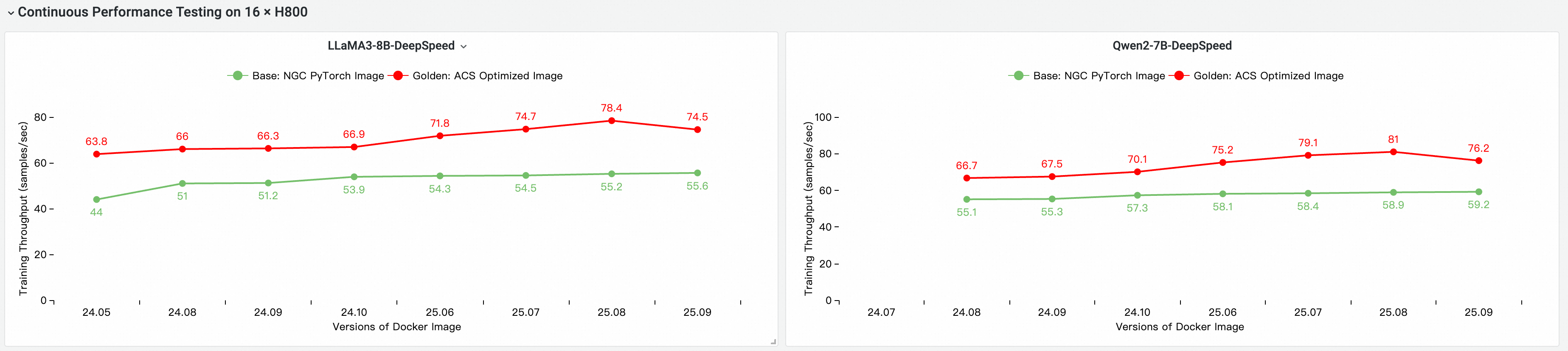
The following performance comparison was conducted on a multi-node GPU cluster using the cloud-native AI performance evaluation and analysis tool CNP. The baseline is the NGC PyTorch image.
Image and iteration comparison against the base image
End-to-end performance contribution by component
The tests measure the cumulative impact of each optimization layer:
Configuration | Description |
Base | NGC PyTorch image |
ACS AI image: Base + ACCL | Adds the ACCL communication library |
ACS AI image: AC2 + ACCL | Golden image using AC2 Base OS with no additional optimizations |
ACS AI image: AC2 + ACCL + CompilerOpt | Golden image using AC2 Base OS with |
ACS AI image: AC2 + ACCL + CompilerOpt + CkptOpt | Golden image using AC2 Base OS with both |

System requirements
Item | Details |
Use cases | Training / Inference |
Framework | PyTorch |
NVIDIA driver | Release 575 or later |
Driver compatibility
The 25.09 release is based on CUDA 12.8.0 and requires NVIDIA driver version 575 or later. For data center GPUs such as the T4, the following driver versions are also supported:
470.57 or later (R470)
525.85 or later (R525)
535.86 or later (R535)
545.23 or later (R545)
The following driver versions are not forward-compatible with CUDA 12.8 and must be upgraded before using this image: R418, R440, R450, R460, R510, R520, R530, R545, R555, and R560. For the complete list of supported drivers, see CUDA Application Compatibility. For upgrade guidance, see CUDA Compatibility and Upgrades.
Core components
Component | Version |
Ubuntu | 24.04 |
Python | 3.12.7+gc |
CUDA | 12.8 |
perf | 5.4.30 |
gdb | 15.0.50.20240403-git |
torch | 2.8.0.9+nv25.3 |
triton | 3.4.0 |
transformer_engine | 2.3.0+5de3e148 |
deepspeed | 0.16.9+ali |
flash_attn | 2.8.3 |
flash_attn_3 | 3.0.0b1 |
transformers | 4.56.1+ali |
grouped_gemm | 1.1.4 |
accelerate | 1.7.0+ali |
diffusers | 0.34.0 |
mmengine | 0.10.3 |
mmcv | 2.1.0 |
mmdet | 3.3.0 |
opencv-python-headless | 4.11.0.86 |
ultralytics | 8.3.96 |
timm | 1.0.20 |
vllm | 0.10.1.1 |
flashinfer-python | 0.2.5 |
pytorch-dynamic-profiler | 0.24.11 |
peft | 0.16.0 |
ray | 2.49.2 |
megatron-core | 0.12.1 |
Image assets
Public image
egslingjun-registry.cn-wulanchabu.cr.aliyuncs.com/egslingjun/training-nv-pytorch:25.09-serverlessThis image is suitable for Alibaba Cloud Container Compute Service (ACS) products and Lingjun multi-tenant scenarios. Do not use it in Lingjun single-tenant scenarios.
VPC image
acs-registry-vpc.{region-id}.cr.aliyuncs.com/egslingjun/{image:tag}Replace the placeholders with the following values:
Placeholder | Description | Example |
| Region where your ACS is activated |
|
| Image name and tag | See the public image above |
Quick start
The following example shows how to pull and run the training-nv-pytorch image using Docker.
To use this image in ACS, select it from the Artifacts page when creating a workload in the console, or specify the image reference in a YAML file—do not use Docker directly.
Step 1: Pull the image
docker pull egslingjun-registry.cn-wulanchabu.cr.aliyuncs.com/egslingjun/training-nv-pytorch:[tag]Step 2: Enable compile and recomputation optimizations
Enable compile optimization
Use the Transformers Trainer API:

Enable activation recomputation for GPU memory optimization
export CHECKPOINT_OPTIMIZATION=trueStep 3: Start the container and run a training task
The image includes a built-in model training tool named ljperf. The following example starts a container and runs an LLM training task:
# Start and enter the container
docker run --rm -it --ipc=host --net=host --privileged \
  egslingjun-registry.cn-wulanchabu.cr.aliyuncs.com/egslingjun/training-nv-pytorch:[tag]

# Run the training demo
ljperf benchmark --model deepspeed/llama3-8b
Usage notes
Do not reinstall the customized versions of libraries bundled in this image, such as PyTorch and DeepSpeed. Reinstalling them overwrites the Alibaba Cloud optimizations.
In your DeepSpeed configuration, leave
zero_optimization.stage3_prefetch_bucket_sizeblank or set it toauto.Set
NCCL_SOCKET_IFNAMEbased on the number of GPUs requested per pod:GPUs per pod
NCCL_SOCKET_IFNAMEvalue1, 2, 4, or 8
eth0(default)16 (full node, using HPN)
hpn0