This topic describes how to modify the shm size of an ACS pod to resolve insufficient shared memory issues. You can do this by setting the sizeLimit of a memory-based emptyDir volume and mounting it to /dev/shm.
Scenario
By default, a pod created in Kubernetes is allocated 64 MiB of shared memory (/dev/shm). This value cannot be changed.
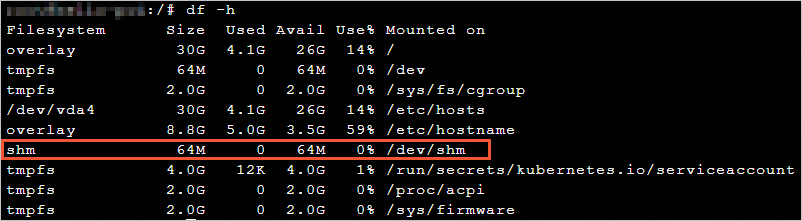
Kubernetes does not provide a way to set the size of shm. To resolve the insufficient shared memory issue, you can mount a memory-backed emptyDir volume to /dev/shm.
Configuration examples
This topic describes how to modify the shm size for standard and GPU workloads.
CPU workload
Create emptydir-shm.yaml. In this example, setting the
mediumof an EmptyDir Volume toMemoryand itssizeLimitto256 MiB, and mounting the EmptyDir Volume to the/dev/shmdirectory sets theshmsize of the Pod to 256 MiB.apiVersion: apps/v1 kind: Deployment metadata: name: test labels: app: test spec: replicas: 1 selector: matchLabels: app: nginx template: metadata: name: nginx-test labels: app: nginx spec: containers: - name: nginx image: anolis-registry.cn-zhangjiakou.cr.aliyuncs.com/openanolis/nginx:1.14.1-8.6 ports: - containerPort: 80 volumeMounts: - mountPath: /dev/shm name: cache-volume volumes: - emptyDir: medium: Memory sizeLimit: 256Mi name: cache-volumeDeploy the deployment.
kubectl apply -f emptydir-shm.yamlCheck the result.
kubectl exec -it deploy/test -- df -hExpected output:
Filesystem      Size  Used Avail Use% Mounted on
overlay          30G  2.8G   26G  10% /
tmpfs            64M     0   64M   0% /dev
tmpfs           2.8G     0  2.8G   0% /sys/fs/cgroup
tmpfs           256M     0  256M   0% /dev/shm
/dev/vda5        30G  2.8G   26G  10% /etc/hosts
tmpfs           4.0G   12K  4.0G   1% /run/secrets/kubernetes.io/serviceaccount
tmpfs           2.8G     0  2.8G   0% /proc/acpi
tmpfs           2.8G     0  2.8G   0% /proc/scsi
tmpfs           2.8G     0  2.8G   0% /sys/firmware
The size of
/dev/shmhas increased to 256 MiB.
GPU workload
Create `emptydir-shm-gpu.yaml`. This example changes the
shmsize of a GPU pod to 256 MiB by setting themediumof an EmptyDir volume toMemory, setting itssizeLimitto256Mi, and mounting the volume to the/dev/shmdirectory.apiVersion: apps/v1 kind: Deployment metadata: labels: app: test-gpu name: test-gpu namespace: default spec: replicas: 1 selector: matchLabels: app: test-gpu template: metadata: labels: app: test-gpu alibabacloud.com/compute-class: gpu alibabacloud.com/compute-qos: default alibabacloud.com/gpu-model-series: T4 spec: volumes: - emptyDir: medium: Memory sizeLimit: 256Mi name: cache-volume containers: - image: registry.cn-beijing.aliyuncs.com/acs/tensorflow-mnist-sample:v1.5 name: tensorflow-mnist command: - sleep - infinity resources: limits: nvidia.com/gpu: "1" volumeMounts: - mountPath: /dev/shm name: cache-volumeDeploy the deployment.
kubectl apply -f emptydir-shm-gpu.yamlCheck the result.
kubectl exec -it deploy/test-gpu -- df -hExpected output:
Filesystem                    Size  Used Avail Use% Mounted on
35xxxxxfe-rootfs               30G  283M   29G   1% /
tmpfs                          64M     0   64M   0% /dev
tmpfs                         1.5G     0  1.5G   0% /sys/fs/cgroup
tmpfs                         256M     0  256M   0% /dev/shm
tmpfs                         1.5G  116K  1.5G   1% /etc/hosts
tmpfs                         3.4G   12K  3.4G   1% /run/secrets/kubernetes.io/serviceaccount
virtiofs-default              189G   17M  189G   1% /run/nvidia-topologyd/virtualTopology.xml
tmpfs                         1.5G   68K  1.5G   1% /proc/driver/nvidia/params
tmpfs                         1.5G  4.0K  1.5G   1% /etc/nvidia/nvidia-application-profiles-rc.d
devtmpfs                      1.5G     0  1.5G   0% /dev/nvidia0
The size of
/dev/shmhas increased to 256 Mi.