This topic describes the Domain Name System (DNS) resolution policies and caching policies for Alibaba Cloud Container Compute Service (ACS) clusters.
DNS resolution pipelines
The following diagrams show the DNS resolution pipeline for two scenarios.
Non-containerized applications on Elastic Compute Service (ECS) instances
For example, an application named App runs on an ECS instance, as shown in the following figure.

Containerized applications in pods with the ClusterFirst DNS policy
For example, an application named App runs in a pod in a Kubernetes cluster, as shown in the following figure.
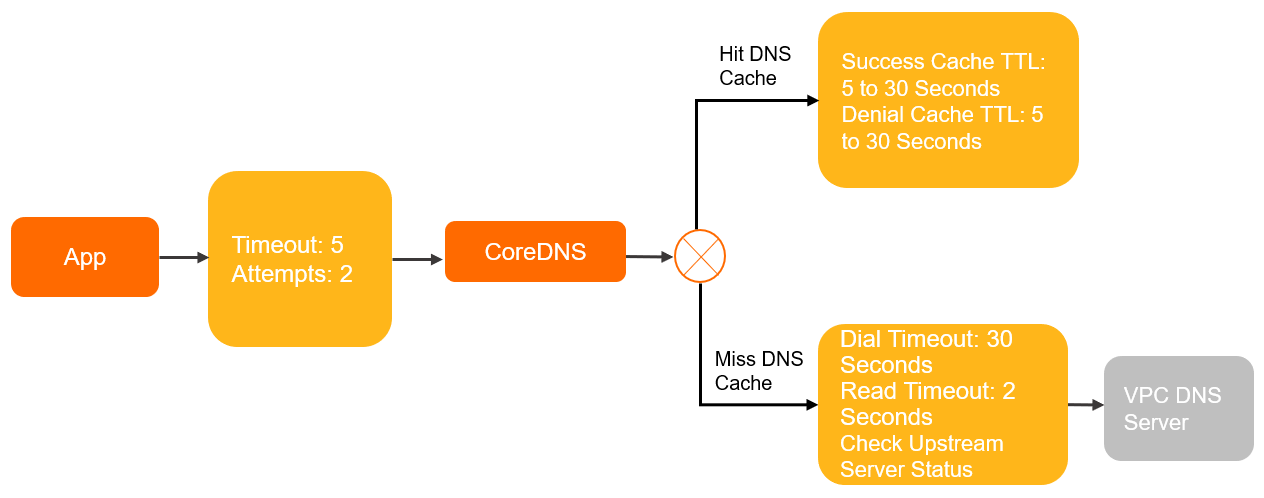
Resolution policies
Client side
DNS queries from pods are handled through the interfaces provided by glibc. The /etc/resolv.conf file controls how glibc performs DNS resolution. The following table lists the configurable parameters and their default values across environments.
| Parameter | Description | Default (glibc) | ECS | ClusterFirst pod | Default pod | Host network + Default pod |
|---|---|---|---|---|---|---|
nameserver | The DNS server that resolves domain names. | None | VPC DNS servers ② | CoreDNS cluster IP ③ | VPC DNS servers | VPC DNS servers |
search | Non-FQDN domain names are appended with these suffixes before resolution. | None | None | <ns>.svc.cluster.local svc.cluster.local cluster.local | None | None |
ndots:n | If a domain name contains fewer dots than this value, search suffixes are appended before resolution. If it contains more dots, the name is treated as a fully qualified domain name (FQDN) and resolved directly. | 1 | 1 | 5 | 1 | 1 |
timeout:n | Timeout for each DNS resolution attempt, in seconds. | 5 | 2 | 5 | 5 | 2 |
attempts:n ① | Maximum number of retries when a DNS resolution fails. | 2 | 3 | 2 | 2 | 3 |
rotate | Send DNS queries to nameservers in round-robin order. | Disabled | Enabled | Disabled | Disabled | Enabled |
single-request-reopen | If two DNS requests are sent over the same socket, close the socket after the first request and open a new socket for the second. | Disabled | Enabled | Disabled | Disabled | Enabled |
The following table describes what each DNS policy means for query routing.
| DNS policy | Behavior |
|---|---|
ClusterFirst | DNS queries are sent to CoreDNS. Queries that match the cluster domain suffix are resolved by CoreDNS. All other queries are forwarded to upstream nameservers. This is the default policy when dnsPolicy is not specified. |
Default | The pod inherits the DNS settings of the ECS instance it runs on. DNS queries go directly to the VPC DNS servers, bypassing CoreDNS. |
"Default" is not the default DNS policy. When dnsPolicy is not specified, Kubernetes uses ClusterFirst.
① The attempts parameter applies only when the server returns SERVFAIL, NOTIMP, or REFUSED, or when NOERROR is returned with no resolution results. For details, see Introduction to the attempts parameter.
② VPC DNS servers are the default nameservers for ECS instances in the virtual private cloud (VPC). Their IP addresses are 100.100.2.136 and 100.100.2.138. They resolve authoritative domain names and domain names added to Alibaba Cloud DNS PrivateZone.
③ The CoreDNS cluster IP is the IP address of the kube-dns Service in the kube-system namespace. The kube-dns Service forwards DNS queries to CoreDNS for internal domain names, authoritative domain names, and domain names added to Alibaba Cloud DNS PrivateZone.
For more information about resolv.conf configuration, see resolv.conf.
Non-standard environments
The client-side DNS configuration described above applies to environments using glibc. The following environments behave differently.
Alpine Linux (musl libc)
Alpine Linux replaces glibc with musl libc, which introduces several DNS resolution differences:
single-requestandsingle-request-reopenare not supported in/etc/resolv.conf.Alpine 3.3 and earlier do not support the
searchparameter for search domains. This causes service discovery to fail.musl libc sends queries to all nameservers in
/etc/resolv.confin parallel, which prevents NodeLocal DNSCache from optimizing DNS resolution.musl libc sends A and AAAA queries in parallel over the same socket. On older kernel versions, this causes packet loss on the conntrack port.
For more information, see musl libc functional differences from glibc.
Golang and Node.js
Applications built with Golang or Node.js may use a built-in DNS resolver instead of glibc. This can produce significantly different DNS resolution behavior. Check your application's DNS resolution implementation if you observe unexpected behavior.
Internal DNS servers in the cluster
By default, CoreDNS inherits /etc/resolv.conf from the ECS instance that hosts it. CoreDNS then uses the built-in forward plugin to forward DNS queries upstream.
The following table lists the forward plugin parameters and their default values. For the full reference, see forward.
| Parameter | Description | Default (CoreDNS) | Default (NodeLocal DNSCache) |
|---|---|---|---|
prefer_udp | Use UDP to communicate with the upstream server. | Enabled | Disabled |
force_tcp | Use TCP to communicate with the upstream server. | Disabled | Enabled |
max_fails | Number of consecutive failed health checks before an upstream server is considered unhealthy. | 2 | 2 |
expire | How long to keep the connection to the upstream server alive. | 10s | 10s |
policy | Policy for selecting upstream servers. | random | random |
health_check | Interval between upstream server health checks. | 0.5s | 0.5s |
max_concurrent | Maximum number of concurrent queries to upstream servers. | None | None |
dial timeout | Connection timeout for upstream servers. Decreases dynamically based on actual connection duration. | 30s | 30s |
read timeout | Request timeout for upstream servers. | 2s | 2s |
Caching policies
Client side
The DNS caching policy at the client side depends on the container and application configuration. Configure client-side caching based on your requirements.
Internal DNS servers in the cluster
CoreDNS uses the cache plugin to cache DNS resolution results. The following table lists the cache plugin parameters and their default values in ACS.
| Parameter | Description | Default (CoreDNS) | Default (CoreDNS in ACS) |
|---|---|---|---|
| success Max TTL | Maximum time to live (TTL) for cached successful DNS resolutions. | 3600s | 30s |
| success Min TTL | Minimum TTL for cached successful DNS resolutions. | 5s | 5s |
| success Capacity | Maximum number of successful DNS resolution results to cache. | 9984 | 9984 |
| denial Max TTL | Maximum TTL for cached failed DNS resolutions. | 1800s | 30s |
| denial Min TTL | Minimum TTL for cached failed DNS resolutions. | 5s | 5s |
| denial Capacity | Maximum number of failed DNS resolution results to cache. | 9984 | 9984 |
| ServerError TTL | Maximum TTL for DNS results returned from unhealthy upstream servers. | 5s | 0s. If the CoreDNS version is earlier than 1.8.4.2, the default is 5s. |
serve_stale | Serve stale cached entries when the upstream server is unreachable. | Disabled | Disabled |
The actual TTL applied to a cached entry is determined as follows:
If the DNS record TTL exceeds the maximum TTL, the maximum TTL is used.
If the DNS record TTL is below the minimum TTL, the minimum TTL is used.
If the DNS record TTL falls between the minimum and maximum TTL, the DNS record TTL is used.
Optimize DNS resolution
Modify the pod YAML file or the CoreDNS ConfigMap to tune DNS resolution behavior.
Use VPC DNS servers directly
Set dnsPolicy: Default to bypass CoreDNS and resolve domain names directly through VPC DNS servers. The pod inherits the DNS settings of the ECS instance that hosts it.
apiVersion: v1
kind: Pod
metadata:
  name: example
  namespace: default
spec:
  containers:
  - image: registry.cn-hangzhou.aliyuncs.com/example-ns/example:v1
    name: example
  # Set the dnsPolicy parameter to Default.
  dnsPolicy: Default

# The /etc/resolv.conf file in the pod.
# cat /etc/resolv.conf
nameserver 100.100.2.136
nameserver 100.100.2.138
Improve fault tolerance for Default pods
When dnsPolicy: Default is set, the pod's /etc/resolv.conf omits the rotate, single-request-reopen, timeout:2, and attempts:3 options that ECS instances include by default. Without these options, DNS resolution is more likely to fail during network jitter.
Add these options using dnsConfig to match the ECS instance behavior:
apiVersion: v1
kind: Pod
metadata:
  name: example
  namespace: default
spec:
  containers:
  - image: registry.cn-hangzhou.aliyuncs.com/example-ns/example:v1
    name: example
  # Set the dnsPolicy parameter to Default.
  dnsPolicy: Default
  # Add the following options.
  dnsConfig:
    options:
    - name: timeout
      value: "2"
    - name: attempts
      value: "3"
    - name: rotate
    - name: single-request-reopen

# After adding the options, redeploy the pod to apply the changes.
# cat /etc/resolv.conf
nameserver 100.100.2.136
nameserver 100.100.2.138
options rotate single-request-reopen timeout:2 attempts:3