Knative Pod Autoscaler (KPA) scales pods based on real-time traffic. KPA monitors pod concurrency and requests per second (RPS) to determine the optimal pod count. When traffic drops to zero, KPA scales pods down to zero by default, eliminating idle resource costs. When traffic resumes, KPA creates pods on demand.
Prerequisites
Deploy Knative in the ACS cluster.
How it works
Knative Serving injects a Queue Proxy container named queue-proxy into each pod. This container reports request concurrency metrics to KPA. Based on the reported metrics and the scaling algorithm, KPA adjusts the number of pods in the Deployment.

KPA calculates the target pod count using the following formula:
Pod count = Concurrent requests / (Max concurrency per pod x Target utilization)By default, each pod handles up to 100 concurrent requests, and target utilization is 70%.
Example: Max concurrency is set to 10, target utilization is 0.7, and 100 concurrent requests arrive. KPA calculates: 100 / (10 x 0.7) = 15 pods.
Configure the config-autoscaler ConfigMap
Some parameters support both revision-level annotations and global ConfigMap settings. When both are configured, the revision-level annotation takes precedence.
KPA behavior is controlled through the config-autoscaler ConfigMap. View the current configuration:
kubectl -n knative-serving describe cm config-autoscalerThe following table describes the ConfigMap parameters and their defaults:
| Parameter | Default | Description |
|---|---|---|
container-concurrency-target-default | 100 | Default maximum concurrent requests per pod. |
container-concurrency-target-percentage | 70 | Target concurrency utilization percentage. |
requests-per-second-target-default | 200 | Default RPS target per pod. |
target-burst-capacity | 211 | Burst capacity threshold that controls Activator routing. When set to 0, the Activator handles requests only during scale-to-zero. When set to -1, all requests always pass through the Activator (infinite burst capacity). Other negative values are invalid. When greater than 0 and container-concurrency-target-percentage is 100, requests always pass through the Activator. If (ready pods x max concurrency) - target-burst-capacity - panic concurrency < 0, the traffic burst exceeds capacity and the system switches to the Activator for request buffering. |
stable-window | 60s | Duration of the stable-mode averaging window. |
panic-window-percentage | 10.0 | Panic window as a percentage of the stable window. Default results in a 6-second panic window. |
panic-threshold-percentage | 200.0 | Threshold percentage that triggers panic mode. |
max-scale-up-rate | 1000.0 | Maximum pods for a single scale-out event. Actual limit: math.Ceil(MaxScaleUpRate x readyPodsCount). |
max-scale-down-rate | 2.0 | Maximum scale-down rate. Default removes half the pods per scale-in cycle. |
enable-scale-to-zero | true | Enable or disable scale-to-zero. |
scale-to-zero-grace-period | 30s | Delay before scaling to zero after the last request. |
scale-to-zero-pod-retention-period | 0s | Minimum time to retain a pod before scaling to zero. Useful when pod startup is expensive. |
pod-autoscaler-class | kpa.autoscaling.knative.dev | Autoscaler plugin. Supported values: KPA, Horizontal Pod Autoscaler (HPA), and Advanced Horizontal Pod Autoscaler (AHPA). |
activator-capacity | 100.0 | Request capacity of the Activator. |
initial-scale | 1 | Number of pods created when a revision starts. |
allow-zero-initial-scale | false | Allow a revision to start with zero pods. |
min-scale | 0 | Minimum pod count for a revision. 0 allows scale-to-zero. |
max-scale | 0 | Maximum pod count for a revision. 0 means no upper limit. |
scale-down-delay | 0s | Delay before scaling down. 0s means immediate scale-down. |
Default ConfigMap:
apiVersion: v1
kind: ConfigMap
metadata:
 name: config-autoscaler
 namespace: knative-serving
data:
 container-concurrency-target-default: "100"
 container-concurrency-target-percentage: "70"
 requests-per-second-target-default: "200"
 target-burst-capacity: "211"
 stable-window: "60s"
 panic-window-percentage: "10.0"
 panic-threshold-percentage: "200.0"
 max-scale-up-rate: "1000.0"
 max-scale-down-rate: "2.0"
 enable-scale-to-zero: "true"
 scale-to-zero-grace-period: "30s"
 scale-to-zero-pod-retention-period: "0s"
 pod-autoscaler-class: "kpa.autoscaling.knative.dev"
 activator-capacity: "100.0"
 initial-scale: "1"
 allow-zero-initial-scale: "false"
 min-scale: "0"
 max-scale: "0"
 scale-down-delay: "0s"
Configure metrics
Set the scaling metric for each revision using the autoscaling.knative.dev/metric annotation.
Supported metrics:
concurrency,rps,cpu,memory, and custom metricsDefault metric:
concurrency
Concurrency metric
apiVersion: serving.knative.dev/v1
kind: Service
metadata:
  name: helloworld-go
  namespace: default
spec:
  template:
    metadata:
      annotations:
        autoscaling.knative.dev/metric: "concurrency"
RPS metric
apiVersion: serving.knative.dev/v1
kind: Service
metadata:
  name: helloworld-go
  namespace: default
spec:
  template:
    metadata:
      annotations:
        autoscaling.knative.dev/metric: "rps"
    spec:
      containers:
        - image: registry.cn-hangzhou.aliyuncs.com/knative-sample/helloworld-go:73fbdd56
CPU metric
CPU and memory metrics require the Horizontal Pod Autoscaler (HPA) class.
apiVersion: serving.knative.dev/v1
kind: Service
metadata:
  name: helloworld-go
  namespace: default
spec:
  template:
    metadata:
      annotations:
        autoscaling.knative.dev/class: "hpa.autoscaling.knative.dev"
        autoscaling.knative.dev/metric: "cpu"
Memory metric
apiVersion: serving.knative.dev/v1
kind: Service
metadata:
  name: helloworld-go
  namespace: default
spec:
  template:
    metadata:
      annotations:
        autoscaling.knative.dev/class: "hpa.autoscaling.knative.dev"
        autoscaling.knative.dev/metric: "memory"
Configure concurrency
Concurrency defines the maximum number of simultaneous requests a single pod handles. Configure concurrency through soft limits, hard limits, target utilization, and RPS settings.
Soft limit
A soft limit is a scaling target, not a strict boundary. During traffic bursts, actual concurrency may temporarily exceed this value.
Revision level
apiVersion: serving.knative.dev/v1
kind: Service
metadata:
  name: helloworld-go
  namespace: default
spec:
  template:
    metadata:
      annotations:
        autoscaling.knative.dev/target: "200"
Global level (ConfigMap)
apiVersion: v1
kind: ConfigMap
metadata:
 name: config-autoscaler
 namespace: knative-serving
data:
 container-concurrency-target-default: "200"
Hard limit
A hard limit is a strict upper bound on concurrent requests. When concurrency reaches this limit, excess requests are buffered by the queue-proxy or Activator until capacity becomes available.
Use a hard limit only when your application has a clear concurrency ceiling. Setting a low hard limit can degrade throughput and increase latency.
apiVersion: serving.knative.dev/v1
kind: Service
metadata:
  name: helloworld-go
  namespace: default
spec:
  template:
    spec:
      containers:
        - image: registry.cn-hangzhou.aliyuncs.com/knative-sample/helloworld-go:73fbdd56
      containerConcurrency: 50
Target utilization
Target utilization triggers scaling before concurrency reaches the hard limit. This reduces cold-start latency by creating pods in advance.
Example: containerConcurrency is 10 and target utilization is 70%. A new pod is created when the average concurrency across existing pods reaches 7. Because pods take time to start, a lower target utilization value triggers earlier scale-out.
Revision level
apiVersion: serving.knative.dev/v1
kind: Service
metadata:
  name: helloworld-go
  namespace: default
spec:
  template:
    metadata:
      annotations:
        autoscaling.knative.dev/target-utilization-percentage: "70"
    spec:
      containers:
        - image: registry.cn-hangzhou.aliyuncs.com/knative-sample/helloworld-go:73fbdd56
Global level (ConfigMap)
apiVersion: v1
kind: ConfigMap
metadata:
 name: config-autoscaler
 namespace: knative-serving
data:
 container-concurrency-target-percentage: "70"
RPS-based scaling
RPS defines the number of requests a single pod handles per second.
Revision level
apiVersion: serving.knative.dev/v1
kind: Service
metadata:
  name: helloworld-go
  namespace: default
spec:
  template:
    metadata:
      annotations:
        autoscaling.knative.dev/target: "150"
        autoscaling.knative.dev/metric: "rps"
    spec:
      containers:
        - image: registry.cn-hangzhou.aliyuncs.com/knative-sample/helloworld-go:73fbdd56
Global level (ConfigMap)
apiVersion: v1
kind: ConfigMap
metadata:
 name: config-autoscaler
 namespace: knative-serving
data:
 requests-per-second-target-default: "150"
Configure scale-to-zero
Enable or disable scale-to-zero (global)
Set enable-scale-to-zero to "true" or "false" to control whether idle Knative services scale down to zero pods.
apiVersion: v1
kind: ConfigMap
metadata:
 name: config-autoscaler
 namespace: knative-serving
data:
 enable-scale-to-zero: "false"
Grace period (global)
Set scale-to-zero-grace-period to specify the wait time before an idle service scales to zero.
apiVersion: v1
kind: ConfigMap
metadata:
 name: config-autoscaler
 namespace: knative-serving
data:
 scale-to-zero-grace-period: "40s"
Pod retention period
Control how long a pod is retained after the service becomes idle. This is useful when pod startup costs are high.
Revision level
apiVersion: serving.knative.dev/v1
kind: Service
metadata:
  name: helloworld-go
  namespace: default
spec:
  template:
    metadata:
      annotations:
        autoscaling.knative.dev/scale-to-zero-pod-retention-period: "1m5s"
    spec:
      containers:
        - image: registry.cn-hangzhou.aliyuncs.com/knative-sample/helloworld-go:73fbdd56
Global level (ConfigMap)
apiVersion: v1
kind: ConfigMap
metadata:
 name: config-autoscaler
 namespace: knative-serving
data:
 scale-to-zero-pod-retention-period: "42s"
Configure scaling target thresholds
Set the scaling target threshold per revision using the autoscaling.knative.dev/target annotation. For a global threshold, use container-concurrency-target-default in the ConfigMap.
Revision level
apiVersion: serving.knative.dev/v1
kind: Service
metadata:
  name: helloworld-go
  namespace: default
spec:
  template:
    metadata:
      annotations:
        autoscaling.knative.dev/target: "50"
    spec:
      containers:
        - image: registry.cn-hangzhou.aliyuncs.com/knative-sample/helloworld-go:73fbdd56
Global level (ConfigMap)
apiVersion: v1
kind: ConfigMap
metadata:
 name: config-autoscaler
 namespace: knative-serving
data:
 container-concurrency-target-default: "200"
Stable and panic modes
KPA operates in two modes to balance responsiveness and stability.
Stable mode
KPA averages concurrent requests across all pods within the stable window (default: 60 seconds). It adjusts the pod count based on this average to maintain steady load distribution.
Panic mode
KPA averages concurrent requests within a shorter panic window (default: 6 seconds). The panic window is derived from the stable window:
Panic window = Stable window x panic-window-percentageThe default panic-window-percentage is 0.1 (10%), so the default panic window is 60 x 0.1 = 6 seconds.
KPA enters panic mode when the pod count calculated in panic mode meets or exceeds the panic threshold. The panic threshold is:
Panic threshold = panic-threshold-percentage / 100The default panic-threshold-percentage is 200, so the default panic threshold is 2. If the pod count from the panic calculation is greater than or equal to twice the current ready pods, KPA scales to the panic-mode pod count. Otherwise, KPA uses the stable-mode pod count.
Scenario examples
Scale based on concurrent requests
Deploy a service with a concurrency target of 10 and verify that KPA scales pods in response to traffic.
Create a file named
autoscale-go.yamland deploy it to the cluster.apiVersion: serving.knative.dev/v1 kind: Service metadata: name: autoscale-go namespace: default spec: template: metadata: labels: app: autoscale-go annotations: autoscaling.knative.dev/target: "10" spec: containers: - image: registry.cn-hangzhou.aliyuncs.com/knative-sample/autoscale-go:0.1kubectl apply -f autoscale-go.yamlRetrieve the service access gateway. Run one of the following commands based on the ingress controller in use:
ALB
Run the following command to retrieve the service access gateway.
kubectl get albconfig knative-internetExpected output:
    NAME               ALBID                    DNSNAME                                              PORT&PROTOCOL   CERTID   AGE
    knative-internet   alb-hvd8nngl0lsdra15g0   alb-hvd8nng******.cn-beijing.alb.aliyuncs.com                            2
MSE
Run the following command to retrieve the service access gateway.
kubectl -n knative-serving get ing stats-ingressExpected output:
    NAME            CLASS                  HOSTS   ADDRESS                         PORTS   AGE
    stats-ingress   knative-ingressclass   *       101.201.XX.XX,192.168.XX.XX   80      15d
ASM
Run the following command to retrieve the service access gateway.
kubectl get svc istio-ingressgateway --namespace istio-system --output jsonpath="{.status.loadBalancer.ingress[*]['ip']}"Expected output:
121.XX.XX.XXKourier
Run the following command to obtain the service access gateway.
kubectl -n knative-serving get svc kourierExpected output:
    NAME      TYPE           CLUSTER-IP    EXTERNAL-IP      PORT(S)                      AGE
    kourier   LoadBalancer   10.0.XX.XX    39.104.XX.XX     80:31133/TCP,443:32515/TCP   49m
Send 50 concurrent requests for 30 seconds using the Hey load testing tool. Replace
121.199.XXX.XXXwith the gateway IP address from the previous step. Expected result: KPA scales out to 5 pods (50 concurrent requests / 10 concurrency target = 5 pods).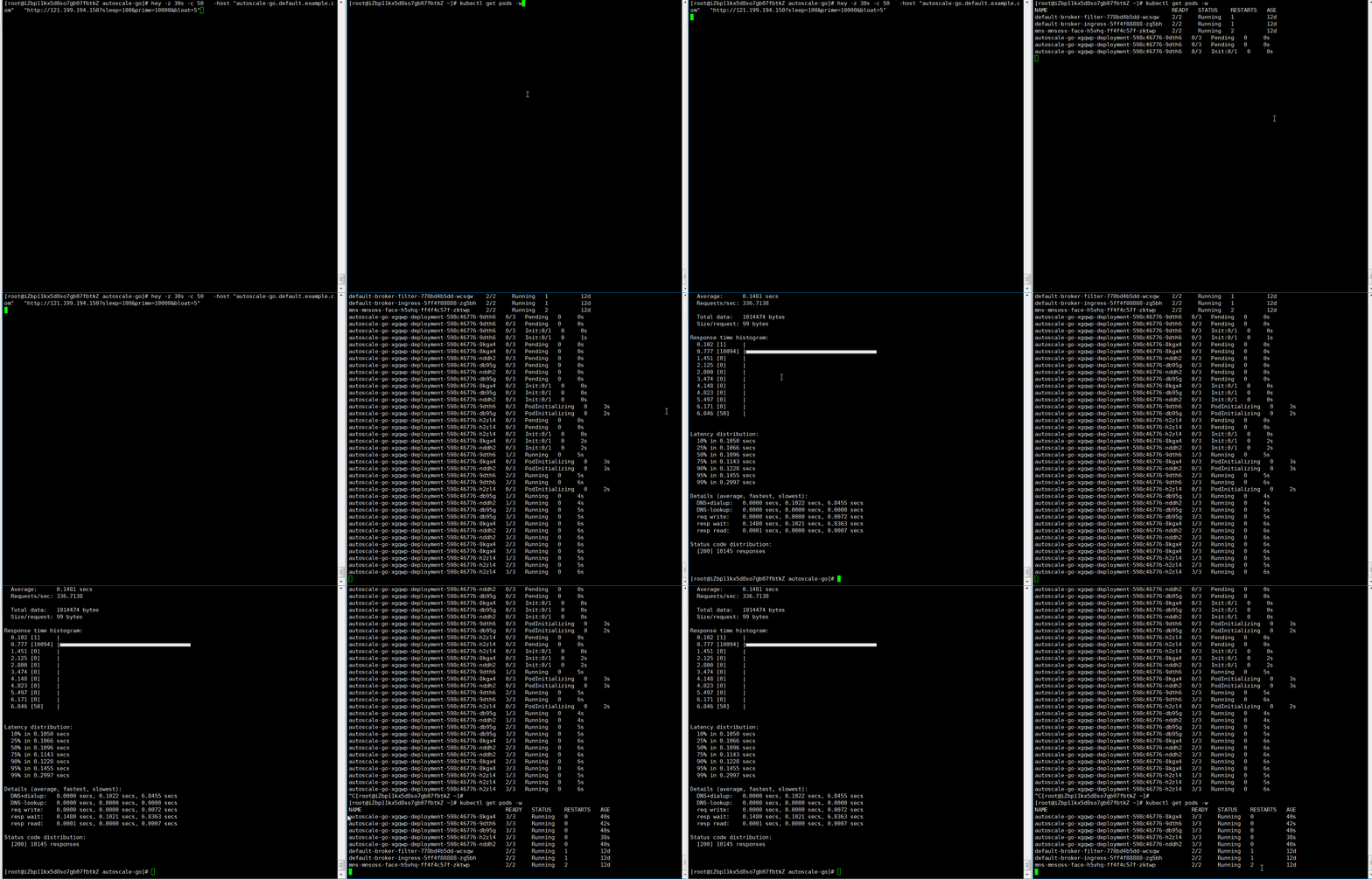
    hey -z 30s -c 50 \
      -host "autoscale-go.default.example.com" \
      "http://121.199.XXX.XXX"
Scale with boundaries
Deploy a service with a concurrency target of 10, a minimum of 1 pod, and a maximum of 3 pods.
Create a file named
autoscale-go.yamland deploy it to the cluster.apiVersion: serving.knative.dev/v1 kind: Service metadata: name: autoscale-go namespace: default spec: template: metadata: labels: app: autoscale-go annotations: autoscaling.knative.dev/target: "10" autoscaling.knative.dev/min-scale: "1" autoscaling.knative.dev/max-scale: "3" spec: containers: - image: registry.cn-hangzhou.aliyuncs.com/knative-sample/autoscale-go:0.1kubectl apply -f autoscale-go.yamlRetrieve the service access gateway. Run one of the following commands based on the ingress controller in use:
ALB
Run the following command to retrieve the service access gateway.
kubectl get albconfig knative-internetExpected output:
    NAME               ALBID                    DNSNAME                                              PORT&PROTOCOL   CERTID   AGE
    knative-internet   alb-hvd8nngl0lsdra15g0   alb-hvd8nng******.cn-beijing.alb.aliyuncs.com                            2
MSE
Run the following command to retrieve the service access gateway.
kubectl -n knative-serving get ing stats-ingressExpected output:
    NAME            CLASS                  HOSTS   ADDRESS                         PORTS   AGE
    stats-ingress   knative-ingressclass   *       101.201.XX.XX,192.168.XX.XX   80      15d
ASM
Run the following command to retrieve the service access gateway.
kubectl get svc istio-ingressgateway --namespace istio-system --output jsonpath="{.status.loadBalancer.ingress[*]['ip']}"Expected output:
121.XX.XX.XXKourier
Run the following command to obtain the service access gateway.
kubectl -n knative-serving get svc kourierExpected output:
    NAME      TYPE           CLUSTER-IP    EXTERNAL-IP      PORT(S)                      AGE
    kourier   LoadBalancer   10.0.XX.XX    39.104.XX.XX     80:31133/TCP,443:32515/TCP   49m
Send 50 concurrent requests for 30 seconds using the Hey load testing tool. Replace
121.199.XXX.XXXwith the gateway IP address from the previous step. Expected result: KPA scales out to a maximum of 3 pods (bounded bymax-scale). When traffic stops, 1 pod remains running (bounded bymin-scale).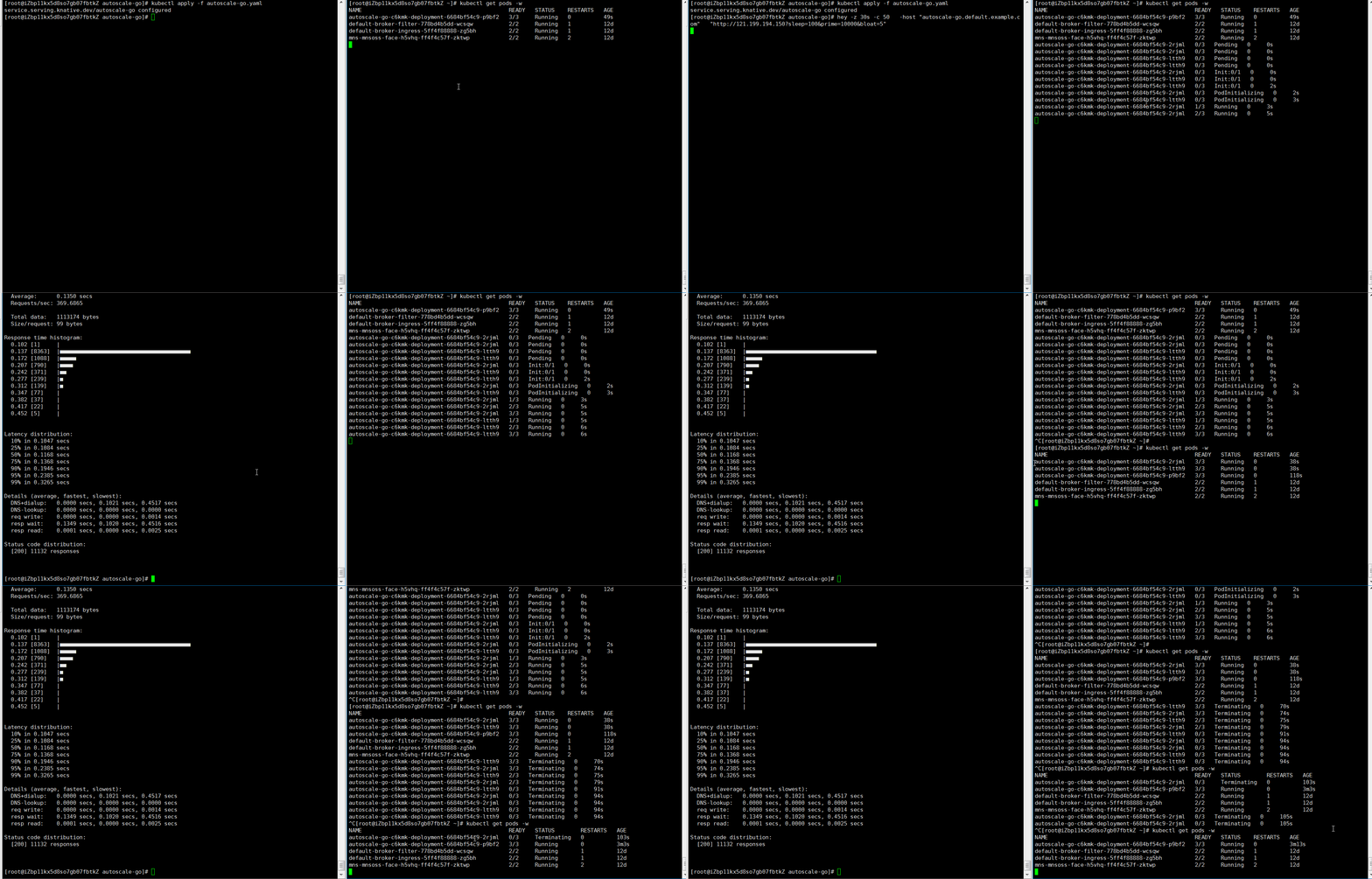
    hey -z 30s -c 50 \
      -host "autoscale-go.default.example.com" \
      "http://121.199.XXX.XXX"
References
Use an Advanced Horizontal Pod Autoscaler (AHPA) in Knative to scale resources proactively based on historical metrics. For more information, see Use AHPA to implement scheduled auto scaling.