CPFS General-purpose Edition offers two storage redundancy types: locally redundant storage (LRS) and zone-redundant storage (ZRS). These options help you meet different requirements for data durability and service availability.
How it works
-
Locally redundant storage (LRS)
LRS replicates your data across multiple devices at different facilities within a single availability zone (AZ). LRS protects your data against hardware failures. However, if a disaster such as a fire or power outage causes the entire availability zone to become unavailable, your data becomes inaccessible.
-
Zone-redundant storage (ZRS)
ZRS synchronously replicates your data across multiple availability zones (AZs) within the same region. This design ensures that your data remains accessible for read and write operations even if an entire availability zone fails. This design provides higher availability.
This feature is available only to allowlisted users. To use this feature, submit a ticket.
Choose a storage redundancy type
|
Comparison item |
ZRS |
LRS |
|
Supported storage classes |
100 MB/s/TiB Standard |
|
|
Supported regions |
China (Hangzhou), China (Beijing) More regions will be available soon. |
China (Hangzhou), China (Shanghai), and China (Beijing) |
|
Recovery Point Objective (RPO) The maximum amount of data loss that a system can tolerate after a disaster. |
0 |
Not recoverable |
|
Recovery Time Objective (RTO) The time required for a system to return to an operational state after a disaster. |
Minutes |
Not recoverable |
|
Service Level Agreement (SLA) |
99.99% |
99.9% |
|
Durability |
99.999999999% (eleven 9s) |
99.999999999% (eleven 9s) |
|
Supported protocols |
NFS v3.0 |
NFS v3.0, POSIX |
|
Deployment AZ |
Multi-AZ deployment |
Single-AZ deployment |
|
Mount target |
Region-level mount target |
AZ-level mount target (Has an AZ attribute and must be in the same AZ as the file system) |
|
Service interruption during a single-node failure |
≤ 70 s |
≤ 70 s |
|
Service interruption during a single availability zone failure |
≤ 70 s |
Read and write services become unavailable |
|
Read latency for a single 4 KB I/O request |
3 ms to 5 ms |
|
|
Maximum read bandwidth per file system |
8.75 GB/s To request a higher bandwidth, submit a ticket. |
|
|
Maximum read IOPS per file system (4 KB I/O) |
350,000 To request a higher IOPS, submit a ticket. |
CPFS-NFS:
CPFS-POSIX:
|
|
Minimum capacity |
500 GiB |
3,600 GiB |
|
Maximum capacity |
Approximately 88 TiB (89,600 GiB) |
1 PiB |
|
Scaling step |
100 GiB |
1,200 GiB |
|
Maximum number of files or directories per file system |
1 billion |
4 billion |
|
Feature support |
|
|
Create an LRS file system
To create a CPFS file system that uses LRS, see Create a file system.
Create a ZRS file system
Prerequisites
-
You have created a Virtual Private Cloud (VPC) and a VSwitch in the target region.
-
Ensure that your workloads are deployed in a region that supports ZRS.
Procedure
-
Log on to the CPFS console.
-
On the CPFS International (pay-as-you-go) page, configure the parameters for the file system.
Parameter
Description
Region
Select the region where you want to create the file system.
The file system must be in the same region as the ECS instances that will mount it. CPFS file systems and ECS instances in different regions cannot communicate with each other.
Storage class
100 MB/s/TiB Baseline. The throughput of the file system is calculated as: Baseline Throughput × Capacity. For more information, see Specifications.
Storage redundancy type
Zone-Redundant Storage.
Capacity
-
Minimum capacity: 500 GiB
-
Maximum capacity: Approximately 88 TiB (89,600 GiB)
-
Scaling step: 100 GiB
Select a capacity that meets your business requirements and ensures sufficient storage space.
Encryption type
The method for encryption at rest. You can set this parameter only when you create the file system, and it cannot be modified afterward.
-
Not Encrypted: Data is not encrypted. This option is suitable for development and test environments.
-
Managed key: Alibaba Cloud automatically manages encryption keys. No configuration is required. This option is suitable for standard encryption requirements.
-
KMS-managed key: Use KMS to manage your own keys. This option is suitable for scenarios with high compliance requirements.
For more information, see Server-side encryption.
Service-Linked Role
This Service-Linked Role is required if you select KMS-managed key. The role allows the file system to access the KMS service.
Key ID
This parameter is required if you select KMS-managed key.
Resource Group
(Optional)
Select a resource group for resource management. If you do not select a resource group, the file system is added to the default resource group. For more information, see Best practices for designing resource groups.
If you need to create a new resource group, click Create Resource Group. In the Create Resource Group dialog box, configure the Resource Group Identifier and Resource Group Name, and then click OK.
Virtual Private Cloud (VPC)
Select the same VPC as your ECS instances.
ZRS zones
Select three different availability zones to implement zone-redundant storage. An availability zone is a physical location within a region that has independent power and network resources.
ZRS VSwitches
Select a VSwitch for each availability zone.
Service-Linked Role
CPFS requires a Service-Linked Role to configure network resources.
-
-
Click Buy Now and complete the purchase as prompted.
Creating the file system takes 15 to 20 minutes. Afterward, it is automatically configured for zone-redundant storage and provides the following capabilities:
-
Data is automatically and synchronously replicated across multiple availability zones.
-
Automatic failover occurs if a single availability zone fails, which provides an RPO of 0 and an RTO within minutes.
-
A Service Level Agreement (SLA) guarantees 99.99% service availability.
-
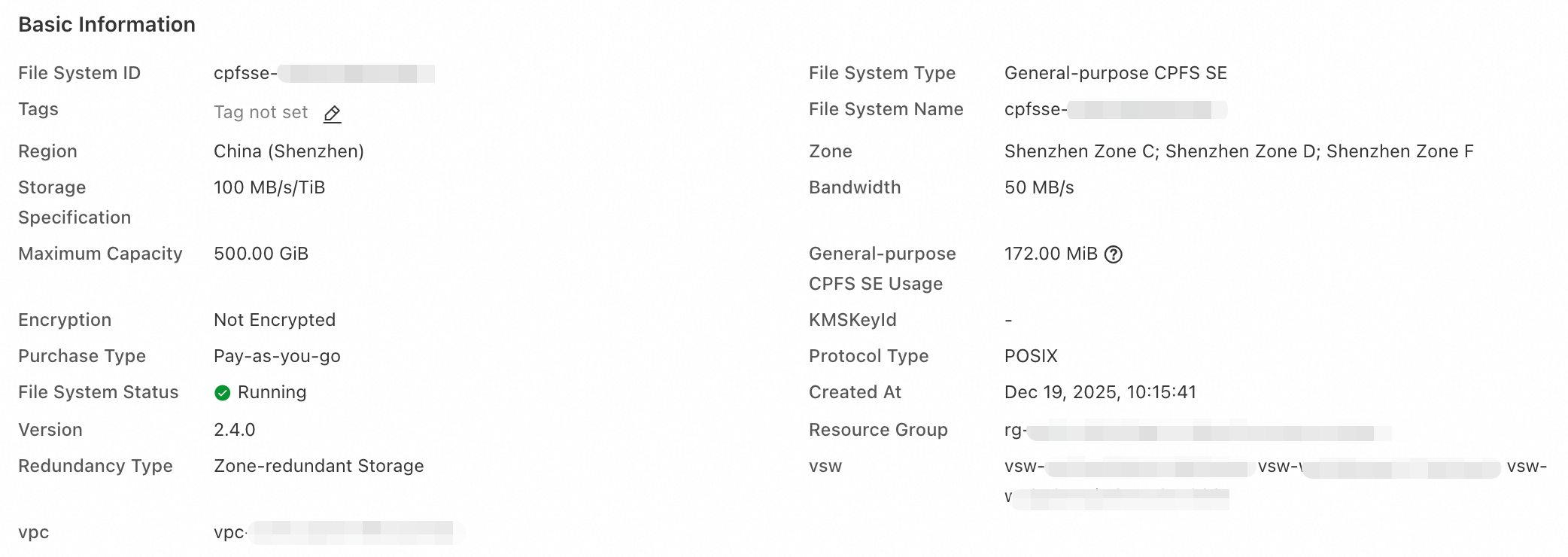
View the storage redundancy type
Log on to the CPFS console.
In the left-side navigation pane, choose File System > File System List.
In the top navigation bar, select a region.
On the File System List page, click the target file system.
On the Basic Information page of the file system, view the redundancy type of the file system.
Billing
-
LRS and ZRS are billed at different rates. For pricing details, see the CPFS Pricing page.
-
Pay-as-you-go billing is supported.