This topic describes how to use the ARMS agent for Go and Service Mesh (ASM) to implement end-to-end canary release and real-time monitoring for Go applications.
Sample applications
Architecture

YAML files of the sample applications:
Note All the sample applications are deployed in the go-gray namespace.
Entry application
apiVersion: apps/v1
kind: Deployment
metadata:
  name: requestsender
  namespace: go-gray
spec:
  replicas: 1
  selector:
    matchLabels:
      app: requestsender
  template:
    metadata:
      labels:
        app: requestsender
        ASM_TRAFFIC_TAG: v1
        version: v1
        armsPilotCreateAppName: requestsender
        armsPilotAutoEnable: 'on'
        aliyun.com/app-language: golang
    spec:
      containers:
        - name: requestsender
          image: registry.cn-hangzhou.aliyuncs.com/private-mesh/hellob:requestsender-demo
          imagePullPolicy: Always
          ports:
            - containerPort: 8080

---
apiVersion: v1
kind: Service
metadata:
  name: requestsender
  namespace: go-gray
spec:
  selector:
    app: requestsender
  ports:
    - protocol: TCP
      port: 80
      targetPort: 8080
  type: ClusterIP
Application A
apiVersion: apps/v1
kind: Deployment
metadata:
  name: go-demo-a-base
  namespace: go-gray
spec:
  replicas: 1
  selector:
    matchLabels:
      app: go-demo-a
  template:
    metadata:
      labels:
        app: go-demo-a
        armsPilotAutoEnable: "on"
        ASM_TRAFFIC_TAG: v1
        version: v1
        armsPilotCreateAppName: "go-demo-a"
        aliyun.com/app-language: golang
    spec:
      containers:
        - name: go-demo-a
          image: registry.cn-hangzhou.aliyuncs.com/private-mesh/hellob:a-demo
          imagePullPolicy: Always
          ports:
            - containerPort: 8080
---
apiVersion: apps/v1
kind: Deployment
metadata:
  name: go-demo-a-gray
  namespace: go-gray
spec:
  replicas: 1
  selector:
    matchLabels:
      app: go-demo-a
  template:
    metadata:
      labels:
        app: go-demo-a
        ASM_TRAFFIC_TAG: v2
        version: v2
        armsPilotCreateAppName: go-demo-a
        armsPilotAutoEnable: 'on'
        aliyun.com/app-language: golang
    spec:
      containers:
        - name: go-demo-a-base
          image: registry.cn-hangzhou.aliyuncs.com/private-mesh/hellob:a-demo-gray
          imagePullPolicy: Always
          ports:
            - containerPort: 8080
---
apiVersion: v1
kind: Service
metadata:
  name: go-demo-a
  namespace: go-gray
spec:
  selector:
    app: go-demo-a
  ports:
    - protocol: TCP
      port: 80
      targetPort: 8080
  type: ClusterIP
Application B
apiVersion: apps/v1
kind: Deployment
metadata:
  name: go-demo-b-base
  namespace: go-gray
spec:
  replicas: 1
  selector:
    matchLabels:
      app: go-demo-b
  template:
    metadata:
      labels:
        app: go-demo-b
        ASM_TRAFFIC_TAG: v1
        version: v1
        armsPilotCreateAppName: go-demo-b
        armsPilotAutoEnable: 'on'
        aliyun.com/app-language: golang
    spec:
      containers:
        - name: go-demo-b
          image: registry.cn-hangzhou.aliyuncs.com/private-mesh/hellob:b-demo
          imagePullPolicy: Always
          ports:
            - containerPort: 8080
---
apiVersion: apps/v1
kind: Deployment
metadata:
  name: go-demo-b-gray
  namespace: go-gray
spec:
  replicas: 1
  selector:
    matchLabels:
      app: go-demo-b
  template:
    metadata:
      labels:
        app: go-demo-b
        ASM_TRAFFIC_TAG: v2
        version: v2
        armsPilotCreateAppName: go-demo-b
        armsPilotAutoEnable: 'on'
        aliyun.com/app-language: golang
    spec:
      containers:
        - name: go-demo-b
          image: registry.cn-hangzhou.aliyuncs.com/private-mesh/hellob:b-demo-gray
          imagePullPolicy: Always
          ports:
            - containerPort: 8080
---
apiVersion: v1
kind: Service
metadata:
  name: go-demo-b
  namespace: go-gray
spec:
  selector:
    app: go-demo-b
  ports:
    - protocol: TCP
      port: 80
      targetPort: 8080
  type: ClusterIP
Application C
apiVersion: apps/v1
kind: Deployment
metadata:
  name: go-demo-c-base
  namespace: go-gray
spec:
  replicas: 1
  selector:
    matchLabels:
      app: go-demo-c
  template:
    metadata:
      labels:
        app: go-demo-c
        ASM_TRAFFIC_TAG: v1
        version: v1
        armsPilotCreateAppName: go-demo-c
        armsPilotAutoEnable: 'on'
        aliyun.com/app-language: golang
    spec:
      containers:
        - name: go-demo-c
          image: registry.cn-hangzhou.aliyuncs.com/private-mesh/hellob:c-demo
          imagePullPolicy: Always
          ports:
            - containerPort: 8080
---
apiVersion: apps/v1
kind: Deployment
metadata:
  name: go-demo-c-gray
  namespace: go-gray
spec:
  replicas: 1
  selector:
    matchLabels:
      app: go-demo-c
  template:
    metadata:
      labels:
        app: go-demo-c
        ASM_TRAFFIC_TAG: v2
        version: v2
        armsPilotCreateAppName: go-demo-c
        armsPilotAutoEnable: 'on'
        aliyun.com/app-language: golang
    spec:
      containers:
        - name: go-demo-c
          image: registry.cn-hangzhou.aliyuncs.com/private-mesh/hellob:c-demo-gray
          imagePullPolicy: Always
          ports:
            - containerPort: 8080
---
apiVersion: v1
kind: Service
metadata:
  name: go-demo-c
  namespace: go-gray
spec:
  selector:
    app: go-demo-c
  ports:
    - protocol: TCP
      port: 80
      targetPort: 8080
  type: ClusterIP
Use the ARMS agent to monitor the applications
You can use the ARMS agent for Go to integrate the applications into Application Monitoring so that you can view the application topology, interface calls, and database analysis in ARMS.
Use ASM for end-to-end canary release
Create an ASM instance and add a cluster to it.
Create an ingress gateway.
Use the following YAML file to create an Istio gateway named ingressgateway in the istio-system namespace. For more information, see Manage Istio gateways.
View the YAML file
apiVersion: networking.istio.io/v1beta1
kind: Gateway
metadata:
  name: ingressgateway
  namespace: istio-system
spec:
  selector:
    istio: ingressgateway
  servers:
    - port:
        number: 80
        name: http
        protocol: HTTP
      hosts:
        - '*'
Inject sidecar proxies into the applications and restart the applications. For more information, see Install a sidecar proxy.
Enable tracing.
Create a namespace named opentelemetry-operator-system.
kubectl create namespace opentelemetry-operator-system
Create a tracing service.
apiVersion: v1
kind: Service
metadata:
  name: default-collector
  namespace: opentelemetry-operator-system
spec:
  ports:
    - port: 4317
      protocol: TCP
      targetPort: 4317
  selector:
    app: default-collector
  sessionAffinity: None
  type: ClusterIP
Enable tracing in the ASM console.
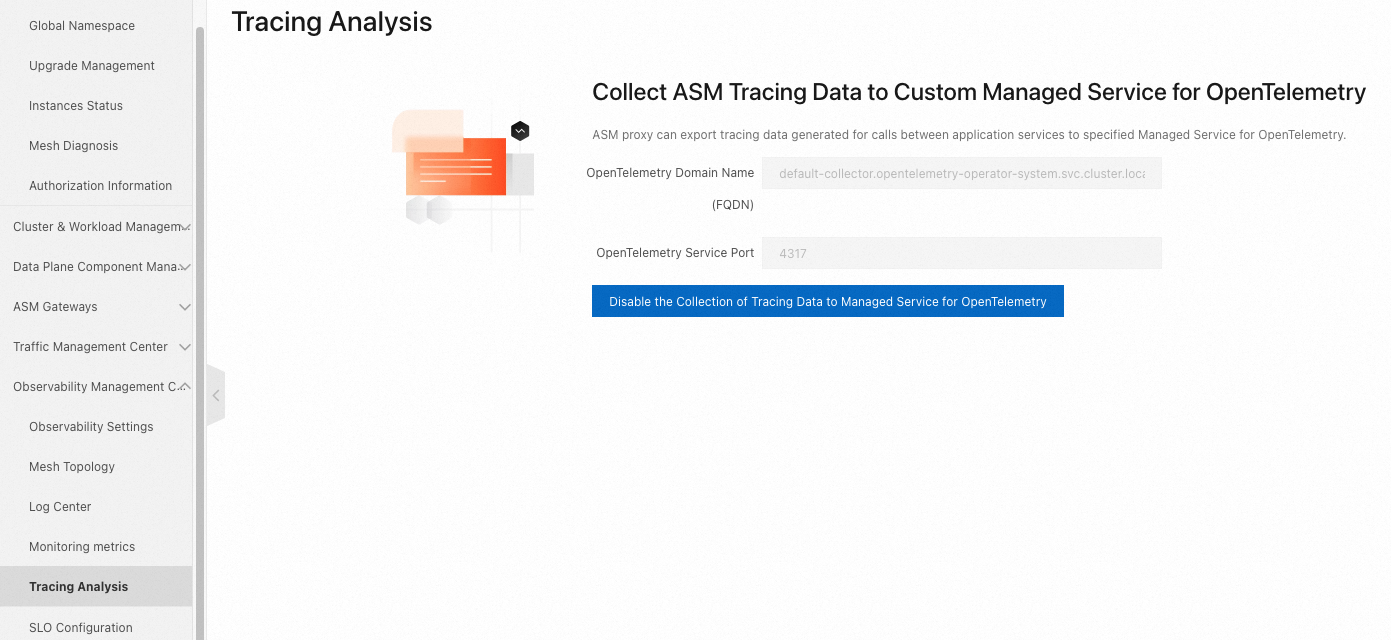
In the Tracing Analysis Settings section of the Observability Settings page, enable tracing and configure the sample rate based on your needs.

Create lanes.
Create a lane group named test.
Parameter | Sample value |
Trace ID Request Header | traceparent |
Routing Request Header | x-asm-prefer-tag |
Swimlane Services | requestsender, go-demo-a, go-demo-b, and go-demo-c |
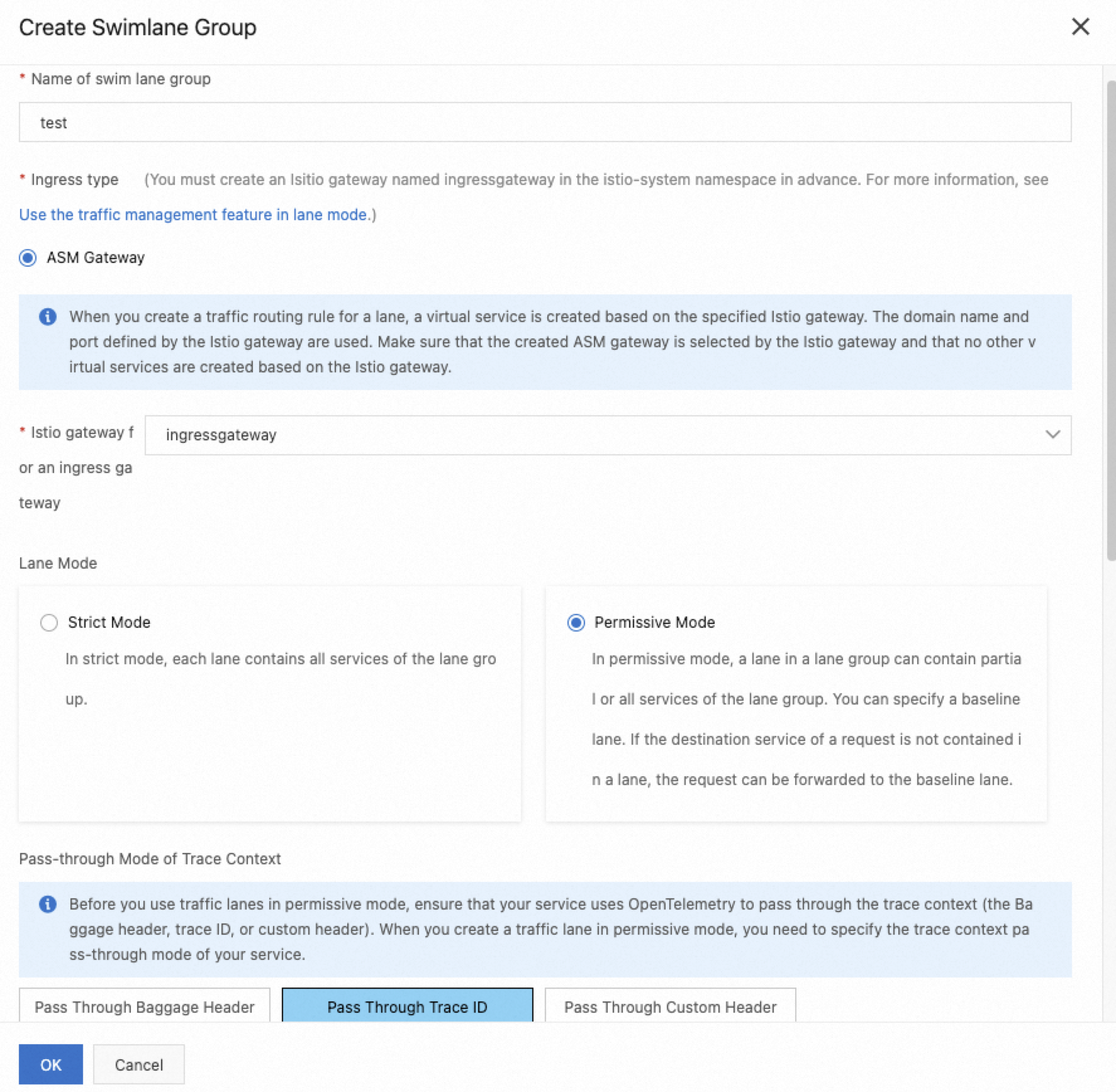
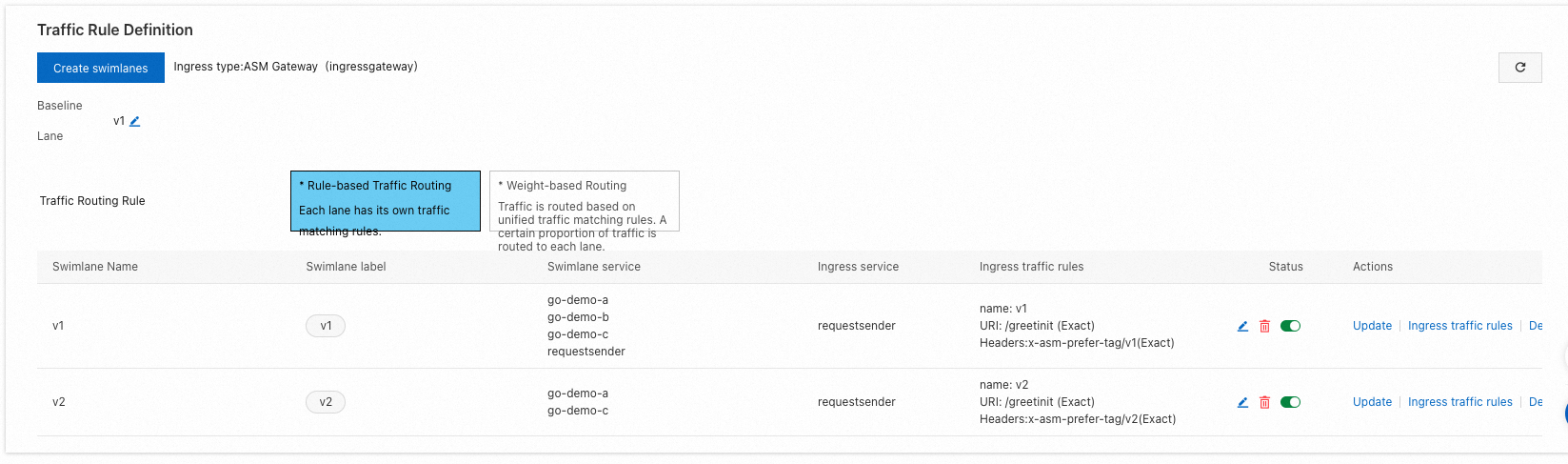
Create two lanes named v1 and v2.
Parameter | Sample value |
Swimlane Name | v1 and v2 |
Configure Service Tag | Label Key: ASM_TRAFFIC_TAG Label Value: v1 and v2 |
Add Service | v1: requestsender, go-demo-a, go-demo-b, and go-demo-c v2: go-demo-a and go-demo-c |
Configure request routing rules for v1 and v2.
Parameter | Sample value |
Ingress service | requestsender.go-gray.svc.cluster.local |
Ingress traffic rules | Name: v1 and v2 Domain Name: * Matching Method: Exact Content: /greetinit |
Result
Verify the result
In the left-side navigation pane of the ARMS console, choose and obtain the public IP address of the ingress gateway.
Run the following command to configure an environment variable.
xxx.xxx.xxx.xxx is the IP address obtained in the preceding step.
export ASM_GATEWAY_IP=xxx.xxx.xxx.xxx
Check whether the end-to-end canary release takes effect.
Baseline:
for i in {1..100}; do curl -H 'x-asm-prefer-tag: v1' http://${ASM_GATEWAY_IP}/greetinit; echo ''; sleep 1; done;
Expected output:
{"code":0,"data":{"greeting":"Hello ","callChain":"Init:base:172.30.208.29 - A:base:172.30.208.114 - B:base:172.30.208.116 - C:base:172.30.208.120"},"message":"success"}
{"code":0,"data":{"greeting":"Hello ","callChain":"Init:base:172.30.208.29 - A:base:172.30.208.114 - B:base:172.30.208.116 - C:base:172.30.208.120"},"message":"success"}
Canary release:
for i in {1..100}; do curl -H 'x-asm-prefer-tag: v2' http://${ASM_GATEWAY_IP}/greetinit; echo ''; sleep 1; done;
Expected output:
{"code":0,"data":{"greeting":"Hello ","callChain":"Init:base:172.30.208.29 - A:gray:172.30.208.115 - B:base:172.30.208.116 - C:gray:172.30.208.122"},"message":"success"}
{"code":0,"data":{"greeting":"Hello ","callChain":"Init:base:172.30.208.29 - A:gray:172.30.208.115 - B:base:172.30.208.116 - C:gray:172.30.208.122"},"message":"success"}
View the monitoring data
Log on to the ARMS console. In the left-side navigation pane, choose . On the Applications page, view the applications.
