You can use permissive mode traffic lanes to isolate application versions. Based on propagated request headers and ingress request headers, traffic is routed to different lanes. When services in a lane call each other, if the destination service does not exist in the current lane, the system forwards the request to the baseline lane. This ensures the integrity of the call chain and simplifies traffic management.
Before you begin, read and understand Use permissive mode traffic lanes for end-to-end traffic management and its related concepts.
Scenario overview
This example uses three services, mocka, mockb, and mockc, to create three traffic lanes that represent three versions of a call chain: s1, s2, and s3. Lane s1 is the baseline lane and contains all three services. Lane s2 contains only the mocka and mockc services. Lane s3 contains only the mockb service.
Step 1: Create a lane group and lanes
-
Create a lane group.
-
Log on to the ASM console. In the left-side navigation pane, choose .
-
On the Mesh Management page, click the name of the target instance. In the left-side navigation pane, choose .
-
On the Traffic Lane page, click Create Swimlane Group. In the Create Swimlane Group panel, configure the parameters and then click OK.
Parameter
Description
Name of swim lane group
In this example, set the name to test.
Entrance gateway
Select ingressgateway.
Lane Mode
Select Permissive Mode.
Pass-through Mode of Trace Context
Select Pass Through Trace ID.
Trace ID Request Header
The sample application propagates the
my-trace-idrequest header through the call chain. Therefore, set this parameter tomy-trace-id.Routing Request Header
This header is used by the gateway to route ingress traffic to different lanes and maintain the lane context. You can specify any valid header name. In this example, use x-asm-prefer-tag.
Swimlane Services
Select the target Kubernetes cluster and the default namespace. From the list of available services, select mocka, mockb, and mockc, click the
 icon to move them to the selected list.
After you complete the configuration, the system automatically generates a corresponding
TrafficLabelresource. In the left-side navigation pane, click TrafficLabel to view the resource. For example, the followingTrafficLabelis generated for themockaservice.
-
-
Create the s1, s2, and s3 lanes and bind them to the v1, v2, and v3 versions, respectively.
-
On the Traffic Lane page, in the Traffic Rule Definition section, click Create swimlanes.
-
In the Create swimlanes dialog box, configure the parameters and then click OK.
Parameter
Description
Swimlane Name
Name the three lanes s1, s2, and s3, respectively.
Configure Service Tag
Label Key: Select ASM_TRAFFIC_TAG.
Label Value: Select v1 for lane s1, v2 for lane s2, and v3 for lane s3.
Add Service
s1 lane: Select mocka(default), mockb(default), and mockc(default).
s2 lane: Select mocka(default) and mockc(default).
s3 lane: Select mockb(default).
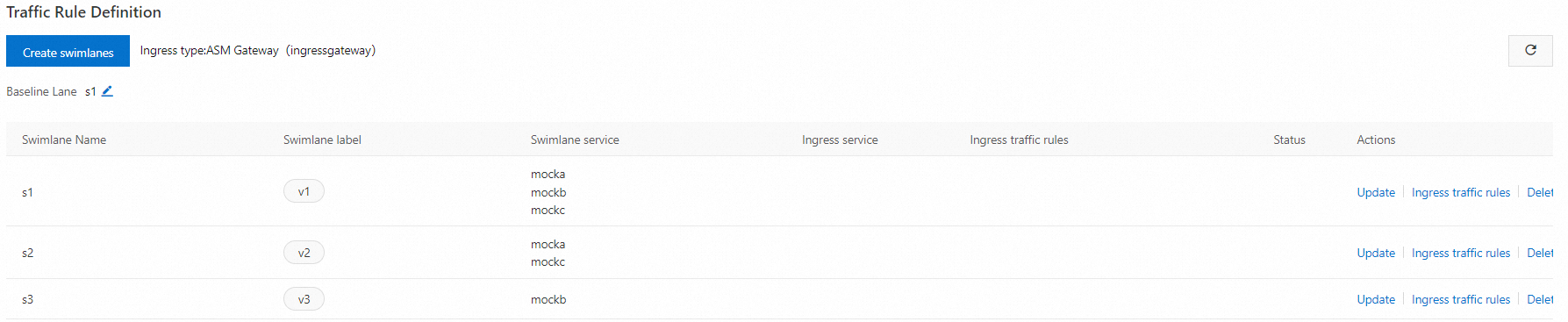
After the three lanes are created, the result is shown in the following figure:
 Note
NoteBy default, the first traffic lane you create in a lane group becomes the baseline lane. You can modify the baseline lane. If a request targets a service that is not in the current lane, the fallback mechanism forwards it to the baseline lane. For more information, see Modify the baseline lane in permissive mode.
After the three lanes are created, the system generates a
DestinationRuleand aVirtualServicefor each service in the lane group. In the left-side navigation pane, choose or to view these resources. For example, the followingDestinationRuleandVirtualServiceare automatically created for themockaservice.
-
-
Create ingress traffic rules for the three lanes.
-
On the Traffic Lane page, in the Traffic Rule Definition section, find the target lane and click Ingress traffic rules in the Actions column.
-
In the Add drainage rule dialog box, configure the parameters and then click OK.
This example assumes that the ingress API for all lane services is
/mock. Configure the same ingress traffic rule for each lane.Parameter
Description
Ingress service
Select mocka.default.svc.cluster.local.
Ingress traffic rules
Set the Name for the three rules to r1, r2, and r3, respectively. Set realm name to *.
Matching request URI
Set Method to Exact and Content to /mock.
After creating the ingress traffic rules for the three lanes, the configuration is as follows: lane s1 (baseline, label v1, with services mocka, mockb, and mockc), lane s2 (label v2, with services mocka and mockc), and lane s3 (label v3, with service mockb). Each ingress traffic rule also includes a header match condition for
x-asm-prefer-tagthat exactly matches the corresponding lane name.After you create the rules, the system automatically generates an ingress traffic rule (a VirtualService) for each lane. For example, the following VirtualService is generated for lane s2.
-
Step 2: Verify the end-to-end canary feature
-
Obtain the public IP address of the ASM ingress gateway. For more information, see Obtain the IP address of the ASM ingress gateway.
-
Run the following command to set an environment variable.
Replace
xxx.xxx.xxx.xxxwith the IP address from the previous step.export ASM_GATEWAY_IP=xxx.xxx.xxx.xxx -
Verify that the end-to-end canary feature works as expected.
-
Run the following command to check the access to lane s1.
The value of the
x-asm-prefer-tagheader,s1, matches the name you configured for lane s1 in substep 2 of Step 1.for i in {1..100}; do curl -H 'x-asm-prefer-tag: s1' -H'my-trace-id: x000'$i http://${ASM_GATEWAY_IP}/mock ; echo ''; sleep 1; done;Expected output:
-> mocka(version: v1, ip: 172.17.0.54)-> mockb(version: v1, ip: 172.17.0.129)-> mockc(version: v1, ip: 172.17.0.130)The output shows that traffic with the request header
x-asm-prefer-tag: s1is routed to the services in lane s1, as expected. -
Run the following command to check the access to lane s2.
The value of the
x-asm-prefer-tagheader,s2, matches the name you configured for lane s2 in substep 2 of Step 1.for i in {1..100}; do curl -H 'x-asm-prefer-tag: s2' -H'my-trace-id: x000'$i http://${ASM_GATEWAY_IP}/mock ; echo ''; sleep 1; done;Expected output:
-> mocka(version: v2, ip: 172.17.0.9)-> mockb(version: v1, ip: 172.17.0.129)-> mockc(version: v2, ip: 172.17.0.128)The output shows that traffic with the request header
x-asm-prefer-tag: s2is routed to the services in lane s2. When traffic is sent to themockbservice, which does not exist in lane s2, the fallback mechanism routes the request to themockbservice in the baseline lane s1. When the call chain continues to themockcservice, the traffic is correctly routed back to themockcservice in lane s2. This is the expected behavior. -
Run the following command to check the access to lane s3.
The value of the
x-asm-prefer-tagheader,s3, matches the name you configured for lane s3 in substep 2 of Step 1.for i in {1..100}; do curl -H 'x-asm-prefer-tag: s3' -H'my-trace-id: x000'$i http://${ASM_GATEWAY_IP}/mock ; echo ''; sleep 1; done;Expected output:
mocka(version: v1, ip: 172.17.0.54)-> mockb(version: v3, ip: 192.168.1.120)-> mockc(version: v1, ip: 172.17.0.130)The output shows that traffic with the request header
x-asm-prefer-tag: s3is routed to the services in lane s3. When traffic is sent to themockaandmockcservices, which do not exist in lane s3, the fallback mechanism routes the requests to themockaandmockcservices in the baseline lane s1. This is the expected behavior.
-
Modify the baseline lane in permissive mode
Before you can modify the baseline lane, you must have a lane group in permissive mode that has at least two lanes.
-
Log on to the ASM console. In the left-side navigation pane, choose .
-
On the Mesh Management page, click the name of the ASM instance. In the left-side navigation pane, choose .
-
On the Traffic Lane page, click the tab of the target lane group. In the Traffic Rule Definition section, click the
 icon next to Baseline Lane.
 -
Select the name of the new baseline lane and click confirm edit.