Once a probe is installed for an application, Cloud Monitor 2.0 begins monitoring it. On the Application list page, you can view basic metrics such as request count, error rate, and response time.
Try the feature
Alibaba Cloud Playground provides a demo environment where you can experience the main features of Cloud Monitor 2.0.
Go to the Playground Demo. The workspace page is displayed by default.
In the navigation pane on the left, choose .
Page description
Log on to the Cloud Monitor 2.0 console, and select a workspace. In the left navigation pane, choose .
The Application list page displays basic metrics for all connected applications, including average request count, average error count, and average latency.
Filter applications by query condition or keyword at the top of the page.
Click an application name to view its details and configure custom settings.
Hover over a parameter in the list for quick operations.

 : Preview entity. View basic information about the entity in the panel.
 : Send to Copilot. Use the AIOps Agent to analyze issues for the current parameter.
 : Copy the current parameter name.
 : View entities associated with the current application, such as K8s pods, interfaces, and instances.
 : Open the link for the current parameter for detailed information.
FAQ
Why do duplicate application names appear?
Duplicate application names typically occur in two scenarios:
Two applications from different sources use the same name. For example, an application integrated through a product such as EDAS or SAE has the same name as an application that was manually connected to Cloud Monitor 2.0.
Two applications that use different language frameworks have the same name.
A RAM user cannot see applications on the Application list page
A RAM user with only the `ReadOnlyAccess` or `AliyunARMSReadOnlyAccess` system policy can log on to the Cloud Monitor 2.0 console but cannot view applications. To view applications, you must also grant the `ReadTraceApp` permission for a specific resource group. Without this permission, Cloud Monitor 2.0 cannot display the application list because access is controlled by resource group authentication. For more information, see Customize RAM authorization policies for Application Monitoring.
When you grant the ReadTraceApp access policy, set the resource scope to the resource group level.
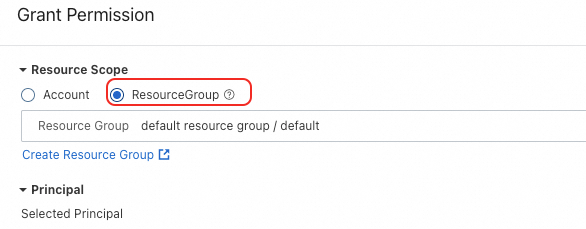
Example:
